
<div class="admonition admonition-warning"><div class="admonition-icon"><svg xmlns="http://www.w3.org/2000/svg" fill="none" viewBox="0 0 24 24" stroke="currentColor" stroke-width="2.5"><path stroke-linecap="round" stroke-linejoin="round" d="M12 9v2m0 4h.01m-6.938 4h13.856c1.54 0 2.502-1.667 1.732-2.5L13.732 4c-.77-.833-1.964-.833-2.732 0L4.082 16.5c-.77.833.192 2.5 1.732 2.5z" /></svg></div><div class="admonition-body"><div class="admonition-content">

If an insert in a Dynamic Content communication is malformed, the communication fails and is not downloaded by the SDK at all.

</div></div></div>


<div class="admonition admonition-tip"><div class="admonition-icon"><svg xmlns="http://www.w3.org/2000/svg" fill="none" viewBox="0 0 24 24" stroke="currentColor" stroke-width="2.5"><path stroke-linecap="round" stroke-linejoin="round" d="M9.663 17h4.673M12 3v1m6.364 1.636l-.707.707M21 12h-1M4 12H3m3.343-5.657l-.707-.707m2.828 9.9a5 5 0 117.072 0l-.548.547A3.374 3.374 0 0014 18.469V19a2 2 0 11-4 0v-.531c0-.895-.356-1.754-.988-2.386l-.548-.547z" /></svg></div><div class="admonition-body"><div class="admonition-content">

If you use Visual Studio Code as your editor, you can use code snippets to speed up working with inserts.  
You can find the snippets in our Github repository: [https://github.com/Synerise/jinja-code-snippet](https://github.com/Synerise/jinja-code-snippet)

</div></div></div>


## Common tags available in dynamic content

You can use all tags from [Insert usage](/developers/inserts/insert-usage).

## Accessing meta properties

To access the value of a [`product:` meta tag's](/developers/web/og-tags) `content` attribute when creating dynamic content, use the following syntax:

<pre><code class="language-jinja">{{ metric_additional_params["product:PARAM_NAME"] }}</code></pre>


<div class="admonition admonition-important"><div class="admonition-icon"><svg xmlns="http://www.w3.org/2000/svg" fill="none" viewBox="0 0 24 24" stroke="currentColor" stroke-width="2.5"><path stroke-linecap="round" stroke-linejoin="round" d="M12 8v4m0 4h.01M21 12a9 9 0 11-18 0 9 9 0 0118 0z" /></svg></div><div class="admonition-body"><div class="admonition-content">

- This method only works with HTML meta tags that have the `property` and `content` attributes.
- This only works with `product:` tags, for example `product:retailer_part_no`. It does **not** work with tags such as `og:url` and with the `product:category` tag, which is reserved..

</div></div></div>


This allows you to modify and personalize the page depending on metadata. For example, you can manipulate search results or manipulate which catalogs are accessed.

### Example


<pre><code class="language-jinja">// Get the unique ID from meta tags:
{% set key = metric_additional_params['product:retailer_part_no'] %}
// Use the part number to retrieve the value of the 'title' column:
{% catalog.catalogName(key).title %}</code></pre>


You can use this mechanism to retrieve data such as the name, price, or brand of an item from a catalog. Thanks to this, the catalog can become a single source of data for multiple websites that present the same item.

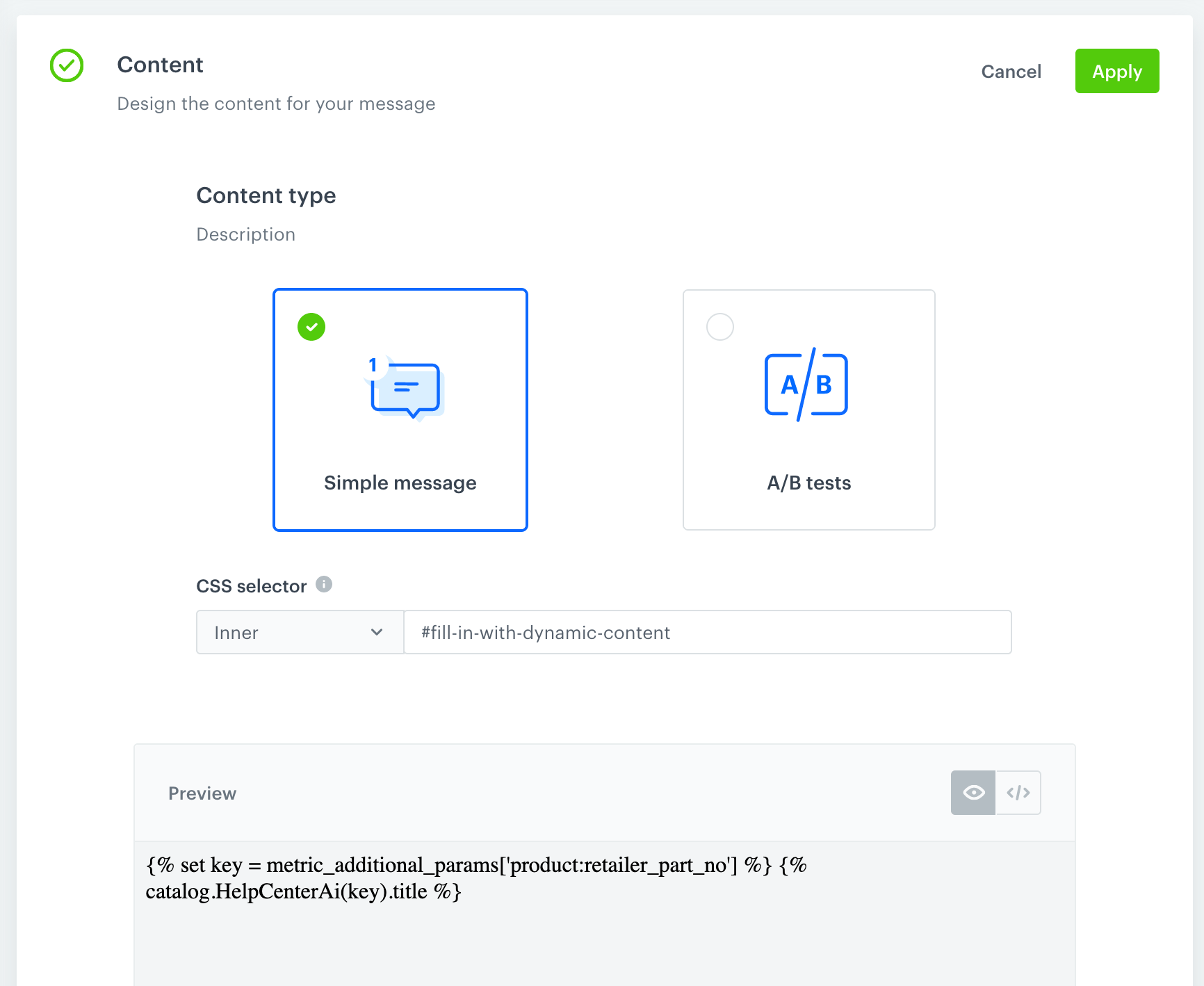
In this example, the insert is used in a dynamic content communication created for the article you are reading now.

<figure><img src="/api/docs/image/54176ad07f146575310749eba44b7c2f42c1b327/developers/inserts/_gfx/dc-example.png" class="large" alt="Configuration of the example"><figcaption>Content configuration of the example</figcaption></figure>

The communication:
1. Checks the unique ID of the item (this article) in the page's [OG tags](/developers/web/og-tags).
2. Retrieves the title of the item from the `HelpCenterAi` catalog in Synerise.
3. Replaces the content of the `code` tag below with the retrieved title. 

**The content of the following code tag is replaced:**  
<code id="fill-in-with-dynamic-content">Replace this text</code>

**The original HTML code, before dynamic content is downloaded, is the following:**
```html
<code id="fill-in-with-dynamic-content">Replace this text</code>
```

## Social proof

A social proof insert lets you retrieve a value of the [metric](/docs/analytics/metrics).
- The metric must contain only one [dynamic key](/docs/analytics/i_events-parameter-value#dynamic-key).
- In the configuration of the metric, we recommend using the **Equal** operator instead of the **Contain** operator. The **Contain** operator in the social proof insert will work only if there is an exact match between the two compared elements (for example, when comparing `abc` to `abcd`, `abc` won't be considered a match for `abcd`).


  <div class="admonition admonition-note"><div class="admonition-icon"><svg xmlns="http://www.w3.org/2000/svg" fill="none" viewBox="0 0 24 24" stroke="currentColor" stroke-width="2.5"><path stroke-linecap="round" stroke-linejoin="round" d="M13 16h-1v-4h-1m1-4h.01M21 12a9 9 0 11-18 0 9 9 0 0118 0z" /></svg></div><div class="admonition-body"><div class="admonition-content">

  To see a social proof insert in a practical example, check [Adding mix of social proof to product pages](/use-cases/social-proof-basics) use case.

  </div></div></div>


**Syntax:**

<pre><code class="language-jinja">{% socialproof %} metric-hash {% endsocialproof %}</code></pre>


**Example:**  
The number of times the product was added to cart during the last 30 days.


<pre><code class="language-jinja">&lt;div class="snrs-wrapper"&gt;
  &lt;div id="snrsCornerMessage" class="snrs-corner-message-wrap"&gt;
    &lt;div class="snrs-corner-message"&gt;
      &lt;div class="snrs-corner-main"&gt;
        &lt;div class="snrs-corner-message-text"&gt;
            This product has been added to the cart {% socialproof %} 537165da-9d8c-4460-a3a2-6294f1f7aef9 {% endsocialproof %} times in the last 30 days!
        &lt;/div&gt;
      &lt;/div&gt;
    &lt;/div&gt;
  &lt;/div&gt;
&lt;/div&gt;</code></pre>


Output (metric result is "235"):


<pre><code class="language-html">&lt;div class="snrs-wrapper"&gt;
  &lt;div id="snrsCornerMessage" class="snrs-corner-message-wrap"&gt;
    &lt;div class="snrs-corner-message"&gt;
      &lt;div class="snrs-corner-main"&gt;
        &lt;div class="snrs-corner-message-text"&gt;
            This product has been added to the cart 235 times in the last 30 days!
        &lt;/div&gt;
      &lt;/div&gt;
    &lt;/div&gt;
  &lt;/div&gt;
&lt;/div&gt;</code></pre>


## Validation
Whenever you use Jinjava in dynamic content, verify that it displays correctly for a few different test customers to make sure that the logic you applied covers all scenarios. If Jinjava fails to render, the communication is not sent to a customer at all.