This article presents inserts that can be used while creating [transformation rules](/docs/automation/data-transformation-and-imports/creating-data-transformation).
If you use Visual Studio Code as your editor, you can use code snippets to speed up working with inserts.
You can find the snippets in our Github repository: [https://github.com/Synerise/jinja-code-snippet](https://github.com/Synerise/jinja-code-snippet)
## Change values
You can replace the value in a column with another value.
To get a value from the file, use the following snippet:
root['columnName']
### Change current value
The following snippet replaces the value of `paymentInfo`:
- if the value is `cash`, it is replaced with `POS`
- any other value is replaced with `WEB_DESKTOP`
{%- if root['paymentInfo'] == 'cash' -%}POS{%- else -%}WEB_DESKTOP{%- endif -%}
### Conditionally keep current value
The following snippet keeps `cash` as the value of `paymentInfo`, but replaces any other value with `WEB_DESKTOP`
{%- if root['paymentInfo'] == 'cash' -%}{{root['paymentInfo']}}{%- else -%}WEB_DESKTOP{%- endif -%}
### Combine conditions
The following snippet replaces the value of `paymentInfo`:
- `cash` is replaced with `POS`
- `online` is replaced with `WEB_DESKTOP`
- any other value is replaced with `UNKNOWN`
### Replace string
The following snippet takes the value of `g:sale_price` and replaces " USD" with an empty string, for example "256 USD" becomes "256".
{{ root["g:sale_price"]|replace(" USD", "") }}
## Fill in empty values
If a cell has no value (is empty), you can insert a value.
The following snippet replaces a missing value of `paymentInfo` with `foo`
{%- if not root['paymentInfo'] -%}foo{%- else -%}{{root['paymentInfo']}}{%- endif -%}
## Event salt
The event salt is a UUID generated on the basis of unique combination of at least two parameters. This allows you to avoid duplicating an event entry in the database if it is imported more than once.
1. Select two or more parameters whose combination is unique.
For example, you can use `orderID` and `eventTimestamp`. Even if one of them repeats for some reason, the chances of both being identical between two events are practically zero.
2. Add an `eventSalt` column.
3. In the `eventSalt` column, add the following insert (example according to step 1):
{{root.orderId}}{{root.eventTimestamp}}
where `orderId` and `eventTimestamp` are column names.
**Result:**
When the import is processed, the value combination in the `eventSalt` column is calculated into a UUID that is always the same. When other imports are performed and that UUID already exists in the database, the event is not imported as a duplicate.
## Calculate revenue
If the file does not have a column that calculates the total value of an imported transaction, add a `revenue.amount` and `value.amount` column and use Jinjava to perform that calculation.
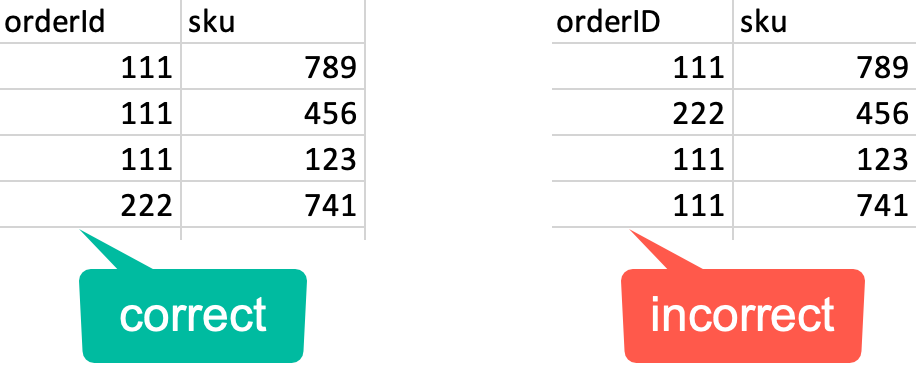
All items from the transaction must be contained in rows that immediately follow each other. Transactions are recognized by `orderId` and products are recognized by `sku`.
Example of correct and incorrect grouping of items according to the order they were included in
The following code uses the values from the `productQuantityProduct` and `finalUnitPriceAmount` to calculate the total value of an order.
The actual code **must not** include any line breaks, the example uses them for better readability.
{% set line_sums = [0] %}
{%- for prod in root.products -%}
{%- if line_sums.append(prod["productQuantity"]|int*prod["finalUnitPriceAmount"]|replace(",", ".")|float) -%}
{%- endif -%}
{%- endfor -%}
{{ line_sums|sum }}