

<div class="admonition admonition-tip"><div class="admonition-icon"><svg xmlns="http://www.w3.org/2000/svg" fill="none" viewBox="0 0 24 24" stroke="currentColor" stroke-width="2.5"><path stroke-linecap="round" stroke-linejoin="round" d="M9.663 17h4.673M12 3v1m6.364 1.636l-.707.707M21 12h-1M4 12H3m3.343-5.657l-.707-.707m2.828 9.9a5 5 0 117.072 0l-.548.547A3.374 3.374 0 0014 18.469V19a2 2 0 11-4 0v-.531c0-.895-.356-1.754-.988-2.386l-.548-.547z" /></svg></div><div class="admonition-body"><div class="admonition-content">

If you use Visual Studio Code as your editor, you can use code snippets to speed up working with inserts.  
You can find the snippets in our Github repository: [https://github.com/Synerise/jinja-code-snippet](https://github.com/Synerise/jinja-code-snippet)
</div></div></div>


## Common tags available in in-app communication

You can use all tags from [Insert usage](/developers/inserts/insert-usage).

## Trigger event parameters

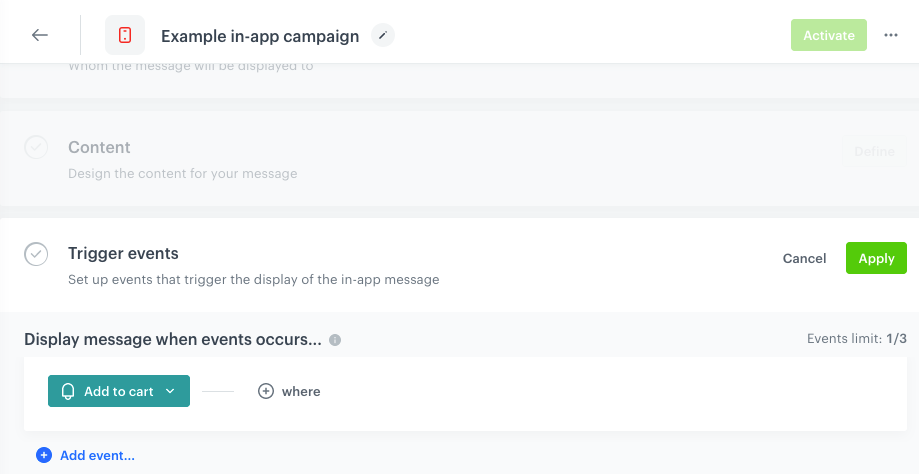
The parameters of events which in-app messages provide valuable context for your message content.
You can insert these parameters in in-app content, which makes your message more relevant and tailored to your customers' actions. 

<figure><img src="/api/docs/image/54176ad07f146575310749eba44b7c2f42c1b327/developers/inserts/_gfx/inapp-trigger.png" class="large" alt="Selecting the trigger event in the in-app definition"><figcaption>Selecting the trigger event in the in-app definition</figcaption></figure>

To insert a property from the trigger event, use the following insert:
```
{{ event.PARAMNAME }}
```

<div class="admonition admonition-tip"><div class="admonition-icon"><svg xmlns="http://www.w3.org/2000/svg" fill="none" viewBox="0 0 24 24" stroke="currentColor" stroke-width="2.5"><path stroke-linecap="round" stroke-linejoin="round" d="M9.663 17h4.673M12 3v1m6.364 1.636l-.707.707M21 12h-1M4 12H3m3.343-5.657l-.707-.707m2.828 9.9a5 5 0 117.072 0l-.548.547A3.374 3.374 0 0014 18.469V19a2 2 0 11-4 0v-.531c0-.895-.356-1.754-.988-2.386l-.548-.547z" /></svg></div><div class="admonition-body"><div class="admonition-content">

Most parameters are stored in the `params` object and you will need to refer to that object first:
```
{{ event.params.PARAMNAME }}
```

</div></div></div>


Example scenarios you can build based on this feature: 
- in-app messages featuring products similar to the ones your customers have recently added to their favorites,
- in-app messages featuring cross-sell products for the ones your customers have recently bought or added to the cart,
- in-app message featuring detailed product information stored in the catalog after your customer adds that product to cart.

## Errors in processing

If an insert in the communication can't be rendered, an [`inApp.renderFail` event](/docs/assets/events/event-reference/inapp#inapprenderfail) is generated.