# Insert usage examples

This section presents some practical examples and mechanisms of inserts.

In inserts, you use:
- Jinjava elements (values), inserted in the following way: `{{ ... }}`  
    Such a value will be printed in the place where it's used.
- tags, which are statements that allow you to use functions and build logic. They are inserted in the following ways: `{% ... %}`, `{%- ... -%}` (see ["Tag delimiters"](/developers/inserts/tag#tag-delimiters))


  <div class="admonition admonition-tip"><div class="admonition-icon"><svg xmlns="http://www.w3.org/2000/svg" fill="none" viewBox="0 0 24 24" stroke="currentColor" stroke-width="2.5"><path stroke-linecap="round" stroke-linejoin="round" d="M9.663 17h4.673M12 3v1m6.364 1.636l-.707.707M21 12h-1M4 12H3m3.343-5.657l-.707-.707m2.828 9.9a5 5 0 117.072 0l-.548.547A3.374 3.374 0 0014 18.469V19a2 2 0 11-4 0v-.531c0-.895-.356-1.754-.988-2.386l-.548-.547z" /></svg></div><div class="admonition-body"><div class="admonition-content">

  If you use Visual Studio Code as your editor, you can use code snippets to speed up working with inserts.  
  You can find the snippets in our Github repository: [https://github.com/Synerise/jinja-code-snippet](https://github.com/Synerise/jinja-code-snippet)

  </div></div></div>


## Operators

Operators let you compare and manipulate values or add more complex logic.

### Logic operators

See ["If, else if, else: Combining conditions"](/developers/inserts/tag#combining-conditions).

### Math operators

| Operator | Description | Example |
| --- | --- | --- |
| `+` | Adds numbers, lists, objects, or strings.<sup>1</sup> | `{{ 1 + 2 }}` = 3|
| `-` | Subtracts numbers. | `{{ 2 - 1 }}` = 1|
| `/` | Divides numbers, returns a floating point number. | `{{ 5 / 2 }}` = 2.5 |
| `//` | Divides numbers, rounds to an integer. | `{{ 5 // 2 }}` = 2 |
| `%` | Returns the remainder of a division. | `{{ 5 % 2 }}` = 1 |
| `*` | Multiplies numbers. | `{{ 3 * 2 }}` = 6 |
| `**` | Raises to a power. | `{{ 2 ** 3 }}` = 8 |
| `()` | Groups formulas. | `{{ (2 + 2) * 2 }}` = 8|

<sup>1</sup> The recommended way to concatenate strings is the `~` operator (see ["Other"](#other-operators)).

### Comparison operators

| Operator | Description | Example |
| --- | --- | --- |
| `==`<sup>1</sup> | L(eft) is equal to R(ight) | `{{ 2 == 2 }}` = true |
| `!=`<sup>1</sup> | L is not equal to R| `{{ 2 != 3 }}` = true |
| `>` | L is greater than R | `{{ 2 > 1 }}` = true |
| `>=` | L is greater than or equal to R | `{{ 3 >= 3 }}` = true |
| `<` | L is lower than R | `{{ 1 < 2 }}` = true |
| `<=` | L is lower than or equal to R | `{{ 3 <= 3 }}` = true |

<sup>1</sup>Can be used to compare strings, objects, and lists.

### Other operators

| Operator | Description | Example |
| --- | --- | --- |
| `in` | Checks if a value is in a list. | `{{ 2 in [1,2,3] }}` = true |
| `is` | Performs a [test](/developers/inserts/exptest). | `{{ 4 is divisibleby 2 }}` = true |
| `~` | Converts L and R into strings and concatenates them. |  <pre><code class="language-jinja">{%- set p = "world" -%}{{ "Hello, " ~ p ~ "!" }}</code></pre> = Hello, world! |

## Objects and arrays

### Object properties

You can access object properties in the following ways:
- `object.get('property')` - accepts special characters in property names.
- `object.property` - doesn't accept special characters in property names.
- `object['property']` - accepts special characters in property names.

If there is a chance that a property doesn't exist, you need to verify if it's defined, using tests such as [`is defined`](/developers/inserts/exptest#isdefined). Otherwise, rendering might fail or there might be nulls or whitespaces in rendered output.

**Examples**:

<pre><code class="language-jinja">{% set exampleProduct = {'size':12,'prop:title':'Item'} %}

{{ exampleProduct.get('size') }}       {# renders successfully #}
{{ exampleProduct['size'] }}           {# renders successfully #}
{{ exampleProduct.size }}              {# renders successfully #}

{{ exampleProduct.get('prop:title') }} {# renders successfully #}
{{ exampleProduct['prop:title'] }}     {# renders successfully #}
{{ exampleProduct.prop:title }}        {# error in rendering the template (special character in name) #}

{% if exampleProduct.get('color') is defined %} {# verify if property exists to avoid unexpected behavior #}
    {{ exampleProduct.get('color') }}      
    {{ exampleProduct['color'] }}          
    {{ exampleProduct.color }}             
{% endif %}</code></pre>


### Arrays

You can access values from an array by referring to the index:


<pre><code class="language-jinja">{% set exampleArray = [1,2,3] %}

{{ exampleArray[0] }} {# output: 1 #}
{{ exampleArray[2] }} {# output: 3 #}
{% if exampleArray | length &gt; 4 %}  {#RECOMMENDED: to avoid errors, verify array size before accessing an index #}
    {{ exampleArray[4] }} 
{% else %}
  Index 4 is out of range
{% endif %}</code></pre>


### Nested arrays and objects

An object can contain objects and arrays:


<pre><code class="language-jinja">{% set exampleObject = {'nestedObject':{'size':12}} %}

{{ exampleObject.nestedObject }}     {# output: {size=12} #}
{{ exampleObject.nestedObject.size}} {# output: 12 #}</code></pre>


An array can contain objects and arrays:


<pre><code class="language-jinja">{% set exampleArray = [{'size':12,'prop:title':'Item'},{'size':14,'prop:title':'Item2'}] %}

{{ exampleArray[0] }}      {# output: {size=12, prop:title=Item} #}
{{ exampleArray[1].size }} {# output: 14 #}</code></pre>


## Expressions

To find out what expressions are and how to create them, read [this article](/docs/analytics/expressions).


<pre><code class="language-jinja">{% expression %} expression-hash {% endexpression %}</code></pre>


**Example:**  
An expression that holds the value of an abandoned cart.


<pre><code class="language-jinja">&lt;h1&gt;
  Total amount: {% expression %} 4085025a-313e-4a63-a6b4-d19820853912 {% endexpression %}$
&lt;/h1&gt;</code></pre>


Output:


<pre><code class="language-html">&lt;h1&gt;
  Total amount: 345$
&lt;/h1&gt;</code></pre>


You can also use the expression result as a variable:


<pre><code class="language-jinja">{% expressionvar expression-hash %}
    {{ expression_result }} {# the result of the expression is stored in this variable #}
{% endexpressionvar %}</code></pre>


**Example**:  
The result of an expression that is a number can be rounded:

<pre><code class="language-jinja">{% expressionvar 0abc195a-548e-460d-a904-1e285b8adb96 %}
    You have {{ expression_result|round }} loyalty points.
{% endexpressionvar %}</code></pre>


## Aggregates

To find out what aggregates are and how to create them, read [this article](/docs/analytics/aggregates/creating-aggregates).

<div class="admonition admonition-important"><div class="admonition-icon"><svg xmlns="http://www.w3.org/2000/svg" fill="none" viewBox="0 0 24 24" stroke="currentColor" stroke-width="2.5"><path stroke-linecap="round" stroke-linejoin="round" d="M12 8v4m0 4h.01M21 12a9 9 0 11-18 0 9 9 0 0118 0z" /></svg></div><div class="admonition-body"><div class="admonition-content">

If an aggregate has dynamic elements (such as values from another aggregate or expression), then instead of using the `aggregate` tag:
1. Create an expression that includes the aggregate with dynamic values.
2. Insert this expression by using the [`expression` tag](#expressions).

</div></div></div>


**Syntax:**

<pre><code class="language-jinja">{% aggregate aggregate-hash %}
  {{ aggregate_result[0] }}
{% endaggregate %}</code></pre>


<div class="admonition admonition-note"><div class="admonition-icon"><svg xmlns="http://www.w3.org/2000/svg" fill="none" viewBox="0 0 24 24" stroke="currentColor" stroke-width="2.5"><path stroke-linecap="round" stroke-linejoin="round" d="M13 16h-1v-4h-1m1-4h.01M21 12a9 9 0 11-18 0 9 9 0 0118 0z" /></svg></div><div class="admonition-body"><div class="admonition-content">

The aggregate result is always returned as a list. To use the data, use [loops](/developers/inserts/tag#for) or access a [specific index](/developers/inserts/insert-usage#arrays) in the result.

</div></div></div>


**Example:**  
An aggregate that holds a list of categories that have recently been added to the cart.


<pre><code class="language-jinja">{% aggregate 0b352529-497e-3cbd-bf3d-fcb6072cef9e %}
&lt;ul&gt;
  {%- for item in aggregate_result -%}
  &lt;li&gt;{{ item }}&lt;/li&gt;
  {%- endfor -%}
&lt;/ul&gt;
{% endaggregate %}</code></pre>


Output:


<pre><code class="language-html">&lt;ul&gt;
  &lt;li&gt;Home&lt;/li&gt;
  &lt;li&gt;Sports&lt;/li&gt;
  &lt;li&gt;Toys&lt;/li&gt;
  &lt;li&gt;Electronics&lt;/li&gt;
&lt;/ul&gt;</code></pre>


<div class="admonition admonition-tip"><div class="admonition-icon"><svg xmlns="http://www.w3.org/2000/svg" fill="none" viewBox="0 0 24 24" stroke="currentColor" stroke-width="2.5"><path stroke-linecap="round" stroke-linejoin="round" d="M9.663 17h4.673M12 3v1m6.364 1.636l-.707.707M21 12h-1M4 12H3m3.343-5.657l-.707-.707m2.828 9.9a5 5 0 117.072 0l-.548.547A3.374 3.374 0 0014 18.469V19a2 2 0 11-4 0v-.531c0-.895-.356-1.754-.988-2.386l-.548-.547z" /></svg></div><div class="admonition-body"><div class="admonition-content">

Troubleshooting common problems:
- If your template fails to render, verify that all referenced aggregates exist.
- If the output is empty, use [try/catch](/developers/inserts/tag#trycatch) to handle empty aggregate results.

</div></div></div>


## Promotions

<div class="youtube-embed youtube-facade not-prose" data-youtube-id="VFPGd9E_Q60" role="button" tabindex="0" aria-label="Play YouTube video"><img src="https://img.youtube.com/vi/VFPGd9E_Q60/hq720.jpg" alt="YouTube video" class="youtube-facade-thumb" loading="lazy" /><span class="youtube-facade-play" aria-hidden="true"><svg viewBox="0 0 68 48" width="68" height="48"><path d="M66.52 7.74c-.78-2.93-2.49-5.41-5.42-6.19C55.79.13 34 0 34 0S12.21.13 6.9 1.55c-2.93.78-4.64 3.26-5.42 6.19C.06 13.05 0 24 0 24s.06 10.95 1.48 16.26c.78 2.93 2.49 5.41 5.42 6.19C12.21 47.87 34 48 34 48s21.79-.13 27.1-1.55c2.93-.78 4.64-3.26 5.42-6.19C67.94 34.95 68 24 68 24s-.06-10.95-1.48-16.26z" fill="red"/><path d="M45 24 27 14v20" fill="white"/></svg></span></div>

---

You can use an insert to retrieve promotions assigned to a profile, including anonymous profiles.


<div class="admonition admonition-note"><div class="admonition-icon"><svg xmlns="http://www.w3.org/2000/svg" fill="none" viewBox="0 0 24 24" stroke="currentColor" stroke-width="2.5"><path stroke-linecap="round" stroke-linejoin="round" d="M13 16h-1v-4h-1m1-4h.01M21 12a9 9 0 11-18 0 9 9 0 0118 0z" /></svg></div><div class="admonition-body"><div class="admonition-content">

This tag is currently only available in Experience and Automation Hubs.

</div></div></div>


**Syntax:**  

<pre><code class="language-jinja">{%- set getFields=["code"] -%}
{%- promotions fields=getFields [optional arguments] -%}
{{ promotions_result }}
{%- endpromotions -%}</code></pre>


where:
- `getFields` is a variable that declares the promotion properties you want to include in the result.  
  In this example, only one property is retrieved.
  
  <details class="accordion"><summary>Available fields</summary><div class="accordion-content"><ul> <li><code>uuid</code></li> <li><code>code</code></li> <li><code>status</code></li> <li><code>type</code></li> <li><code>redeemLimitPerClient</code></li> <li><code>redeemQuantityPerActivation</code></li> <li><code>currentRedeemedQuantity</code></li> <li><code>currentRedeemLimit</code></li> <li><code>activationCounter</code></li> <li><code>possibleRedeems</code></li> <li><code>details</code></li> <li><code>discountType</code></li> <li><code>discountValue</code></li> <li><code>discountMode</code></li> <li><code>discountModeDetails</code></li> <li><code>requireRedeemedPoints</code></li> <li><code>name</code></li> <li><code>headline</code></li> <li><code>description</code></li> <li><code>images</code></li> <li><code>startAt</code></li> <li><code>expireAt</code></li> <li><code>displayFrom</code></li> <li><code>displayTo</code></li> <li><code>assignedAt</code></li> <li><code>lastingTime</code></li> <li><code>lastingAt</code></li> <li><code>catalogIndexItems</code></li> <li><code>params</code></li> <li><code>price</code></li> <li><code>priority</code></li> <li><code>maxBasketValue</code></li> <li><code>minBasketValue</code></li> <li><code>itemScope</code></li> <li><code>tags</code></li> <li><code>handbillUuid</code></li> </ul></div></details>

- the `fields` argument (required, non-empty) uses the `getFields` variable in the function.  
  This is the only way of using an array-type argument in a function.
- `optional arguments` can be used to filter the results.  
  See ["Optional arguments"](#optional-arguments).
- `promotions_result` is an object with all promotions assigned to a profile.  
  You can retrieve up to 100 promotions. This can be changed by contacting Synerise Support.

**Example:**  

<div class="content-tabs" data-tab-group="tabgrp-6">
<div class="tab-buttons"><button class="tab-button" data-tab-id="tabgrp-6-0" data-tab-group="tabgrp-6" data-tab-active="true">Input</button><button class="tab-button" data-tab-id="tabgrp-6-1" data-tab-group="tabgrp-6">Output</button></div>

<div class="tab-panel" data-tab-id="tabgrp-6-0" data-tab-group="tabgrp-6" data-tab-active="true">

<pre><code class="language-jinja">{%- set getFields=["code","discountValue","images"] -%}
{%- promotions fields=getFields -%}
You have available promotions!&lt;br&gt;
{%- for i in promotions_result -%}
    Code: {{ i.code }}&lt;br&gt;
    Discount: {{ i.discountValue }} USD&lt;br&gt;
    &lt;img src="{{ i.images[0].url }}"&gt;&lt;br&gt;
    &lt;br&gt;
{%- endfor -%}
{%- endpromotions -%}</code></pre>

</div>

<div class="tab-panel" data-tab-id="tabgrp-6-1" data-tab-group="tabgrp-6">

<pre><code class="language-html">You have available promotions!&lt;br&gt;
Code: d139125e-88a2-4146-a1b3-d766b94d859d&lt;br&gt;
Discount: 100 USD&lt;br&gt;
&lt;img src="https://upload.snrcdn.net/f2afa4d4d7af216196047d1f7f0613f22a50a8c8/default/origin/f8fa57fa59egrhfgh11987845c19c5c.png"&gt;&lt;br&gt;
&lt;br&gt;Code: 501000d9-5f96-4362-9350-eccf592e4e4b&lt;br&gt;
Discount: 20 USD&lt;br&gt;
&lt;img src="https://upload.snrcdn.net/f2afa4d4d7af216196047d1f7f0613f22a50a8c8/default/origin/50d289eff4234tr78a900cdf3bee.png"&gt;&lt;br&gt;
&lt;br&gt;Code: 089a9ab2-0171-4eb4-93a5-8d2e12822be1&lt;br&gt;
Discount: 15 USD&lt;br&gt;
&lt;img src="https://upload.snrcdn.net/f2afa4d4d7af216196047d1f7f0613f22a50a8c8/default/origin/7af3145sdffgh3acd0124a25a91.png"&gt;&lt;br&gt;
&lt;br&gt;</code></pre>

</div>
</div>


### Optional arguments
You can manipulate the results of the `{% promotions %}` insert with the following optional arguments:
| Name              | Type             | Default         | Description                                                                                                                                                                                                                                                                                                                                                                                                                                                                                               |
| ----------------- | ---------------- | --------------- | --------------------------------------------------------------------------------------------------------------------------------------------------------------------------------------------------------------------------------------------------------------------------------------------------------------------------------------------------------------------------------------------------------------------------------------------------------------------------------------------------------- |
| `limit`           | Integer          | 20              | The maximum number of promotions to retrieve.                                                                                                                                                                                                                                                                                                                                                                                                                                                             |
| `status`          | String           | No filtering    | Filter results by status: `ACTIVE`, `ASSIGNED`, `REDEEMED`.                                                                                                                                                                                                                                                                                                                                                                                                                                               |
| `sort`            | Array of strings | See description | Sort results by field, choose direction with `asc` and `desc`, for example: `priority,desc`. You can also use fields that aren't declared in the `fields` argument.<br>If not defined, the promotions are sorted by our AI. If the AI model isn't trained, they are sorted by creation date, ascending.<br>This argument must be declared with `{% set %}` and used as a variable - the variable is an array with one string that consists of the field name and direction (see example below the table). |
| `tagNames`        | Array of strings | No filtering    | Filter results to promotions with certain tags. Must be declared with `{% set %}` and used as a variable.                                                                                                                                                                                                                                                                                                                                                                                                 |
| `presentOnly`     | Boolean          | No filtering    | When `true`, only promotions with `startAt later than now` and `expireAt earlier than now` are retrieved.                                                                                                                                                                                                                                                                                                                                                                                                 |
| `displayableOnly` | Boolean          | No filtering    | When `true`, only promotions with `displayFrom later than now` and `displayTo earlier than now` are retrieved.                                                                                                                                                                                                                                                                                                                                                                                            |
| `uuids`           | Array of strings | No filtering    | Filter results to promotions with certain UUIDs. Must be declared with `{% set %}` and used as a variable.                                                                                                                                                                                                                                                                                                                                                                                                |


**Example:**
Retrieve promotions that are currently displayable, filter by tags, and sort by creation date:

<pre><code class="language-jinja">{%- set getFields = ["code"] -%}
{%- set filterTags = ["foo","bar"] -%}
{%- set sort = ["createdAt,desc"] -%}
{%- promotions fields=getFields displayableOnly=true tagNames=filterTags sort=sort -%}
{{ promotions_result }}
{%- endpromotions -%}</code></pre>

## Personalized promotions

<div class="youtube-embed youtube-facade not-prose" data-youtube-id="L_V6beZwBc0" role="button" tabindex="0" aria-label="Play YouTube video"><img src="https://img.youtube.com/vi/L_V6beZwBc0/hq720.jpg" alt="YouTube video" class="youtube-facade-thumb" loading="lazy" /><span class="youtube-facade-play" aria-hidden="true"><svg viewBox="0 0 68 48" width="68" height="48"><path d="M66.52 7.74c-.78-2.93-2.49-5.41-5.42-6.19C55.79.13 34 0 34 0S12.21.13 6.9 1.55c-2.93.78-4.64 3.26-5.42 6.19C.06 13.05 0 24 0 24s.06 10.95 1.48 16.26c.78 2.93 2.49 5.41 5.42 6.19C12.21 47.87 34 48 34 48s21.79-.13 27.1-1.55c2.93-.78 4.64-3.26 5.42-6.19C67.94 34.95 68 24 68 24s-.06-10.95-1.48-16.26z" fill="red"/><path d="M45 24 27 14v20" fill="white"/></svg></span></div>


<div class="admonition admonition-important"><div class="admonition-icon"><svg xmlns="http://www.w3.org/2000/svg" fill="none" viewBox="0 0 24 24" stroke="currentColor" stroke-width="2.5"><path stroke-linecap="round" stroke-linejoin="round" d="M12 8v4m0 4h.01M21 12a9 9 0 11-18 0 9 9 0 0118 0z" /></svg></div><div class="admonition-body"><div class="admonition-content">

This insert can only be used in Experience and Automation Hubs.

</div></div></div>


The `handbills` insert assigns [personalized promotions](/docs/ai-hub/personalized-promotions) to a profile and returns a list of promotions assigned to the profile, including promotions with type other than `HANDBILL`.

By default, the insert returns up to 20 promotions of all types, with any status. You can change this with optional parameters.

**Syntax**:

<pre><code class="language-jinja">{%- set handbillUuidVar=["UUID"] -%}
{%- handbills handbillUuids=handbillUuidVar [optional arguments] -%}
{{ handbills_result }}
{%- endhandbills -%}</code></pre>


where:
- `handbillUuids` is a list of personalized promotions (handbills) to assign and retrieve. The value must be stored in a variable (`handbillUuidVar` in the snippet above).
- `optional arguments` can be used to filter the results.  
  See ["Optional arguments"](#optional-arguments-2). 
- `handbills_result` is an array of retrieved promotions.  
    To learn about the returned parameters, see the response of the ["Generate batch handbill for Profile and get Profile promotions" endpoint in the API reference documentation](https://developers.synerise.com/LoyaltyandEngagement/LoyaltyandEngagement.html#tag/Handbills/operation/getAssignHandbillsForClient_GET).  
  
  <details class="accordion"><summary>See example raw output</summary><div class="accordion-content"><p>This output shows 2 promotions.<br></p> <p><code>[{handbillUuid=3f56de5a-b560-456d-8c94-cb63bc0c53be, currentRedeemedQuantity=0, headline=, name=test1, priority=250, discountType=NONE, discountValue=0, redeemQuantityPerActivation=1, description=, currentRedeemLimit=0, tags=null, uuid=86c67c62-0b70-4144-a986-688510d00332, redeemLimitPerClient=1000, price=1, params=null, possibleRedeems=0, assignedAt=2025-07-29T14:23:14.057Z, discountMode=STATIC, maxBasketValue=null, activationCounter=0, expireAt=null, code=d98cca9b-e7c0-4639-8bdc-a1d0441068cc, itemScope=LINE_ITEM, displayFrom=null, startAt=null, status=ASSIGNED, lastingAt=2025-07-30T14:23:14.046Z, catalogIndexItems=[Ljava.lang.Object;@75377931, details=null, displayTo=null, lastingTime=0, type=HANDBILL, requireRedeemedPoints=0, minBasketValue=null, images=[Ljava.lang.Object;@2b3c4cdf, discountModeDetails=null}, {currentRedeemedQuantity=0, headline=null, name=test2, priority=250, discountType=AMOUNT, discountValue=0, redeemQuantityPerActivation=null, description=null, currentRedeemLimit=null, tags=null, uuid=01caa294-5d81-4130-ab44-a7427f0ff779, redeemLimitPerClient=324, price=0, params=null, possibleRedeems=1, discountMode=STEP, maxBasketValue=null, activationCounter=0, expireAt=null, code=1067d8f5-1460-4387-abeb-8a4a3e97ec35, itemScope=LINE_ITEM, displayFrom=null, startAt=null, status=ASSIGNED, lastingAt=null, catalogIndexItems=null, details=null, displayTo=null, lastingTime=0, type=GENERAL, requireRedeemedPoints=0, minBasketValue=null, images=null, discountModeDetails={discountUsageTrigger=REDEEM, steps=[Ljava.lang.Object;@41e37d59}}]</code></p></div></details>


**Example**:  
You can iterate over the returned promotions and retrieve only the parameters that you need.


<div class="content-tabs" data-tab-group="tabgrp-7">
<div class="tab-buttons"><button class="tab-button" data-tab-id="tabgrp-7-0" data-tab-group="tabgrp-7" data-tab-active="true">Input</button><button class="tab-button" data-tab-id="tabgrp-7-1" data-tab-group="tabgrp-7">Output</button></div>

<div class="tab-panel" data-tab-id="tabgrp-7-0" data-tab-group="tabgrp-7" data-tab-active="true">

<pre><code class="language-jinja">{%- set handbillUuidVar=["3f56de5a-b560-456d-8c94-cb63bc0c53be","c35d0a9-08b1-4c4f-a8cd-0732b1c00b7f"] -%}
{%- handbills handbillUuids=handbillUuidVar -%}
You have available promotions!&lt;br&gt;
{%- for i in handbills_result -%}
    {{ i.name }}&lt;br&gt;
    &lt;img src="{{ i.images[0].url }}"&gt;&lt;br&gt;
    &lt;br&gt;
{%- endfor -%}
{%- endhandbills -%}</code></pre>

</div>

<div class="tab-panel" data-tab-id="tabgrp-7-1" data-tab-group="tabgrp-7">

<pre><code class="language-html">You have available promotions!&lt;br&gt;
Hot dog + soda&lt;br&gt;
&lt;img src="https://upload.snrcdn.net/f2afa4d45c19c5c.png"&gt;&lt;br&gt;
Cheeseburger 50% off&lt;br&gt;
&lt;img src="https://upload.snrcdn.net/fr78a900cdf3bee.png"&gt;&lt;br&gt;
Apple pie + coffee&lt;br&gt;
&lt;img src="https://upload.snrcdn.net/f2afd0124a25a91.png"&gt;&lt;br&gt;
&lt;br&gt;</code></pre>

</div>
</div>


### Optional arguments {#optional-arguments-2}

You can filter the results of the `{% handbills %}` insert with these optional arguments:
- `type`: a list of promotion types. Must be declared as a variable.  
  The allowed values are: `GENERAL`, `CUSTOM`, `MEMBERS_ONLY`, `HANDBILL`  
- `status`: a list of promotion statuses. Must be declared as a variable.  
  The allowed values are: `ACTIVE`, `ASSIGNED`, `REDEEMED`
- `limit`: the maximum number of results to retrieve.  
  If not defined, 20 results are returned.  
  By default, you can't set the limit to more than 100. To change this, contact Synerise Support.


**Example**  
Retrieve 5 handbill-type promotions that are active or assigned.

<pre><code class="language-LANG">{%- set handbillUuidVar=["3f56de5a-b560-456d-8c94-cb63bc0c53be"] -%}
{%- set typeFilterVar=["HANDBILL"] -%}
{%- set statusFilterVar=["ACTIVE","ASSIGNED"] -%}
{%- handbills handbillUuids=handbillUuidVar type=typeFilterVar status=statusFilterVar limit=5 -%}
{%- for i in handbills_result -%}
    &lt;img src="{{ i.images[0].url }}"&gt;&lt;br&gt;
{%- endfor -%}
{%- endhandbills -%}</code></pre>


## Recommendations

### Recommendations as Jinjava variable


<div class="admonition admonition-important"><div class="admonition-icon"><svg xmlns="http://www.w3.org/2000/svg" fill="none" viewBox="0 0 24 24" stroke="currentColor" stroke-width="2.5"><path stroke-linecap="round" stroke-linejoin="round" d="M12 8v4m0 4h.01M21 12a9 9 0 11-18 0 9 9 0 0118 0z" /></svg></div><div class="admonition-body"><div class="admonition-content">

This insert can't be used in Screen Views and Documents.

</div></div></div>


This insert can be used to retrieve recommendations in HTML. If you need an insert that can be used in JSON requests (for example, generating a document), see [Screen views and Documents inserts](/developers/inserts/screen-views-documents#recommendations).


<pre><code class="language-jinja">{% recommendations3 campaignId=campaignId %}
    {{recommended_products3}} 
{% endrecommendations3 %}</code></pre>


You can find more information, examples, and advanced scenarios in [Inserting recommendations](/developers/inserts/recommendations-v2).

### Recommendations as JSON

This insert is only available in [Screen Views and Documents](/developers/inserts/screen-views-documents#recommendations).

## Catalogs

To find out what catalogs are and how to create them, read [this article](/docs/assets/catalogs).

### Extracting values from catalogs

The following method lets you obtain a single value from a catalog.

**Syntax:**

<pre><code class="language-jinja">{% catalog.catalogName(itemKey).columnName %}</code></pre>
  

Or as a variable that you can modify:


<pre><code class="language-jinja">{% catalogvar.catalogName(itemKey).columnName %}
  {{ catalog_result }}
{% endcatalogvar %}</code></pre>


where:
- `catalogName` is the name of the catalog
- `itemKey` is the value of the unique identifier of the item in the catalog.  
    This is the value from the column which you selected as **itemKey** (for data imports by API) or **Primary key** (when importing data into the catalog in the Synerise Portal or with Automation Hub).
- `columnName` is the name of the column (attribute) in the item whose value you want to retrieve.


  <div class="admonition admonition-important"><div class="admonition-icon"><svg xmlns="http://www.w3.org/2000/svg" fill="none" viewBox="0 0 24 24" stroke="currentColor" stroke-width="2.5"><path stroke-linecap="round" stroke-linejoin="round" d="M12 8v4m0 4h.01M21 12a9 9 0 11-18 0 9 9 0 0118 0z" /></svg></div><div class="admonition-body"><div class="admonition-content">

  `itemKey` must always be entered as a variable.<br>
  <strong style="color:green">CORRECT:</strong>
  
  <pre><code class="language-jinja">{% set myitemKey = "1234" %}
    {% catalog.catalogName(myitemKey).columnName %}</code></pre>
  
  <strong style="color:red">WRONG:</strong>
  
  <pre><code class="language-jinja">{% catalog.catalogName("1234").columnName %}</code></pre>


  </div></div></div>


**Example:**  

<pre><code class="language-jinja">&lt;ul&gt;
    {% aggregate 0b352529-497e-3cbd-bf3d-fcb6072cef9e %}
    {%- for sku_value in aggregate_result -%}
    &lt;li id="{% catalog.myCatalog(sku_value).product:retailer_part_no %}"&gt;
        &lt;a href="{% catalog.myCatalog(sku_value).og:url %}" title="{% catalog.myCatalog(sku_value).og:title %}"&gt;
            &lt;img src="{% catalog.myCatalog(sku_value).og:image %}"&gt;
        &lt;/a&gt;
    &lt;/li&gt;
    {%- endfor -%}
    {% endaggregate %}
&lt;/ul&gt;</code></pre>


1. An [aggregate](#aggregates) (line 2) returns a list of 10 SKUs of recently viewed products.  
    The SKUs will be used as identifiers to retrieve more data about those products from a catalog and display them on a website.
2. On line 3, a loop starts that runs for each SKU in that list.  
    - `sku_value` is an example name of the iterator variable. You can change it. The value of the iterator is the SKU from the aggregate result.
    - `aggregate_result` is the name of the iterable. The `aggregate` insert from line 2 creates this iterable, always under this name.
3. On lines 4-6, attributes from the `myCatalog` catalog are accessed:
    1. SKU was set to be the unique item identifier in the catalog when data was imported into `myCatalog`.
    2. `sku_value` is replaced with the current iterator value in each iteration of the loop, so the item identified by the SKU is accessed.
    3. The values of the following columns are retrieved:
      - `product:retailer_part_no`
      - `og:url`
      - `og:title`
      - `og:image`

Output:


<pre><code class="language-html">&lt;ul&gt;
    &lt;li id="000097"&gt;
        &lt;a href="https://example.com/accessories-for-shaver/cleaner-contribution-to-shavers,id-2369"
            title="Cleaning insert for shavers"&gt;
            &lt;img src="https://example.com/temp/thumbs-new/2/other/cd1c73e35b1db186e79e8a0039b27293_250x200w50.jpg"&gt;
        &lt;/a&gt;
    &lt;/li&gt;
    &lt;li&gt;...&lt;/li&gt;
    &lt;li&gt;...&lt;/li&gt;
    &lt;li&gt;...&lt;/li&gt;
    &lt;li&gt;...&lt;/li&gt;
    &lt;li&gt;...&lt;/li&gt;
    &lt;li&gt;...&lt;/li&gt;
    &lt;li&gt;...&lt;/li&gt;
    &lt;li&gt;...&lt;/li&gt;
    &lt;li&gt;...&lt;/li&gt;
&lt;/ul&gt;</code></pre>


### Extracting items from catalogs as objects

You can retrieve an entire item as an object and extract values of multiple columns at once using the following syntax:


<pre><code class="language-jinja">{% set key = 'itemKey' %}
{% catalogitemv2.catalogName(key) allowEmpty=False %}
    {% set object = catalog_result %}
    {{ object.get("objectColumn").propertyName }}
    {{ object.get("stringColumn") }}
{% endcatalogitemv2 %}</code></pre>

where:
- `itemKey` is the unique key of the item in the catalog
- `catalogName` is the catalog name
- `objectColumn` is the name of the column that stores an object
- `propertyName` is the name of a property in the object
- `stringColumn` is the name of the column that stores a string
- `allowEmpty` is an optional parameter that [manages the handling of non-existing items](#handling-non-existing-items-in-catalogs).

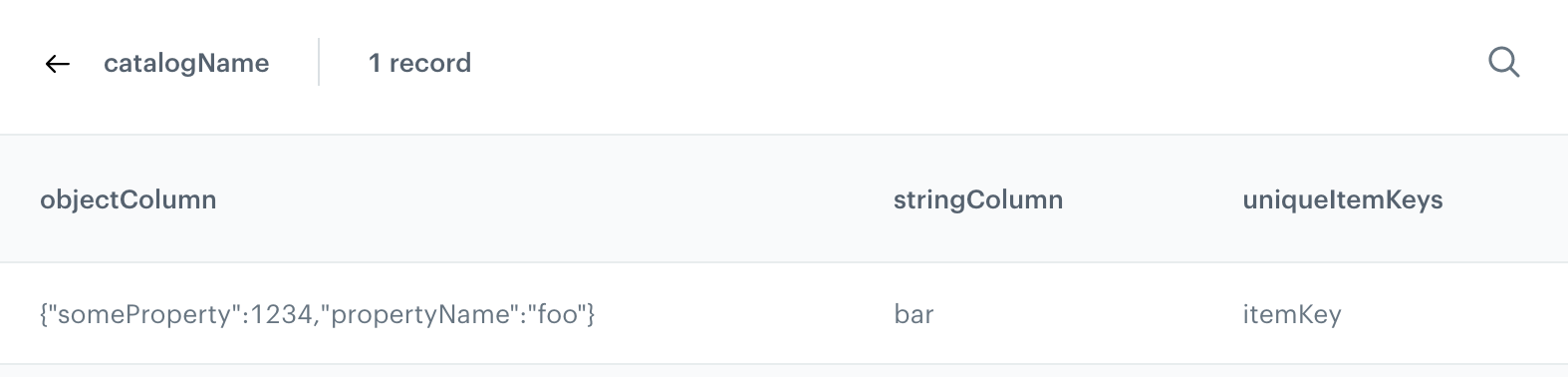
The above code, without any changes, will return `foo` and `bar` for the following catalog:

<figure><img src="/api/docs/image/54176ad07f146575310749eba44b7c2f42c1b327/developers/inserts/_gfx/catalog-example.png" class="large" alt="Screenshot of a catalog with one column that stores a string and one column that stores an object"><figcaption>Example of a catalog with one column that stores a string and one column that stores an object</figcaption></figure>

To extract more values, add more `object.get()` statements.

#### Handling non-existing items in catalogs

By default, when a requested item does not exist in the catalog, the `catalogitemv2` insert is not executed at all (communication is not sent).

You can change this behavior by setting the optional `allowEmpty` parameter to `True`. With this setting, the insert returns nulls as the values of the item's parameters. You should always verify if property exists before accessing it in order to avoid errors.

The following code returns the string `No item` if the requested `itemKey` does not exist in the catalog and the requested `name` parameter is empty:

<pre><code class="language-jinja">{% set key = 'itemKey' %}
{% catalogitemv2.catalogName(key) allowEmpty=True%}
  {% set object = catalog_result %}
  {%- if object.get("name") is defined -%}
    {{ object.get("name") }}
  {%- else -%}
    No item
  {%- endif -%}
{% endcatalogitemv2 %}</code></pre>


## Metrics

To find out what metrics are and how to create them, read [this article](/docs/analytics/metrics).

**Syntax:**

<pre><code class="language-jinja">{% metrics %} metrics-hash {% endmetrics %}</code></pre>


Or as a variable that you can modify:


<pre><code class="language-jinja">{% metricsvar metric_id:metrics-hash %}
    {{ metric_result }}
{% endmetricsvar %}</code></pre>


**Example:**  
A metric that holds the value of products sold in the last 30 days.


<pre><code class="language-jinja">{% metricsvar metric_id:07e93207-4dd4-4239-ab1a-9267118276b0 %}

  {% set result = metric_result|int %}

  {%- if result &gt; 4500 -%}
  Bravo! we achieved the set goal
  {%- else -%}
  {{ 4500 - result }} USD more to get a goal
  {%- endif -%}

{% endmetricsvar %}</code></pre>


Output (the metric result is 2400):


<pre><code class="language-html">2100 USD more to get a goal</code></pre>


## Customer attributes

You can access customer attributes, such as the name, surname, email, phone number, and more and use them as variables.  
By means of those variables, you can personalize the content, for example you can use the name of the customer in the greeting at the beginning of an email.

**Syntax:**

<pre><code class="language-jinja">{% customer attr-name %}</code></pre>


**Example:**  
A welcome message.


<pre><code class="language-jinja">&lt;div class="snrs-wrapper"&gt;
  &lt;div id="snrsCornerMessage" class="snrs-corner-message-wrap"&gt;
    &lt;div class="snrs-corner-message"&gt;
      &lt;div class="snrs-corner-main"&gt;
        &lt;div class="snrs-corner-message-text"&gt;
            Hello {% customer firstname %}!
        &lt;/div&gt;
      &lt;/div&gt;
    &lt;/div&gt;
  &lt;/div&gt;
&lt;/div&gt;</code></pre>


Output (the result of the variable is "John"):


<pre><code class="language-html">&lt;div class="snrs-wrapper"&gt;
  &lt;div id="snrsCornerMessage" class="snrs-corner-message-wrap"&gt;
    &lt;div class="snrs-corner-message"&gt;
      &lt;div class="snrs-corner-main"&gt;
        &lt;div class="snrs-corner-message-text"&gt;
            Hello John!
        &lt;/div&gt;
      &lt;/div&gt;
    &lt;/div&gt;
  &lt;/div&gt;
&lt;/div&gt;</code></pre>


### Inserting attributes conditionally

If you're not sure if an attribute is present in the profiles of all target customers, you can use conditional logic.  
For example:

<pre><code class="language-jinja">Hello {%- if customer.get('firstname') -%}{{ customer.firstname }}{%- else -%}user{%- endif -%}!</code></pre>


Output:
- If the `firstname` attribute is `John`: `Hello John!`
- If the `firstname` attribute does not exist: `Hello user!`


  <div class="admonition admonition-tip"><div class="admonition-icon"><svg xmlns="http://www.w3.org/2000/svg" fill="none" viewBox="0 0 24 24" stroke="currentColor" stroke-width="2.5"><path stroke-linecap="round" stroke-linejoin="round" d="M9.663 17h4.673M12 3v1m6.364 1.636l-.707.707M21 12h-1M4 12H3m3.343-5.657l-.707-.707m2.828 9.9a5 5 0 117.072 0l-.548.547A3.374 3.374 0 0014 18.469V19a2 2 0 11-4 0v-.531c0-.895-.356-1.754-.988-2.386l-.548-.547z" /></svg></div><div class="admonition-body"><div class="admonition-content">

  You can also use the [try/catch](/developers/inserts/tag#trycatch) tag and the [default value](/developers/inserts/filter#default) filter.

  </div></div></div>


#### Advanced use
You can check if a customer has an attribute set and act accordingly.  
For example, this can be used to set up a single campaign for customers who have an attribute and those who don't. Without the check, you would need to create two separate campaigns.

**Example 1:** Check if a customer belongs to a loyalty club and what kind of membership they have:

<pre><code class="language-jinja">{%- if "club_member" in customer.keySet() -%} {# checks if the club_member attribute exists #}
  {%- if customer["club_member"] == "highPriority" -%}
    {#  insert HTML code  #}
  {%- elif customer["club_member"] == "mediumPriority" -%}
    {#  insert HTML code  #}
  {%- elif customer["club_member"] == "lowPriority" -%}
    {#  insert HTML code  #}
  {%- endif -%}
{%- endif -%}</code></pre>


**Example 2:**
Check if the customer profile includes an entry about the city of residence:

<pre><code class="language-jinja">{%- if "city" in customer.keySet() -%}
  Check the best prices in {{ customer["city"] }}!
{%- else -%}
  Check the best prices in your city!
{%- endif -%}</code></pre>


## Code pools

To find out what code pools are and how to create them, read [this article](/docs/assets/code-pools).

Normally, each code can only be retrieved once. You can override this behavior by [binding the code to a profile](#retrieving-the-same-code-every-time). This code is stored separately, so you can bind a code and still assign other codes (only one code can be bound to a profile). For example, you can bind a code and use it to identify a profile, and still retrieve codes from other pools to use in marketing campaigns.

When a code is assigned or bound to a profile, a [voucherCode.assigned](/docs/assets/events/event-reference/loyalty#vouchercodeassigned) event is generated.


<div class="admonition admonition-warning"><div class="admonition-icon"><svg xmlns="http://www.w3.org/2000/svg" fill="none" viewBox="0 0 24 24" stroke="currentColor" stroke-width="2.5"><path stroke-linecap="round" stroke-linejoin="round" d="M12 9v2m0 4h.01m-6.938 4h13.856c1.54 0 2.502-1.667 1.732-2.5L13.732 4c-.77-.833-1.964-.833-2.732 0L4.082 16.5c-.77.833.192 2.5 1.732 2.5z" /></svg></div><div class="admonition-body"><div class="admonition-content">

If your code pool is limited, testing email or dynamic content templates (including as a preview in the creator) consumes codes from the pool in the same way as when the communication is sent out to customers. You should use a separate pool for testing.

</div></div></div>


### Assigning a code to a profile

**Syntax:**

<pre><code class="language-jinja">{% voucher %} pool-uuid {% endvoucher %}</code></pre>


If the code pool is empty, doesn't exist, or no more codes are available, the insert fails to render. You can use [try/catch statements](/developers/inserts/tag#trycatch) to handle such cases.

**Example:**  
A promotion code from a selected code pool:


<pre><code class="language-jinja">&lt;div class="snrs-wrapper"&gt;
  &lt;div id="snrsCornerMessage" class="snrs-corner-message-wrap"&gt;
    &lt;div class="snrs-corner-message"&gt;
      &lt;div class="snrs-corner-main"&gt;
        &lt;div class="snrs-corner-message-text"&gt;
            Take your promotional code and use it durning the transaction to get a 50% discount!
            &lt;strong&gt;{% voucher %} 274a18d5-e8bd-4fec-82d1-cea0af19af01 {% endvoucher %}&lt;/strong&gt;
        &lt;/div&gt;
      &lt;/div&gt;
    &lt;/div&gt;
  &lt;/div&gt;
&lt;/div&gt;</code></pre>


Output (voucher result is "5510018091219"):


<pre><code class="language-html">&lt;div class="snrs-wrapper"&gt;
  &lt;div id="snrsCornerMessage" class="snrs-corner-message-wrap"&gt;
    &lt;div class="snrs-corner-message"&gt;
      &lt;div class="snrs-corner-main"&gt;
        &lt;div class="snrs-corner-message-text"&gt;
            Take your promotional code and use it during the transaction to get a 50% discount!
            &lt;strong&gt;5510018091219&lt;/strong&gt;
        &lt;/div&gt;
      &lt;/div&gt;
    &lt;/div&gt;
  &lt;/div&gt;
&lt;/div&gt;</code></pre>


### Using the code as a variable

By using the `vouchervar` tag, you can create a block of code in which the code can be accessed as the `voucher_result` variable.

If the code pool is empty, doesn't exist, or no more codes are available, the insert fails to render. You can use [try/catch statements](/developers/inserts/tag#trycatch) to handle such cases.

**Syntax:**  

<pre><code class="language-jinja">{% vouchervar id=pool-uuid %}
  {{ voucher_result }}
{% endvouchervar %}</code></pre>


**Example:**  
In this example, the voucher's value is accessible as a variable and can be converted to capital letters.


<pre><code class="language-jinja">{% vouchervar id=5fae8aba-b48e-4144-8d28-db24b1570ab0 %}
&lt;ul&gt;
  &lt;li&gt;The voucher value is {{ voucher_result }}.&lt;/li&gt;
  &lt;li&gt;When capitalized, it becomes {{ voucher_result|capitalize }}.&lt;/li&gt;
&lt;/ul&gt;
{% endvouchervar %}</code></pre>


The output (the voucher's value is "CapitalizeMe") is:

<pre><code class="language-html">&lt;ul&gt;
  &lt;li&gt;The voucher value is CapitalizeMe.&lt;/li&gt;
  &lt;li&gt;When capitalized, it becomes CAPITALIZEME.&lt;/li&gt;
&lt;/ul&gt;</code></pre>


### Retrieving the same code every time

Setting the `assign` variable to `false` binds a code from a pool to a profile (unless one is already bound) and retrieves that same code for this profile every time. This can be used, for example, to create unique codes that can be used to identify a profile.

Binding codes doesn't have any influence on assigning codes (described earlier).


<pre><code class="language-jinja">{% voucher assign=false %} pool-uuid {% endvoucher %}</code></pre>


### Barcodes

To add a barcode of a voucher to an email template, paste the following code:


<pre><code class="language-jinja">{% vouchervar id=pool-uuid  %} 
{% barcode code= {{voucher_result}}, gray=true, type=EAN_13, hrp=BOTTOM %}
{% endvouchervar %}</code></pre>


The result of that insert will be the HTML code for the image of the barcode.

If you want to get only the URL of the barcode, use the following code:


<pre><code class="language-jinja">{% vouchervar id=pool-uuid  %}
{% barcodeurl code= {{voucher_result}}, gray=true, type=EAN_13, hrp=BOTTOM %}
{% endvouchervar %}</code></pre>


**Explanation of parameters**:

- `pool-uuid` is the UUID of a voucher pool available on the platform (**Data Modeling Hub > Voucher pools**).
- `gray` defines the color of the barcode. Parameter values:
    - `TRUE` - The code is generated in grayscale.
    - `FALSE` - The code consists of black and white pixels.
- `type` defines the type of barcode. Parameter values:
    - `EAN_13`
    - `EAN_8`
    - `EAN_128`
    - `CODE_39`
    - `CODE_128`
    - `ITF_14`
    - `POSTNET`
    - `UPC-A`
    - `UPC-E`
- `hrp` (*human readable part*) defines the position of the readable part of the code for customers (usually it takes the form of a string of numbers). Parameter values: 
    - `NONE` - There is no readable part of the code.
    - `BOTTOM` - The readable string is at the bottom of the barcode. 
- `resolution` defines the resolution of a bar code in dpi and indirectly affects the width of the narrowest bar. 

## Snippets

You can reference a [snippet](/docs/assets/snippets). The content generated from such a reference is updated when the referenced definition changes.

Print the contents of the referenced snippet:

<pre><code class="language-jinja">{% snippet %} 6197adde-e1da-4ef1-be40-aa411e2fbdff {% endsnippet %}</code></pre>


Save the referenced snippet to a variable:

<pre><code class="language-jinja">{% snippetvar id=6197adde-e1da-4ef1-be40-aa411e2fbdff %}
{{ snippet_result }}
{% endsnippetvar %}</code></pre>


Such a variable can be used in functions.

For example, if the referenced snippet contains a number, you can add it to another number:

<pre><code class="language-jinja">{% snippetvar id=6197adde-e1da-4ef1-be40-aa411e2fbdff %}
{{ snippet_result|add(5) }}
{% endsnippetvar %}</code></pre>


## Communication campaign metadata

You can access the ID and variant ID of the communication campaign. Thanks to this, you don't need to manually edit those details after cloning a campaign or copying content between templates.

| Jijava | Example result | Description |
| --- | --- | --- |
| `{{campaignContext.id}}` | `f3ac122e-9305-441c-9081-79d32b5cf06d` | The ID of the communication campaign |
| `{{campaignContext.variantId}}` | `15761220` | ID of the variant. Can be used in all campaign types except for landing pages. |
| `{{campaignContext.version}}` | `2025-06-23T10:36:51.927532232` | Version number. Can only be used in landing pages. |

## Stopping communication from rendering

You can use the `{% terminate [message] %}` insert to completely stop the message from rendering, which means an email is not sent at all, a dynamic content is not displayed, and so on.

When this tag is triggered, a `notSent` ([message](/docs/assets/events/event-reference/email#messagenotsent), [sms](/docs/assets/events/event-reference/sms#smsnotsent), [push](/docs/assets/events/event-reference/mobile-push#pushnotsent), [webpush](/docs/assets/events/event-reference/webpush#webpushnotsent)) or `renderFail` ([inApp](/docs/assets/events/event-reference/inapp#inapprenderfail), [landingpage](/docs/assets/events/event-reference/landing-page#landingpagerenderfail)) is generated. In the event:
- the `exception` (SMS, email, push, web push) or `error` (in-app, landing page) parameter is added, with the value set to `TerminateRenderingException`
- if you added the `message` parameter to the insert, it's saved in the `info` parameter. Otherwise, the default message is `Jinja rendering terminated by user`.  
    The message doesn't support Jinjava.

This can be useful when you want to terminate a communication when a certain condition is met.  
For example, the following communication:
- is terminated for customers whose result of an expression is less than 100.
- informs a customer about the result of the expression if it's 100 or more.
- adds "Expression result too low" as the `info` parameter in the "not sent" event.

  <pre><code class="language-jinja">{% expressionvar expression-hash %}
    {%- if expression_result &lt; 100 -%}
      {% terminate Expression result too low %}
    {%- else -%}
      You have {{ expression_result }} loyalty points.
    {%- endif -%}
  {% endexpressionvar %}</code></pre>


<div class="admonition admonition-note"><div class="admonition-icon"><svg xmlns="http://www.w3.org/2000/svg" fill="none" viewBox="0 0 24 24" stroke="currentColor" stroke-width="2.5"><path stroke-linecap="round" stroke-linejoin="round" d="M13 16h-1v-4h-1m1-4h.01M21 12a9 9 0 11-18 0 9 9 0 0118 0z" /></svg></div><div class="admonition-body"><div class="admonition-content">

This insert used to be known as `kill` and `killit`. They are now deprecated and may be removed in the future.

</div></div></div>


## Brickworks

Use Brickworks content in templates across the Synerise platform with dedicated JinJava tags.


JinJava tags work consistently across all Synerise modules that support JinJava rendering, creating a unified content experience throughout your platform:

- **Experience Hub channels** – Email campaigns, SMS messaging, mobile push notifications, and web push notifications with dynamic, personalized content 
- **Automation Hub workflows** – Sophisticated automation sequences with content that adapts based on customer actions and behavioral triggers 
- **Screen views and Documents** – Interactive displays, personalized mobile applications content
- **In-App Messaging**– Contextual experiences that respond to customer behavior in real-time

### Generate record

This tag can't be used in Brickworks schemas or records. In Documents and Screen Views, if you want to display an entire object instead of just one property, you need to use `{{ brickworks_result|tojson }}`

In singleton schemas, use the API name (`appName`) or UUID of the schema in place of the record identifier.

The `brickworksgenerate` tag generates a an object from a record with all references resolved and Jinja templates rendered:

    
<pre><code class="language-jinja">{% set myFieldContext = {"oneToManyRelation": {"page":2, "limit": 50}} %}
{% set myContext={
    "example1":"value1",
    "example2":"value2"
    } 
%}

{% brickworksgenerate schemaId=SCHEMA_ID/APP_ID recordId=RECORD_ID/SLUG context=myContext fieldContext=myFieldContext %}</code></pre>


where:
- The values for the `context` and `fieldContext` arguments must be variables created with `set` (as shown above).
- `myFieldContext` provides paging data for a relation field named `oneToManyRelation`. You can skip this argument if you don't need it.
- `myContext` provides values for two inserts used in the record (regardless of field names): `{{ context.example1 }}` and `{{ context.example2 }}`. You can skip this argument if you don't need it.

Alternatively, you can use `brickworksgeneratevar` to create a `{{ brickworks_result }}` variable for reuse in a template:  


<pre><code class="language-jinja">{% brickworksgeneratevar schemaId=SCHEMA_ID/APP_ID recordId=RECORD_ID/SLUG context=myContext fieldContext=myFieldContext %}
  {{ brickworks_result }}            {# prints out the entire record #}
  {{ brickworks_result.someString }} {# prints out the value of the someString field #}
{% endbrickworksgeneratevar %}</code></pre>


### Fetch raw record

This tag can't be used in Brickworks schemas or records. In Documents and Screen Views, if you want to display an entire object instead of just one property, you need to use `{{ brickworks_result|tojson }}`

In singleton schemas, use the API name (`appName`) or UUID of the schema in place of the record identifier.

- The following tag fetches a raw record as defined in the database: 
    
  <pre><code class="language-jinja">{% brickworks schemaId=SCHEMA_ID/APP_ID recordId=OBJECT_ID/SLUG %}</code></pre>
  
- The following tag fetches a raw record as defined in the database, but saves the result to a variable for reuse in your template:  
    
  <pre><code class="language-jinja">{% brickworksvar schemaId=SCHEMA_ID/APP_ID recordId=OBJECT_ID/SLUG %}
    {{ brickworks_result }}
  {% endbrickworksvar %}</code></pre>


### Fetch raw records

This tag lets you retrieve multiple records (raw content) from a schema and access the result as an iterable.

This tag can't be used in Brickworks schemas or records. In Documents and Screen Views, if you want to display an entire object instead of just one property, you need to use `{{ brickworks_result|tojson }}`


<pre><code class="language-jinja">{% brickworksrecordsvar schemaId=ID/APPID [optional parameters] %}

{# example logic: iterate through result and return record IDs #}
{% for record in brickworks_result %}
{{ record.id }} 
{% endfor %}
{# end example logic #}
{% endbrickworksrecordsvar %}</code></pre>


where:
- `schemaId` is the App ID or UUID of a schema.
- `optional parameters` can be used to sort and filter the retrieved records:
    - The parameters can be applied in two ways (see [examples](#filtering-examples)):
        - as arguments in the tag.  
            In this case, `slugs`, `ids`, and `filters` must be declared with `set` first.
        - as a `filteringParams` object. If you insert the same parameter in both ways, `filteringParams` takes precedence.
    - You can use these parameters: 
        - `sortBy`: a record attribute to sort by and the sorting direction.  
            **This parameter can't be added to `filteringParams`**  
            For a list of sorting attributes, see the [/v1/schemas/{schemaIdentifier}/records (Get records) endpoint](https://developers.synerise.com/Brickworks/Brickworks.html#tag/Brickworks:-Records/operation/getRecordsFromSchema).
        - `search`: a string to search for in the values of fields which are [configured as searchable in the schema](/docs/assets/brickworks/schema-field-types#common-field-properties).
        - `filters`: an RSQL string to filter the records.  
          These following system parameter names must include the `__` prefix: `__id`, `__schemaId`, `__name`, `__slug`, `__status`, `__createdAt`, `__updatedAt`, `__publishedAt`, `__recordVersion`
        - `slugs`: a list of record slugs. Looks for exact matches.
        - `ids`: a list of record IDs. Looks for exact matches.

<span id="filtering-examples"></span>

<div class="content-tabs" data-tab-group="tabgrp-8">
<div class="tab-buttons"><button class="tab-button" data-tab-id="tabgrp-8-0" data-tab-group="tabgrp-8" data-tab-active="true">filteringParams</button><button class="tab-button" data-tab-id="tabgrp-8-1" data-tab-group="tabgrp-8">Arguments</button></div>

<div class="tab-panel" data-tab-id="tabgrp-8-0" data-tab-group="tabgrp-8" data-tab-active="true">

You can collect the filters in an object and provide that object as an argument in the tag.  
Example:

<pre><code class="language-jinja">{% set parametersVar = {
    search: "string",
    filters: "status==PUBLISHED",
    slugs: ["string","string"],
    ids: ["uuid","uuid"]
} %}
{% brickworksrecordsvar
    schemaId=string
    filteringParams=parametersVar %}
{{ brickworks_result }}
{% endbrickworksrecordsvar %}</code></pre>

</div>

<div class="tab-panel" data-tab-id="tabgrp-8-1" data-tab-group="tabgrp-8">

You can enter the filters as arguments of the tag. Some of them must first be declared as variables with `set`, as shown in the example:

<pre><code class="language-jinja">{% set filtersVar = "status==PUBLISHED" %}
{% set slugsVar = ["string","string"] %}
{% set idsVar = ["uuid","uuid"] %}
{% brickworksrecordsvar 
    schemaId=string
    search=string
    sortBy=createdAt:asc
    filters=filtersVar
    slugs=slugsVar
    ids=idsVar
%}
{{ brickworks_result }}
{% endbrickworksrecordsvar %}</code></pre>

</div>
</div>

