## Overview
---
Simple push is a standard push notification interacting with your operating system. If an app is not active (was closed or running in the background) in the moment of receiving simple push, it appears in the notification center. When a customer clicks the notification, they are taken to the application and a simple push is presented.

If an app is active, the simple push is presented right away.

Read more about creating and testing simple push [here](/docs/campaign/Mobile/creating-mobile-push).


<div class="admonition admonition-note"><div class="admonition-icon"><svg xmlns="http://www.w3.org/2000/svg" fill="none" viewBox="0 0 24 24" stroke="currentColor" stroke-width="2.5"><path stroke-linecap="round" stroke-linejoin="round" d="M13 16h-1v-4h-1m1-4h.01M21 12a9 9 0 11-18 0 9 9 0 0118 0z" /></svg></div><div class="admonition-body"><div class="admonition-content">

Additionaly, iOS and React Native (iOS) simple push campaigns support two types of Rich Media extensions:
- [Single Media](#single-media)
- [Image Carousel](#image-carousel)
  
<br/>

Add support for Rich Media Push Notifications in your application. See [Rich Media in Push Notifications](/developers/mobile-sdk/configuring-push-notifications/ios#rich-media-in-push-notifications) section.

</div></div></div>


## Configuration
---
Simple push campaign is served by push notifications. See:
- [Configuring push notifications - Android](/developers/mobile-sdk/configuring-push-notifications/android)
- [Configuring push notifications - iOS](/developers/mobile-sdk/configuring-push-notifications/ios)
- [Configuring push notifications - React Native](/developers/mobile-sdk/configuring-push-notifications/react-native)
- [Configuring push notifications - Flutter](/developers/mobile-sdk/configuring-push-notifications/flutter)

Additionally, check possible available configuration options in the [Settings](/developers/mobile-sdk/settings#notifications).

## Events generated by simple push
---
For information about events generated by simple push, see the [event reference](/docs/assets/events/event-reference/mobile-push).


## Handling actions from simple push
---
Handling main actions from campaigns depends on campaign type and operating system and it is described [here](/developers/mobile-sdk/campaigns/action-handling).


## Additional in-app alert when simple push is received
---

<div class="admonition admonition-note"><div class="admonition-icon"><svg xmlns="http://www.w3.org/2000/svg" fill="none" viewBox="0 0 24 24" stroke="currentColor" stroke-width="2.5"><path stroke-linecap="round" stroke-linejoin="round" d="M13 16h-1v-4h-1m1-4h.01M21 12a9 9 0 11-18 0 9 9 0 0118 0z" /></svg></div><div class="admonition-body"><div class="admonition-content">

This feature is available only in iOS SDK, React Native SDK (iOS) and Flutter SDK (iOS).

</div></div></div>


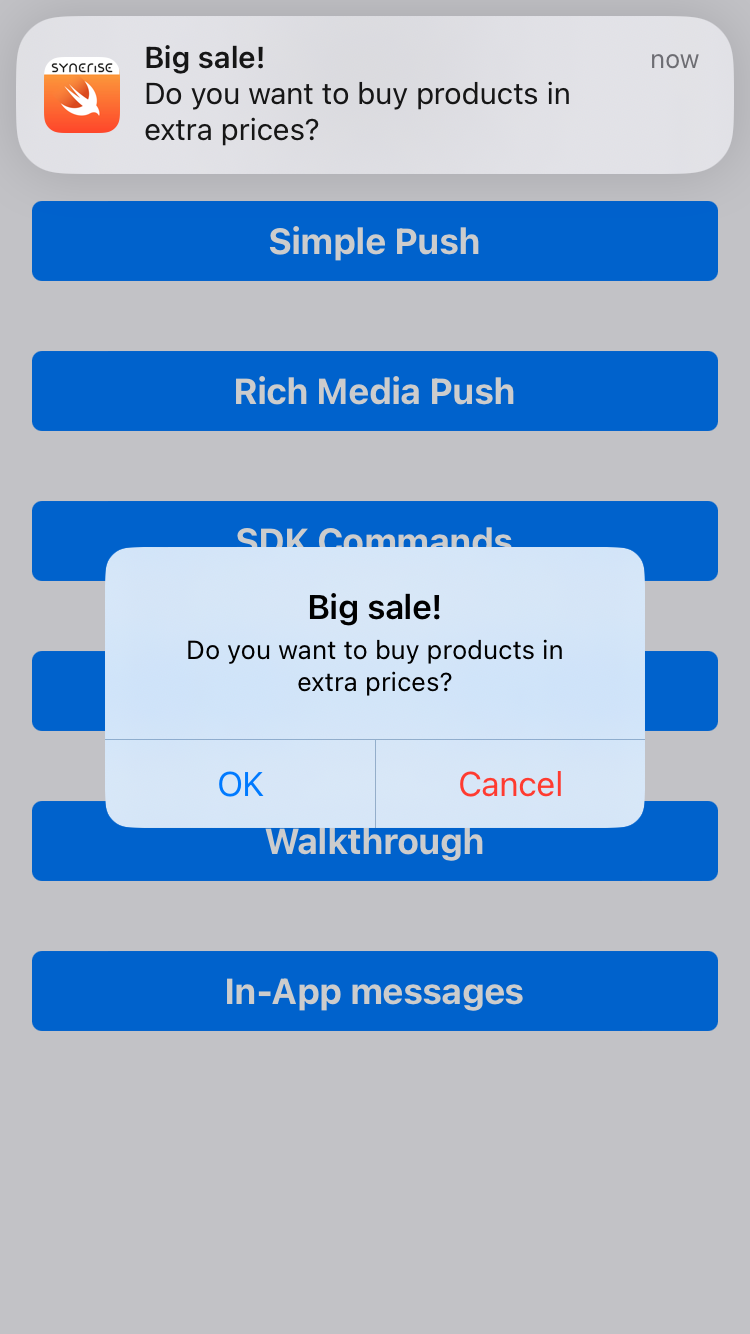
The iOS SDK displays an additional alert in the application after a simple push campaign is received and it is configured with [OPEN_URL](/developers/mobile-sdk/campaigns/action-handling#types-of-actions-in-campaigns) or [DEEP_LINKING](/developers/mobile-sdk/campaigns/action-handling#types-of-actions-in-campaigns) action. This alert is displayed in the middle of the screen with content from the native notification payload. This is the default behavior.

You can disable it in the SDK Settings - [Enable/disable notification alerts](/developers/mobile-sdk/settings#enabledisable-notification-in-app-alerts).

<figure><img src="/api/docs/image/54176ad07f146575310749eba44b7c2f42c1b327/developers/mobile-sdk/_gfx/ios-simple-push-in-app-alert.png" alt="Simple Push campaign with in-app alert" class="small"><figcaption>Simple Push campaign with in-app alert</figcaption></figure>


## Payload
---
<br/>

<div class="content-tabs" data-tab-group="tabgrp-30">
<div class="tab-buttons"><button class="tab-button" data-tab-id="tabgrp-30-0" data-tab-group="tabgrp-30" data-tab-active="true">Android</button><button class="tab-button" data-tab-id="tabgrp-30-1" data-tab-group="tabgrp-30">iOS</button></div>

<div class="tab-panel" data-tab-id="tabgrp-30-0" data-tab-group="tabgrp-30" data-tab-active="true">

<pre><code class="language-json">{
  "data": {
    "issuer": "Synerise",
    "message-type": "static-content",
    "content-type": "simple-push",
    "content": {
      "notification": {
        "title": "Finish your purchase",
        "body": "You have in your basket Road Bike RS-500 with discount for \"New Users\". Comeback to the basket and complete your purchase.",
        "icon": "https://upload.snrcdn.net/f2afa4d4d7af216196047d1f7f0613f22a50a8c8/default/origin/7eba69de2d4dab3a9388b9d72abd91eb.png",
        "action": {
          "type": "OPEN_APP"
        }
      },
      "buttons": [
        {
          "identifier": "check",
          "text": "Check",
          "action": {
            "type": "OPEN_URL",
            "item": "http://www.synerise.com"
          }
        },
        {
          "identifier": "view_similar",
          "text": "View similar",
          "action": {
            "type": "OPEN_URL",
            "item": "http://www.synerise.com"
          }
        }
      ],
      "campaign": {
        "hash_id": "196211cc-af48-4064-8860-aad986449322",
        "variant_id": 3175648,
        "type": "Mobile push",
        "title": "SimplePush For Docs"
      }
    }
  }
}</code></pre>
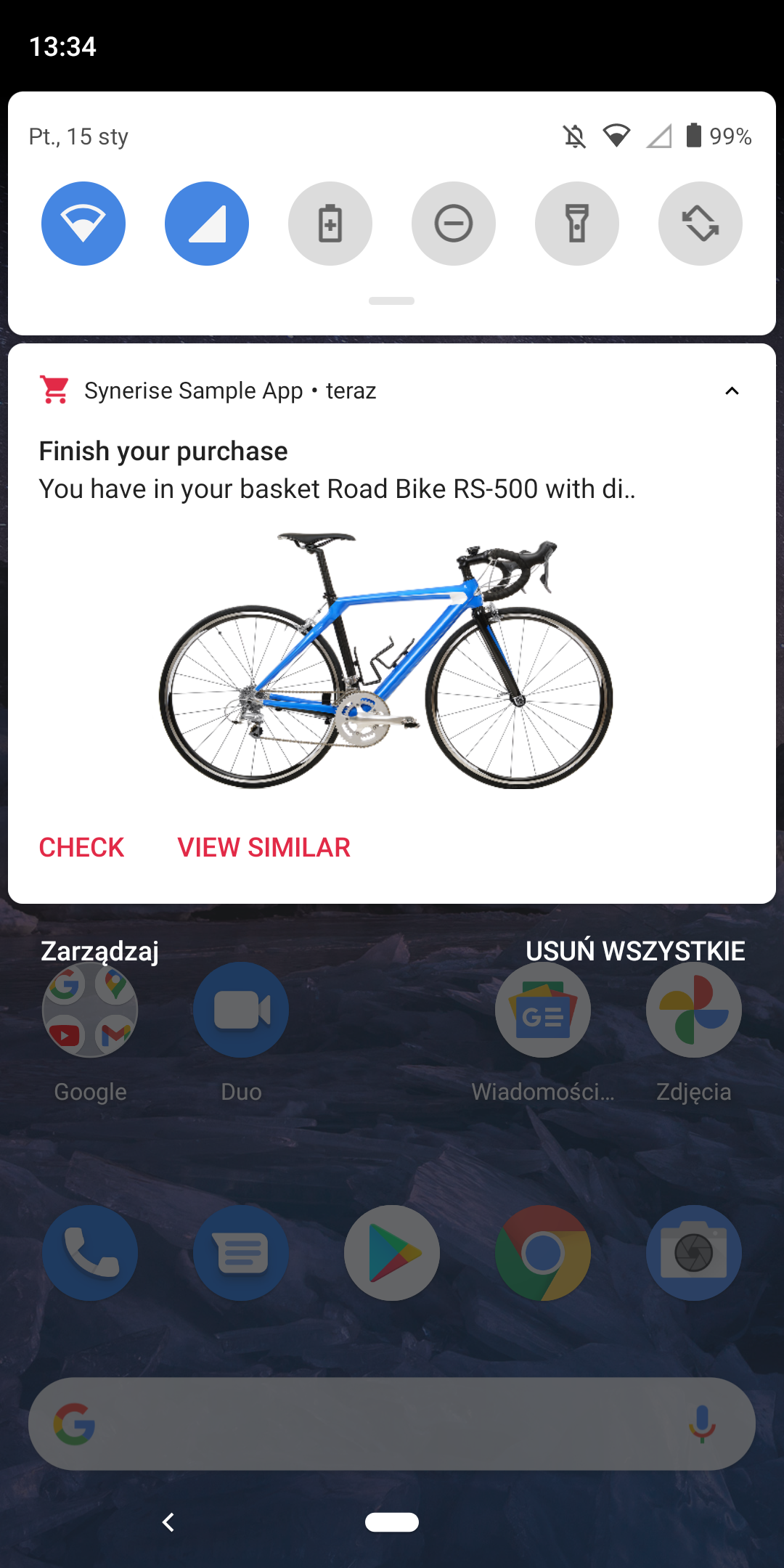


The example presents a simple push campaign with a main action, image, and two clickable buttons connected to actions. All user interactions are tracked by Synerise Android SDK.


<div class="admonition admonition-note"><div class="admonition-icon"><svg xmlns="http://www.w3.org/2000/svg" fill="none" viewBox="0 0 24 24" stroke="currentColor" stroke-width="2.5"><path stroke-linecap="round" stroke-linejoin="round" d="M13 16h-1v-4h-1m1-4h.01M21 12a9 9 0 11-18 0 9 9 0 0118 0z" /></svg></div><div class="admonition-body"><div class="admonition-content">

The look of your push notifications may vary depending on Android versions.

</div></div></div>


<figure><img src="/api/docs/image/54176ad07f146575310749eba44b7c2f42c1b327/developers/mobile-sdk/_gfx/android-simple-push-expanded.png" alt="Expanded simple push notification" class="medium"><figcaption>Simple push notification presented on Android 10</figcaption></figure>

</div>

<div class="tab-panel" data-tab-id="tabgrp-30-1" data-tab-group="tabgrp-30">

<pre><code class="language-json">{
  "aps": {
    "alert": {
      "title": "Complete your purchase",
      "body": "Your basket contains Road Bike RS-500 with a discount for \"New Users\". Come and complete your purchase!"
    },
    "sound": "default",
    "category": "[YOUR CATEGORY]",
    "mutable-content": 1
  },
  "issuer": "Synerise",
  "message-type": "dynamic-content",
  "content-type": "simple-push",
  "content": {
    "campaign": {
      "variant_id": 3175648,
      "hash_id": "196211cc-af48-4064-8860-aad986449322",
      "type": "Simple Push",
      "title": "Simple Push campaign for docs"
    },
    "notification": {
      "action": {
        "type": "OPEN_APP"
      }
    },
    "buttons": [{
      "identifier": "check",
      "text": "Check",
      "action": {
        "type": "OPEN_URL",
        "item": "http://www.synerise.com"
      }
    },
    {
      "identifier": "view_similiar",
      "text": "View similiar",
      "action": {
        "type": "OPEN_URL",
        "item": "http://www.synerise.com"
      }
    }]
  }
}</code></pre>
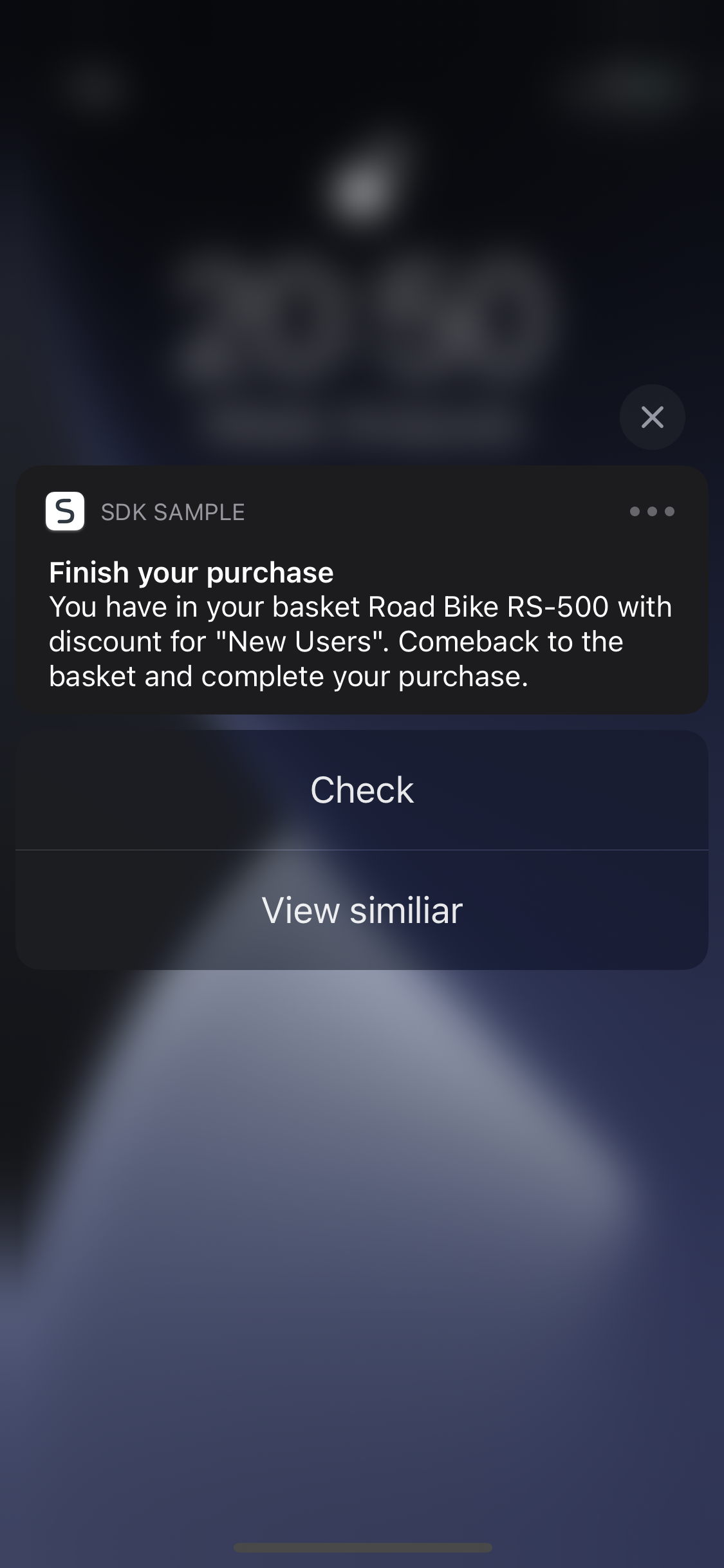


The example presents a simple push campaign with a main action and two clickable buttons connected to actions. All user interactions are tracked by Synerise iOS SDK.

<figure><img src="/api/docs/image/54176ad07f146575310749eba44b7c2f42c1b327/developers/mobile-sdk/_gfx/ios-simple-push-campaign-1.png" alt="Simple Push campaign" class="small"><figcaption>Simple push campaign presented on iOS 14</figcaption></figure>


<div class="admonition admonition-note"><div class="admonition-icon"><svg xmlns="http://www.w3.org/2000/svg" fill="none" viewBox="0 0 24 24" stroke="currentColor" stroke-width="2.5"><path stroke-linecap="round" stroke-linejoin="round" d="M13 16h-1v-4h-1m1-4h.01M21 12a9 9 0 11-18 0 9 9 0 0118 0z" /></svg></div><div class="admonition-body"><div class="admonition-content">

The look of your push notifications may vary depending on iOS versions.

</div></div></div>

</div>
</div>


## Single Media
---

<div class="admonition admonition-note"><div class="admonition-icon"><svg xmlns="http://www.w3.org/2000/svg" fill="none" viewBox="0 0 24 24" stroke="currentColor" stroke-width="2.5"><path stroke-linecap="round" stroke-linejoin="round" d="M13 16h-1v-4h-1m1-4h.01M21 12a9 9 0 11-18 0 9 9 0 0118 0z" /></svg></div><div class="admonition-body"><div class="admonition-content">

This feature is available only in iOS SDK.

</div></div></div>


It is a simple push campaign with an image that can be seen after expanding the notification.

### Payload {id=single-media-payload}


<div class="content-tabs" data-tab-group="tabgrp-31">
<div class="tab-buttons"><button class="tab-button" data-tab-id="tabgrp-31-0" data-tab-group="tabgrp-31" data-tab-active="true">iOS</button></div>

<div class="tab-panel" data-tab-id="tabgrp-31-0" data-tab-group="tabgrp-31" data-tab-active="true">

<pre><code class="language-json">{
  "aps": {
    "alert": {
      "title": "Complete your purchase",
      "body": "Your basket contains Road Bike RS-500 with a discount for \"New Users\". Come and complete your purchase!"
    },
    "sound": "default",
    "category": "synerise.notifications.category.single-media",
    "mutable-content": 1
  },
  "issuer": "Synerise",
  "message-type": "dynamic-content",
  "content-type": "simple-push",
  "content": {
    "campaign": {
      "variant_id": 3175648,
      "hash_id": "196211cc-af48-4064-8860-aad986449322",
      "type": "Simple Push",
      "title": "Simple Push campaign for docs"
    },
    "notification": {
      "action": {
        "type": "OPEN_APP"
      }
    },
    "buttons": [{
      "identifier": "check",
      "text": "Check",
      "action": {
        "type": "OPEN_URL",
        "item": "http://www.synerise.com"
      }
    },
    {
      "identifier": "view_similiar",
      "text": "View similiar",
      "action": {
        "type": "OPEN_URL",
        "item": "http://www.synerise.com"
      }
    }],
    "rich-media": {
      "type": "single-image",
      "single-image": {
        "image": "https://upload.snrcdn.net/f2afa4d4d7af216196047d1f7f0613f22a50a8c8/default/origin/7eba69de2d4dab3a9388b9d72abd91eb.png"
      }
    }
  }
}</code></pre>
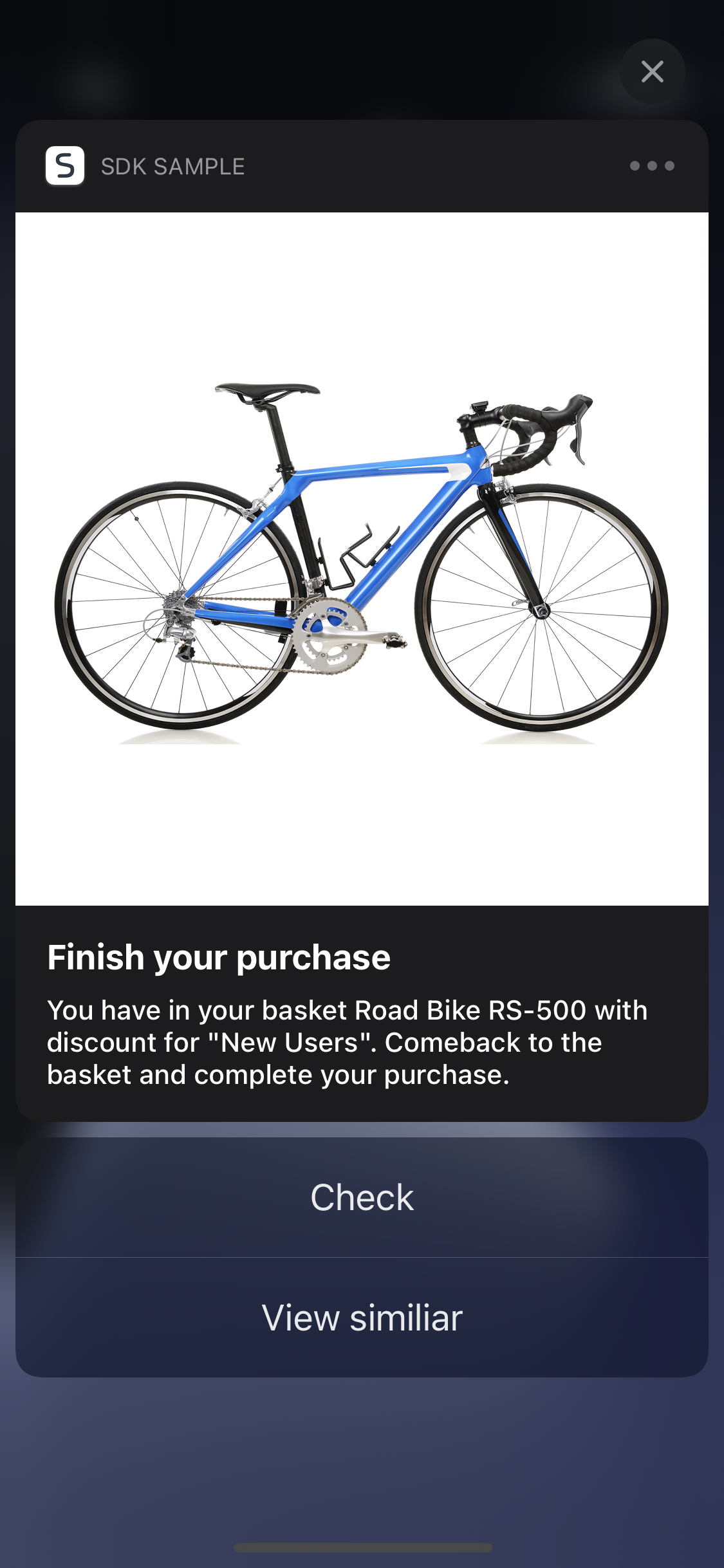


The example presents a simple push campaign with a main action, single image, and two clickable buttons connected to actions. All user interactions are tracked by Synerise iOS SDK.

<figure><img src="/api/docs/image/54176ad07f146575310749eba44b7c2f42c1b327/developers/mobile-sdk/_gfx/ios-simple-push-campaign-2.png" alt="Simple Push campaign" class="small"><figcaption>Simple push campaign presented on iOS 14</figcaption></figure>


<div class="admonition admonition-note"><div class="admonition-icon"><svg xmlns="http://www.w3.org/2000/svg" fill="none" viewBox="0 0 24 24" stroke="currentColor" stroke-width="2.5"><path stroke-linecap="round" stroke-linejoin="round" d="M13 16h-1v-4h-1m1-4h.01M21 12a9 9 0 11-18 0 9 9 0 0118 0z" /></svg></div><div class="admonition-body"><div class="admonition-content">

The look of your push notifications may vary depending on iOS versions.
</div></div></div>

</div>
</div>


## Image Carousel
---

<div class="admonition admonition-note"><div class="admonition-icon"><svg xmlns="http://www.w3.org/2000/svg" fill="none" viewBox="0 0 24 24" stroke="currentColor" stroke-width="2.5"><path stroke-linecap="round" stroke-linejoin="round" d="M13 16h-1v-4h-1m1-4h.01M21 12a9 9 0 11-18 0 9 9 0 0118 0z" /></svg></div><div class="admonition-body"><div class="admonition-content">

This feature is available only in iOS SDK.

</div></div></div>


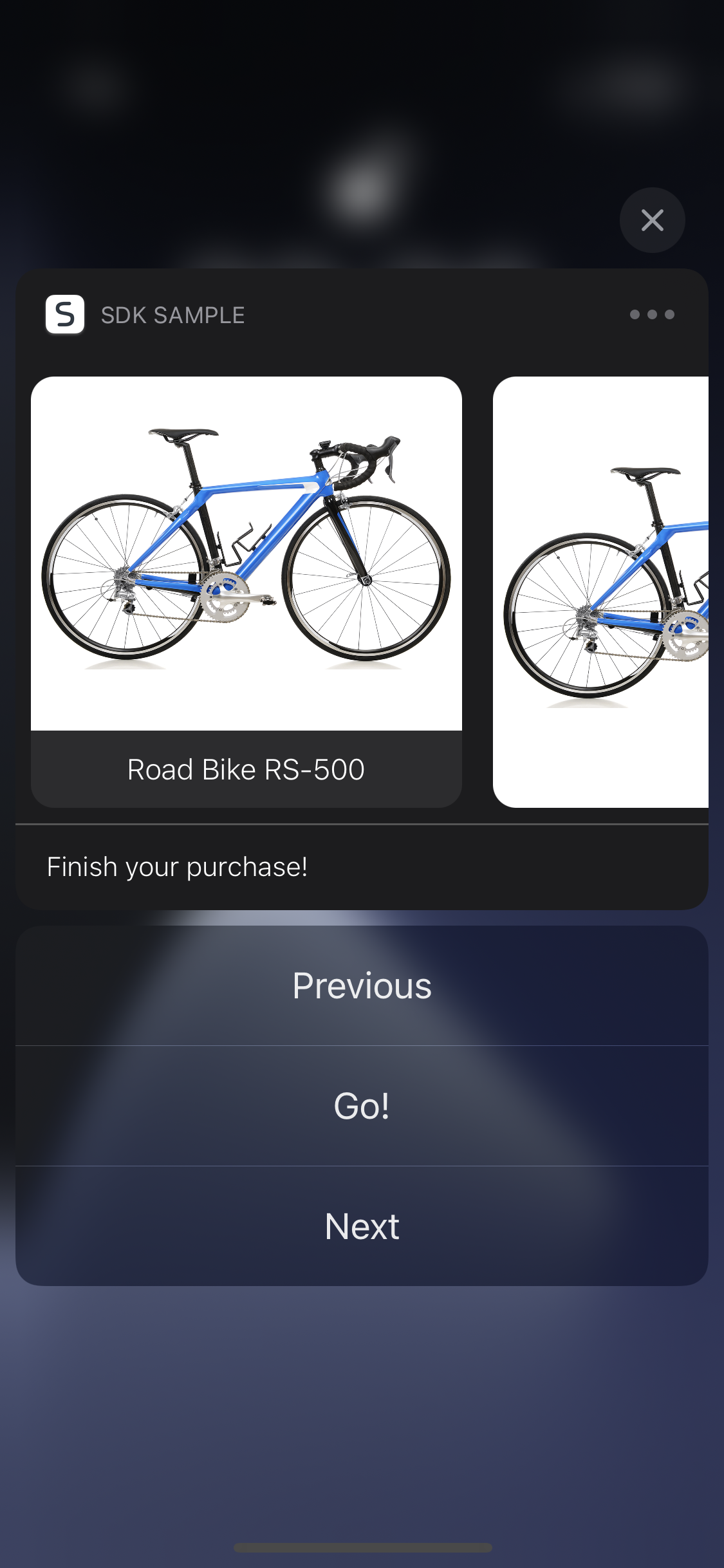
It is a simple push campaign with images that can be seen and swiped after expanding the notification.

### Payload {id=image-carousel-payload}


<div class="content-tabs" data-tab-group="tabgrp-32">
<div class="tab-buttons"><button class="tab-button" data-tab-id="tabgrp-32-0" data-tab-group="tabgrp-32" data-tab-active="true">iOS</button></div>

<div class="tab-panel" data-tab-id="tabgrp-32-0" data-tab-group="tabgrp-32" data-tab-active="true">

<pre><code class="language-json">{
    "aps":
    {
        "alert":
        {
            "title": "Complete your purchase",
            "body": "Your basket contains Road Bike RS-500 with a discount for \"New Users\". Come and complete your purchase!"
        },
        "sound": "default",
        "badge": "5",
        "category": "synerise.notifications.category.carousel"
    },
    "issuer": "Synerise",
    "message-type": "dynamic-content",
    "content-type": "simple-push",
    "content":
    {
        "campaign":
        {
            "variant_id": 3175648,
            "hash_id": "196211cc-af48-4064-8860-aad986449322",
            "type": "Simple Push",
            "title": "Simple Push campaign for docs"
        },
        "notification":
        {
            "action":
            {
                "type": "OPEN_URL",
                "item": "https://www.synerise.com"
            }
        },
        "rich-media":
        {
            "type": "carousel",
            "carousel":
            {
                "orientation": "PORTRAIT",
                "items":
                [
                    {
                        "caption": "Check!",
                        "subcaption": "Road Bike RS-500",
                        "image": "https://upload.snrcdn.net/f2afa4d4d7af216196047d1f7f0613f22a50a8c8/default/origin/7eba69de2d4dab3a9388b9d72abd91eb.png",
                        "url": "https://www.synerise.com"
                    },
                    {
                        "caption": "Check!",
                        "subcaption": "Road Bike RS-500",
                        "image": "https://upload.snrcdn.net/f2afa4d4d7af216196047d1f7f0613f22a50a8c8/default/origin/7eba69de2d4dab3a9388b9d72abd91eb.png",
                        "url": "https://www.synerise.com"
                    }
                ]
            }
        }
    }
}</code></pre>


<details class="accordion"><summary>Click to see an example push with image carousel</summary><div class="accordion-content"><p>The example presents a simple push campaign with a main action and carousel of images with connected actions. All user interactions are tracked by Synerise iOS SDK.</p> <div class="admonition admonition-note"><div class="admonition-icon"><svg xmlns="http://www.w3.org/2000/svg" fill="none" viewBox="0 0 24 24" stroke="currentColor" stroke-width="2.5"><path stroke-linecap="round" stroke-linejoin="round" d="M13 16h-1v-4h-1m1-4h.01M21 12a9 9 0 11-18 0 9 9 0 0118 0z" /></svg></div><div class="admonition-body"><div class="admonition-content"> <p>The look of your push notifications may vary depending on iOS versions.</p> </div></div></div> <figure><img src="/api/docs/image/54176ad07f146575310749eba44b7c2f42c1b327/developers/mobile-sdk/_gfx/ios-simple-push-campaign-3.png" alt="Simple Push campaign" class="small"><figcaption>Simple Push campaign presented on iOS 14</figcaption></figure></div></details>

</div>
</div>


