# Configuring push notifications (iOS)
## Prerequisites
---
- Configure handling push notifications in your application. See [Apple Developer - Notifications](https://developer.apple.com/notifications/).
- Google Firebase Cloud Messaging is necessary to handle [Mobile Campaigns](/docs/campaign/Mobile) sent from Synerise.
1. Follow the instructions in [Firebase - Get Started on iOS](https://firebase.google.com/docs/storage/ios/start).
2. Integrate the Firebase with Synerise. See [Integration](/docs/settings/tool/firebase) section.
## Set up Firebase Cloud Messaging for Synerise SDK
---
Extend the Firebase Messaging Delegate so our SDK can receive the Firebase token that is required to deliver push notifications from Synerise:
```Swift
func application(_ application: UIApplication, didFinishLaunchingWithOptions launchOptions: [UIApplicationLaunchOptionsKey: Any]?) -> Bool {
FirebaseApp.configure()
Messaging.messaging().delegate = self
if #available(iOS 10, *) {
UNUserNotificationCenter.current().requestAuthorization(options: [.alert, .badge, .sound]) { (granted, error) in
if granted {
DispatchQueue.main.async {
UIApplication.shared.registerForRemoteNotifications()
}
guard let fcmToken = Messaging.messaging().fcmToken else {
return
}
let mobilePushAgreement = true // true or false, should depend on device permissions and customer's agreement in the application
Client.registerForPush(registrationToken:fcmToken, mobilePushAgreement:mobilePushAgreement, success: { (success) in
// success
}) { (error) in
// failure
}
}
} else {
let settings = UIUserNotificationSettings(types: [.alert, .badge, .sound], categories: nil)
application.registerUserNotificationSettings(settings)
}
}
// MARK: - MessagingDelegate
func messaging(_ messaging: Messaging, didReceiveRegistrationToken fcmToken: String) {
if let registrationToken = fcmToken {
let mobilePushAgreement = true // true or false, should depend on device permissions and customer's agreement in the application
Client.registerForPush(registrationToken:registrationToken, mobilePushAgreement:mobilePushAgreement, success: { (success) in
// success
}) { (error) in
// failure
}
}
}
```
```Objective-C
- (BOOL)application:(UIApplication *)application didFinishLaunchingWithOptions:(NSDictionary *)launchOptions {
[FIRApp configure];
[FIRMessaging messaging].delegate = self;
if (@available(iOS 10, *)) {
[UNUserNotificationCenter currentNotificationCenter].delegate = self;
UNAuthorizationOptions authOptions = (UNAuthorizationOptionAlert | UNAuthorizationOptionSound | UNAuthorizationOptionBadge);
[[UNUserNotificationCenter currentNotificationCenter] requestAuthorizationWithOptions:authOptions completionHandler:^(BOOL granted, NSError *error) {
if (granted == YES) {
[[UIApplication sharedApplication] registerForRemoteNotifications];
}
NSString *fcmToken = [FIRMessaging messaging].FCMToken;
if (fcmToken == nil) {
return;
}
BOOL mobilePushAgreement = YES; // YES or NO, should depend on device permissions and customer's agreement in the application
[SNRClient registerForPush:fcmToken mobilePushAgreement:mobilePushAgreement success:^(BOOL isSuccess) {
// success
} failure:^(NSError *error) {
// failure
}];
}];
} else {
UIUserNotificationType allNotificationTypes = (UIUserNotificationTypeSound | UIUserNotificationTypeAlert | UIUserNotificationTypeBadge);
UIUserNotificationSettings *settings = [UIUserNotificationSettings settingsForTypes:allNotificationTypes categories:nil];
[[UIApplication sharedApplication] registerUserNotificationSettings:settings];
}
#pragma mark - FIRMessagingDelegate
- (void)messaging:(FIRMessaging *)messaging didReceiveRegistrationToken:(NSString *)fcmToken {
if (fcmToken != nil) {
BOOL mobilePushAgreement = YES; // YES or NO, should depend on device permissions and customer's agreement in the application
[SNRClient registerForPush:fcmToken mobilePushAgreement:mobilePushAgreement success:^(BOOL isSuccess) {
// success
} failure:^(NSError *error) {
// failure
}];
}
}
```
The second parameter of the registration method is the agreement for mobile push campaigns. In the Profile's card in Synerise, you can find it in the **Subscriptions** section (if you have the required access permission). Learn more about the [Client.registerForPush(registrationToken:mobilePushAgreement:success:failure:) method in the method reference](/developers/mobile-sdk/method-reference/ios/campaigns#register-for-push-notifications).
## Keep Firebase token always up-to-date
---
You must always keep the Firebase token updated. In many cases in the application lifecycle, such as authorization, destroyed sessions, user context change, periodic jobs ([Background Tasks](/developers/mobile-sdk/installation-and-configuration/ios#background-tasks)), and so on, the registration needs to be updated. In these situations, the SDK invokes the [snr_registerForPushNotificationsIsNeeded(origin:)](/developers/mobile-sdk/listeners-and-delegates/ios-delegates#synerise-delegate-register-for-push-notifications-is-needed-by-origin) method or [snr_registerForPushNotificationsIsNeeded()](/developers/mobile-sdk/listeners-and-delegates/ios-delegates#synerise-delegate-register-for-push-notifications-is-needed) method.
[Background Tasks](/developers/mobile-sdk/installation-and-configuration/ios#background-tasks)) allows you to keep the Firebase token updated even if the host application is not launched for a long time. It launches your app in the background approximately every 20 days and refreshes the token so it stays up to date.
```Swift
// MARK: - SyneriseDelegate
func snr_registerForPushNotificationsIsNeeded(origin: PushNotificationsRegistrationOrigin) -> Void {
guard let fcmToken = Messaging.messaging().fcmToken else {
return
}
let mobilePushAgreement = true // true or false, depending to customer's agreement in the application
Client.registerForPush(registrationToken:fcmToken, mobilePushAgreement:mobilePushAgreement, success: { (success) in
// success
}) { (error) in
// failure
}
}
```
```Objective-C
#pragma mark - SNRSyneriseDelegate
- (void)SNR_registerForPushNotificationsIsNeededByOrigin:(SNRPushNotificationsRegistrationOrigin)origin {
NSString *fcmToken = [FIRMessaging messaging].FCMToken;
if (fcmToken == nil) {
return;
}
BOOL mobilePushAgreement = YES; // YES or NO, depending to customer's agreement in the application
[SNRClient registerForPush:fcmToken mobilePushAgreement:mobilePushAgreement success:^(BOOL isSuccess) {
// success
} failure:^(NSError *error) {
// failure
}];
}
```
## Configure Notification Encryption
---
To enable encrypted push notifications, you must change the configuration of your workspace in the Synerise portal. See [Google Firebase](/docs/settings/tool/firebase).
iOS 10 or higher version is required for this feature.
Set your Keychain Group Identifier (see [this section](/developers/mobile-sdk/settings#set-up-keychain-group-identifier)) and enable `Synerise.settings.notifications.encryption` in SDK settings:
**Next:** Configure [Synerise Notification Service Extension](/developers/mobile-sdk/configuring-push-notifications/ios#synerise-notification-service-extension).
## Synerise Notification Service Extension {id=synerise-notification-service-extension}
---
**Synerise Notification Service Extension** is an object that adds the notification functionality to the SDK. It works by implementing the [`UNNotificationServiceExtension`](https://developer.apple.com/documentation/usernotifications/unnotificationserviceextension) that cooperates with the host application.
The Synerise Notification Service Extension facilitates some operations by automating them. This means a one-time implementation provides new functionalities, changes, and fixes, along with new versions of the SDK.
It implements the following operations:
- Decrypting **Simple Push** communication data (if encryption is enabled).
- Tracking events from **Simple Push** communication (e.g. `push.view`).
- Tracking `push.dismiss` when the notification is cleared from the notification center.
- Adding action buttons to **Simple Push** communication (if the communication contains any).
- Improving the appearance of **Simple Push** communication (Rich Media - Single Image) with an image thumbnail.
From version 4.24.0, the SDK started tracking `push.dismiss` events when clearing from the notification center. You can enable tracking this event by setting **kSNRNotificationServiceExtensionOptionsPushDismissProcessing** to true ([see implementation below](/developers/mobile-sdk/configuring-push-notifications/ios#synerise-notification-service-extension-implementation)). If you enable this option, it can cause a noticeable amount of generated events.
### Configuration {id=synerise-notification-service-extension-configuration}
1. Configure **App Group Identifier** (see [this section](/developers/mobile-sdk/settings#set-up-app-group-identifier)).
2. Configure **Keychain Group Identifier** (see [this section](/developers/mobile-sdk/settings#set-up-keychain-group-identifier)).
3. Add the **Notification Service Extension** to your iOS project ([Apple Developer - UNNotificationServiceExtension](https://developer.apple.com/documentation/usernotifications/unnotificationserviceextension)).
4. Configure the SDK both in the host application and in the notification service extension.
- Configuring **App Group Identifier** and **Keychain Group Identifier** both in the host application and in the notification service extension is required for proper functioning of all **Notification Service Extension** features.
- Your host application and the **Notification Service Extension** must have the same **iOS Deployment Target** version (newer than iOS 10).
- If you want to enable processing the campaign by **Notification Service Extension**, select the [Mutable-Content](/developers/mobile-sdk/configuring-push-notifications/ios#mutable-content-parameter) option.
```Swift
import UserNotifications
import SyneriseSDK
class NotificationService: UNNotificationServiceExtension {
var contentHandler: ((UNNotificationContent) -> Void)?
var bestAttemptContent: UNMutableNotificationContent?
override func didReceive(_ request: UNNotificationRequest, withContentHandler contentHandler: @escaping (UNNotificationContent) -> Void) {
self.contentHandler = contentHandler
self.bestAttemptContent = (request.content.mutableCopy() as? UNMutableNotificationContent)
if let bestAttemptContent = self.bestAttemptContent {
Synerise.settings.sdk.appGroupIdentifier = "YOUR_APP_GROUP_IDENTIFIER"
Synerise.settings.sdk.keychainGroupIdentifier = "YOUR_KEYCHAIN_GROUP_IDENTIFIER"
NotificationServiceExtension.setDelegate(self)
NotificationServiceExtension.setNotificationDelegate(self)
#if DEBUG
NotificationServiceExtension.setDebugModeEnabled(true)
#endif
NotificationServiceExtension.setDecryptionFallbackNotificationTitleAndBody(title: "(Encrypted))", body: "(Encrypted)")
NotificationServiceExtension.didReceiveNotificationExtensionRequest(request, withMutableNotificationContent: bestAttemptContent, options: [
kSNRNotificationServiceExtensionOptionsPushDismissProcessing: true
])
contentHandler(bestAttemptContent)
}
}
override func serviceExtensionTimeWillExpire() {
// Called just before the extension will be terminated by the system.
// Use this as an opportunity to deliver your "best attempt" at modified content, otherwise the original push payload will be used.
if let contentHandler = self.contentHandler, let bestAttemptContent = self.bestAttemptContent {
contentHandler(bestAttemptContent)
}
}
}
extension NotificationService: NotificationServiceExtensionDelegate {
func notificationServiceExtensionDidFailProcessingWithError(_ error: Error) {
#if DEBUG
self.bestAttemptContent?.title = error.localizedDescription
#endif
}
func notificationServiceExtensionDidFailDecryptionWithError(_ error: Error) {
#if DEBUG
self.bestAttemptContent?.title = error.localizedDescription
#endif
}
}
extension NotificationService: NotificationDelegate {
// This method is called when a Synerise notification is received.
func snr_notificationDidReceive(notificationInfo: NotificationInfo) {
//...
}
}
```
```Objective-C
#import "NotificationService.h"
#import
#import
@interface NotificationService ()
@property (nonatomic, strong) void (^contentHandler)(UNNotificationContent *contentToDeliver);
@property (nonatomic, strong) UNMutableNotificationContent *bestAttemptContent;
@end
@implementation NotificationService
- (void)didReceiveNotificationRequest:(UNNotificationRequest *)request withContentHandler:(void (^)(UNNotificationContent * _Nonnull))contentHandler {
self.contentHandler = contentHandler;
self.bestAttemptContent = [request.content mutableCopy];
SNRSynerise.settings.sdk.appGroupIdentifier = @"YOUR_APP_GROUP_IDENTIFIER";
SNRSynerise.settings.sdk.keychainGroupIdentifier = @"YOUR_KEYCHAIN_GROUP_IDENTIFIER";
[SNRNotificationServiceExtension setDelegate:self];
[SNRNotificationServiceExtension setNotificationDelegate:self];
#ifdef DEBUG
[SNRNotificationServiceExtension setDebugModeEnabled:YES];
#endif
[SNRNotificationServiceExtension setDecryptionFallbackNotificationTitle:@"(Encrypted)" andBody:@"(Encrypted)"];
[SNRNotificationServiceExtension didReceiveNotificationExtensionRequest:request withMutableNotificationContent:self.bestAttemptContent options:@{
kSNRNotificationServiceExtensionOptionsPushDismissProcessing: @(YES) // if true, tracking `push.dismiss` by clearing from the notification center is enabled
}];
self.contentHandler(self.bestAttemptContent);
}
- (void)serviceExtensionTimeWillExpire {
// Called just before the extension will be terminated by the system.
// Use this as an opportunity to deliver your "best attempt" at modified content, otherwise the original push payload will be used.
self.contentHandler(self.bestAttemptContent);
}
#pragma mark - SNRNotificationServiceExtensionDelegate
- (void)notificationServiceExtensionDidFailProcessingWithError:(NSError *)error {
#ifdef DEBUG
self.bestAttemptContent.body = error.localizedDescription;
#endif
}
- (void)notificationServiceExtensionDidFailDecryptionWithError:(NSError *)error {
#ifdef DEBUG
self.bestAttemptContent.body = error.localizedDescription;
#endif
}
#pragma mark - SNRNotificationDelegate
// This method is called when a Synerise notification is received.
- (void)SNR_notificationDidReceive:(SNRNotificationInfo *)notificationInfo {
//...
}
@end
```
Examples of Notification Service Extensions:
- [Notification Service Extension in Swift](https://github.com/Synerise/synerise-ios-sdk/tree/master/SampleAppSwift/4.10.0/SyneriseNotificationServiceExtension)
- [Notification Service Extension in Objective-C](https://github.com/Synerise/synerise-ios-sdk/tree/master/SampleAppSwift/4.10.0/SyneriseNotificationServiceExtensionObjC)
### Debug Mode {id=synerise-notification-service-extension-debug-mode}
You can enable the debug mode for Notification Service Extension logging and testing purposes.
Do not use the debug mode in a release version of your application.
In the debug mode, decryption process is considered successful even if it fails. Your best attempt content (`UNNotificationContent` object) is modified - the notification displays the title and body with the problem that occurred during decryption. It may help you debug and find problems with the configuration.
## Handling incoming push notifications
---
You may disable handling push notifications in the SDK at any time. See [Enable/disable notifications](/developers/mobile-sdk/settings#enabledisable-notifications).
Documentation on how to prepare push notifications in [app.synerise.com](https://app.synerise.com) is available in our [user guide](/docs/campaign/Mobile).
In order to handle Synerise push notifications, you must pass the incoming push payload to the Synerise SDK.
### Synerise payload
The following code shows how to handle push notifications in the `AppDelegate`:
```Swift
// Support for Push Notifications on iOS 9
// Support for Silent Notifications
func application(_ application: UIApplication, didReceiveRemoteNotification userInfo: [AnyHashable : Any], fetchCompletionHandler completionHandler: @escaping (UIBackgroundFetchResult) -> Void) {
let isSyneriseNotification: Bool = Synerise.isSyneriseNotification(userInfo)
if isSyneriseNotification {
Synerise.handleNotification(userInfo)
completionHandler(.noData)
}
}
func application(_ application: UIApplication, handleActionWithIdentifier identifier: String?, forRemoteNotification userInfo: [AnyHashable : Any], completionHandler: @escaping () -> Void) {
let isSyneriseNotification: Bool = Synerise.isSyneriseNotification(userInfo)
if isSyneriseNotification {
Synerise.handleNotification(userInfo, actionIdentifier: identifier)
completionHandler()
}
}
// Support for Push Notifications on iOS 10 and above
// MARK: - UNUserNotificationCenterDelegate
@available(iOS 10.0, *)
func userNotificationCenter(_ center: UNUserNotificationCenter, didReceive response: UNNotificationResponse, withCompletionHandler completionHandler: @escaping () -> Void) {
let userInfo = response.notification.request.content.userInfo
let isSyneriseNotification: Bool = Synerise.isSyneriseNotification(userInfo)
if isSyneriseNotification {
Synerise.handleNotification(userInfo, actionIdentifier: response.actionIdentifier)
completionHandler()
}
}
@available(iOS 10.0, *)
func userNotificationCenter(_ center: UNUserNotificationCenter, willPresent notification: UNNotification, withCompletionHandler completionHandler: @escaping (UNNotificationPresentationOptions) -> Void) {
let userInfo = notification.request.content.userInfo
let isSyneriseNotification: Bool = Synerise.isSyneriseNotification(userInfo)
if isSyneriseNotification {
Synerise.handleNotification(userInfo)
completionHandler(UNNotificationPresentationOptions.init(rawValue: 0))
}
}
```
```Objective-C
// Support for Push Notifications on iOS 9
// Support for Silent Notifications
- (void)application:(UIApplication *)application didReceiveRemoteNotification:(NSDictionary *)userInfo fetchCompletionHandler:(void (^)(UIBackgroundFetchResult))completionHandler {
BOOL isSyneriseNotification = [SNRSynerise isSyneriseNotification:userInfo];
if (isSyneriseNotification) {
[SNRSynerise handleNotification:userInfo];
completionHandler(UIBackgroundFetchResultNoData);
}
}
- (void)application:(UIApplication *)application handleActionWithIdentifier:(nullable NSString *)identifier forRemoteNotification:(NSDictionary *)userInfo completionHandler:(void(^)())completionHandler {
BOOL isSyneriseNotification = [SNRSynerise isSyneriseNotification:userInfo];
if (isSyneriseNotification) {
[SNRSynerise handleNotification:userInfo actionIdentifier:identifier];
completionHandler();
}
}
// Support for Push Notifications on iOS 10 and above
// pragma mark - UNUserNotificationCenterDelegate
- (void)userNotificationCenter:(UNUserNotificationCenter *)center didReceiveNotificationResponse:(UNNotificationResponse *)response withCompletionHandler:(void (^)(void))completionHandler NS_AVAILABLE_IOS(10) {
NSDictionary *userInfo = response.notification.request.content.userInfo;
BOOL isSyneriseNotification = [SNRSynerise isSyneriseNotification:userInfo];
if (isSyneriseNotification) {
[SNRSynerise handleNotification:userInfo actionIdentifier:response.actionIdentifier];
completionHandler();
}
}
- (void)userNotificationCenter:(UNUserNotificationCenter *)center willPresentNotification:(UNNotification *)notification withCompletionHandler:(void (^)(UNNotificationPresentationOptions))completionHandler NS_AVAILABLE_IOS(10) {
NSDictionary *userInfo = notification.request.content.userInfo;
BOOL isSyneriseNotification = [SNRSynerise isSyneriseNotification:userInfo];
if (isSyneriseNotification) {
[SNRSynerise handleNotification:userInfo];
completionHandler(UNNotificationPresentationOptionNone);
}
}
```
All of these methods must be implemented to ensure proper handling of push notifications.
Displaying the notification banner on top of the screen in foreground state depends on values passed in `completionHandler` in the [UNUserNotificationCenterDelegate.userNotificationCenter(_:willPresent:completionHandler:)](https://developer.apple.com/documentation/usernotifications/unusernotificationcenterdelegate/1649518-usernotificationcenter) method.
### Custom payload
You may send both custom push notifications and custom campaigns in [Synerise](https://app.synerise.com). The code below of one sample delegate method checks if the notification origin and then handles it.
```Swift
@available(iOS 10.0, *)
func userNotificationCenter(_ center: UNUserNotificationCenter, willPresent notification: UNNotification, withCompletionHandler completionHandler: @escaping (UNNotificationPresentationOptions) -> Void) {
let userInfo = notification.request.content.userInfo
let isSyneriseNotification: Bool = Synerise.isSyneriseNotification(userInfo)
if isSyneriseNotification {
Synerise.handleNotification(userInfo)
completionHandler(UNNotificationPresentationOptions.init(rawValue: 0))
} else {
// Handle other notification in your own way
}
}
```
```Objective-C
- (void)userNotificationCenter:(UNUserNotificationCenter *)center willPresentNotification:(UNNotification *)notification withCompletionHandler:(void (^)(UNNotificationPresentationOptions))completionHandler NS_AVAILABLE_IOS(10) {
NSDictionary *userInfo = notification.request.content.userInfo;
BOOL isSyneriseNotification = [SNRSynerise isSyneriseNotification:userInfo];
if (isSyneriseNotification) {
[SNRSynerise handleNotification:userInfo];
completionHandler(UNNotificationPresentationOptionNone);
} else {
// Handle other notification in your own way
}
}
```
### Encrypted payloads
If you handle the Synerise push notification, you do not have to do anything. The SDK decrypts Synerise push notification's payload:
- In [Notification Service Extension](#synerise-notification-service-extension) for push notifications
- In the SDK, after invoking [`Synerise.handleNotification(_:)`](/developers/mobile-sdk/method-reference/ios/campaigns#handle-synerise-push-notification) for silent push notifications
Otherwise, if it is a custom encrypted push notification sent by Synerise, or you need decrypt data from the push notification, there are two methods for dealing with them:
- [`Synerise.isNotificationEncrypted(_:)`](/developers/mobile-sdk/method-reference/ios/campaigns#check-if-push-notification-is-encrypted) - checks if the notification payload is encrypted by Synerise.
- [`Synerise.decryptNotification(_:)`](/developers/mobile-sdk/method-reference/ios/campaigns#decrypt-push-notification) - decrypts a notification payload.
```Swift
@available(iOS 10.0, *)
func userNotificationCenter(_ center: UNUserNotificationCenter, willPresent notification: UNNotification, withCompletionHandler completionHandler: @escaping (UNNotificationPresentationOptions) -> Void) {
let userInfo = notification.request.content.userInfo
let isSyneriseNotification: Bool = Synerise.isSyneriseNotification(userInfo)
if isSyneriseNotification {
let isNotificationEncrypted: Bool = Synerise.isNotificationEncrypted(userInfo)
if isNotificationEncrypted == true {
if let userInfoDecrypted = Synerise.decryptNotification(userInfo) {
// Handle decrypted payload in your own way
}
Synerise.handleNotification(userInfo)
completionHandler(UNNotificationPresentationOptions.init(rawValue: 0))
}
}
```
```Objective-C
- (void)userNotificationCenter:(UNUserNotificationCenter *)center willPresentNotification:(UNNotification *)notification withCompletionHandler:(void (^)(UNNotificationPresentationOptions))completionHandler NS_AVAILABLE_IOS(10) {
NSDictionary *userInfo = notification.request.content.userInfo;
BOOL isSyneriseNotification = [SNRSynerise isSyneriseNotification:userInfo];
if (isSyneriseNotification) {
BOOL isNotificationEncrypted = [SNRSynerise isNotificationEncrypted:userInfo];
if (isNotificationEncrypted == YES) {
NSDictionary *userInfoDecrypted = [SNRSynerise decryptNotification:userInfo];
if (userInfoDecrypted != nil) {
// Handle decrypted payload in your own way
}
[SNRSynerise handleNotification:userInfo];
completionHandler(UNNotificationPresentationOptionNone);
}
}
```
Remember, if you want to send custom push notifications by Synerise (and it is not a silent push notification), you must implement the code in your [Notification Service Extension](/developers/mobile-sdk/configuring-push-notifications/ios#synerise-notification-service-extension):
```Swift
import UserNotifications
import SyneriseSDK
class NotificationService: UNNotificationServiceExtension {
var contentHandler: ((UNNotificationContent) -> Void)?
var bestAttemptContent: UNMutableNotificationContent?
override func didReceive(_ request: UNNotificationRequest, withContentHandler contentHandler: @escaping (UNNotificationContent) -> Void) {
self.contentHandler = contentHandler
self.bestAttemptContent = (request.content.mutableCopy() as? UNMutableNotificationContent)
if let bestAttemptContent = self.bestAttemptContent {
var userInfo = notification.request.content.userInfo
let isSyneriseNotification: Bool = Synerise.isSyneriseNotification(userInfo)
if isSyneriseNotification == true {
//...
} else {
let isNotificationEncrypted: Bool = Synerise.isNotificationEncrypted(userInfo)
if isNotificationEncrypted == true {
if let userInfoDecrypted = Synerise.decryptNotification(userInfo) {
bestAttemptContent.title = userInfoDecrypted["aps"]?["alert"]?["title"]
bestAttemptContent.body = userInfoDecrypted["aps"]?["alert"]?["body"]
bestAttemptContent.userInfo = userInfoDecrypted;
} else {
bestAttemptContent.title = "YOUR_FALLBACK_TITLE"
bestAttemptContent.body = "YOUR_FALLBACK_BODY"
}
}
}
contentHandler(bestAttemptContent)
}
}
}
```
### 'Content-Available' parameter
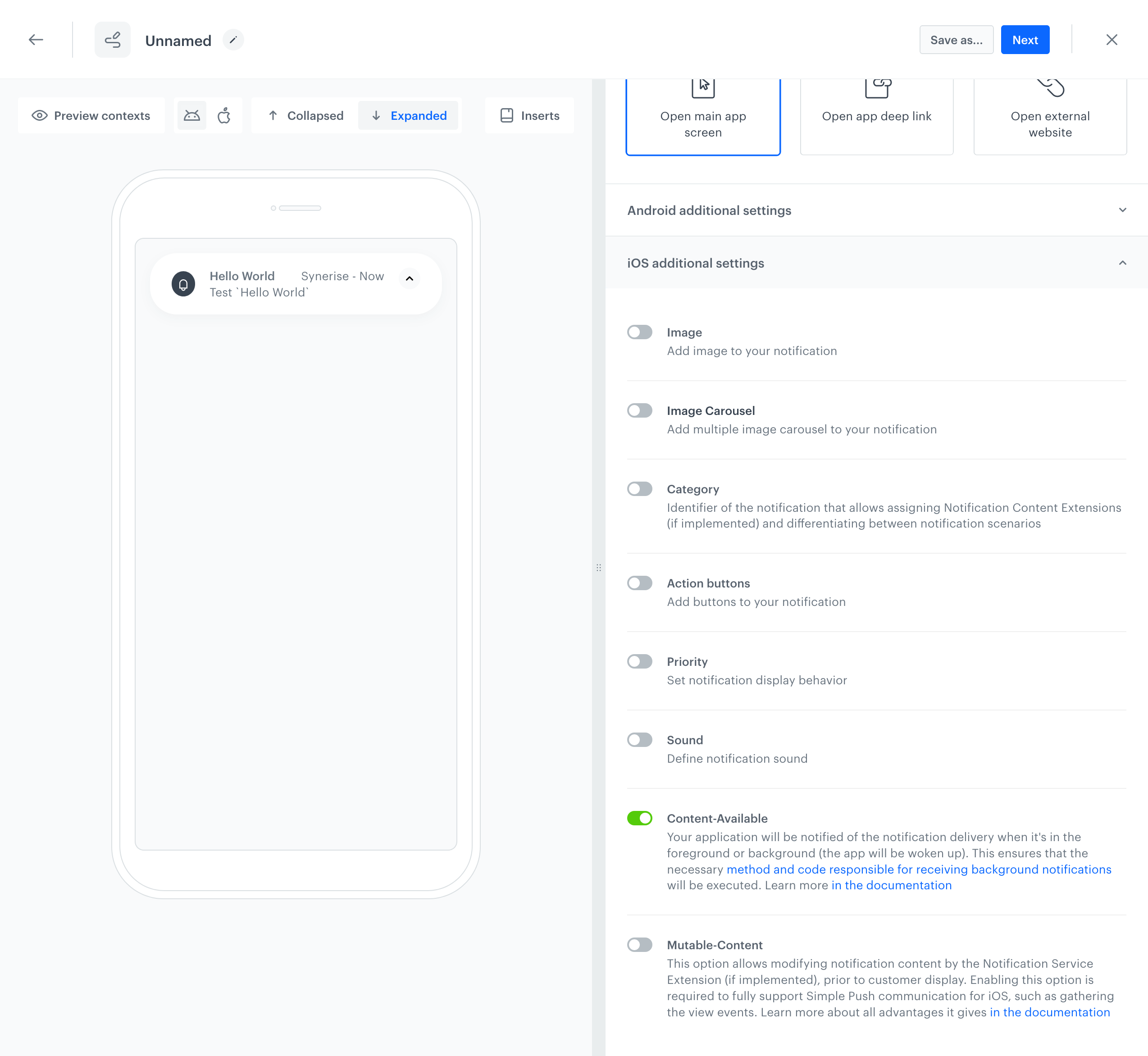
If you want to receive push notification in the background and foreground states, enable the `Content-Available` option while creating a push notification in Synerise ([Creating mobile push templates](/docs/campaign/Mobile/creating-mobile-push-templates/mobile-push-visual-builder)).
Enabled `Content-Available` option in a visual builder
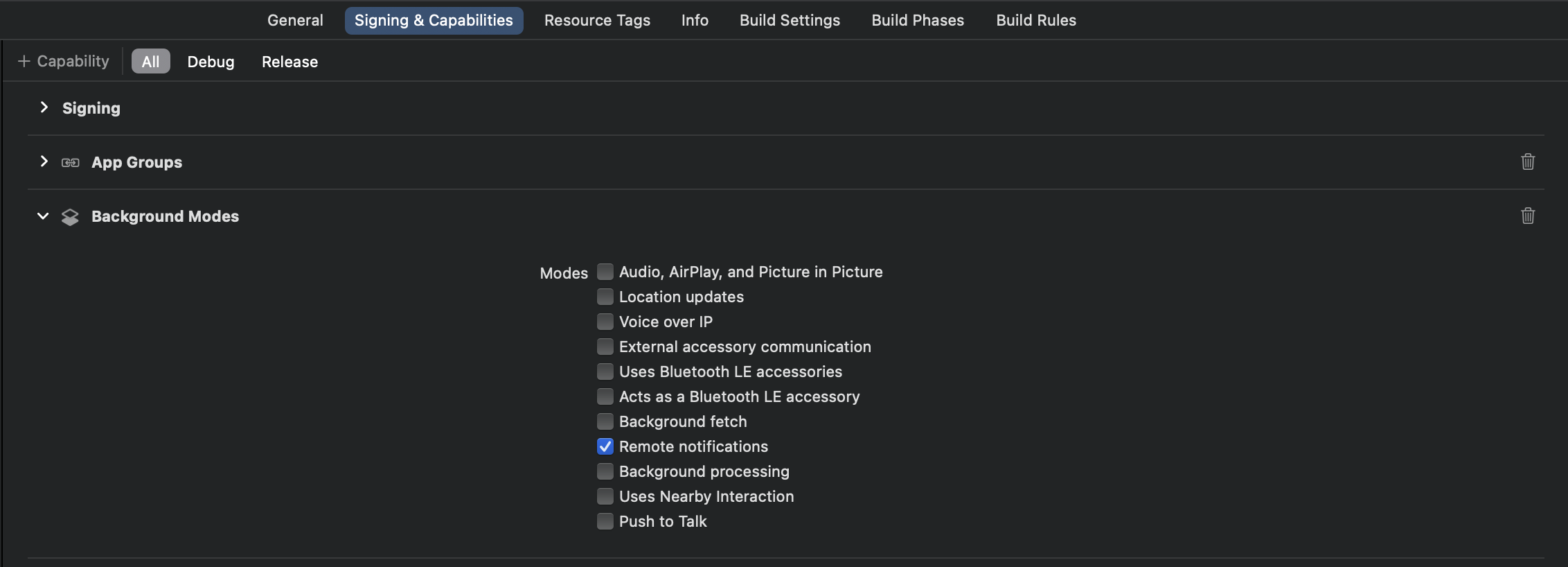
When you want support this option, you must add the capability to your application. In the **Signing and Capability** tab, in the **Background Modes** capability, select the **Remote notifications** checkbox:
Remote notifications capability in the Xcode
Your application will be notified of the notification delivery when it's in the foreground or background (the app will be woken up). This ensures that the necessary method and code responsible for receiving background notifications are executed. On iOS, it calls your app delegate’s [application(_:didReceiveRemoteNotification:fetchCompletionHandler:)](https://developer.apple.com/documentation/uikit/uiapplicationdelegate/1623013-application) method. On watchOS, it calls your extension delegate’s [didReceiveRemoteNotification(_:fetchCompletionHandler:)](https://developer.apple.com/documentation/watchkit/wkextensiondelegate/3152235-didreceiveremotenotification) method.
For more details, see [Apple Developer - Pushing Background Updates to Your App](https://developer.apple.com/documentation/usernotifications/setting_up_a_remote_notification_server/pushing_background_updates_to_your_app).
### 'Mutable-Content' parameter
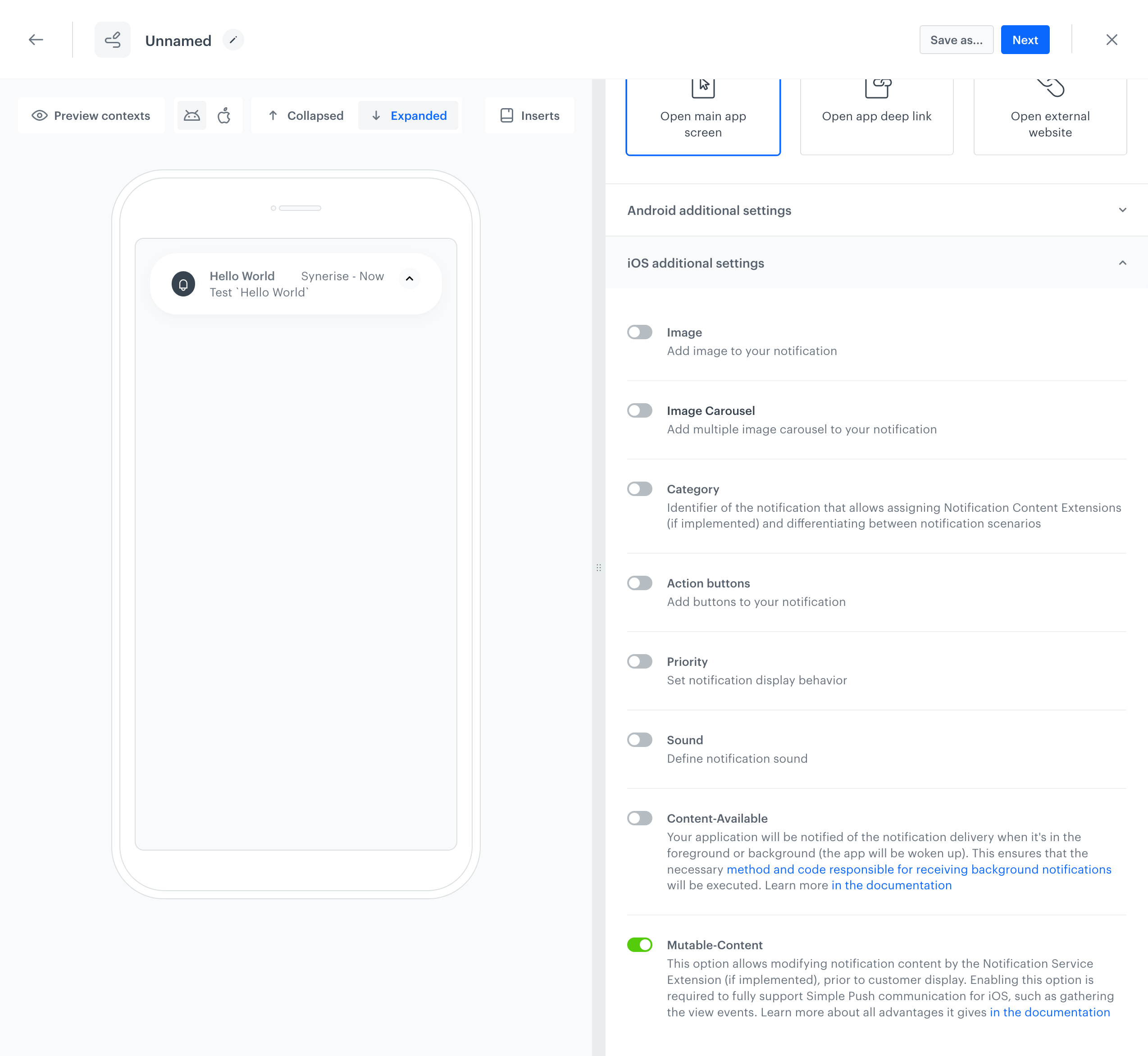
If you want your notification to be processed by the Notification Service Extension, enable the `Mutable-Content` option while creating a push notification in Synerise ([Creating mobile push templates](/docs/campaign/Mobile/creating-mobile-push-templates/mobile-push-visual-builder)).
Enabled `Mutable-Content` option in a visual builder
If you want to have full support for **Simple Push** communication, and to make `Mutable-Content` relevant and functional, you must configure [Synerise Notification Service Extension](/developers/mobile-sdk/configuring-push-notifications/ios#synerise-notification-service-extension). This extension is required to fully support Simple Push communication for iOS, such as gathering the view events.
For more details, see [Apple Developer - Modifying content in newly delivered notifications](https://developer.apple.com/documentation/usernotifications/modifying-content-in-newly-delivered-notifications).
### Delegate methods
[NotificationDelegate](/developers/mobile-sdk/listeners-and-delegates/ios-delegates#notification-delegate) is available from SDK version 4.10.0.
A [NotificationDelegate](/developers/mobile-sdk/listeners-and-delegates/ios-delegates#notification-delegate) handles events from Synerise notifications.
- To handle "receive" events when an application is disabled or in background state: set the delegate in the notification service extension by using the `NotificationServiceExtension.setNotificationDelegate(_:)` method. See [this section](/developers/mobile-sdk/configuring-push-notifications/ios#synerise-notification-service-extension-implementation) to get a sample code for the notification service extension.
- **SDK version 4.14.3 or newer:** To handle "receive" events when an application is launched by the notification or in foreground state: set the delegate in the application by using the `Synerise.setNotificationDelegate(_:)` method.
- To handle "dismiss" and "click" events: set the delegate in the application by using the `Synerise.setNotificationDelegate(_:)` method.
See a sample code from the application below:
```Swift
extension SyneriseManager: NotificationDelegate {
// This method is called when a Synerise notification is received.
func snr_notificationDidReceive(notificationInfo: NotificationInfo) {
//...
}
// This method is called when a Synerise notification is dismissed.
func snr_notificationDidDissmis(notificationInfo: NotificationInfo) {
//...
}
// This method is called when a Synerise notification is clicked.
func snr_notificationClicked(notificationInfo: NotificationInfo) {
//...
}
// This method is called when an action button is clicked in a Synerise notification.
func snr_notificationClicked(notificationInfo: NotificationInfo, actionButton: String) {
//...
}
}
```
```Objective-C
#pragma mark - SNRNotificationDelegate
// This method is called when a Synerise notification is received.
- (void)SNR_notificationDidReceive:(SNRNotificationInfo *)notificationInfo {
//...
}
// This method is called when a Synerise notification is dismissed.
- (void)SNR_notificationDidDissmis:(SNRNotificationInfo *)notificationInfo {
//...
}
// This method is called when a Synerise notification is clicked.
- (void)SNR_notificationClicked:(SNRNotificationInfo *)notificationInfo {
//...
}
// This method is called when an action button is clicked in a Synerise notification.
- (void)SNR_notificationActionButtonClicked:(SNRNotificationInfo *)notificationInfo actionButton:(NSString *)actionButton {
//...
}
```
## Handling actions from push notifications
---
- [Read more about types of actions in campaigns](/developers/mobile-sdk/campaigns/action-handling#types-of-actions-in-campaigns)
- [Read more about handling actions from push notifications](/developers/mobile-sdk/campaigns/action-handling#handling-actions-from-campaigns-in-ios)
## Additional in-app alert from push notifications
---
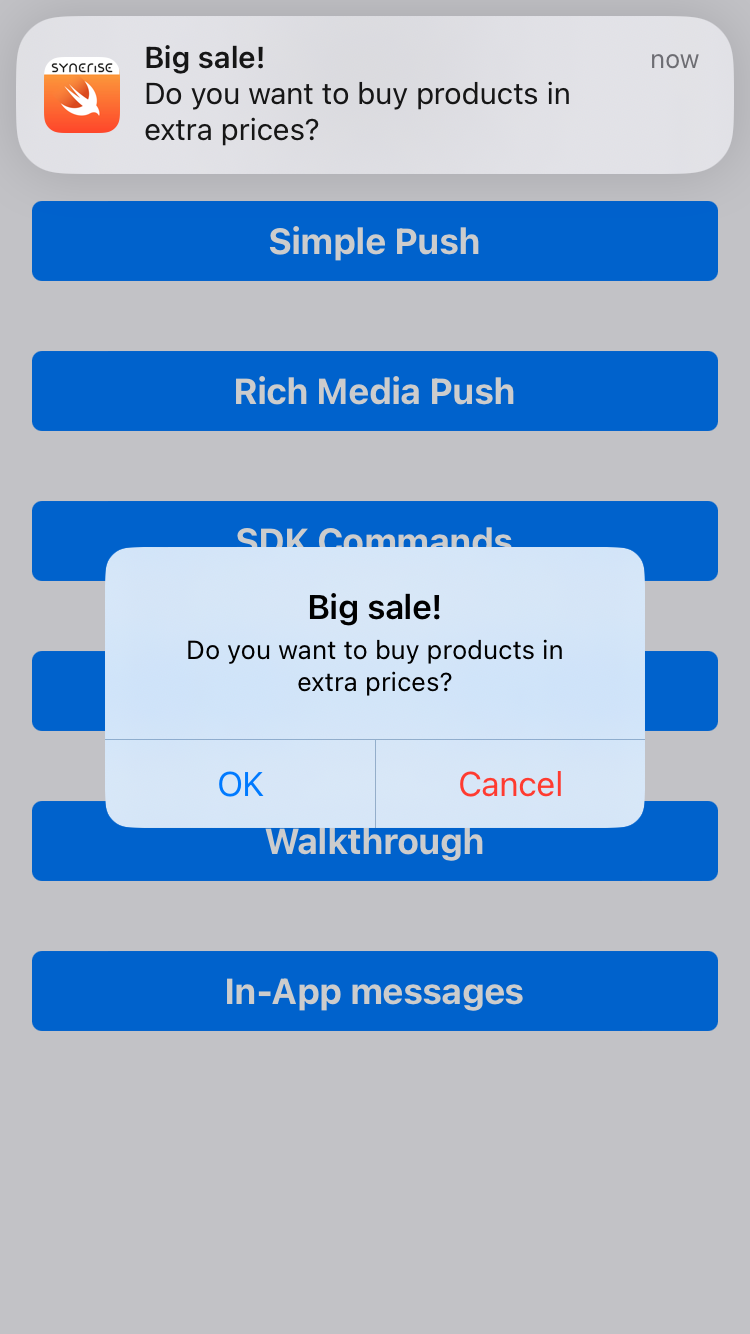
The iOS SDK can display an additional alert in the application after a push notification is received. See [this article](/developers/mobile-sdk/campaigns/simple-push#additional-in-app-alert-when-simple-push-is-received) to read more about this feature.
Simple Push campaign with in-app alert
## Rich Media in push notifications
---
**Notification Content Extension** is an object that allows rendering your own appearance of a push notification when the notification is expanded (by tapping the notification). It works by implementing the UNNotificationContentExtension that cooperates with the host application.
Synerise SDK does most of the work needed and provides classes for the Notification Content Extensions. When you create an extension, you only need to make it inherit from a suitable Synerise SDK class.
### Prerequisites {id=rich-media-in-push-notifications-prerequisites}
1. Configure **App Group Identifier** (see [this section](/developers/mobile-sdk/settings#set-up-app-group-identifier)).
2. Configure **Keychain Group Identifier** (see [this section](/developers/mobile-sdk/settings#set-up-keychain-group-identifier)).
### Configuration {id=rich-media-in-push-notifications-configuration}
To add this feature in your [Simple Push Campaigns](/developers/mobile-sdk/campaigns/simple-push), you must:
3. Add the **Notification Content Extensions** in your iOS project - separately for each type of our Rich Media extensions.
4. Configure the host application and the notification content extensions with the SDK.
- Configuring **App Group Identifier** and **Keychain Group Identifier** both in the host application and in the notification service extension is required for proper functioning of all **Notification Content Extensions** features.
- Your host application and all the **Notification Content Extensions** must have the same **iOS Deployment Target** version (higher than iOS 10).
### Application implementation {id=rich-media-in-push-notifications-application-implementation}
You must create push notification categories with the right identifiers, correlating with **Content Extensions** that you added before. The identifiers must be taken from the Synerise SDK constants (they are used in the code sample below). This does not affect button names.
```Swift
Synerise.settings.sdk.appGroupIdentifier = "YOUR_APP_GROUP_IDENTIFIER"
Synerise.settings.sdk.keychainGroupIdentifier = "YOUR_KEYCHAIN_GROUP_IDENTIFIER"
let singleMediaCategory = UNNotificationCategory(identifier: SNRSingleMediaContentExtensionViewControllerCategoryIdentifier, actions: [], intentIdentifiers: [], options: [])
let carouselPrevious = UNNotificationAction(identifier: SNRCarouselContentExtensionViewControllerPreviousItemIdentifier, title: "Previous", options: [])
let carouselAction = UNNotificationAction(identifier: SNRCarouselContentExtensionViewControllerChooseItemIdentifier, title: "Go!", options: UNNotificationActionOptions.foreground)
let carouselNext = UNNotificationAction(identifier: SNRCarouselContentExtensionViewControllerNextItemIdentifier, title: "Next", options: [])
let carouselCategory = UNNotificationCategory(identifier: SNRCarouselContentExtensionViewControllerCategoryIdentifier, actions: [carouselPrevious, carouselAction, carouselNext], intentIdentifiers: [], options: [])
// Use this method when you use SDK 4.21.0 or higher
Synerise.setNotificationCategories([singleMediaCategory, carouselCategory])
// or
// Use this method when you use SDK lower than 4.21.0
UNUserNotificationCenter.current().setNotificationCategories([singleMediaCategory, carouselCategory])
```
| Method | Description |
| --- | --- |
| [`Synerise.setNotificationCategories(_:)`](/developers/mobile-sdk/method-reference/ios/campaigns#set-notification-categories) | Sets the notification categories (including Synerise categories) that your app supports. Use this method when you use SDK 4.21.0 or higher. |
| [`UNUserNotificationCenter.current().setNotificationCategories(_:)`](https://developer.apple.com/documentation/usernotifications/unusernotificationcenter/setnotificationcategories(_:)) | Sets the notification categories by using the standard iOS SDK method. Use this method when you use SDK lower than 4.21.0. |
### Single Media implementation {id=rich-media-in-push-notifications-single-media-implementation}
#### Properties {id=rich-media-in-push-notifications-single-media-properties}
| Parameter | Type | Default | Description |
| --- | --- | --- | --- |
| contentViewIsScrollable | `Bool` | true | This parameter specifies if vertical scroll is enabled. If false, content is adjusted to the screen height. |
| imageContentMode | `UIViewContentMode` | `UIViewContentModeScaleAspectFill` | This parameter sets the rendering mode of an image |
#### Info.plist {id=rich-media-in-push-notifications-single-media-info-plist}
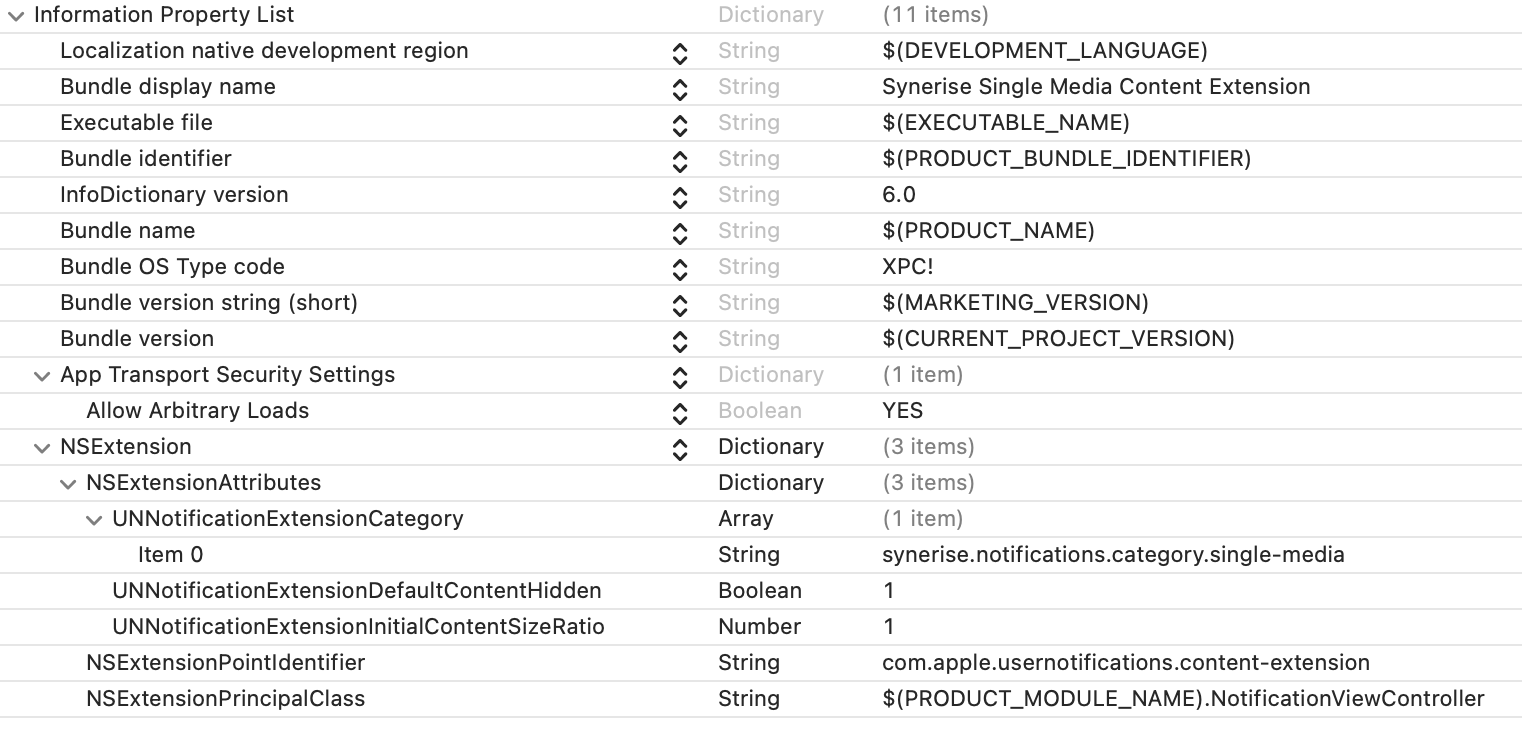
The configuration for your **Content Extension** in `\*.plist` file must be:
- correlated with Synerise SDK constants for notification category
*NSExtension->NSExtensionAttributes->UNNotificationExtensionCategory->0* must be **synerise.notifications.category.single-media**.
- configured without a storyboard (by, default a storyboard is set).
*NSExtensionMainStoryboard* key and its values must be removed from `\*.plist` file.
- correlated with the principal class
*NSextensionPrincipalClass* key must have value with the name of the main class for the notification extension you have created. For **Content Extension** written in Swift, the prefix `$(PRODUCT_MODULE_NAME).` is required. For Objective-C, it is not.
Example `\*.plist` file for single media:
Sample *.plist configuration in Single Image Notification Content Extension
#### Example {id=rich-media-in-push-notifications-single-media-example}
Examples of Single Media Notification Content Extension:
- [Single Media Notification Content Extension in Swift](https://github.com/Synerise/synerise-ios-sdk/tree/master/SampleAppSwift/4.10.0/SyneriseSingleMediaNotificationContentExtension)
- [Single Media Notification Content Extension in Objective-C](https://github.com/Synerise/synerise-ios-sdk/tree/master/SampleAppSwift/4.10.0/SyneriseSingleMediaNotificationContentExtensionObjC)
### Carousel implementation {id=rich-media-in-push-notifications-carousel-implementation}
#### Properties {id=rich-media-in-push-notifications-carousel-properties}
| Parameter | Type | Default | Description |
| --- | --- | --- | --- |
| imageContentMode | `UIViewContentMode` | `UIViewContentModeScaleAspectFill` | This parameter sets the rendering mode of images |
#### Info.plist {id=rich-media-in-push-notifications-carousel-info-plist}
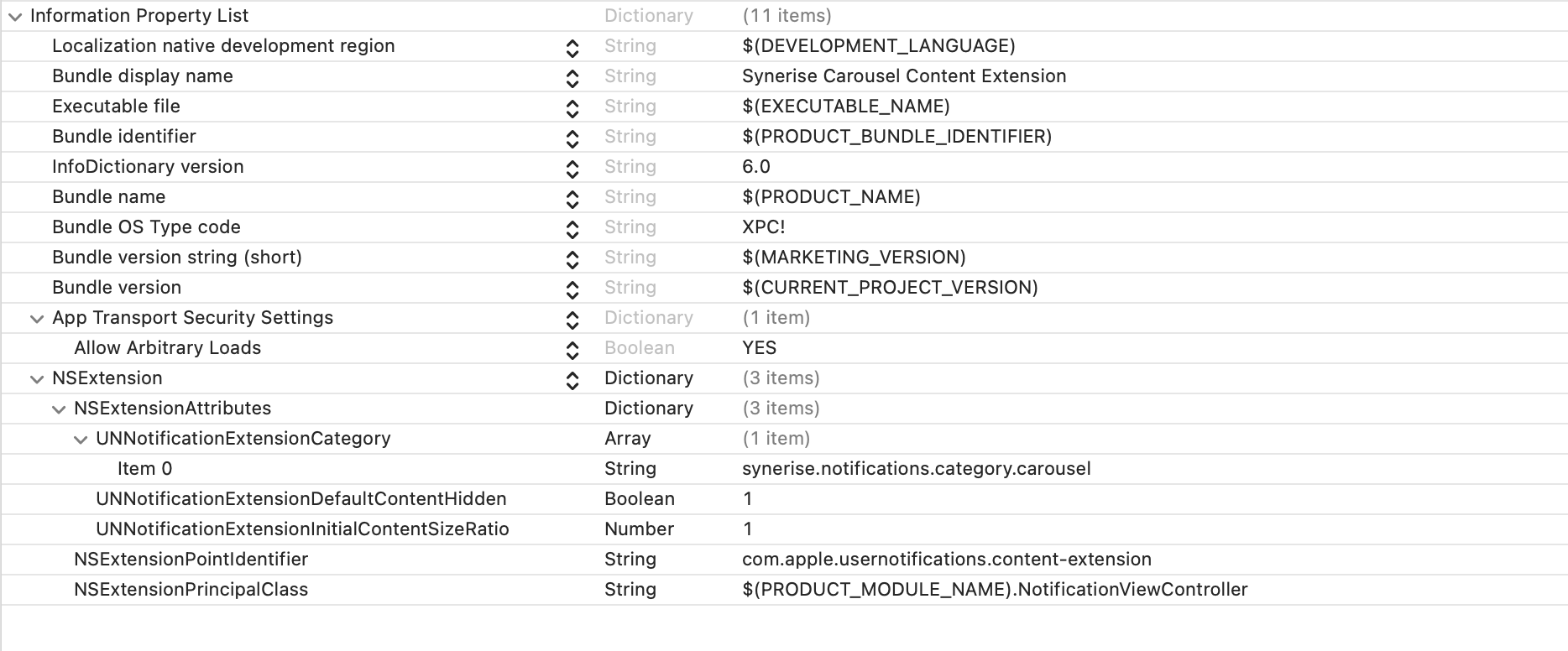
The configuration for your **Content Extension** in `\*.plist` file must be:
- correlated with Synerise SDK constants for notification category.
*NSExtension->NSExtensionAttributes->UNNotificationExtensionCategory->0* must be **synerise.notifications.category.carousel**.
- configured without storyboard (it is set by default).
*NSExtensionMainStoryboard* key and its values must be removed from `\*.plist` file.
- correlated with the principal class.
*NSextensionPrincipalClass* key must have value with name of your main class for the notification extension you have created. For **Content Extension** written in Swift, the prefix `$(PRODUCT_MODULE_NAME).` is required. For Objective-C, it is not.
See proper `\*.plist` file example for single media below:
Sample *.plist configuration in Carousel Notification Content Extension
#### Example {id=rich-media-in-push-notifications-carousel-example}
Examples of Carousel Notification Content Extension:
- [Carousel Notification Content Extension in Swift](https://github.com/Synerise/synerise-ios-sdk/tree/master/SampleAppSwift/4.10.0/SyneriseCarouselNotificationContentExtension)
- [Carousel Notification Content Extension in Objective-C](https://github.com/Synerise/synerise-ios-sdk/tree/master/SampleAppSwift/4.10.0/SyneriseCarouselNotificationContentExtensionObjC)