# Configuring push notifications (React Native)

## Configuring Firebase
---

Google Firebase Cloud Messaging is necessary to handle [push notifications](/docs/campaign/Mobile) sent from Synerise.

1. Follow the instructions in [this article](https://firebase.google.com/docs/storage/ios/start).
2. Integrate the Firebase project with Synerise. See [this article](/docs/settings/tool/firebase).

## Setting up - Android {id=setting-up-android}
---

### Requirements {id=android-requirements}

After configuring Firebase, add the `google-services.json` file to your project/android/app catalog.

### Firebase Cloud Messaging integration {id=android-firebase-cloud-messaging-integration}

1. Add the google-services dependency to your project's `build.gradle` file.
  
   <pre><code class="language-gradle">dependencies {
             ...
             classpath 'com.google.gms:google-services:4.3.3'
             ...
         }</code></pre>

2. Configure the application's `build.gradle` as follows:
  
   <pre><code class="language-gradle">dependencies {
         implementation fileTree(dir: "libs", include: ["*.jar"])
         implementation "com.facebook.react:react-native:+"  // from node_modules

         // FCM
         implementation "com.google.firebase:firebase-messaging:20.0.1"
         implementation "com.google.android.gms:play-services-base:17.1.0"
         implementation "com.google.firebase:firebase-core:17.2.1"
         implementation "com.google.firebase:firebase-analytics:17.2.1"
             ...
         }</code></pre>


1. Make sure that at the end of the application gradle file, you add plugin: 'com.google.gms.google-services'

1. In your MainApplication class, include `setPushListener` to listen for the changes of the Firebase token.

   <div class="content-tabs code-tabs" data-tab-group="tabgrp-544">
   <div class="tab-buttons"><button class="tab-button" data-tab-id="tabgrp-544-0" data-tab-group="tabgrp-544" data-tab-active="true">Java</button><button class="tab-button" data-tab-id="tabgrp-544-1" data-tab-group="tabgrp-544">Kotlin</button></div>

   <div class="tab-panel" data-tab-id="tabgrp-544-0" data-tab-group="tabgrp-544" data-tab-active="true">

   ```Java
   @Override
     public void onCreate() {
       super.onCreate();
       SoLoader.init(this, /* native exopackage */ false);
       getReactNativeHost().getReactInstanceManager().createReactContextInBackground();

       RNNotifications.setPushListener(new OnRegisterPushListener() {

         @Override
         public void onRegisterPushRequired() {
           FirebaseInstanceId.getInstance().getInstanceId().addOnSuccessListener(instanceIdResult -> {
             String refreshedToken = instanceIdResult.getToken();
             Log.d(TAG, "Refreshed token: " + refreshedToken);

             RNNotifications.setRegistrationToken(refreshedToken);
           });
         }
       });
     }
   ```

   </div>

   <div class="tab-panel" data-tab-id="tabgrp-544-1" data-tab-group="tabgrp-544">

   ```Kotlin
   fun onCreate() {
         super.onCreate()
         SoLoader.init(this, /* native exopackage */ false)
         getReactNativeHost().getReactInstanceManager().createReactContextInBackground()
         RNNotifications.setPushListener(object:OnRegisterPushListener() {
            fun onRegisterPushRequired() {
               FirebaseInstanceId.getInstance().getInstanceId().addOnSuccessListener({ instanceIdResult->
                  val refreshedToken = instanceIdResult.getToken()
                  Log.d(TAG, "Refreshed token: " + refreshedToken)
                  RNNotifications.setRegistrationToken(refreshedToken)
          })
       }
     })
   }
   ```

   </div>
   </div>


### Receiving push notifications {id=android-receiving-push-notifications}

In order to handle Synerise push notifications, you must pass the incoming push payload to the Synerise SDK.

1. Create a class extending `FirebaseMessagingService`:
  
   <div class="content-tabs code-tabs" data-tab-group="tabgrp-545">
   <div class="tab-buttons"><button class="tab-button" data-tab-id="tabgrp-545-0" data-tab-group="tabgrp-545" data-tab-active="true">Java</button><button class="tab-button" data-tab-id="tabgrp-545-1" data-tab-group="tabgrp-545">Kotlin</button></div>

   <div class="tab-panel" data-tab-id="tabgrp-545-0" data-tab-group="tabgrp-545" data-tab-active="true">

   ```Java
   public class MyFirebaseMessagingService extends FirebaseMessagingService {

       private static final String TAG = MyFirebaseMessagingService.class.getSimpleName();

       @Override
       public void onMessageReceived(@NonNull RemoteMessage remoteMessage) {
           super.onMessageReceived(remoteMessage);
           Map<String, String> data = remoteMessage.getData();
           RNNotifications.onNotificationReceive(data);
       }

       @Override
       public void onNewToken(String refreshedToken) {
           super.onNewToken(refreshedToken);

           Log.d(TAG, "Refreshed token: " + refreshedToken);

           if (refreshedToken != null) {
               RNNotifications.setRegistrationToken(refreshedToken);
           }
       }
   }
   ```

   </div>

   <div class="tab-panel" data-tab-id="tabgrp-545-1" data-tab-group="tabgrp-545">

   ```Kotlin
   class MyFirebaseMessagingService:FirebaseMessagingService() {

     fun onMessageReceived(@NonNull remoteMessage:RemoteMessage) {
       super.onMessageReceived(remoteMessage)
       val data = remoteMessage.getData()
       RNNotifications.onNotificationReceive(data)
     }

     fun onNewToken(refreshedToken:String) {
       super.onNewToken(refreshedToken)
       Log.d(TAG, "Refreshed token: " + refreshedToken)
       if (refreshedToken != null)
       {
         RNNotifications.setRegistrationToken(refreshedToken)
       }
     }
   }
   ```

   </div>
   </div>

1. To enable banners, handle the intent when the app starts. You can do it in your `MainActivity` by calling `RNNotifications.onNotificationReceive` in your `onCreate` and `onNewIntent`.
  
   <div class="content-tabs code-tabs" data-tab-group="tabgrp-546">
   <div class="tab-buttons"><button class="tab-button" data-tab-id="tabgrp-546-0" data-tab-group="tabgrp-546" data-tab-active="true">Java</button><button class="tab-button" data-tab-id="tabgrp-546-1" data-tab-group="tabgrp-546">Kotlin</button></div>

   <div class="tab-panel" data-tab-id="tabgrp-546-0" data-tab-group="tabgrp-546" data-tab-active="true">

   ```Java
   @Override
       protected void onCreate(Bundle savedInstanceState) {
           super.onCreate(savedInstanceState);
           RNNotifications.onNotificationReceive(getIntent().getExtras());
       }

       @Override
       public void onNewIntent(Intent intent) {
           super.onNewIntent(intent);
           RNNotifications.onNotificationReceive(intent.getExtras());
       }
   ```

   </div>

   <div class="tab-panel" data-tab-id="tabgrp-546-1" data-tab-group="tabgrp-546">

   ```Kotlin
   protected fun onCreate(savedInstanceState:Bundle) {
     super.onCreate(savedInstanceState)
     RNNotifications.onNotificationReceive(getIntent().getExtras())
   }
   fun onNewIntent(intent:Intent) {
     super.onNewIntent(intent)
     RNNotifications.onNotificationReceive(intent.getExtras())
   }
   ```

   </div>
   </div>


## Setting up - iOS {id=setting-up-ios}
---

### Requirements {id=ios-requirements}

Configure handling Push Notifications in your application. See [Apple Notifications](https://developer.apple.com/notifications/).

### Firebase Cloud Messaging integration {id=ios-firebase-cloud-messaging-integration}

1. Import `RNNotifications.h`
   
   <div class="content-tabs code-tabs" data-tab-group="tabgrp-547">
   <div class="tab-buttons"><button class="tab-button" data-tab-id="tabgrp-547-0" data-tab-group="tabgrp-547" data-tab-active="true">Swift</button><button class="tab-button" data-tab-id="tabgrp-547-1" data-tab-group="tabgrp-547">Objective-C</button></div>

   <div class="tab-panel" data-tab-id="tabgrp-547-0" data-tab-group="tabgrp-547" data-tab-active="true">

   ```Swift
   import react-native-synerise-sdk
   ```

   </div>

   <div class="tab-panel" data-tab-id="tabgrp-547-1" data-tab-group="tabgrp-547">

   ```Objective-C
   #import <react-native-synerise-sdk/RNNotifications.h>
   ```

   </div>
   </div>

2. Extend the Firebase Messaging Delegate so our SDK can receive the Firebase token that is required to deliver push notifications from Synerise.
   
   <div class="content-tabs code-tabs" data-tab-group="tabgrp-548">
   <div class="tab-buttons"><button class="tab-button" data-tab-id="tabgrp-548-0" data-tab-group="tabgrp-548" data-tab-active="true">Swift</button><button class="tab-button" data-tab-id="tabgrp-548-1" data-tab-group="tabgrp-548">Objective-C</button></div>

   <div class="tab-panel" data-tab-id="tabgrp-548-0" data-tab-group="tabgrp-548" data-tab-active="true">

   ```Swift
   func application(_ application: UIApplication, didFinishLaunchingWithOptions launchOptions: [UIApplicationLaunchOptionsKey: Any]?) -> Bool {
       FirebaseApp.configure()
       Messaging.messaging().delegate = self

       if #available(iOS 10, *) {
         UNUserNotificationCenter.current().requestAuthorization(options: [.alert, .badge, .sound]) { (granted, error) in

         }
       } else {
         let settings = UIUserNotificationSettings(types: [.alert, .badge, .sound], categories: nil)
         application.registerUserNotificationSettings(settings)
       }

       application.registerForRemoteNotifications()
      }

      // MARK: - MessagingDelegate

      func messaging(_ messaging: Messaging, didReceiveRegistrationToken fcmToken: String) {
       RNNotifications.didChangeRegistrationToken(fcmToken)
      }
   ```

   </div>

   <div class="tab-panel" data-tab-id="tabgrp-548-1" data-tab-group="tabgrp-548">

   ```Objective-C
   - (BOOL)application:(UIApplication *)application didFinishLaunchingWithOptions:(NSDictionary *)launchOptions {
       [FIRApp configure];
       [FIRMessaging messaging].delegate = self;

       if (@available(iOS 10, *)) {
         [UNUserNotificationCenter currentNotificationCenter].delegate = self;
         UNAuthorizationOptions authOptions = (UNAuthorizationOptionAlert | UNAuthorizationOptionSound | UNAuthorizationOptionBadge);
         [[UNUserNotificationCenter currentNotificationCenter] requestAuthorizationWithOptions:authOptions completionHandler:^(BOOL granted, NSError *error) {

         }];
       } else {
         UIUserNotificationType allNotificationTypes = (UIUserNotificationTypeSound | UIUserNotificationTypeAlert | UIUserNotificationTypeBadge);
         UIUserNotificationSettings *settings = [UIUserNotificationSettings settingsForTypes:allNotificationTypes categories:nil];

         [[UIApplication sharedApplication] registerUserNotificationSettings:settings];
       }

       [[UIApplication sharedApplication] registerForRemoteNotifications];
      }

      #pragma mark - FIRMessagingDelegate

      - (void)messaging:(FIRMessaging *)messaging didReceiveRegistrationToken:(NSString *)fcmToken {
         [RNNotifications didChangeRegistrationToken:fcmToken];
      }
   ```

   </div>
   </div>


   <div class="admonition admonition-important"><div class="admonition-icon"><svg xmlns="http://www.w3.org/2000/svg" fill="none" viewBox="0 0 24 24" stroke="currentColor" stroke-width="2.5"><path stroke-linecap="round" stroke-linejoin="round" d="M12 8v4m0 4h.01M21 12a9 9 0 11-18 0 9 9 0 0118 0z" /></svg></div><div class="admonition-body"><div class="admonition-content">

   Make sure that the Firebase token is always up-to-date. When it changes, use `RNNotifications.didChangeRegistrationToken(registrationToken:)` again.

   </div></div></div>


### Receiving push notifications {id=ios-receiving-push-notifications}

The following code shows how to receive push notifications in the `AppDelegate.h` and pass these to the React Native part of the application:


<div class="admonition admonition-important"><div class="admonition-icon"><svg xmlns="http://www.w3.org/2000/svg" fill="none" viewBox="0 0 24 24" stroke="currentColor" stroke-width="2.5"><path stroke-linecap="round" stroke-linejoin="round" d="M12 8v4m0 4h.01M21 12a9 9 0 11-18 0 9 9 0 0118 0z" /></svg></div><div class="admonition-body"><div class="admonition-content">

To properly receive notifications, all of these methods must be implemented.

</div></div></div>


<div class="content-tabs code-tabs" data-tab-group="tabgrp-549">
<div class="tab-buttons"><button class="tab-button" data-tab-id="tabgrp-549-0" data-tab-group="tabgrp-549" data-tab-active="true">Swift</button><button class="tab-button" data-tab-id="tabgrp-549-1" data-tab-group="tabgrp-549">Objective-C</button></div>

<div class="tab-panel" data-tab-id="tabgrp-549-0" data-tab-group="tabgrp-549" data-tab-active="true">

```Swift
// iOS 9
// Push Notifications
// Silent Push Notifications

func application(_ application: UIApplication, didReceiveRemoteNotification userInfo: [AnyHashable : Any], fetchCompletionHandler completionHandler: @escaping (UIBackgroundFetchResult) -> Void) {
  RNNotifications.didReceiveNotification(userInfo)
  completionHandler(.noData)
}

func application(_ application: UIApplication, handleActionWithIdentifier identifier: String?, forRemoteNotification userInfo: [AnyHashable : Any], completionHandler: @escaping () -> Void) {
  RNNotifications.didReceiveNotification(userInfo, actionIdentifier:identifier)
  completionHandler()
}

// iOS 10 and above
// Push Notifications

// MARK: - UNUserNotificationCenterDelegate

@available(iOS 10.0, *)
func userNotificationCenter(_ center: UNUserNotificationCenter, didReceive response: UNNotificationResponse, withCompletionHandler completionHandler: @escaping () -> Void) {
  RNNotifications.didReceiveNotification(response.notification.request.content.userInfo, actionIdentifier:response.actionIdentifier)
  completionHandler()
}

@available(iOS 10.0, *)
func userNotificationCenter(_ center: UNUserNotificationCenter, willPresent notification: UNNotification, withCompletionHandler completionHandler: @escaping (UNNotificationPresentationOptions) -> Void) {
  RNNotifications.didReceiveNotification(notification.request.content.userInfo)
  completionHandler(UNNotificationPresentationOptions.init(rawValue: 0))
}
```

</div>

<div class="tab-panel" data-tab-id="tabgrp-549-1" data-tab-group="tabgrp-549">

```Objective-C
// iOS 9
// Push Notifications
// Silent Push Notifications

- (void)application:(UIApplication *)application didReceiveRemoteNotification:(NSDictionary *)userInfo fetchCompletionHandler:(void (^)(UIBackgroundFetchResult))completionHandler {
  [RNNotifications didReceiveNotification:userInfo];
  completionHandler(UIBackgroundFetchResultNoData);
}

- (void)application:(UIApplication *)application handleActionWithIdentifier:(nullable NSString *)identifier forRemoteNotification:(NSDictionary *)userInfo completionHandler:(void(^)())completionHandler {
  [RNNotifications didReceiveNotification:userInfo actionIdentifier:identifier];
  completionHandler();
}

// iOS 10 and above
// Push Notifications

#pragma mark - UNUserNotificationCenterDelegate

- (void)userNotificationCenter:(UNUserNotificationCenter *)center didReceiveNotificationResponse:(UNNotificationResponse *)response withCompletionHandler:(void (^)(void))completionHandler NS_AVAILABLE_IOS(10) {
  [RNotifications didReceiveNotification:response.notification.request.content.userInfo actionIdentifier:response.actionIdentifier];
  completionHandler();
}

- (void)userNotificationCenter:(UNUserNotificationCenter *)center willPresentNotification:(UNNotification *)notification withCompletionHandler:(void (^)(UNNotificationPresentationOptions))completionHandler NS_AVAILABLE_IOS(10) {
  [RNNotifications didReceiveNotification:notification.request.content.userInfo];
  completionHandler(UNNotificationPresentationOptionAlert | UNNotificationPresentationOptionBadge | UNNotificationPresentationOptionSound);
}
```

</div>
</div>


### Extensions for push notifications {id=ios-extensions-for-push-notifications}

#### Notification Service Extension {id=synerise-notification-service-extension-for-ios}

**Synerise Notification Service Extension** is an object that adds the notification functionality to the SDK.
  
It implements the following operations:
- Decrypting **Simple Push** communication data (if encryption is enabled).
- Tracking events from **Simple Push** communication.
- Adding action buttons to **Simple Push** communication (if the communication contains any).
- Improving the appearance of **Simple Push** communication (Rich Media - Single Image) with an image thumbnail.
  
**Notification Service Extension** should be implemented in the native part of the application. Follow the instructions in [this article](/developers/mobile-sdk/configuring-push-notifications/ios#synerise-notification-service-extension-configuration).

#### Rich Media Notification Content Extensions {id=synerise-notification-content-extension-for-ios}

**Synerise Rich Media Notification Content Extension** is an object that allows rendering your own appearance of a push notification when the notification is expanded (by tapping the notification).
  
**Synerise Rich Media Notification Content Extensions** should be implemented in the native part of the application. Follow the instructions in [this article](/developers/mobile-sdk/configuring-push-notifications/ios#rich-media-in-push-notifications).

## Set up Firebase FCM token registration for Synerise SDK
---
Get Firebase FCM token from the native part of the application so our SDK can receive the Firebase token that is required to deliver push notifications from Synerise. Make sure that the Firebase FCM token is always up-to-date by implementing the [onRegistrationRequired()](/developers/mobile-sdk/listeners-and-delegates/react-native-listeners#notifications-listener) method.


<div class="content-tabs code-tabs" data-tab-group="tabgrp-550">
<div class="tab-buttons"><button class="tab-button" data-tab-id="tabgrp-550-0" data-tab-group="tabgrp-550" data-tab-active="true">JavaScript</button></div>

<div class="tab-panel" data-tab-id="tabgrp-550-0" data-tab-group="tabgrp-550" data-tab-active="true">

```JavaScript
Synerise.Notifications.setListener({
  onRegistrationToken: function(token) {
    Synerise.Notifications.registerForNotifications(token, true, function() {
      // success
    }, function(error) {
      // failure
    });
  },
  onRegistrationRequired: function() {
    let registrationToken = getLastPushRegistrationToken();
    let mobilePushAgreement = true; // true or false, should depend on device permissions and customer's agreement in the application

    Synerise.Notifications.registerForNotifications(registrationToken, mobilePushAgreement, function() {
      // success
    }, function(error) {
      // failure
    });
  }
  //...
});
```

</div>
</div>


<div class="admonition admonition-important"><div class="admonition-icon"><svg xmlns="http://www.w3.org/2000/svg" fill="none" viewBox="0 0 24 24" stroke="currentColor" stroke-width="2.5"><path stroke-linecap="round" stroke-linejoin="round" d="M12 8v4m0 4h.01M21 12a9 9 0 11-18 0 9 9 0 0118 0z" /></svg></div><div class="admonition-body"><div class="admonition-content">

The second parameter of the registration method is the agreement for mobile push campaigns. In the Profile's card in Synerise, you can find it in the **Subscriptions** section (if you have the required access permission). Learn more about the [Synerise.Notifications.registerForNotifications(registrationToken:mobilePushAgreement:onSuccess:onError:) method in the method reference](/developers/mobile-sdk/method-reference/react-native/campaigns#register-for-push-notifications).

</div></div></div>


<div class="admonition admonition-important"><div class="admonition-icon"><svg xmlns="http://www.w3.org/2000/svg" fill="none" viewBox="0 0 24 24" stroke="currentColor" stroke-width="2.5"><path stroke-linecap="round" stroke-linejoin="round" d="M12 8v4m0 4h.01M21 12a9 9 0 11-18 0 9 9 0 0118 0z" /></svg></div><div class="admonition-body"><div class="admonition-content">

You must always keep the Firebase token updated. In many cases in the application lifecycle, such as authorization, destroy session, user context change, and so on, the registration needs to be updated. In these situations, the SDK invokes the [onRegistrationRequired()](/developers/mobile-sdk/listeners-and-delegates/react-native-listeners#notifications-listener) method (see code snippet above).

</div></div></div>


## Configure Notification Encryption
---
### Android {id=android-notification-encryption-configuration}
See [Configure Notification Encryption](/developers/mobile-sdk/configuring-push-notifications/android#configure-notification-encryption).

### iOS {id=ios-notification-encryption-configuration}
See [Synerise Notification Service Extension](#synerise-notification-service-extension-for-ios) and [Configure Notification Encryption](/developers/mobile-sdk/configuring-push-notifications/ios#configure-notification-encryption).

### Application implementation {id=application-notification-encryption-configuration}

In the application, you must set `encryption` to `true` in the SDK initializer or in the SDK settings. 


<div class="content-tabs code-tabs" data-tab-group="tabgrp-551">
<div class="tab-buttons"><button class="tab-button" data-tab-id="tabgrp-551-0" data-tab-group="tabgrp-551" data-tab-active="true">JavaScript</button></div>

<div class="tab-panel" data-tab-id="tabgrp-551-0" data-tab-group="tabgrp-551" data-tab-active="true">

```JavaScript
// The first way
// WARNING: This option must be configured before Synerise SDK is initialized!
Synerise.Settings.notifications.encryption = true;

// The second way
Synerise.Initializer()
  .withApiKey('XXXXXXX-XXXX-XXXX-XXXX-XXXXXXXXXXXX')
  .withBaseUrl(null)
  .withDebugModeEnabled(true)
  .withCrashHandlingEnabled(true)
  .withSettings({
    notifications: {
      enabled: true,
      encryption: true
    }
    //...
  })
  .init()
```

</div>
</div>


## Handling incoming push notifications
---


<div class="admonition admonition-note"><div class="admonition-icon"><svg xmlns="http://www.w3.org/2000/svg" fill="none" viewBox="0 0 24 24" stroke="currentColor" stroke-width="2.5"><path stroke-linecap="round" stroke-linejoin="round" d="M13 16h-1v-4h-1m1-4h.01M21 12a9 9 0 11-18 0 9 9 0 0118 0z" /></svg></div><div class="admonition-body"><div class="admonition-content">

You may disable handling push notifications in the SDK at any time. See [Enable/disable notifications](/developers/mobile-sdk/settings#enabledisable-notifications).

</div></div></div>


### Synerise payload

The following code shows how to handle push notifications:


<div class="content-tabs code-tabs" data-tab-group="tabgrp-552">
<div class="tab-buttons"><button class="tab-button" data-tab-id="tabgrp-552-0" data-tab-group="tabgrp-552" data-tab-active="true">JavaScript</button></div>

<div class="tab-panel" data-tab-id="tabgrp-552-0" data-tab-group="tabgrp-552" data-tab-active="true">

```JavaScript
Synerise.Notifications.setListener({
  //...
  onNotification: function(payload, actionIdentifier) {
    if (Synerise.Notifications.isSyneriseNotification(payload)) {
      Synerise.Notifications.handleNotification(payload, actionIdentifier);
    }
  }
  //...
});
```

</div>
</div>


### Custom payload

You may send both custom push notifications and custom campaigns in [Synerise](https://app.synerise.com). The code below of one sample delegate method checks the notification origin and then handles it.


<div class="content-tabs code-tabs" data-tab-group="tabgrp-553">
<div class="tab-buttons"><button class="tab-button" data-tab-id="tabgrp-553-0" data-tab-group="tabgrp-553" data-tab-active="true">JavaScript</button></div>

<div class="tab-panel" data-tab-id="tabgrp-553-0" data-tab-group="tabgrp-553" data-tab-active="true">

```JavaScript
Synerise.Notifications.setListener({
  //...
  onNotification: function(payload, actionIdentifier) {
    if (Synerise.Notifications.isSyneriseNotification(payload)) {
      Synerise.Notifications.handleNotification(payload, actionIdentifier);
    } else {
      // Handle other notification in your own way
    }
  }
  //...
});
```

</div>
</div>


### Encrypted payloads

If you handle the Synerise notification, you do not have to do anything. The SDK decrypts Synerise notification's payload:
- In [Notification Service Extension](#synerise-notification-service-extension-for-ios) for push notifications
- In the SDK, after invoking [`Synerise.Notifications.handleNotification(payload, actionIdentifier)`](/developers/mobile-sdk/method-reference/react-native/campaigns#handle-synerise-push-notification) for silent push notifications 
  
Otherwise, if it is a custom encrypted push notification sent by Synerise, or you need decrypt data from the push notification, there are two methods for dealing with it:
- [`Synerise.Notifications.isNotificationEncrypted(payload)`](/developers/mobile-sdk/method-reference/react-native/campaigns#check-if-push-notification-is-encrypted) - checks if the notification payload is encrypted by Synerise.
- [`Synerise.Notifications.decryptNotification(payload)`](/developers/mobile-sdk/method-reference/react-native/campaigns#decrypt-push-notification) - decrypts a notification payload.


  <div class="content-tabs code-tabs" data-tab-group="tabgrp-554">
  <div class="tab-buttons"><button class="tab-button" data-tab-id="tabgrp-554-0" data-tab-group="tabgrp-554" data-tab-active="true">JavaScript</button></div>

  <div class="tab-panel" data-tab-id="tabgrp-554-0" data-tab-group="tabgrp-554" data-tab-active="true">

  ```JavaScript
  Synerise.onReady(function() {
      //...
      onNotification: function(payload, actionIdentifier) {
        if (Synerise.Notifications.isSyneriseNotification(payload)) {
          let isNotificationEncrypted = Synerise.Notifications.isNotificationEncrypted(payload)
          var decryptedPayload
          if (isNotificationEncrypted) {
            decryptedPayload = Synerise.Notifications.decryptNotification(payload)
          } else {
            decryptedPayload = payload
          }
          Synerise.Notifications.handleNotification(decryptedPayload, actionIdentifier)
        }
      }
      //...
    })
  })
  ```

  </div>
  </div>


<div class="admonition admonition-note"><div class="admonition-icon"><svg xmlns="http://www.w3.org/2000/svg" fill="none" viewBox="0 0 24 24" stroke="currentColor" stroke-width="2.5"><path stroke-linecap="round" stroke-linejoin="round" d="M13 16h-1v-4h-1m1-4h.01M21 12a9 9 0 11-18 0 9 9 0 0118 0z" /></svg></div><div class="admonition-body"><div class="admonition-content">

The `Synerise.Notifications.decryptNotification(payload)` method returns raw data when the payload is not encrypted. If the operation fails, the method returns null.

</div></div></div>


## Handling actions from push notifications
---
- [Read more about types of actions in campaigns](/developers/mobile-sdk/campaigns/action-handling#types-of-actions-in-campaigns)  
- [Read more about handling actions from push notifications](/developers/mobile-sdk/campaigns/action-handling#handling-actions-from-campaigns-in-react-native)  

## Additional in-app alert from push notifications
---
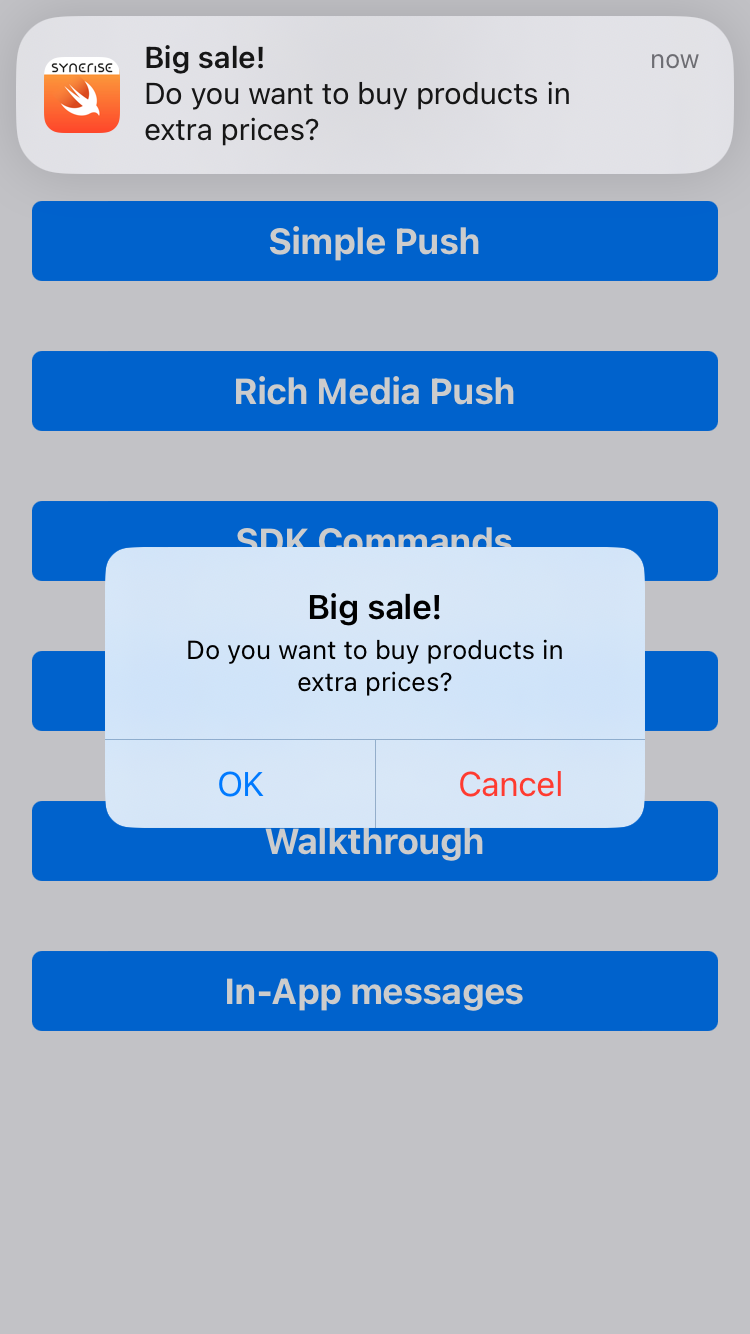
The React Native SDK on iOS devices can display an additional alert in the application after a push notification is received. See [this article](/developers/mobile-sdk/campaigns/simple-push#additional-in-app-alert-when-simple-push-is-received) to read more about this feature.

<figure><img src="/api/docs/image/54176ad07f146575310749eba44b7c2f42c1b327/developers/mobile-sdk/_gfx/ios-simple-push-in-app-alert.png" alt="Simple Push campaign with in-app alert" class="small"><figcaption>Simple Push campaign with in-app alert</figcaption></figure>

## Limitations compared to native platforms
---

Due to platform limitations, not all notification functionalities may work as in native SDKs.