This article contains instruction on authenticating a customer in a mobile application with your backend by an OAuth-like method. Prepare your backend for this solution and then you perform part of the configuration on a user interface in the Synerise platform (`app.synerise.com`). 


<div class="admonition admonition-note"><div class="admonition-icon"><svg xmlns="http://www.w3.org/2000/svg" fill="none" viewBox="0 0 24 24" stroke="currentColor" stroke-width="2.5"><path stroke-linecap="round" stroke-linejoin="round" d="M13 16h-1v-4h-1m1-4h.01M21 12a9 9 0 11-18 0 9 9 0 0118 0z" /></svg></div><div class="admonition-body"><div class="admonition-content">

This is the recommended authentication method.

</div></div></div>


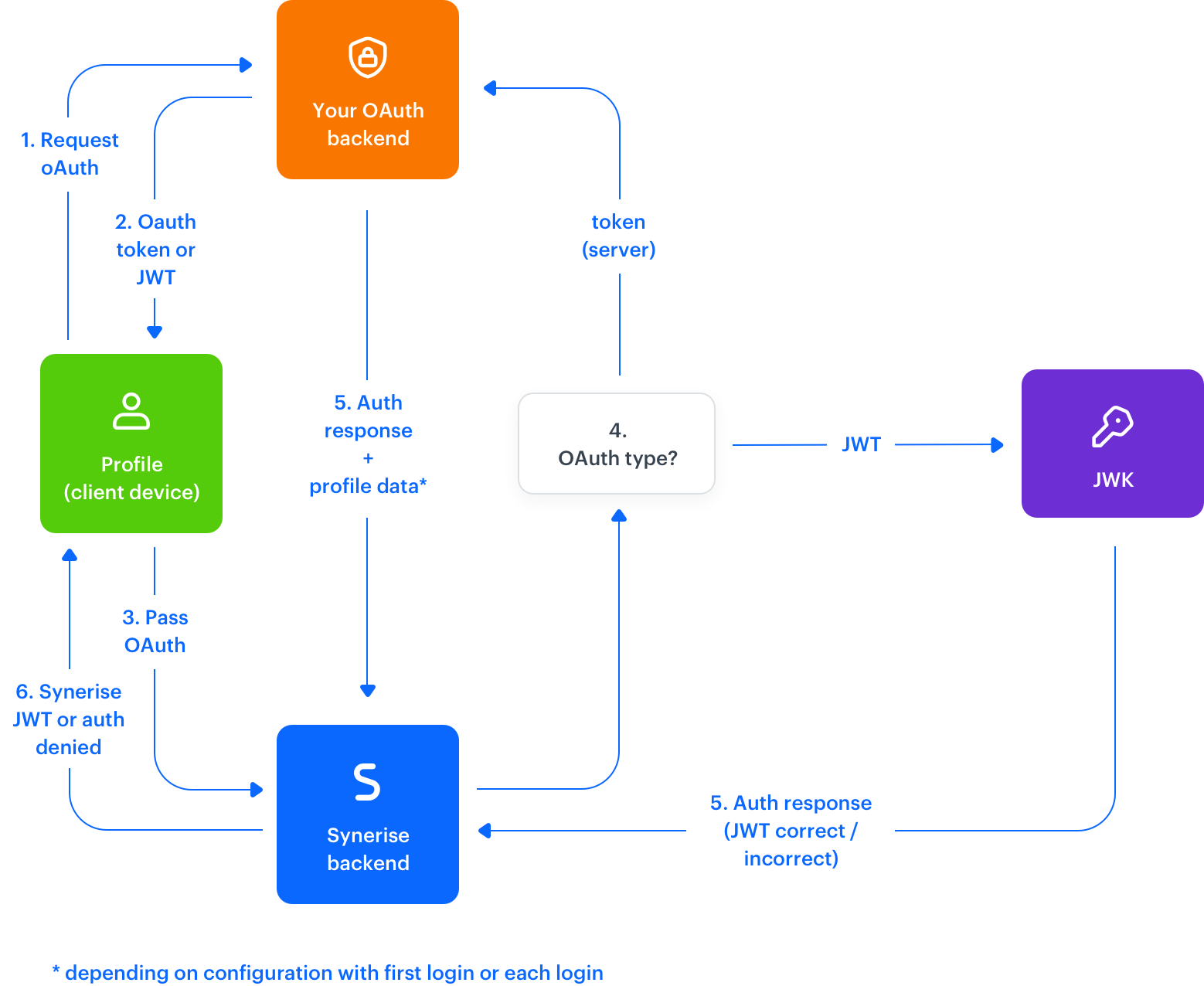
<figure><img src="/api/docs/image/54176ad07f146575310749eba44b7c2f42c1b327/docs/settings/_gfx/oauth-diagram.png" class="full" alt="OAuth diagram"><figcaption>OAuth process diagram </figcaption></figure>

Additionally, in the Synerise platform (`app.synerise.com`) you can define the following settings:
- [Assignment of loyalty card](/docs/settings/tool/iam-for-apps/general#loyalty-card-assignment)
- [JWT longevity](/docs/settings/tool/iam-for-apps/general#jwt-lifetime)
- [Custom ID overwriting](/docs/settings/tool/iam-for-apps/general#custom-id-overwriting)
- [External ID overwriting](/docs/settings/tool/iam-for-apps/general#external-id-overwriting)


## Logic explained
---

The authentication process works in the following way:

1. A customer sign-in to the application generates an authentication request to your backend.
2. Your backend provides the application with an access token.
3. The access token is passed to Synerise by using the following methods:
4. Synerise passes that access token:
    - if the access token is JWT, to external JWK service for validation
    - if the access token isn't JWT, back to your backend in order to check if it's valid.
5. In response:
   - If authentication is successful, Synerise receives customer information such as the email, first name, last name, or other details* (the data can be mapped to fields in our system). For more information, check our [guide](/docs/settings/tool/iam-for-apps/oauth).
   - If the access token is not valid, the response type is different than HTTP 2xx.
6. If the authentication was successful, Synerise provides the application with our JWT access token for the customer (if this the first time this customer is authenticated, they are also registered with the provided information).

*You can declare on user interface in Synerise if you want to update the customer's data with each login or only during the first log-in.


## Authentication methods
---


<div class="admonition admonition-tip"><div class="admonition-icon"><svg xmlns="http://www.w3.org/2000/svg" fill="none" viewBox="0 0 24 24" stroke="currentColor" stroke-width="2.5"><path stroke-linecap="round" stroke-linejoin="round" d="M9.663 17h4.673M12 3v1m6.364 1.636l-.707.707M21 12h-1M4 12H3m3.343-5.657l-.707-.707m2.828 9.9a5 5 0 117.072 0l-.548.547A3.374 3.374 0 0014 18.469V19a2 2 0 11-4 0v-.531c0-.895-.356-1.754-.988-2.386l-.548-.547z" /></svg></div><div class="admonition-body"><div class="admonition-content">

Conditional authentication lets you verify if a customer exists. This way, you can display screens with agreements or processes necessary for the first log-in.

</div></div></div>


| OS           | Method                                                                                                                                                                                                                                                                                                                                                                                                                             |
|--------------|------------------------------------------------------------------------------------------------------------------------------------------------------------------------------------------------------------------------------------------------------------------------------------------------------------------------------------------------------------------------------------------------------------------------------------|
| Android      | - [Client.authenticate(token, provider, agreements, attributes, authId)](/developers/mobile-sdk/method-reference/android/client-authentication#authenticate-customer-by-identityprovider) <br> - [Client.authenticateConditionally(token, provider, agreements, attributes, authId)](/developers/mobile-sdk/method-reference/android/client-authentication#authenticate-customer-conditionally-by-identityprovider) |
| iOS          | - [Client.authenticate(token:clientIdentityProvider:authID:context:success:failure:)](/developers/mobile-sdk/method-reference/ios/client-authentication#authenticate-customer-conditionally-by-identityprovider) <br> - [Client.authenticateConditionally(token:clientIdentityProvider:authID:context:success:failure:)](/developers/mobile-sdk/method-reference/ios/client-authentication#authenticate-customer-conditionally-by-identityprovider) |
| React Native | - [Synerise.Client.authenticate(token, clientIdentityProvider, authID, context, onSuccess, onError)](/developers/mobile-sdk/method-reference/react-native/client-authentication#authenticate-customer-by-identityprovider) <br> - [Synerise.Client.authenticateConditionally(token, clientIdentityProvider, authID context, onSuccess, onError)](/developers/mobile-sdk/method-reference/react-native/client-authentication#authenticate-customer-conditionally-by-identityprovider) |
| Flutter      | - [Synerise.client.authenticate(clientAuthContext, clientIdentityProvider, token)](/developers/mobile-sdk/method-reference/flutter/client-authentication#authenticate-customer-by-identityprovider)) |


<div class="admonition admonition-note"><div class="admonition-icon"><svg xmlns="http://www.w3.org/2000/svg" fill="none" viewBox="0 0 24 24" stroke="currentColor" stroke-width="2.5"><path stroke-linecap="round" stroke-linejoin="round" d="M13 16h-1v-4h-1m1-4h.01M21 12a9 9 0 11-18 0 9 9 0 0118 0z" /></svg></div><div class="admonition-body"><div class="admonition-content">

**authId/authID** parameter is used for decreasing the number of UUID refreshes, so it must be unique for every customer.

</div></div></div>


## Other methods
---

### Check if a customer is signed in

This method checks if a customer is signed in through oAuth, Facebook, Sign in with Apple, or RaaS


<div class="admonition admonition-important"><div class="admonition-icon"><svg xmlns="http://www.w3.org/2000/svg" fill="none" viewBox="0 0 24 24" stroke="currentColor" stroke-width="2.5"><path stroke-linecap="round" stroke-linejoin="round" d="M12 8v4m0 4h.01M21 12a9 9 0 11-18 0 9 9 0 0118 0z" /></svg></div><div class="admonition-body"><div class="admonition-content">

This method returns `false` if a customer is authenticated through [Simple Profile Authentication](/developers/mobile-sdk/user-identification-and-authorization/simple-authentication).

</div></div></div>


| OS           | Method                                                                                                                                    |
|--------------|-------------------------------------------------------------------------------------------------------------------------------------------|
| Android      | [Client.isSignedIn()](/developers/mobile-sdk/method-reference/android/client-authentication#check-if-a-customer-is-signed-in-via-raas-oauth-facebook-apple)                |
| iOS          | [Client.isSignedIn()](/developers/mobile-sdk/method-reference/ios/client-authentication#check-if-a-customer-is-signed-in-via-raas-oauth-facebook-apple) |
| React Native | [Synerise.Client.isSignedIn()](/developers/mobile-sdk/method-reference/react-native/client-authentication#check-if-a-customer-is-signed-in-via-raas-oauth-facebook-apple)       |
| Flutter | [Synerise.client.isSignedIn()](/developers/mobile-sdk/method-reference/flutter/client-authentication#check-if-a-customer-is-signed-in-via-raas-oauth-facebook-apple)      |

### Customer sign out
If you want to provide the customer with a logout feature in your application, use this method. The method terminates the JWT token and ends the customer session.

| OS           | Method                                                                                                                |
|--------------|-----------------------------------------------------------------------------------------------------------------------|
| Android      | [Client.signOut()](/developers/mobile-sdk/method-reference/android/client-authentication#sign-out-customer)               |
| iOS          | [Client.signOut()](/developers/mobile-sdk/method-reference/ios/client-authentication#sign-out-customer)                     |
| React Native | [Synerise.Client.signOut()](/developers/mobile-sdk/method-reference/react-native/client-authentication#sign-out-a-customer) |
| Flutter | [Synerise.client.signOut()](/developers/mobile-sdk/method-reference/flutter/client-authentication#sign-out-a-customer) |

## What's next
---
When the customer's is signed in, you can implement [profile management methods](/developers/mobile-sdk/user-identification-and-authorization/identification-and-user-management#profile-management-methods) and [session management methods](/developers/mobile-sdk/user-identification-and-authorization/session-management).