Simple Profile Authentication is an approach to authenticate customers once they provide their email address or custom ID. It allows for synchronization of data between Synerise and your database, ensuring consistency and an accurate profiling of customers. However, once you create a customer's profile using this authentication method, it cannot be deleted.
When configuring Simple Profile Authentication, you can enable an authentication salt. It's a randomized string that your application must send with the authentication request. This provides an additional layer of security by reducing the risk of requests being made from outside the application. We strongly recommend using this option.
The implementation of this authentication method is straightforward, requiring the usage of a single method. Unlike other authentication standards, it does not involve intercommunication between your application's backend and Synerise's backend. Instead, customer data is transmitted through a device for validation and authorization.
Additionally, in the Synerise platform (`app.synerise.com`) you can define the following settings:
- [Assignment of loyalty card](/docs/settings/tool/iam-for-apps/general#loyalty-card-assignment)
- [JWT longevity](/docs/settings/tool/iam-for-apps/general#jwt-lifetime)
Simple Profile Authentication proves particularly useful in scenarios when:
- you have a large customer base
- you don't require [OAuth](/developers/mobile-sdk/user-identification-and-authorization/oauth), which in most cases is recommended
Currently this authentication is available only for:
- Android (from `5.7.1` version)
- iOS (from `4.14.0` version)
- React Native (from `0.15.0` version)
- Flutter(from `0.7.0` version)
## Integration process
---
1. In the Synerise platform (`app.synerise.com`), go to **Settings > API keys** and create or update the Profile key.
1. In the **Permissions** section, enable the following permissions:
- `SAUTH_SIMPLE_AUTH_CREATE` (the **Auth** group)
- `API_PERSONAL_INFORMATION_CLIENT_READ`
- `SAUTH_LOGOUT_CLIENT_CREATE`
2. In the **Simple Profile Authentication** section:
1. Enable the **Simple Profile Authentication** toggle.
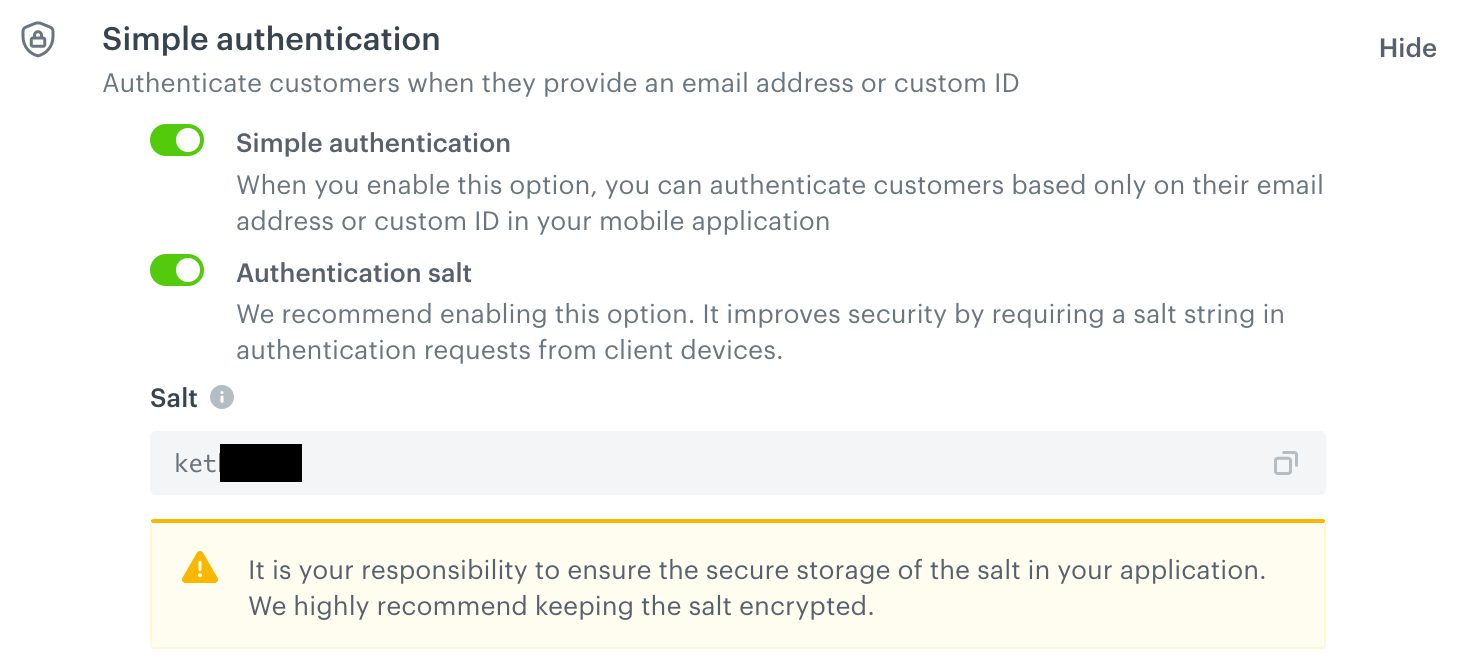
2. If you want to use a salt when authenticating, enable the **Authentication salt** toggle.
**Result**: A randomized salt is generated. It will need to be included in your mobile application (described further in this article).
We recommend enabling the salt. This improves the security of your requests by adding a layer of client/server authentication.
Simple Profile Authentication with salt enabled (recommended)
3. In the **Profile modification allowlist** section, allow modification of the following profile attributes:
- `UUID`
- `email` or `customId` (choose the identifier you will use in [this method](#authentication-methods))
You can learn more about creating API keys in the Synerise platform [here](/docs/settings/tool/api).
1. **If you enabled the Authentication salt**: Insert the salt into the initialization script.
It is your responsibility to ensure the secure storage of the salt in your application. We highly recommend keeping the salt encrypted.
You can find the Synerise initialization scripts in the articles below:
- [Android](/developers/mobile-sdk/installation-and-configuration/android#initialization)
- [iOS](/developers/mobile-sdk/installation-and-configuration/ios#initialization)
- [React Native](/developers/mobile-sdk/installation-and-configuration/react-native#initialization)
- [Flutter](/developers/mobile-sdk/installation-and-configuration/flutter#initialization)
2. As a sign-in method, implement [this method](#authentication-methods). In the customer's data object, `authId` (unique identifier of a customer in your data base), `email` or `customId` parameters are required. As a result of this method, the `client.simpleAuthLogin` event is generated on the activity list of a customer in the Synerise platform in **Behavioral Data Hub**.
Click here to see the event body
A customer logged in with this method is assigned with a Simple Profile Authentication token (a JWT) whose [longevity you can define in the Synerise platform](/docs/settings/tool/iam-for-apps/general#jwt-lifetime).
1. To check if a customer is signed in through Simple Profile Authentication, use [this method](#check-if-a-customer-is-signed-in).
To check if a customer is signed in with other authentication types, use [this method](/developers/mobile-sdk/user-identification-and-authorization/synerise-authentication#check-if-a-customer-is-signed-in)
## Authentication use cases
---
| Use case | Outcome |
|------------------------------------------------------|-------------------------------------------------------------------------------------------------------------------------------------------------------------------------------------------------------------------------------------------------------------------------------------------------------------------|
| An anonymous customer signs in to a new account | 1. Before signing in, a user is only assigned with UUID and clientId. 2. When signed in, they receive authID, and email and custom ID are assigned. The customer can update their data. |
| An anonymous customer signs in to an existing account | 1. Before signing in, a user is only assigned with UUID and clientId. 2. A customer signs in to their account on the interface with their credentials (authID) 3. A customer is [merged](/developers/api/clients/profiles/merging-profiles). 4. A customer is signed in and can update their data. |
| Signed-in customer signs in to a new account | 1. A customer is already recognized. 2. A customer provides new sign-in credentials and the customer is signed in to a new account (a new account is created). This customer receives authID, and email and custom ID are assigned. The customer can update their data. |
| Signed-in customer signs in to an existing account | 1. A customer is already recognized. 2. A customer re-signs in to other existing account on the interface with credentials (authID). 3. A customer is signs in and can update their data. |
## Troubleshooting
---
- If the `authID` value is not unique, there is a risk of generating the same UUID for various customers which results in an error. This is because the UUID is generated based on the `authID` value
- An error may occur when `email` or `customId` is not unique and there is an attempt to update a customer with other's customer `email` or `customId`.
## Best practices
---
- Check if a customer is signed in with [this method](#check-if-a-customer-is-signed-in).
- Use the [Simple Profile Authentication method](#authentication-methods) only for logging in and updating a customer's data.
- Provide a sign-out feature with [this method](#customer-sign-out).
## Authentication methods
---
This method authenticates a customer with Simple Profile Authentication.
| OS | Method |
|--------------|-------------------------------------------------------------------------------------------------------------------------------------------|
| Android | [Client.simpleAuthentication(clientData, authId)](/developers/mobile-sdk/method-reference/android/client-authentication#authenticate-customer-via-simple-profile-authentication) |
| iOS | [Client.simpleAuthentication(data:authID:success:failure:)](/developers/mobile-sdk/method-reference/ios/client-authentication#authenticate-customer-via-simple-profile-authentication) |
| React Native | [Synerise.Client.simpleAuthentication(data, authID, onSuccess, onError)](/developers/mobile-sdk/method-reference/react-native/client-authentication#authenticate-customer-via-simple-profile-authentication) |
| Flutter | [Synerise.client.simpleAuthentication(clientData, authId)](/developers/mobile-sdk/method-reference/flutter/client-authentication#authenticate-customer-via-simple-profile-authentication) |
**authId/authID** parameter is used for decreasing the number of UUID refreshes, so it must be unique for every customer.
## Other methods
---
### Check if a customer is signed in
This method checks if a customer is signed in through Simple Profile Authentication.
This method returns `false` if a customer is authenticated through [RaaS](/developers/mobile-sdk/user-identification-and-authorization/synerise-authentication), [oAuth](/developers/mobile-sdk/user-identification-and-authorization/oauth), [Facebook or Apple](/developers/mobile-sdk/user-identification-and-authorization/authenticate-external-providers).
| OS | Method |
|--------------|-------------------------------------------------------------------------------------------------------------------------------------------|
| Android | [Client.isSignedInViaSimpleAuthentication()](/developers/mobile-sdk/method-reference/android/client-authentication#check-if-a-customer-is-signed-in-via-simple-profile-authentication) |
| iOS | [Client.isSignedInViaSimpleAuthentication()](/developers/mobile-sdk/method-reference/ios/client-authentication#check-if-a-customer-is-signed-in-via-simple-profile-authentication) |
| React Native | [Synerise.Client.isSignedInViaSimpleAuthentication()](/developers/mobile-sdk/method-reference/react-native/client-authentication#check-if-a-customer-is-signed-in-via-simple-profile-authentication) |
| Flutter | [Synerise.client.isSignedInViaSimpleAuthentication()](/developers/mobile-sdk/method-reference/flutter/client-authentication#check-if-a-customer-is-signed-in-via-simple-profile-authentication) |
### Customer sign out
This method signs out the customer. The method terminates the JWT token and ends the customer session.
| OS | Method |
|--------------|-----------------------------------------------------------------------------------------------------------------------|
| Android | - [Client.signOut()](/developers/mobile-sdk/method-reference/android/client-authentication#sign-out-customer) - [Client.signOut(mode, signOutFromAllDevices)](/developers/mobile-sdk/method-reference/android/client-authentication#sign-out-customer-with-mode-or-from-all-devices) |
| iOS | - [Client.signOut()](/developers/mobile-sdk/method-reference/ios/client-authentication#sign-out-customer) - [Client.signOut(mode:fromAllDevices:success:failure:)](/developers/mobile-sdk/method-reference/ios/client-authentication#sign-out-customer-with-mode-or-from-all-devices) |
| React Native | - [Synerise.Client.signOut()](/developers/mobile-sdk/method-reference/react-native/client-authentication#sign-out-a-customer) - [Synerise.Client.signOutWithMode(mode, fromAllDevices, onSuccess, onError)](/developers/mobile-sdk/method-reference/react-native/client-authentication#sign-out-customer-with-mode-or-from-all-devices) |
| Flutter | [Synerise.client.signOut()](/developers/mobile-sdk/method-reference/flutter/client-authentication#sign-out-a-customer) |
## What's next
---
When the customer's is signed in, you can implement [profile management methods](/developers/mobile-sdk/user-identification-and-authorization/identification-and-user-management#profile-management-methods) and [session management methods](/developers/mobile-sdk/user-identification-and-authorization/session-management).