A/B/X testing is a way to try out different recommendation setups in Synerise to see which one works best. You can test different recommendations within one test for a section of a page or even the whole page without needing any extra tools or complicated calculations. You don't have to make any changes to recommendation setup to use this feature.

While creating the test, you will choose a base variant, which is a recommendation (either existing or newly created) that you will request by its ID. Each test variant is a distinct recommendation. Synerise will randomly assign a customer to one of the variants. When the test is done, you can switch to the best setup without needing any coding. The winning setup is marked in the statistics of the test based on specific metrics.


### Key features
---
- Launch tests without any changes to your existing setup.
- Compare up to 5 variants, including your base campaign.
- Precisely control user exposure to each variant.
- Access pre-built dashboards showcasing critical metrics (such as conversion rate, click through rate, average revenue, and more)
- Automatically declare winners based on statistical significance.
- Implement winning variants without developer intervention.
- Convenient outcome preview - you can preview and compare recommendation results directly within the platform. 
### Feature overview
---

1. **A/B/X Test Setup**
    - You can create up to 5 variants (including base variant) in a single test.
    - Each variant requires selecting one recommendation (draft or active status).
    - Variants can be distributed equally or manually with allocation between 1% and 99%.

2. **Variant Assignment**
    - When a request for the base variant for a customer is made, the customer is randomly assigned to one of the test variants.
    - UUID is the profile identifier used to assign customers to groups. If a customer logs in on multiple devices or browsers, this customer can be assigned to more than one variant.
    - Profiles are assigned to a variant for approximately 180 days.
    - A [`variant.assign`](/docs/assets/events/event-reference/recommendations#variantassign) event is generated on the profile card.

3. **Usage Restrictions**
    - Each recommendation can only be used in one A/B/X test at a time.
    - There are no limits on the number of active A/B/X tests.
    - This feature ignores the [global control group](/docs/settings/configuration/global-control-group) - customers who belong to the global control group can be shown recommendations regardless.

4. **Combination Restrictions**
    - The base recommendation type determines the allowed recommendation types in A/B/X testing:
        - If [Section page recommendation](/docs/ai-hub/recommendations-v2/recommendation-types#section-page) is the base, all variants must be of the **Section page** type.
        - If [Attributes recommendation](/docs/ai-hub/recommendations-v2/recommendation-types#attribute) is the base, all variants must be of the **Attributes** type.
        - No restrictions apply if any other type is the base variant.

5. **Displaying Recommendations**
    - Refer to guidelines in the ["Embedding a recommendation in templates"](/docs/ai-hub/recommendations-v2/distributing-recommendations#embedding-a-recommendation-in-templates) section.
    - Recommendations are presented to the defined audience based on recommendation settings.

6. **Performance Evaluation**
    - A/B/X tests run indefinitely by default. Performance metrics such as clicks, CTR, and revenue are continuously calculated. You can stop the A/B/X test manually.
    - Once the test is complete, you can select the best-performing variant. Regardless of the selected variant, the ID of the recommendation will remain the same and no further actions are required.

7. **Custom Analysis**
    - You can perform analyses using [recommendation events](/docs/assets/events/event-reference/recommendations) and the following event parameters:
        - `variantId`: Unique identifier of the variant.
        - `variantName`: The name of the variant.
        - `experimentId`: Unique identifier of the test.
  
8. **Testing external models**
    - If you want to include recommendations from an external model in the test, you can use the **External** recommendation campaign type to pass external results and add them to the test. For details, see [A/B/X testing with external models](/docs/ai-hub/recommendations-v2/abx-test-with-external-model).

## Requirements
---
- You must [create at least two recommendations](/docs/ai-hub/recommendations-v2/creating-recommendation-campaign).
- The recommendations you select for A/B/X testing must have the same preview attributes.  
    In the ["Selecting attributes for preview"](/docs/settings/configuration/ai-engine-configuration/engine-configuration-for-recommendations#selecting-attributes-for-preview) section you can learn to configure preview attributes.

## Configuration
---
1. Go to <img src="/api/docs/image/54176ad07f146575310749eba44b7c2f42c1b327/icons/ai-hub-icon.svg" alt="Image presents the AI Hub icon" class="icon"> **AI Hub > (AI Recommendations) A/B/X Tests > New A/B/X test**.
2. On the top of the screen, you can change the name of the A/B/X test.  
3. In the **Variants and profile allocation** section, click **Define**.  
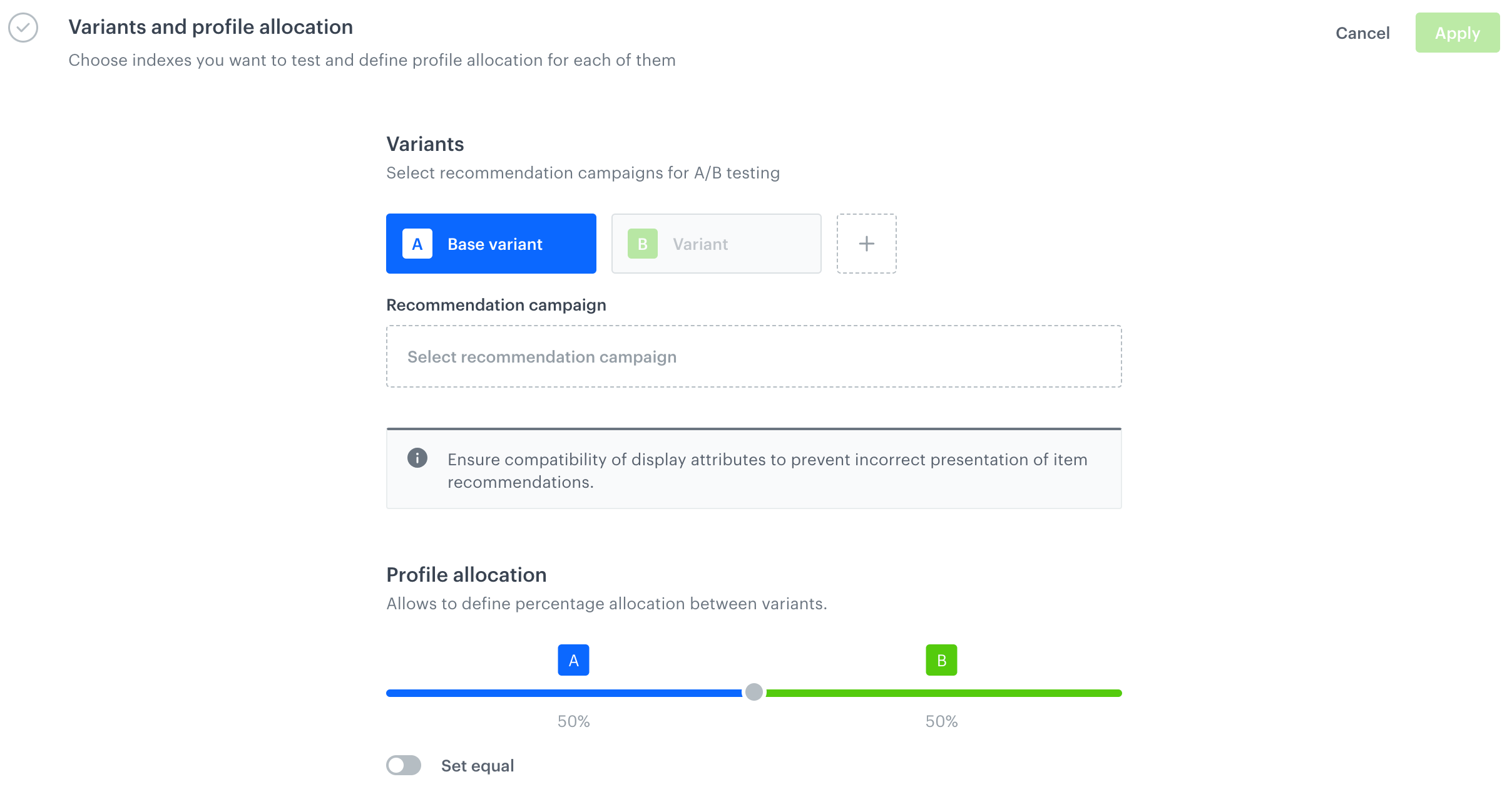
    **Result**: A configuration form for variants is displayed. Two variants are automatically created: **Base variant** and **Variant**.  
        <figure><img src="/api/docs/image/54176ad07f146575310749eba44b7c2f42c1b327/docs/campaign/_gfx/ab-reco-test-config-form.png" class="full" alt="A blank configuration form for A/B/X recommendation test variants"><figcaption>A blank configuration form for A/B/X recommendation test variants</figcaption></figure>  

4. In the **Base variant** tab, from the **Select recommendation campaign** dropdown list, select a recommendation that will be used as the base variant.  
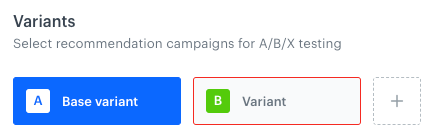
5. Go to the **"B" Variant** tab.  
    <figure><img src="/api/docs/image/54176ad07f146575310749eba44b7c2f42c1b327/docs/campaign/_gfx/b-variant-ab-reco-test.png" class="medium" alt="B Variant tab"><figcaption>B Variant tab</figcaption></figure>  
6. From the **Select recommendation campaign** dropdown list, select a recommendation for this variant. 
5. To add more variants, click <img src="/api/docs/image/54176ad07f146575310749eba44b7c2f42c1b327/icons/add-variant-icon.png" alt="Plus icon" class="icon"> and select recommendations for them.
8. To customize variant allocation, in the **Profile allocation** section, use the slider and set preferred variant allocation.
9. Confirm the settings by clicking **Apply**.  
10. To:
    - save the test as a draft, click **Save**.
    - save and activate the test, click **Save & Run**.

## Stopping the test
---
The test will be running until you stop it. Before stopping the test, you can consult the results each variant has achieved in the [Statistics tab](#statistics). We recommend running the test for at least several days.

1. To stop the test, go to the details of the test by clicking its name on the list.
2. In the upper-right corner, click **Stop test**.  
    **Result**: A pop-up appears.  
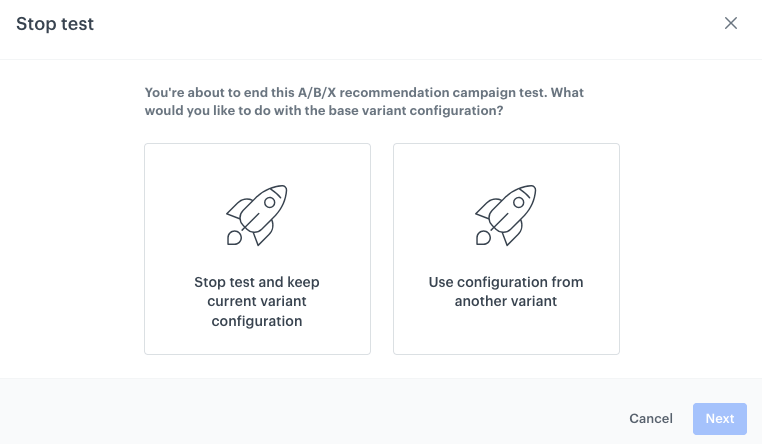
3. On the pop-up, select one of the following options:  
    - **Stop test and keep current variant configuration** - The A/B/X test will be stopped and the configuration of the recommendation which was selected as the base variant remains the same. If the base recommendation is used in active campaigns, nothing will change.  
        
      <div class="admonition admonition-warning"><div class="admonition-icon"><svg xmlns="http://www.w3.org/2000/svg" fill="none" viewBox="0 0 24 24" stroke="currentColor" stroke-width="2.5"><path stroke-linecap="round" stroke-linejoin="round" d="M12 9v2m0 4h.01m-6.938 4h13.856c1.54 0 2.502-1.667 1.732-2.5L13.732 4c-.77-.833-1.964-.833-2.732 0L4.082 16.5c-.77.833.192 2.5 1.732 2.5z" /></svg></div><div class="admonition-body"><div class="admonition-content">

      This action is irreversible.

      </div></div></div>

    - **Use configuration from another variant** - The A/B/X test will be stopped, and the configuration of the recommendation which was declared as the base variant can be replaced with the configuration of one of the tested variants. In further steps, you can select which variant will overwrite the current base configuration. If the base recommendation is used in active campaigns, its configuration will be automatically replaced. The old base configuration can't be restored.   

     <figure><img src="/api/docs/image/54176ad07f146575310749eba44b7c2f42c1b327/docs/campaign/_gfx/stop-abx-reco-test.png" class="large" alt="A pop-up with options concluding A/B/X test"><figcaption>A pop-up with options concluding A/B/X test</figcaption></figure>

4. Click **Next**. 
4. If you selected the **Use configuration from another variant**, select the recommendation variant with which you will overwrite the configuration under the base variant by clicking **Choose**.  
    
   <div class="admonition admonition-warning"><div class="admonition-icon"><svg xmlns="http://www.w3.org/2000/svg" fill="none" viewBox="0 0 24 24" stroke="currentColor" stroke-width="2.5"><path stroke-linecap="round" stroke-linejoin="round" d="M12 9v2m0 4h.01m-6.938 4h13.856c1.54 0 2.502-1.667 1.732-2.5L13.732 4c-.77-.833-1.964-.833-2.732 0L4.082 16.5c-.77.833.192 2.5 1.732 2.5z" /></svg></div><div class="admonition-body"><div class="admonition-content">

   The next action is irreversible.

   </div></div></div>

5. Confirm the action by clicking **Confirm**.  
    

## Statistics
---

Statistics are based on the [recommendation events](/docs/assets/events/event-reference/recommendations), [`product.buy`](/docs/assets/events/event-reference/items#productbuy) and [`transaction.charge`](/docs/assets/events/event-reference/items#transactioncharge) events.
The following metrics are calculated:
- **Clicks** - The number of unique clicks on a recommendation frame.
- **Unique users** - The number of customers for whom a recommendation was generated.
- **CTR** - Click-through rate: the number of clicks on a recommendation frame divided by the number of generated recommendations. 
- **Conversion rate** - The number of unique purchased items divided by the number of all clicks on an item within a recommendation frame.
- **Average revenue** - The average revenue (per customer) the recommendation generated during the test. It is calculated by dividing the total revenue by the number of unique customers who made a purchase.

### How to interpret winners?

The winner status is declared exclusively for individual metrics and not for the entire variant. The following metrics can be declared as winners: **CTR**, **conversion rate**, and **average revenue**.

- For CTR and CR, we use one-tailed 2-proportion Z-test with 95% confidence level, so if the variant metric is labeled "WINNER", it means that there is a 95% probability that the observed metrics difference is not due to random chance.
- For Average Revenue, we use one-tailed 2-sample T-test, with n-2 degrees of freedom, so if the variant metric is labeled "WINNER", it means that there is a statistically significant difference in Average Revenue between the groups.


### Where to find statistics? 

To view the A/B/X test statistics:
1. Go to <img src="/api/docs/image/54176ad07f146575310749eba44b7c2f42c1b327/icons/ai-hub-icon.svg" alt="AI Hub icon" class="icon" > **AI Hub > (AI Recommendations) A/B/X Tests**.  
2. On a running or finished test, click <img src="/api/docs/image/54176ad07f146575310749eba44b7c2f42c1b327/icons/threedoticon.png" alt="Three dot icon" class="icon" >
3. From the dropdown list, click **Show statistics**.  
    **Result**: The preview of A/B/X test statistics is displayed.  
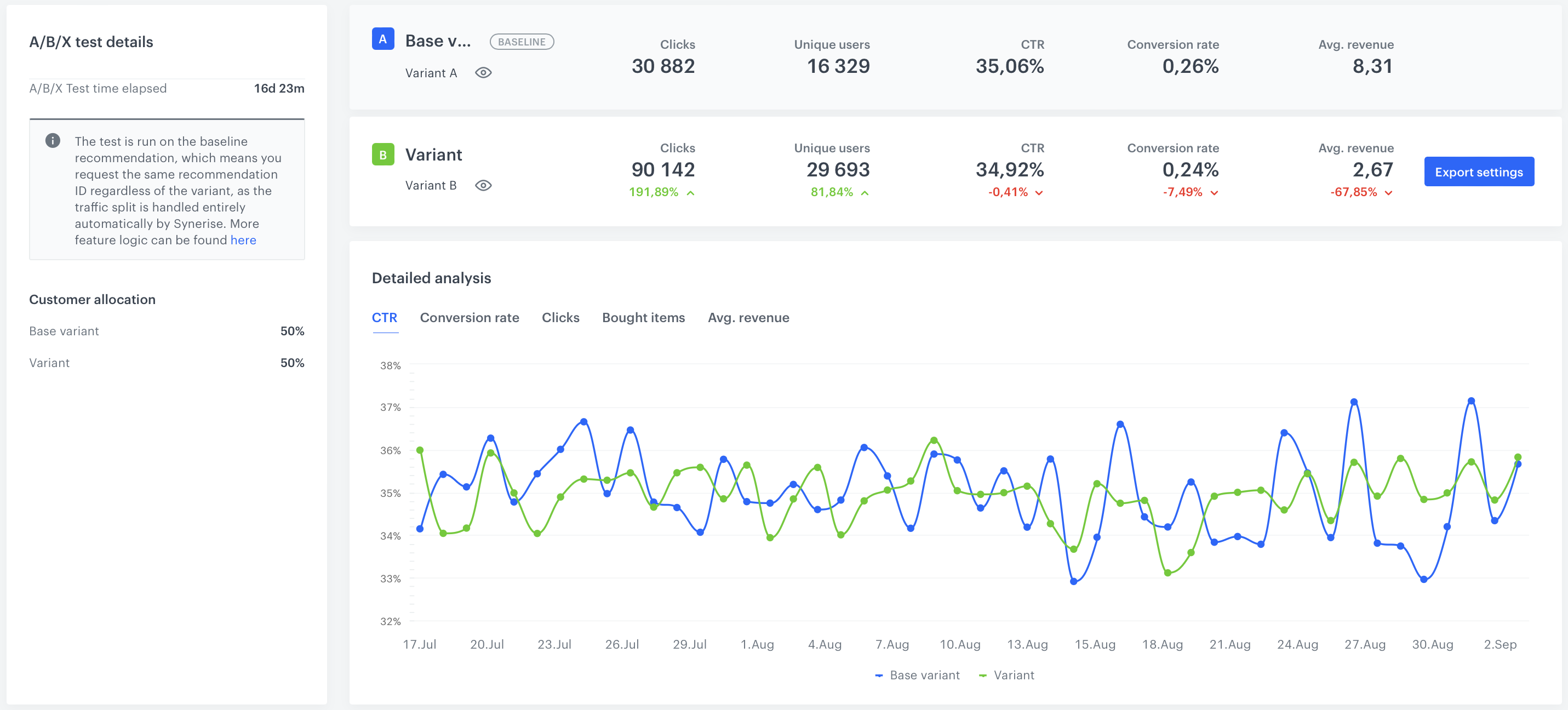
    <figure><img src="/api/docs/image/54176ad07f146575310749eba44b7c2f42c1b327/docs/campaign/_gfx/abx-test-reco-stats.png" class="full" alt="Statistics of A/B/X recommendation test"><figcaption>A/B/X recommendation test</figcaption></figure>

### Statistics overview

| Metric name     | Description                                                                                                                                                                                                                                                                                                           |
|-----------------|-----------------------------------------------------------------------------------------------------------------------------------------------------------------------------------------------------------------------------------------------------------------------------------------------------------------------|
| Clicks          | It is the number of unique clicks on a recommendation frame of a given variant.                                                                                                                                                                                                                                       |
| Unique users    | It is the number of unique profiles for whom recommendation was generated.                                                                                                                                                                                                                                            |
| CTR             | (Click Through Rate) It is the number of clicks on a recommendation frame of a given variant divided by the number of recommendation generations from a given variant.                                                                                                                                               |
| Conversion rate | It is the number of unique products bought divided by the number of all clicks on a recommendation from a given variant. Clicks are tied to the `transaction.charge` event. Clicks made within 24 hours of a transaction count towards the conversion rate of the day when the transaction was made. |
|Avg. revenue| (Average revenue) It is calculated by dividing revenue* by the number of unique customers (those for whom recommendation was generated). |

`*`Revenue - Revenue generated by the recommendations. It is counted when a customer buys an item within 24 hours after clicking the item in the recommendation frame.