Segmentation is the process of grouping customers based on specific characteristics such as attributes (for example, email address, shoe size), preferences (for example, favorite color, favorite brand), or actions (visit to the website, transaction, adding an item to a cart). By understanding how segmentation operates, businesses can tailor their strategies to target these distinct customer groups more effectively. At its core, segmentation utilizes logical constructs to partition diverse customer sets into meaningful segments. This process involves applying a set of predefined conditions or rules to determine customer inclusion within a particular segment.


## Logical functors and effects on sets
---  
In segmentations, the concepts of conjunctions, alternatives, and negations are essential for expressing relationships between conditions. By applying these functors while defining the conditions, you can filter customers with the desirable or non-desirable features out of the whole customer base you have. 

### Conjunction

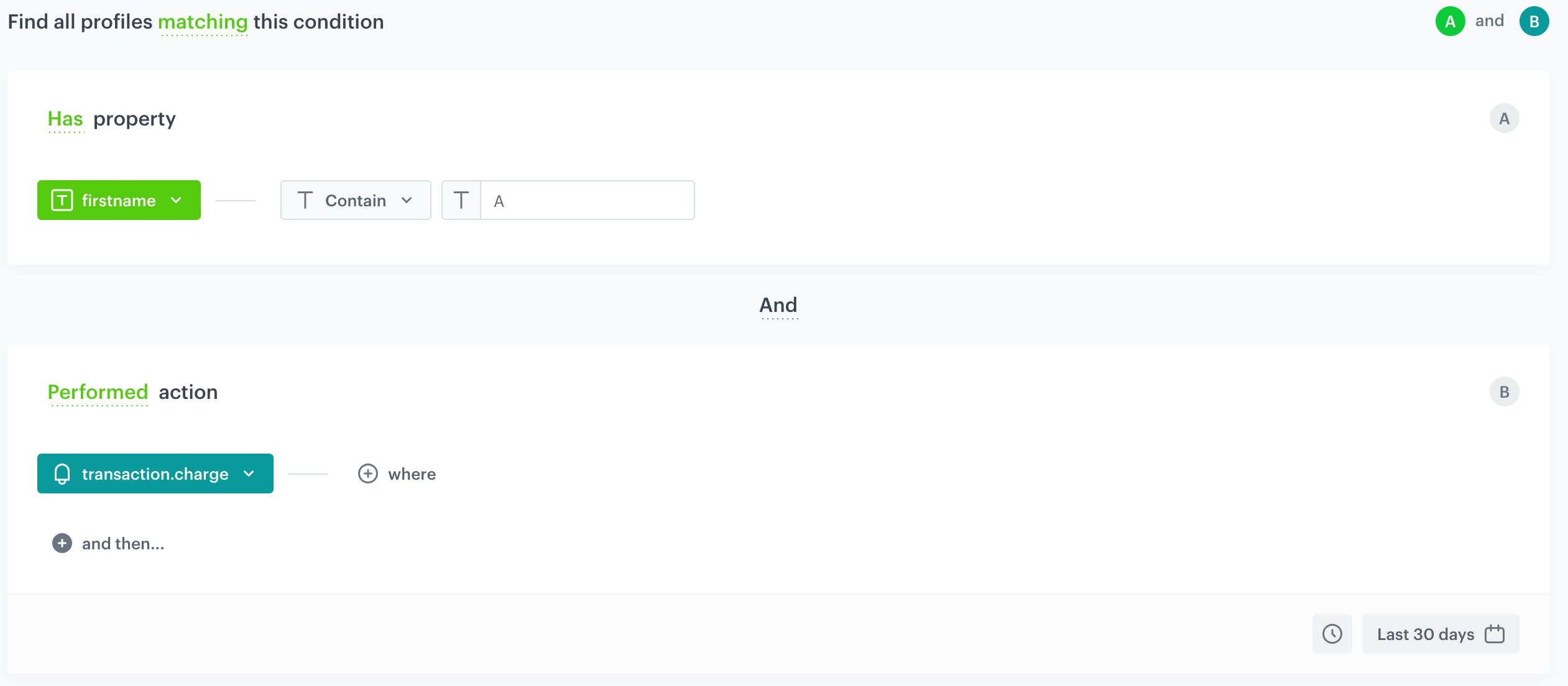
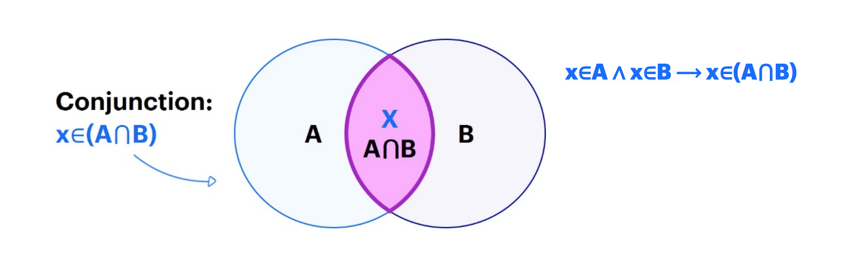
Conjunction (**AND**) is the product of sets, the common part. You can use it to combine multiple conditions to create a more specific segmentation. For example, you can find customers whose names contain the letter `A` and who made a transaction. Both conditions must be met. The image below presents this condition on the interface:

<figure>
<img src="/api/docs/image/54176ad07f146575310749eba44b7c2f42c1b327/docs/analytics/_gfx/classic-matching1.png" alt="Filled segmentation settings" class="full" >
</figure>

 
In the logical record it will look like this:

<figure>
<img src="/api/docs/image/54176ad07f146575310749eba44b7c2f42c1b327/docs/analytics/_gfx/classic-conjunction-diagram.png" alt="A conjunction diagram" class="full" >
</figure>

### Alternative 

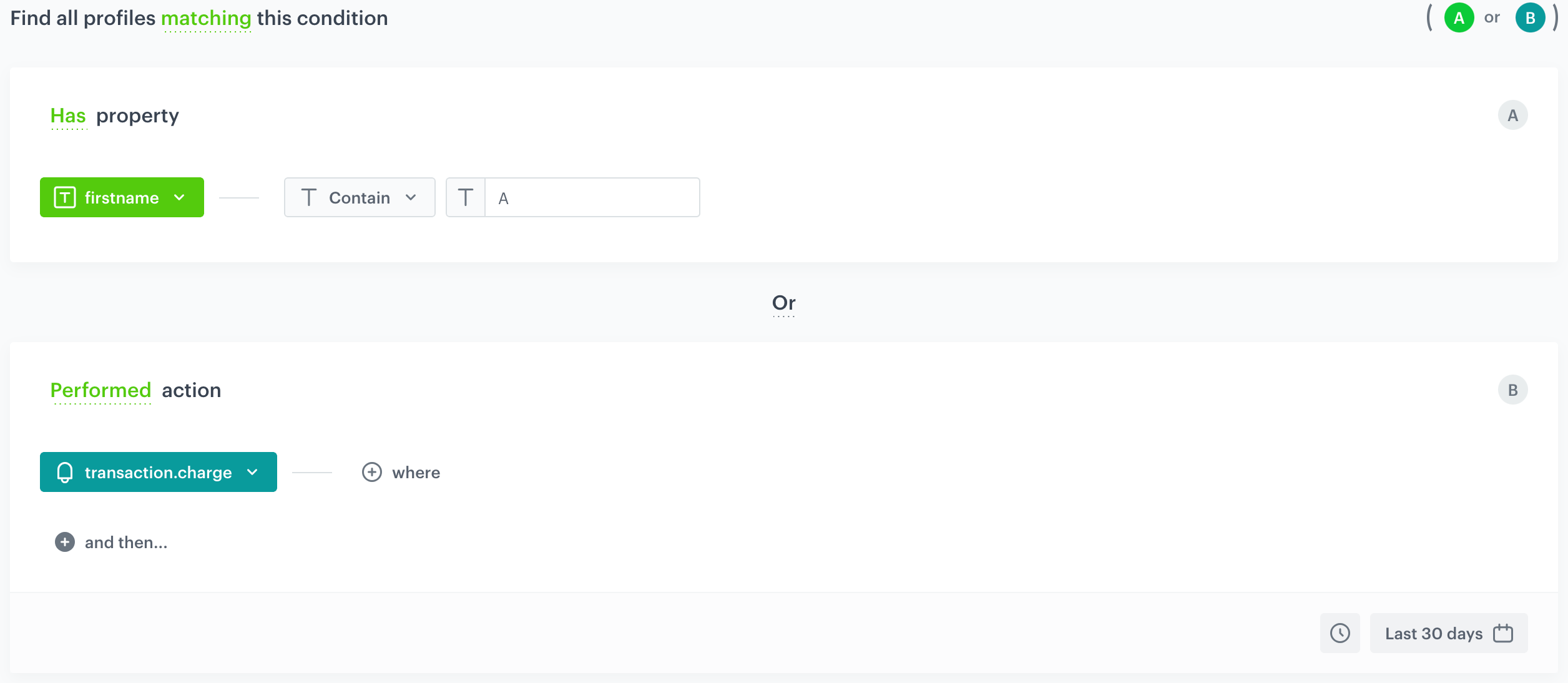
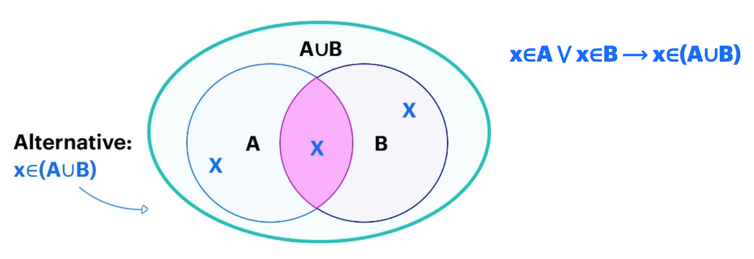
The alternative (**OR**) will be the sum of the sets. It offers the flexibility to specify different conditions for the segmentation. For example, you can find customers whose names contain the `A` letter or who made a transaction. Unlike conjunction, meeting just one of the conditions is sufficient for a customer to be included.  
The image below presents this condition on the interface:   


<figure>
<img src="/api/docs/image/54176ad07f146575310749eba44b7c2f42c1b327/docs/analytics/_gfx/classic-alternative.png" alt="Filled segmentation settings" class="full" >
</figure>

Then the logical record will look like this:

<figure>
<img src="/api/docs/image/54176ad07f146575310749eba44b7c2f42c1b327/docs/analytics/_gfx/classic-alternative-diagram.png" alt="A disjunction diagram" class="full" >
<figcaption>A disjunction diagram</figcaption>
</figure>

### Negation

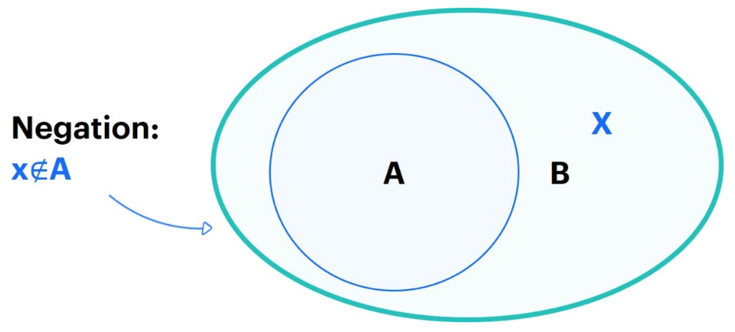
Negation (**NOT MATCHING**) will be an exclusion from the set on the basis of possessing certain attributes or behaviors. For example, you can filter out customers whose names contain the `A` letter.  
The image below presents this condition on the interface:

<figure>
<img src="/api/docs/image/54176ad07f146575310749eba44b7c2f42c1b327/docs/analytics/_gfx/classic-negation.gif" alt="Filled segmentation settings" class="full" >
</figure>


This is the result of the segmentation:

<figure>
<img src="/api/docs/image/54176ad07f146575310749eba44b7c2f42c1b327/docs/analytics/_gfx/classic-negation-diagram.png" alt="A negation diagram" class="full" >
</figure>

### Combining functors in segmentation

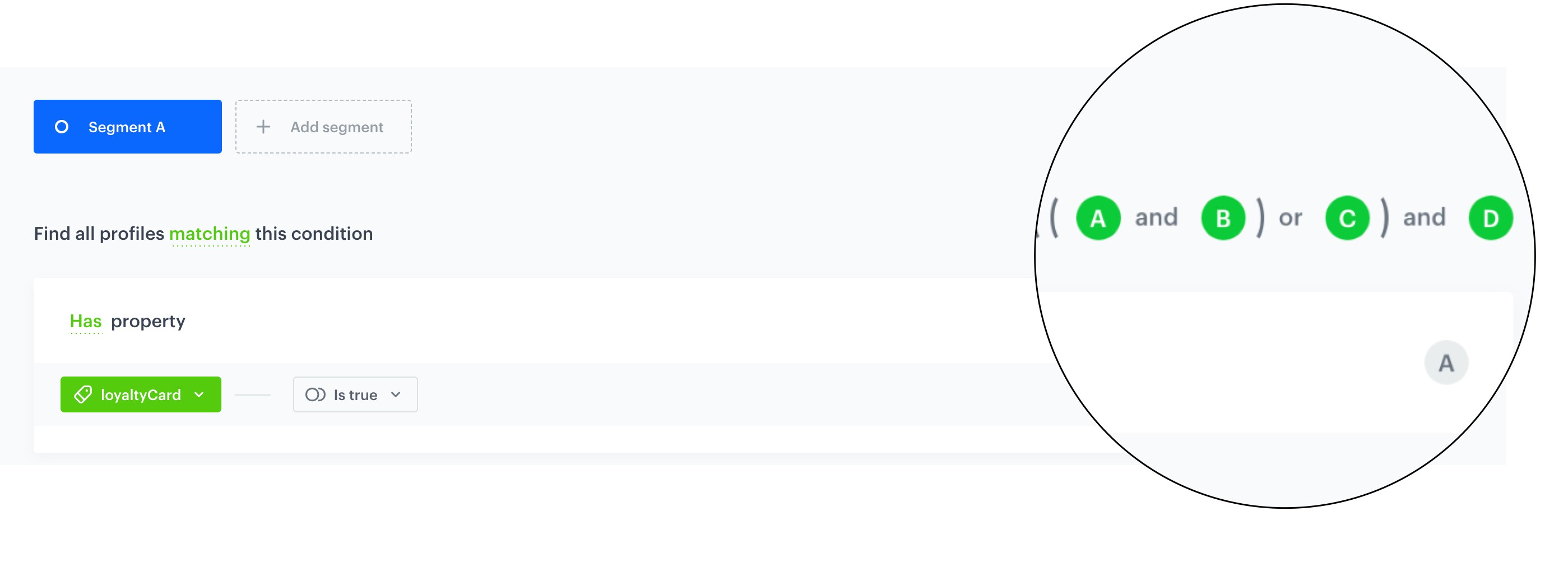
When creating a segmentation, you can add multiple conditions joined by conjunctions (AND) or alternatives (OR). To understand how your multiple conditions interact with each other, look at the parentheses at the top of the view. The parentheses are analyzed from left to right.  

<figure><img src="/api/docs/image/54176ad07f146575310749eba44b7c2f42c1b327/docs/analytics/_gfx/parentheses.png" class="full" alt="Segmentation conditions in parenthesis"><figcaption>Segmentation conditions in parenthesis</figcaption></figure>

#### Example

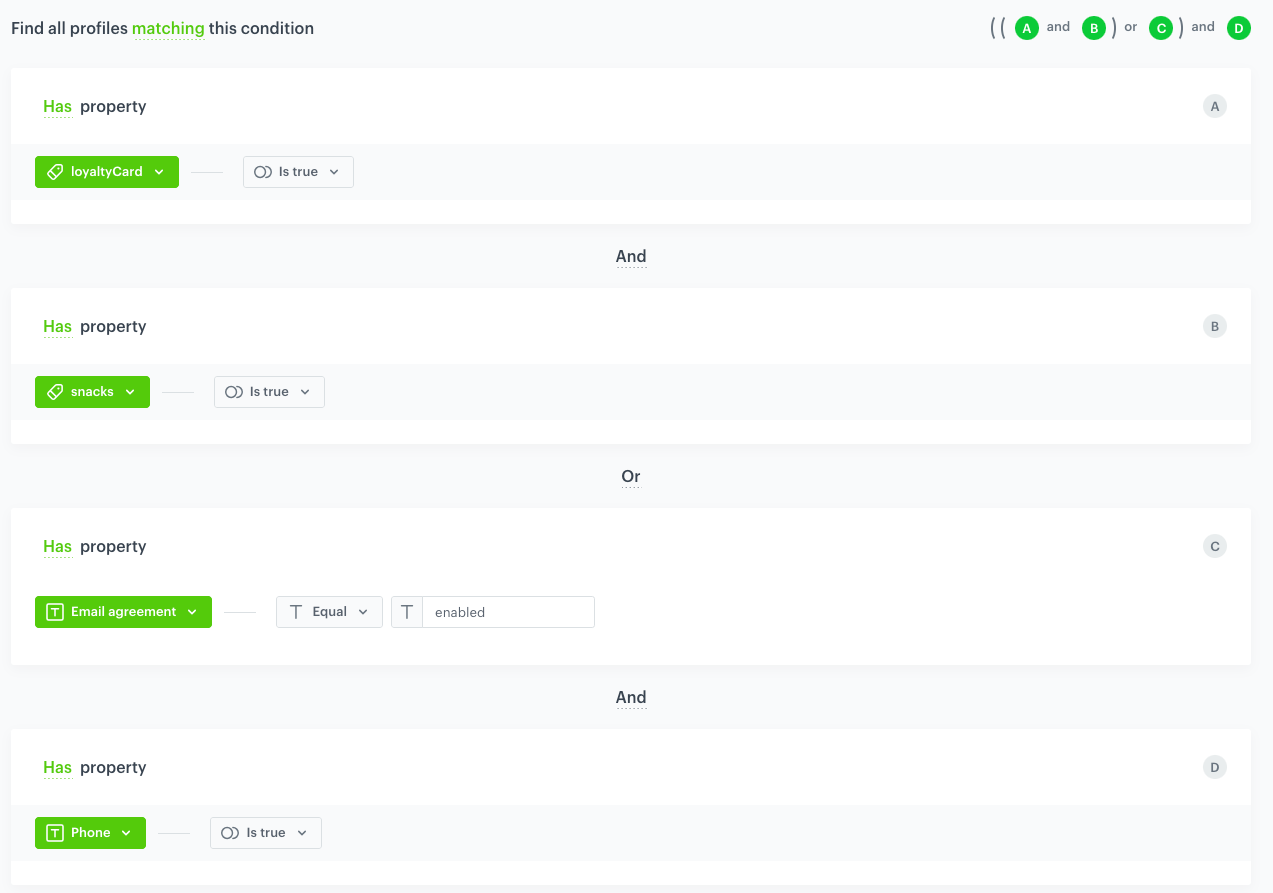
Let's create a segmentation of customers who are assigned `loyaltyCard` and `snacks` tags or have an email agreement enabled. Additionally, they must have a phone number assigned to their card in Synerise. These conditions will be defined in on the interface as follows: 

<figure><img src="/api/docs/image/54176ad07f146575310749eba44b7c2f42c1b327/docs/analytics/_gfx/segmentation-parenthesis.png" class="large" alt="The conditions of an example segmentation"><figcaption>The conditions of an example segmentation</figcaption></figure>

To avoid ambiguity in the interpretation of relationship between the conditions, look at the top right corner to make sure how these conditions will be analyzed. In this case, the interpretation will be as follows: `((A and B) or C) and D`

Let's break it down step by step:

- `((A and B) or C)`: This part evaluates a logical OR between two expressions: `(A and B)` and `C`. In our example, `(A and B)` is true if a customer has both tags assigned, and `C` evaluates whether a customer has enabled their email agreement. The logical OR returns true if at least one of the expressions is true.
- `((A and B) or C) and D`: This part combines the previous logical expression with another logical AND operator along with the expression `D`. `D` evaluates whether a customer has a phone number assigned to their profile card. The logical AND returns true only if both expressions on either side of it are true. 

This means that a customer will belong to the segmentation if they have both tags assigned or have enabled the email agreement. Additionally, they must have a phone number assigned to their profile card. In other cases, customers will not be included in the segmentation.

**Results**: The table below only includes condition combinations that result in a customer being included in the segmentation.


|                    |  loyaltyCard tag assigned    | snacks tag assigned     | Email agreement enabled | Phone number assigned |
|--------------------|-----------------------|---------------------------|-------------------------|-----------------------|
| Customers who have |      <img src="/api/docs/image/54176ad07f146575310749eba44b7c2f42c1b327/icons/check-s.svg" class="icon" alt="Green checkmark">                 |  <img src="/api/docs/image/54176ad07f146575310749eba44b7c2f42c1b327/icons/check-s.svg" class="icon" alt="Green checkmark">                         |    <img src="/api/docs/image/54176ad07f146575310749eba44b7c2f42c1b327/icons/check-s.svg" class="icon" alt="Green checkmark">                     |     <img src="/api/docs/image/54176ad07f146575310749eba44b7c2f42c1b327/icons/check-s.svg" class="icon" alt="Green checkmark">                  |
| Customers who have |      <img src="/api/docs/image/54176ad07f146575310749eba44b7c2f42c1b327/icons/check-s.svg" class="icon" alt="Green checkmark">                 |     <img src="/api/docs/image/54176ad07f146575310749eba44b7c2f42c1b327/icons/check-s.svg" class="icon" alt="Green checkmark">                      |    <img src="/api/docs/image/54176ad07f146575310749eba44b7c2f42c1b327/icons/close-s.svg" class="icon" alt= "Red checkmark">                     |     <img src="/api/docs/image/54176ad07f146575310749eba44b7c2f42c1b327/icons/check-s.svg" class="icon" alt="Green checkmark">                  |
| Customers who have |       <img src="/api/docs/image/54176ad07f146575310749eba44b7c2f42c1b327/icons/check-s.svg" class="icon" alt="Green checkmark">                |      <img src="/api/docs/image/54176ad07f146575310749eba44b7c2f42c1b327/icons/close-s.svg" class="icon" alt= "Red checkmark">                     |     <img src="/api/docs/image/54176ad07f146575310749eba44b7c2f42c1b327/icons/check-s.svg" class="icon" alt="Green checkmark">                    |     <img src="/api/docs/image/54176ad07f146575310749eba44b7c2f42c1b327/icons/check-s.svg" class="icon" alt="Green checkmark">                  |
| Customers who have |       <img src="/api/docs/image/54176ad07f146575310749eba44b7c2f42c1b327/icons/close-s.svg" class="icon" alt= "Red checkmark">                 |      <img src="/api/docs/image/54176ad07f146575310749eba44b7c2f42c1b327/icons/check-s.svg" class="icon" alt="Green checkmark">                     |     <img src="/api/docs/image/54176ad07f146575310749eba44b7c2f42c1b327/icons/check-s.svg" class="icon" alt="Green checkmark">                    |     <img src="/api/docs/image/54176ad07f146575310749eba44b7c2f42c1b327/icons/check-s.svg" class="icon" alt="Green checkmark">                  |
| Customers who have |    <img src="/api/docs/image/54176ad07f146575310749eba44b7c2f42c1b327/icons/close-s.svg" class="icon" alt= "Red checkmark">                   |     <img src="/api/docs/image/54176ad07f146575310749eba44b7c2f42c1b327/icons/close-s.svg" class="icon" alt= "Red checkmark">                     |     <img src="/api/docs/image/54176ad07f146575310749eba44b7c2f42c1b327/icons/check-s.svg" class="icon" alt="Green checkmark">                    |   <img src="/api/docs/image/54176ad07f146575310749eba44b7c2f42c1b327/icons/check-s.svg" class="icon" alt="Green checkmark">                    |


<!--
## Actions with negation and exclusion
---
The situation gets a bit more complicated when it comes to negation.  

We can add  **NOT MATCHING** to each  **MATCHING**, we can add **FALSE** to each  **TRUE**. This is of fundamental importance especially for the operations of exclusion in metrics, funnels and so on.  

For example, suppose you want to exclude people tagged with A (belonging to file A) from the transaction metric. The transaction set T gives us the record: `$totalAmount` for the transaction charge. We mark the exclusion in a filter by simply indicating people who do not belong to the set A.  

<figure>
<img src="/api/docs/image/54176ad07f146575310749eba44b7c2f42c1b327/docs/analytics/_gfx/classic-not-matching.png" alt="Filled segmentation settings" class="full" >
</figure>

Logically, the results look like this:  

`x∈T ∧ x∉A ⟶ x∈(T\A)`

This is intuitive and simple. If the sum of the transaction is $1000, and people with the A tag have generated $200, then after such exclusion, the record will give us $800.  

Let's assume, however, that we want to exclude people with two tags at once: tag A and tag B. So we have to negate two conditions. To correctly calculate the result, will we use a conjunction or alternative? 

Here's what the filter of conjunction excludes:  

<figure>
<img src="/api/docs/image/54176ad07f146575310749eba44b7c2f42c1b327/docs/analytics/_gfx/classic-not-matching2.png" alt="Filled segmentation settings" class="full" >
</figure>  

The calculation looks like this:  

`x∈T ∧ (x∉A ∧ x∉B) ∧ A,B⊂T ⟶ x∈(T\(A∪B))`

The conjunction will therefore exclude people who were marked with both tags (they belong to the set A and to the set B), but the sum of the sets A and B, people marked with at least one of the tags. We are using an alternative.  

This is the exclusion filter:

<figure>
<img src="/api/docs/image/54176ad07f146575310749eba44b7c2f42c1b327/docs/analytics/_gfx/classic-not-matching3.png" alt="Filled segmentation settings" class="full" >
</figure>

And the calculation:  

`x∈T ∧ (x∉A ⋁ x∉B) ∧ A,B⊂T ⟶ x∈(T\A) ⋁ x∈(T\B)`

`x∈(T\A) ⋁ x∈(T\B) ⟶ x∈(T\A⋂B)`

The alternative of negation excludes the common part of collections A and B, people marked with both tags.  

Translating it into arithmetic: if the sum of T is $1000, people with the tag A generate $200, people with the tag B - $300, and those with both tags - $100, are:  

- the alternative of negation in the metric filter will give us $900;
- the conjunction of negation in the metric filter will give us the result of $600;  

<figure>
<img src="/api/docs/image/54176ad07f146575310749eba44b7c2f42c1b327/docs/analytics/_gfx/classic-diagram.png" alt="Filled segmentation settings" class="full" >
</figure>

The negation in the filter can be done at the very top, and not in individual elements. In the case of exclusion, we will not deal with the conjunction of negation or the alternative of negation, respectively, but with the negation of conjunction or the negation of the alternative. Let's take the first case: negation of conjunction.  

The filter will look like this:  

<figure>
<img src="/api/docs/image/54176ad07f146575310749eba44b7c2f42c1b327/docs/analytics/_gfx/classic-not-matching-matching.png" alt="Filled segmentation settings" class="full" >
</figure>

The logical calculation follows:  

`∼(x∈A ∧ x∈B)`

In the classical propositional calculus, in order for a conjunction to result in 0, only one of the elements must give 0. Negative conjunction is thus transformed into an alternative of negation:  

`∼(x∈A ∧ x∈B) ⟶ (x∉A ⋁ x∉B)`

So as in the example above, negating the conjunction A and B will give us the result `x∈ (T \A⋂B)`. The result is $900.  

As you probably guessed, if we use a negation at the top and an alternative at the bottom, it will be exactly the opposite.  

<figure>
<img src="/api/docs/image/54176ad07f146575310749eba44b7c2f42c1b327/docs/analytics/_gfx/classic-not-matching-matching2.png" alt="Filled segmentation settings" class="full" >
</figure>

Because an alternative gives 0 in only one case - when both members are 0 - negation of the alternative gives a conjunction of negation.  

`∼(x∈A ⋁ x∈B) ⟶ (x∉A ∧ x∉B)`

This means that such a negation in the exclusion will give us the sum of collections A and B, i.e. `x∈ (T \(A∪B)`. The post-exclusion document will show $600.  

Let's convert a more complex example. We exclude from the metrics people who have the A and B tag but do not have the C tag. What functor should we use? This is more difficult situation, because conjunction and alternative are two-argument functions, that is, the conjunction sentences and alternatives have two parts, and this case has three:  

`x∉A`  
`x∉B`   
`x∈C`  

When combining their conjunctions, remember to group them. This signifies the order (from left to right) and this order does not do anything with prioritizing the priority of functors.

If we exclude people who do not have the A and B tag, then - remembering how it looks in the calculation - we combine them with an alternative:  

`x∉A ⋁ x∉B`

Which gives us the result:  

`x∈T ∧ (x∉A ⋁ x∉B) ⟶ x∈ (T\A⋂B)`

The alternative `x∉A ⋁ x∉B` must therefore be at the beginning. The result is to exclude people who have both tags. Also, this result must be focused on the C-tag, namely from the excluded people to identify the people who have the tag, and their turnover to be included in the metric.  

We exclude from the part of the common sets A and B the persons who belong to the set C.  

`x∈T ∧ x∈C ∧ x∉(A⋂B) ⟶ x∈(T\((A⋂B)\C))`

The final mathematical result depends on the relation between C and A and B (that is, whether C is a subset of A or B, if it has only a common part, is it separate, etc.) - so we will not substitute numbers here.  

And how will the original negation work in this case? Again, we have `x∉A ⋁ x∉B ∧ x∈C`. As we know, Synerise will make brackets in such a way that the alternative and then the conjunction will be converted first.  

`(x∉A ⋁ x∉B) ∧ x∈C`

If we now add the **NOT MATCHING** segment at the top,, i.e. negate the entire action, then the calculation will look like this:  

`~((x∉A ⋁ x∉B) ∧ x∈C) ⟶ ~(x∉A ⋁ x∉B) ⋁ ~(x∈C) ⟶ (x∈A ∧ x∈B) ⋁ x∉C`

If we apply this segment as a metric filter and convert transactions of all who do not meet the condition `(x∉A ⋁ x∉B) ∧ x∈C)`, this metric will count people who have A and B tags, as well as those who they do not have the C tag.

--->