This article contains a reference of Brickwork inserts which can only be used within the Brickworks feature on the interface.  

## Retrieving values from fields

You can use the `{{ record }}` insert to retrieve the value of another field. You can only refer to String, Number, and Enumeration fields. 

- **Insert is allowed in**: [Jinjava code field type](/docs/assets/brickworks/schema-field-types#jinjava-code)
- **Syntax**: `{{ record.APIname }}`  
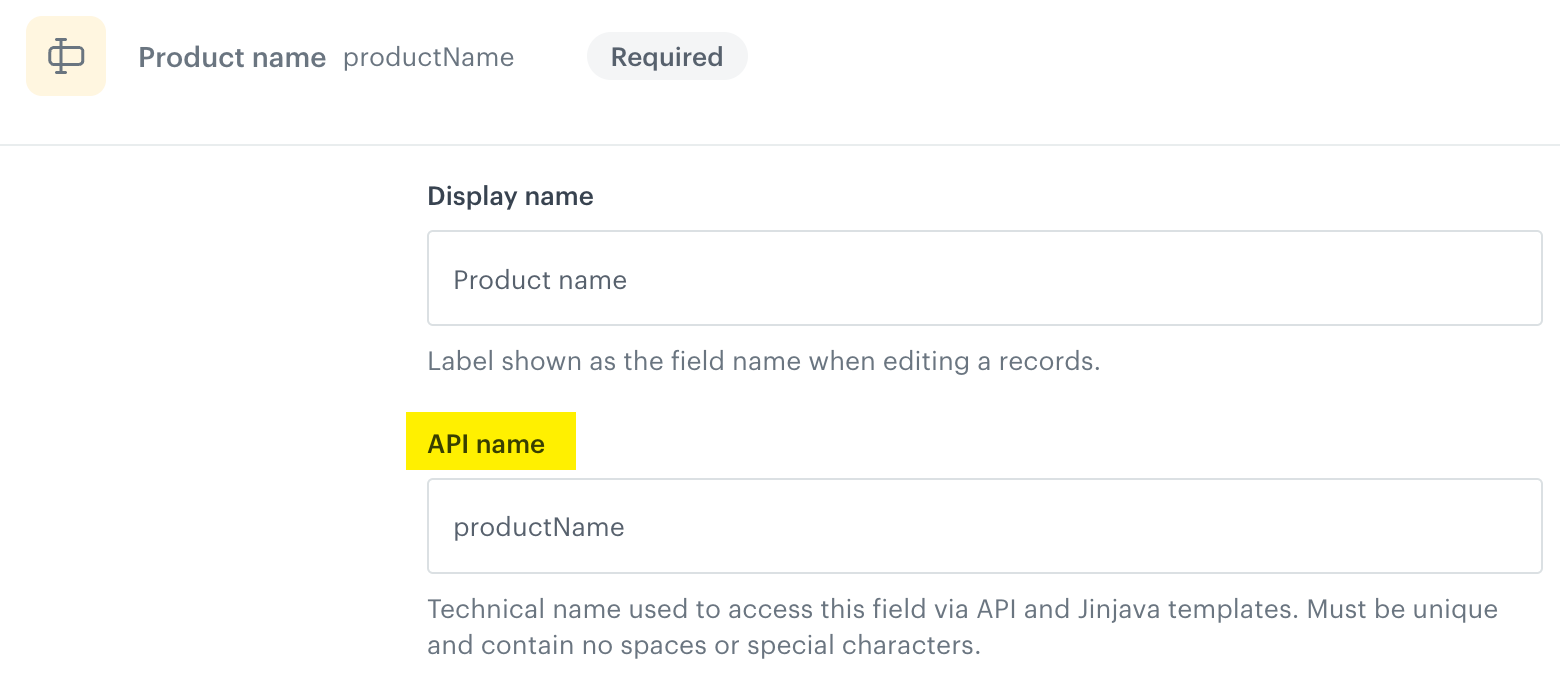
    `APIname` must be replaced with the value of the **API name** option available in the settings of the [field](/docs/assets/brickworks/schema-field-types) on the interface.  
- **Description**:  This insert enables retrieval of values from other fields in a [record](/docs/assets/brickworks/core-concepts#record). Retrieval is limited to fields containing  primitive data types: [strings](/docs/assets/brickworks/schema-field-types#string), [numbers](/docs/assets/brickworks/schema-field-types#number), and [booleans](/docs/assets/brickworks/schema-field-types#boolean)
- **Where is the API name value located?**:  
    <figure><img src="/api/docs/image/54176ad07f146575310749eba44b7c2f42c1b327/docs/assets/_gfx/brickworks-field-api-name.png" class="medium" alt="API name"><figcaption>API name in the configuration of the schema field</figcaption></figure>

In the tabs below, you can find the request for the [preview of record results](/docs/assets/brickworks/quick-start/creating-a-record#previewing-records) and its response.  
The request contains two fields:
- `productName` which is a [string field](/docs/assets/brickworks/schema-field-types#string) 
- `productId` which is a [Jinjava code field](/docs/assets/brickworks/schema-field-types#jinjava-code) 


  <div class="content-tabs" data-tab-group="tabgrp-1249">
  <div class="tab-buttons"><button class="tab-button" data-tab-id="tabgrp-1249-0" data-tab-group="tabgrp-1249" data-tab-active="true">Request</button><button class="tab-button" data-tab-id="tabgrp-1249-1" data-tab-group="tabgrp-1249">Response</button></div>

  <div class="tab-panel" data-tab-id="tabgrp-1249-0" data-tab-group="tabgrp-1249" data-tab-active="true">

  <div class="highlight-code-block" data-hl-lines="5,6">
  <pre><code class="language-json">{
    "identifierValue": "74029569-b01d-5ade-8cc2-6e8f7c136649",
    "context": {},
    "values": {
      "productName": "Sneakers ABC",
      "productId": "The identifier of the {{ record.productName }} is: 123456"
    }
  }</code></pre>
  </div>

  </div>

  <div class="tab-panel" data-tab-id="tabgrp-1249-1" data-tab-group="tabgrp-1249">

  <div class="highlight-code-block" data-hl-lines="7,8">
  <pre><code class="language-json">{
      "__slug": "this-is-unique-slug",
      "__recordVersion": 1,
      "__publishedAt": "2025-12-10T13:03:45.895630Z",
      "__updatedAt": "2025-12-10T13:03:45.872542Z",
      "__createdAt": "2025-12-10T13:03:45.872542Z",
      "productName": "Sneakers ABC",
      "productId": "The identifier of the Sneakers ABC is: 123456",
      "__schemaId": "4ce815e6-6273-4b68-a732-d4589d72c625",
      "__id": "a2b6d8a0-cde9-4987-804a-1bb215042cc6",
      "__schemaVersion": 1
  }</code></pre>
  </div>

  </div>
  </div>


## Retrieving context

- **Allowed in**: 
    - [Jinjava code field type](/docs/assets/brickworks/schema-field-types#jinjava-code) 
    - **Product context** field in [AI recommendation field type](/docs/assets/brickworks/synerise-objects#ai-recommendation), 
    - **Primary key** field in [Catalog field type](/docs/assets/brickworks/synerise-objects#catalog)
- **Syntax**: `{{ context.myField }}`  
    Replace `myField` with the parameter name whose value will be used as a context.    
- **Description**: Use the context insert to supply values for non-profile variables. When previewing the record, include the variable name as the key and its corresponding value to properly render the Jinjava field output in the preview.
- **How to provide context for retrieval?**  
    - In the **Additional parameters** in the preview of the record on the Synerise interface
    - In the Jinjava for [generating an object with record results](/docs/assets/brickworks/generating-objects)
    - In an [object generation request](/docs/assets/brickworks/generating-objects#api), in the `context` object.

In the tabs below, you can find the request for the [preview of record results](/docs/assets/brickworks/quick-start/creating-a-record#additional-preview-context-parameters) and its response.  
The record contains the following fields:
- `productName` which is a string field
- `productId` which is a string field
- `productInformation` which is a catalog field (Synerise object)
- `product` which is an AI recommendation field (Synerise object)

For Synerise object an 


<div class="content-tabs" data-tab-group="tabgrp-1250">
<div class="tab-buttons"><button class="tab-button" data-tab-id="tabgrp-1250-0" data-tab-group="tabgrp-1250" data-tab-active="true">Request</button><button class="tab-button" data-tab-id="tabgrp-1250-1" data-tab-group="tabgrp-1250">Response</button></div>

<div class="tab-panel" data-tab-id="tabgrp-1250-0" data-tab-group="tabgrp-1250" data-tab-active="true">

<div class="highlight-code-block" data-hl-lines="11,16">
<pre><code class="language-json">{
  "identifierValue": "74029569-b01d-5ade-8cc2-6e8f7c136649",
  "context": {
    "itemId": "0000208295260"
  },
  "values": {
    "productName": "Sneakers",
    "productId": "0000208295260",
    "productInformation": {
      "id": "15988",
      "itemKey": "{{ context.itemId }}"
    },
    "products": {
      "id": "TtZiwYdJQbuR",
      "params": {
        "itemId": "{{ context.itemId }}"
      }
    }
  }
}</code></pre>
</div>

</div>

<div class="tab-panel" data-tab-id="tabgrp-1250-1" data-tab-group="tabgrp-1250">

<div class="highlight-code-block" data-hl-lines="4,5,6,7,8,9,10,11,12,13,14,15,16,17,18,19,20,21,22,23,24,25,26,27,28,38,39,40,41,42,43,44,45,46,47,48,49,50,51,52,53,54,55,56,57,58,59,60,61,62,63,64,65,66,67,68,69,70,71,72,73,74,75,76,77,78,79,80,81,82,83,84,85,86,87">
<pre><code class="language-json">{
    "__slug": "this-is-unique-slug",
    "__recordVersion": 1,
    "productInformation": {
        "channel": "online",
        "description": "Excellent choice for colder seasons",
        "color": "Gray",
        "colors": [
            "Gray"
        ],
        "itemGroupId": "0000208295260",
        "link": "https://www.example.com./sneakers-abc-gray.html",
        "itemId": "0000208295260",
        "category": "Women &gt; Sneakers",
        "discount": 0.508,
        "discountAmount": 320,
        "gender": "female",
        "additionalImageLinks": [
            "https://www.example.com/media/product/0/0/0000208295260_04_ks.jpg",
            "https://www.example.com/media/product/0/0/0000208295260_02_ks.jpg",
        ],
        "price": {
            "currency": "PLN",
            "value": 629.99
        },
        "contentLanguage": "PL",
        "availability": true,
        "brand": "ABC",
// ... other properties omitted for brevity
    },
    "__updatedAt": "2025-12-10T16:22:38.860058Z",
    "__createdAt": "2025-12-10T16:22:38.860058Z",
    "productName": "Sneakers",
    "productId": "0000208295260",
    "__schemaId": "8d64213a-4277-491d-93a8-e3be03e2666e",
    "__id": "73e1b44e-94ea-4e95-83c5-59207dcdc553",
    "__schemaVersion": 1,
    "products": {
        "data": [
            {
                "price": {
                    "value": 249.99
                },
                "brand": "XYZ",
                "link": "https://www.example.com/sneakers-xyz-black.html?snrai_campaign=TtZiwYdJQbuR&amp;snrai_id=139beb5b-672e-4984-80ac-7aba76031a61",
                "itemId": "4002092027589",
                "category": "Women &gt; Sneakers",
                "imageLink": "https://www.example.com/media/product/4/0/4002092027589_02_ws.jpg",
                "title": "Sneakers XYZ Black",
                "salePrice": {
                    "value": 249.99
                }
            },
            {
                "price": {
                    "value": 316.99
                },
                "brand": "DEF",
                "link": "https://www.example.com/sneakers-def-black.html?snrai_campaign=TtZiwYdJQbuR&amp;snrai_id=139beb5b-672e-4984-80ac-7aba76031a61",
                "itemId": "5906489211270",
                "category": "Women &gt; Sneakers",
                "imageLink": "https://www.example.com/media/product/5/9/5906489211270_01_plj.jpg",
                "title": "Sneakers DEF Black",
                "salePrice": {
                    "value": 316.99
                }
            }
        ],
        "extras": {
            "campaignId": "TtZiwYdJQbuR",
            "contextItems": null,
            "correlationId": "139beb5b-672e-4984-80ac-7aba76031a61",
            "slots": [
                {
                    "id": 0,
                    "itemIds": [
                        "4002092027589",
                        "5906489211270",  
                    ],
                    "name": "Unnamed slot",
                    "rows": null
                }
            ]
        }
    },
    "__publishedAt": "2025-12-10T16:22:38.875747Z"
}</code></pre>
</div>

</div>
</div>


