
Synerise object fields are powerful tools which let you access data from other Synerise modules.

## Common field properties

These properties exist in multiple field types:

- **Display name**: A human-readable name for the field, shown in the record editor.
- **API name**: A system name for the field.  
    -  In the `{{ record.APIname }}` insert, this name is the `APIname`
    -  When retrieving/creating/updating a record with the API, this name is the identifier of the field.
    -  When generating an object from a record, this is the name of the key that stores the field's value.
- **Description**: A human-readable description of the field's purpose, shown in the record editor.
- **Block record-level overwriting**: Disables changing any values in this field in individual records. You must provide a default value, which will be applied to all records in the schema.
- **Conditional visibility**: Enforces adding a value to a field when another field meets a condition.  
    See [explanation below](#conditional-visibility).
- **Use as record title**: If the record doesn't have a set name, the value of the field is used as the name.
- **Required field**: A record can only be saved if a value for this field is provided.
- **Default value**: The provided value will be used for object generation in records where a value is not set.  
  This is only used when a value isn't defined in a record. It is **not a fallback**. For example, if an expression referenced in a record returns null or an error, the system **doesn't** use the default value.
- **Unique values only**: No other record in the schema may have the same value for this field.  
    You can use this to store your own unique record identifiers.  
    The number of fields with this setting is [limited](/docs/assets/brickworks/limits).
- **Enable search & filtering**: The value can be used when searching and filtering records.  
    The number of fields with this setting is [limited](/docs/assets/brickworks/limits).

### Conditional visibility
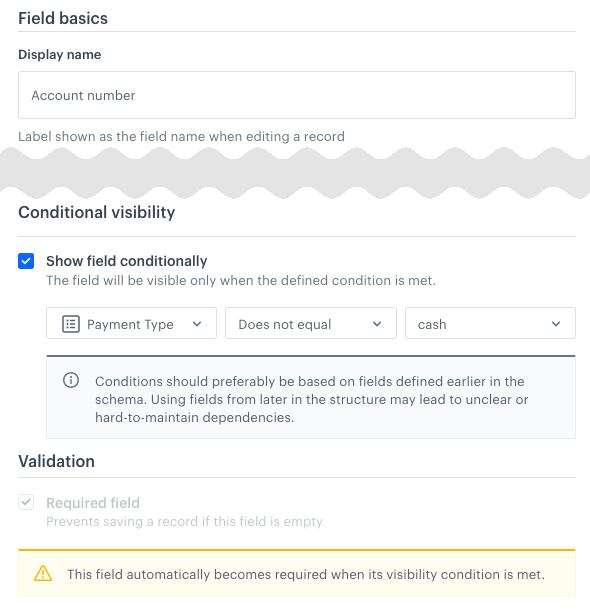
You can enforce entering a value into a field when another field meets a condition. If the condition isn't met, the field with this setting isn't visible in the schema editor/viewer.

The field that appears when the condition is met must have a default value (because it's required).

**Example**:  
<figure><img src="/api/docs/image/54176ad07f146575310749eba44b7c2f42c1b327/docs/assets/brickworks/_gfx/conditional.png" class="medium" alt="Conditional display example: the Account number field is only available (and must be filled) when the Payment Type field (enumeration) is not cash"><figcaption>the <strong>Account number</strong> field is only available (and must be filled) when the <strong>Payment Type</strong> field (enumeration) is not <code>"cash"</code></figcaption></figure>

**Operators**:  
The available operators depend on the type of the field that is checked:
| String | Number | Boolean | Enumeration |
| --- | --- | --- | --- |
| <ul><li>Equals</li><li>Contains</li><li>Is empty</li><li>Is not empty</li></ul> | <ul><li>Equals</li><li>Does not equal</li><li>Greater than</li><li>Less than</li><li>Is empty</li><li>Is not empty</li></ul> | <ul><li>Is true</li><li>Is false</li></ul> | <ul><li>Equals</li><li>Does not equal</li></ul> |

## Synerise object field summary

When creating schemas and defining records, you can leverage existing data within Synerise by adding Synerise objects as fields. These objects enable advanced personalization and dynamic content, such as:

- personalizing messages using expression or aggregate results
- implementing social proof through metric insights
- delivering AI-driven item recommendations
- distributing discount codes
- displaying detailed information stored in catalogs

| Field name                                                   | Stored values                                                                                                                                     | Primitive data type                                               | Can be searchable<sup>1</sup>                                                 | Can be unique<sup>2</sup>                                                     | Accepts Jinjava                                                   | Nullable |
| ------------------------------------------------------------ | ------------------------------------------------------------------------------------------------------------------------------------------------- | ----------------------------------------------------------------- | ----------------------------------------------------------------- | ----------------------------------------------------------------- | ----------------------------------------------------------------- | --- |
| [AI Recommendations](#ai-recommendation) | This field type lets you add a dropdown with list of [AI recommendations](/docs/ai-hub/recommendations-v2). This way you can display the recommendation results in a record.            | <img src="/api/docs/image/54176ad07f146575310749eba44b7c2f42c1b327/icons/close-s.svg" class="icon" alt= "Red checkmark"> | <img src="/api/docs/image/54176ad07f146575310749eba44b7c2f42c1b327/icons/close-s.svg" class="icon" alt= "Red checkmark"> | <img src="/api/docs/image/54176ad07f146575310749eba44b7c2f42c1b327/icons/close-s.svg" class="icon" alt= "Red checkmark"> | <img src="/api/docs/image/54176ad07f146575310749eba44b7c2f42c1b327/icons/check-s.svg" class="icon" alt="Green checkmark"> | <img src="/api/docs/image/54176ad07f146575310749eba44b7c2f42c1b327/icons/check-s.svg" class="icon" alt="Green checkmark"> |
| [Aggregate](#aggregate)                  | This field type lets you add a dropdown with a list of [aggregates](/docs/analytics/aggregates). This way you can display an aggregate result in a record.                                | <img src="/api/docs/image/54176ad07f146575310749eba44b7c2f42c1b327/icons/close-s.svg" class="icon" alt= "Red checkmark"> | <img src="/api/docs/image/54176ad07f146575310749eba44b7c2f42c1b327/icons/close-s.svg" class="icon" alt= "Red checkmark"> | <img src="/api/docs/image/54176ad07f146575310749eba44b7c2f42c1b327/icons/close-s.svg" class="icon" alt= "Red checkmark"> | <img src="/api/docs/image/54176ad07f146575310749eba44b7c2f42c1b327/icons/close-s.svg" class="icon" alt= "Red checkmark">  | <img src="/api/docs/image/54176ad07f146575310749eba44b7c2f42c1b327/icons/check-s.svg" class="icon" alt="Green checkmark"> |
| [Catalog](#catalog)                      | This field type lets you select a [Synerise catalog](/docs/assets/catalogs) as a context for data displayed in a record, for example, if you want to display information about a product. | <img src="/api/docs/image/54176ad07f146575310749eba44b7c2f42c1b327/icons/close-s.svg" class="icon" alt= "Red checkmark"> | <img src="/api/docs/image/54176ad07f146575310749eba44b7c2f42c1b327/icons/close-s.svg" class="icon" alt= "Red checkmark"> | <img src="/api/docs/image/54176ad07f146575310749eba44b7c2f42c1b327/icons/close-s.svg" class="icon" alt= "Red checkmark"> | <img src="/api/docs/image/54176ad07f146575310749eba44b7c2f42c1b327/icons/close-s.svg" class="icon" alt= "Red checkmark">  | <img src="/api/docs/image/54176ad07f146575310749eba44b7c2f42c1b327/icons/check-s.svg" class="icon" alt="Green checkmark"> |
| [Expression](#expression)                | This field type lets you add a dropdown with a list of [expressions](/docs/analytics/expressions). This way you can display an expression result in a record.                             | <img src="/api/docs/image/54176ad07f146575310749eba44b7c2f42c1b327/icons/close-s.svg" class="icon" alt= "Red checkmark"> | <img src="/api/docs/image/54176ad07f146575310749eba44b7c2f42c1b327/icons/close-s.svg" class="icon" alt= "Red checkmark"> | <img src="/api/docs/image/54176ad07f146575310749eba44b7c2f42c1b327/icons/close-s.svg" class="icon" alt= "Red checkmark"> | <img src="/api/docs/image/54176ad07f146575310749eba44b7c2f42c1b327/icons/close-s.svg" class="icon" alt= "Red checkmark">  | <img src="/api/docs/image/54176ad07f146575310749eba44b7c2f42c1b327/icons/check-s.svg" class="icon" alt="Green checkmark"> |
| [Metric](#metric)                        | This field type lets you add a dropdown with a list of [metrics](/docs/analytics/metrics/ ). This way, you can display a metric result in a record.                                        | <img src="/api/docs/image/54176ad07f146575310749eba44b7c2f42c1b327/icons/close-s.svg" class="icon" alt= "Red checkmark"> | <img src="/api/docs/image/54176ad07f146575310749eba44b7c2f42c1b327/icons/close-s.svg" class="icon" alt= "Red checkmark"> | <img src="/api/docs/image/54176ad07f146575310749eba44b7c2f42c1b327/icons/close-s.svg" class="icon" alt= "Red checkmark"> | <img src="/api/docs/image/54176ad07f146575310749eba44b7c2f42c1b327/icons/close-s.svg" class="icon" alt= "Red checkmark">  | <img src="/api/docs/image/54176ad07f146575310749eba44b7c2f42c1b327/icons/check-s.svg" class="icon" alt="Green checkmark"> |
| [Voucher](#voucher)                      | This field type lets you add a dropdown with a list of [voucher pools](/docs/assets/code-pools) and select a code from the pool.                                                          | <img src="/api/docs/image/54176ad07f146575310749eba44b7c2f42c1b327/icons/close-s.svg" class="icon" alt= "Red checkmark"> | <img src="/api/docs/image/54176ad07f146575310749eba44b7c2f42c1b327/icons/close-s.svg" class="icon" alt= "Red checkmark"> | <img src="/api/docs/image/54176ad07f146575310749eba44b7c2f42c1b327/icons/close-s.svg" class="icon" alt= "Red checkmark"> | <img src="/api/docs/image/54176ad07f146575310749eba44b7c2f42c1b327/icons/check-s.svg" class="icon" alt="Green checkmark"> | <img src="/api/docs/image/54176ad07f146575310749eba44b7c2f42c1b327/icons/check-s.svg" class="icon" alt="Green checkmark"> |

<sup>1,2</sup>The number of fields with this setting is [limited](/docs/assets/brickworks/limits).

## Synerise object field reference

### Aggregate

This field type lets you select an [aggregate](/docs/analytics/aggregates). The result of the aggregate is calculated in the context of a profile when generating an object from a record.


<div class="admonition admonition-important"><div class="admonition-icon"><svg xmlns="http://www.w3.org/2000/svg" fill="none" viewBox="0 0 24 24" stroke="currentColor" stroke-width="2.5"><path stroke-linecap="round" stroke-linejoin="round" d="M12 8v4m0 4h.01M21 12a9 9 0 11-18 0 9 9 0 0118 0z" /></svg></div><div class="admonition-body"><div class="admonition-content">

- For "TOP_MULTI" aggregates with the "Return null when object is missing" setting, the Brickworks result is an empty array (`[]`).
- In other aggregate types, when the aggregate results in no value, the Brickworks result is `null`.

</div></div></div>


#### Field configuration in a schema
1. From the **Select aggregate** dropdown list, select the aggregate whose result you want to get.
2. Optionally, to return the full scope of information about the aggregate, select the **Include details in results** checkbox.  

#### Object generation example
Aggregates don't require extra parameters in the object generation request.  
In the following example, the aggregate returns an item ID.
    
<div class="content-tabs" data-tab-group="tabgrp-1257">
<div class="tab-buttons"><button class="tab-button" data-tab-id="tabgrp-1257-0" data-tab-group="tabgrp-1257" data-tab-active="true">Generated content with details</button><button class="tab-button" data-tab-id="tabgrp-1257-1" data-tab-group="tabgrp-1257">Generated content without details</button></div>

<div class="tab-panel" data-tab-id="tabgrp-1257-0" data-tab-group="tabgrp-1257" data-tab-active="true">

<pre><code class="language-json">{
    "dateFilter": {
        "type": "RELATIVE",
        "duration": {
            "type": "DAYS",
            "value": 30
        },
        "offset": {
            "type": "DAYS",
            "value": 0
        },
        "timeZone": "Europe/Warsaw"
    },
    "clientId": 11804828266,
    "result": "WINDBREAKER ZEPHYR",
    "variables": [],
    "analyticVersion": null,
    "title": "Last seen item from jacket category",
    "aggregateUuid": "8c950378-82fd-320d-abec-b90cec5208d5",
    "aggregateId": "8c950378-82fd-320d-abec-b90cec5208d5"
}</code></pre>

</div>

<div class="tab-panel" data-tab-id="tabgrp-1257-1" data-tab-group="tabgrp-1257">

<pre><code class="language-json">"WINDBREAKER ZEPHYR"</code></pre>

</div>
</div>


### AI recommendation

This field type lets you include [AI recommendations](/docs/ai-hub/recommendations-v2).

For each record, you can select a recommendation and display its results while generating an object with the record result. If a selected recommendation model requires an item context, you must provide it. The system checks for the context item in the following order:
1. ID provided in the object generation request.
2. ID from the record.
3. Default ID from the schema.

In the ["Recommendation model summary" section](/docs/ai-hub/recommendations-v2/recommendation-types#recommendation-model-summary), you can find a table in which you can check which recommendation models require an item context.

#### Field configuration in a schema
1. From the **Select recommendation** dropdown list, select the default recommendation.  
2. In the **Parameters** section, you can enter the default item ID. By clicking the icon next to the **Product context** field, you can change how the ID is inserted:
    - **String** to provide a static string.
    - **Jinjava** to provide an insert from which the ID will be extracted.  
    The value can be changed per record or when generating an object from the record, but the type (static string or Jinjava) is enforced by the schema.  
    See the [Recommendation model summary](/docs/ai-hub/recommendations-v2/recommendation-types#recommendation-model-summary) to learn when a context item ID is required.

#### Object generation example


<div class="content-tabs" data-tab-group="tabgrp-1258">
<div class="tab-buttons"><button class="tab-button" data-tab-id="tabgrp-1258-0" data-tab-group="tabgrp-1258" data-tab-active="true">Request</button><button class="tab-button" data-tab-id="tabgrp-1258-1" data-tab-group="tabgrp-1258">Generated content</button></div>

<div class="tab-panel" data-tab-id="tabgrp-1258-0" data-tab-group="tabgrp-1258" data-tab-active="true">

When generating an object from a record, you can provide an item context. This overrides the default from the schema and the values saved in the record.  
This data is provided in the `fieldContext.FIELDNAME` object.  
You can also add any additional request properties described in the ["Get recommendations by campaign" endpoint in the API reference](https://developers.synerise.com/AIRecommendations/AIRecommendations.html#tag/Recommendations/operation/GetRecommendationsByCampaignV2). In the following example, `additionalFilters` is such a field.

<pre><code class="language-json">"fieldContext": {
    "exampleRecommendation": {
        "itemId": "dd9f0a0e6ca8f385776c14de9dd277",
        "additionalFilters": "brand == exampleBrand"
    }
}</code></pre>

</div>

<div class="tab-panel" data-tab-id="tabgrp-1258-1" data-tab-group="tabgrp-1258">

The result is a recommendation frame, same as in the recommendations API. To learn more about the properties, see the "[Get recommendations by campaign" endpoint in the API reference](https://developers.synerise.com/AIRecommendations/AIRecommendations.html#tag/Recommendations/operation/GetRecommendationsByCampaignV2).

<pre><code class="language-json">{
    "data": [
        {
            "name": "Infurniture - Jazmin Wine Glass",
            "price": 59,
            "brand": {
                "id": "86",
                "label": "Infurniture"
            },
            "product_subtype": {
                "id": "113",
                "label": "Wine Glass"
            },
            "itemId": "dd9f0a0e6ca8f385776c14de9dd277",
            "category": "Root Catalog &gt; Default Category &gt; Home &gt; Glasses",
            "productUrl": "https://demoshop.synerise.com/infurniture-jazmin-wine-glass.html?snrai_campaign=yYjFMYPeofN5&amp;snrai_id=9bbaee0d-b2d1-4a0f-9af2-1f2d49ae28d4",
            "image": "https://demoshop.synerise.com/media/catalog/product/d/d/dd9f0a0e6ca8f385776c14de9dd277.png"
        },
        {
            "name": "Lahome - Arcangel Chef's Knife",
            "price": 139,
            "brand": {
                "id": "87",
                "label": "Lahome"
            },
            "product_subtype": {
                "id": "123",
                "label": "Chef's Knife"
            },
            "itemId": "a84fe2f02fc18986600f956bb22864",
            "category": "Root Catalog &gt; Default Category &gt; Home &gt; Knives",
            "productUrl": "https://demoshop.synerise.com/lahome-arcangel-chef-s-knife.html?snrai_campaign=yYjFMYPeofN5&amp;snrai_id=9bbaee0d-b2d1-4a0f-9af2-1f2d49ae28d4",
            "image": "https://demoshop.synerise.com/media/catalog/product/a/8/a84fe2f02fc18986600f956bb22864.png"
        },
        {
            "name": "Homeset - Montell Bread Knife",
            "price": 389,
            "brand": {
                "id": "85",
                "label": "Homeset"
            },
            "product_subtype": {
                "id": "124",
                "label": "Bread Knife"
            },
            "itemId": "3640594393744b17d72aa3996c25f7",
            "category": "Root Catalog &gt; Default Category &gt; Home &gt; Knives",
            "productUrl": "https://demoshop.synerise.com/homeset-montell-bread-knife.html?snrai_campaign=yYjFMYPeofN5&amp;snrai_id=9bbaee0d-b2d1-4a0f-9af2-1f2d49ae28d4",
            "image": "https://demoshop.synerise.com/media/catalog/product/3/6/3640594393744b17d72aa3996c25f7.png"
        }
    ],
    "extras": {
        "campaignId": "yYjFMYPeofN5",
        "contextItems": null,
        "correlationId": "9bbaee0d-b2d1-4a0f-9af2-1f2d49ae28d4",
        "slots": [
            {
                "id": 0,
                "itemIds": [
                    "dd9f0a0e6ca8f385776c14de9dd277",
                    "a84fe2f02fc18986600f956bb22864",
                    "3640594393744b17d72aa3996c25f7"
                ],
                "name": "Unnamed slot",
                "rows": null
            }
        ]
    }
}</code></pre>

</div>
</div>

### Catalog

This field type lets you select a [Synerise catalog](/docs/assets/catalogs) and an item from that catalog. The item's data (without the item key) is included in the response when an object is generated from a record.

#### Field configuration in a schema
1. From **Select catalog** dropdown list, select the default catalog from which data will be retrieved.
2. In **Primary key**: By clicking the icon next to the text field, you can define how you will provide the context:  
    - **String** to provide a default static ID of the product which will serve as the context.
    - **Jinjava** to provide a default insert from which the ID will be extracted.  
    The values can be changed per record, but the type (static string or Jinjava) is enforced by the schema.

#### Object generation example

<div class="content-tabs" data-tab-group="tabgrp-1259">
<div class="tab-buttons"><button class="tab-button" data-tab-id="tabgrp-1259-0" data-tab-group="tabgrp-1259" data-tab-active="true">Request</button><button class="tab-button" data-tab-id="tabgrp-1259-1" data-tab-group="tabgrp-1259">Response</button></div>

<div class="tab-panel" data-tab-id="tabgrp-1259-0" data-tab-group="tabgrp-1259" data-tab-active="true">

If the catalog item ID is inserted with the [`{{ context.keyName }}` insert](/docs/assets/brickworks/brickworks-jinjava-inserts), provide the value for the key:

<pre><code class="language-LANG">"context": {
    "keyName": "sku1234"
}</code></pre>

</div>

<div class="tab-panel" data-tab-id="tabgrp-1259-1" data-tab-group="tabgrp-1259">

In the following example, the catalog item has two properties. The primary key isn't returned.

<pre><code class="language-json">{
    "name": "WINDBREAKER ZEPHYR",
    "color": "blue"
}</code></pre>

</div>
</div>


### Expression

This field type lets you select an [expression](/docs/analytics/expressions). The result of the expression is calculated in the context of a profile when generating an object from a record.


<div class="admonition admonition-important"><div class="admonition-icon"><svg xmlns="http://www.w3.org/2000/svg" fill="none" viewBox="0 0 24 24" stroke="currentColor" stroke-width="2.5"><path stroke-linecap="round" stroke-linejoin="round" d="M12 8v4m0 4h.01M21 12a9 9 0 11-18 0 9 9 0 0118 0z" /></svg></div><div class="admonition-body"><div class="admonition-content">

Expressions without a result are generated as `null` when generating content from the record.

</div></div></div>


#### Field configuration in a schema   

1. From the **Select expression** dropdown list, select the expression whose result you want to get.
2. Optionally, to return the full scope of information about the expression, select the **Include details in results** checkbox.  

#### Object generation example
Expressions don't require extra parameters in the object generation request.  
In the following example, an expression calculates the age of the customer.  
    
<div class="content-tabs" data-tab-group="tabgrp-1260">
<div class="tab-buttons"><button class="tab-button" data-tab-id="tabgrp-1260-0" data-tab-group="tabgrp-1260" data-tab-active="true">Generated content with details</button><button class="tab-button" data-tab-id="tabgrp-1260-1" data-tab-group="tabgrp-1260">Generated content without details</button></div>

<div class="tab-panel" data-tab-id="tabgrp-1260-0" data-tab-group="tabgrp-1260" data-tab-active="true">

<pre><code class="language-json">{
    "name": "Demo calculate age",
    "clientId": 11804828266,
    "result": 26,
    "expressionId": "b2c5cc0b-2830-435f-82a6-a2f0ebadd6d9",
    "variables": [],
    "title": "Demo calculate age "
}</code></pre>

</div>

<div class="tab-panel" data-tab-id="tabgrp-1260-1" data-tab-group="tabgrp-1260">

<pre><code class="language-json">26</code></pre>

</div>
</div>


### Metric

This field type lets you select a [metric](/docs/analytics/metrics). The result of the metric is calculated in the context of a profile when generating an object from a record.

#### Field configuration in a schema  

1. From the **Select metric** dropdown list, select the default metric to calculate.
2. Optionally, to return the full scope of information about the aggregate , select the **Include details in results** checkbox.  

#### Object generation example
Metrics don't require extra parameters in the object generation request.
    
<div class="content-tabs" data-tab-group="tabgrp-1261">
<div class="tab-buttons"><button class="tab-button" data-tab-id="tabgrp-1261-0" data-tab-group="tabgrp-1261" data-tab-active="true">Generated content with details</button><button class="tab-button" data-tab-id="tabgrp-1261-1" data-tab-group="tabgrp-1261">Generated content without details</button></div>

<div class="tab-panel" data-tab-id="tabgrp-1261-0" data-tab-group="tabgrp-1261" data-tab-active="true">

<pre><code class="language-json">{
    "result": 10770077,
    "numberMetrics": [],
    "clientMetrics": [],
    "eventMetrics": []
}</code></pre>

</div>

<div class="tab-panel" data-tab-id="tabgrp-1261-1" data-tab-group="tabgrp-1261">

<pre><code class="language-json">10770077</code></pre>

</div>
</div>


### Voucher

This field type lets you return a code from a [voucher pool](/docs/assets/code-pools). 

#### Field configuration in a schema  

1. From the **Select voucher pool** dropdown list, select a pool from which you will be able to select a code (but only while creating records).  
3. Optionally, to assign a voucher and always return the same voucher in subsequent requests for this profile, select the **Assign to user** checkbox.

#### Object generation example
The voucher code is returned in the `barcode` key.  
Vouchers don't require extra parameters in the object generation request.
<pre><code class="language-json">{
    "barcode": "23123321321"
},</code></pre>
