# RSQL in Synerise
In some Synerise features, you can use RSQL to build filters. This article explains how to build a query and what you can do with the Synerise flavor of RSQL.
You can build the query with a simplified [builder](#basic-builder) or the [query editor](#query-editor). The editor allows using `()` to group conditions (see [Operator precedence](#operator-precedence)).
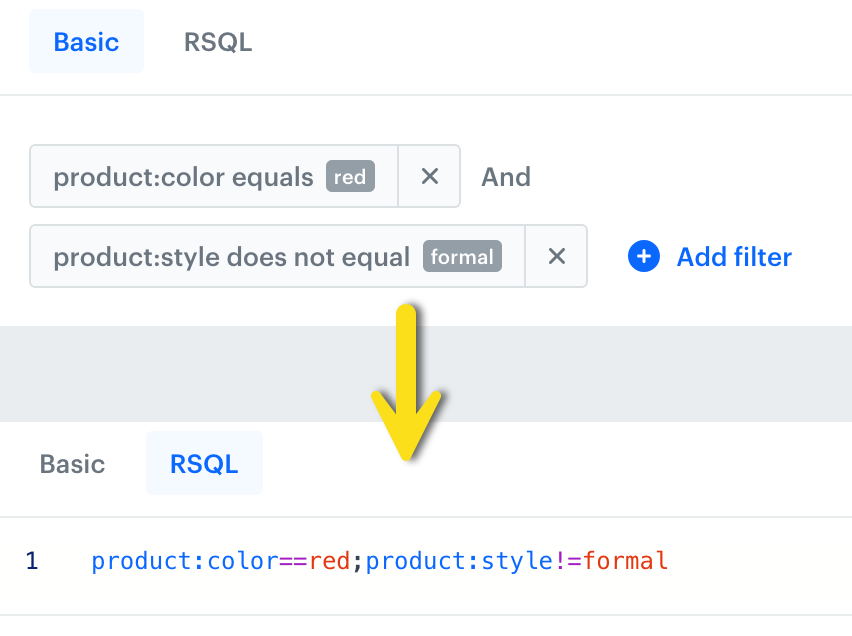
The same query in two views: Basic and RSQL editor in promotion item filters
## Syntax overview
An RSQL query is built from **comparisons** joined by **logical operators**.
A single comparison follows this pattern:
```
property==value
```
where the property is a field name (such as `sku` or `price`) and the value is the term you are matching against. In catalogs and promotion item filters, you can only use the properties that are indexed in the catalog.
The values are NOT case-sensitive, so `sku=FOO` is the same as `sku=foo`.
## Comparison operators
Some operators are only available for certain data types.
| Operator | Meaning | Example |
| -------------------------------------- | ---------------------------------- | ---------------------------------- |
| `==`1 | equals | `sku==ABC-123` |
| `!=`1 | does not equal | `sku!=ABC-123` |
| `>`/`=gt=` | greater than | `price=gt=100` |
| `>=`/`=ge=` | greater than or equal to | `price=ge=100` |
| `<`/`=lt=` | less than | `price=lt=50` |
| `<=`/`=le=` | less than or equal to | `price=le=50` |
| `=in=` | is one of the values in a list | `sku=in=(ABC-123,DEF-456,GHI-789)` |
| `=out=` | is not one of the values in a list | `sku=out=(ABC-123,DEF-456)` |
### Operators by data type
The following table shows which operators are available for each type:
| Operator | Text | Number | Date | Boolean | List |
| -------------- | :--: | :----: | :--: | :-----: | :--: |
| `==` | + | + | + | + | + |
| `!=` | + | + | + | + | + |
| `=gt=` | | + | + | | |
| `=ge=` | | + | + | | |
| `=lt=` | | + | + | | |
| `=le=` | | + | + | | |
| `=in=` | | | | | + |
| `=out=` | | | | | + |
## Reserved characters
If a value contains a reserved character, wrap it in double quotes or single quotes:
```
sku=="ABC=123"
sku=='ABC=123'
```
The reserved characters are: `=`, `!`, `~`, `<`, `>`, `;`, `,`, `(`, `)`, `'`, `"`, and space.
To include the quote character itself inside a quoted value, escape it with a backslash:
```
displayName=="10\" screen"
```
## Logical operators
| Operator | Meaning |
| -------- | ---------------------------------------- |
| `;` | both conditions must be true (AND) |
| `,` | at least one condition must be true (OR) |
## Operator precedence
`;` (AND) binds more tightly than `,` (OR). Consider this example:
```
sku==ABC-123,sku==DEF-456;price=gt=100,sku==GHI-789
```
The `sku==DEF-456;price=gt=100` part is resolved before the `,` operators. As a result, the query is equivalent to:
```
sku==ABC-123,(sku==DEF-456;price=gt=100),sku==GHI-789
```
In the RSQL editor, you can use parentheses to override the default precedence. For example, to require `price=gt=100` for all three SKUs:
```
(sku==ABC-123,sku==DEF-456,sku==GHI-789);price=gt=100
```
## Basic builder
In the basic builder view:
1. Add the first condition by clicking **Add filter**.
2. In the list that opens, select the property to filter by.
3. From the dropdown list, select an operator (the default is **Equals**).
4. In the text field, enter the value to compare the property against.
5. If the operator is **Is one of**/**Is not one of**, add more values by clicking **Add value**.
6. Click **Apply**.
7. To add more conditions, click **Add filter** and repeat the steps above.
8. To change the logic between conditions, click the operator (the default is **And**) and select a new one from the list.
Click the operator to change it
After building the query in the builder, you can change to the RSQL editor to see how it looks as a string.
## Query editor
To use the query editor:
1. In the text box, enter the query.
2. Click **Apply**.
### Examples
#### Find items by SKU
```
sku==ABC-123
```
#### Find items within a price range
```
price=ge=50;price=le=200
```
#### Find items that match any of several SKUs
```
sku=in=(ABC-123,DEF-456,GHI-789)
```
#### Combine conditions with OR
```
sku==ABC-123,price=lt=10
```
This returns items where the SKU is `ABC-123` or the price is below 10.