
Automation Hub lets you automate business processes in your company. With a wide range of multi-purpose scenarios that evoke specific actions in response to defined occurrences automatically, they are applicable in many use cases:

#### Implementation of multi-step marketing strategies    
One of the possibilities offered by Automation Hub is creating workflows that allow you to achieve your business goals such as an increase of revenue and customer loyalty, engagement of new customers, and optimization of your campaigns. Good examples of workflows which allow you to fulfill these requirements are:
- [sending birthday emails](/use-cases/birthday-coupon),  
- [sending out coupon for a membership anniversary](/use-cases/coupon_for_anniversary), 
- [sending email with products from abandoned cart](/use-cases/save-abandoned-cart), 
- [cutting down churn workflows](/use-cases/predictions-automation), 
- [enhancing customer data with weather information](/use-cases/data_with_current_weather_information),
- and more. 

#### Alert detection 
Automation Hub is an excellent tool to build workflows which detect anomalies in your business environment such as [device connection issues](/use-cases/iot#case-2-making-smart-alerts-about-device-connection-problems), [temperature deviations](/use-cases/iot#case-1-making-smart-alerts-about-temperature-deviation-problems), and [delivery delays](/use-cases/automatic-notification-about-delay) which let you keep your customers updated with the delivery status.  

#### Data transformation  
Automation Hub provides you with the possibility of [modifying incoming (imported to Synerise) and outgoing (exported to external systems) data](/docs/automation/data-transformation-and-imports/introduction) which ultimately lets you convert the data to the structure you need and use it in one place without additional development. Although the data transferred to and from Synerise is already secured with protocols, you can use the encryption feature. It lets you [generate an encryption key](/docs/settings/data-exchange-encryption) and use it to encrypt or decrypt data during transformation, you can use it for:

- selected set of columns in an exported/imported file.
- handling the JSON column in ORC file by encrypting or decrypting it.
- any string data using Jinjva tag for [encrypting](/developers/inserts/automation#encrypt-data) and [decrypting data](/developers/inserts/automation#decrypt-data)


#### Data transmission
- **Third-party integrations**  
You can even go outside the Synerise ecosystem by sending and requesting information from external systems. This way, you can use data from Synerise to enrich the scope of data in the external sources. Here are examples of third-party integrations through Automation Hub:  
    - [adding profiles to Custom Audience in Facebook](/use-cases/send-custom-audience-webhook),
    - [uploading data to Google Spreadsheet](/use-cases/google-spreadsheet-integration),
    - [sending survey results to Synerise (Gravity Form integration)](/use-cases/gravity-form-integration),
    - [sending data from Microsoft Azure Forms to Synerise](/use-cases/send-data-from-forms),
    - [sending customer opinions about your company stored in Snowflake to Synerise](/docs/automation/integration/snowflake/get-data-reverse-etl#example-of-use),
- **Import and export of the data files**  
Most of the data is collected directly from touchpoints, however, data such as a contact database, historical transactional data, events can be imported to Synerise at the in order to, for example, train recommendation models. In Automation Hub, you can build workflows which import such data. The possibility of [transferring data](/docs/automation/actions/synerise-integrations#example-with-transformation) to Synerise may be connected with [data transformation](/docs/automation/data-transformation-and-imports/introduction), which you can perform in  Automation Hub as well.


<div class="admonition admonition-important"><div class="admonition-icon"><svg xmlns="http://www.w3.org/2000/svg" fill="none" viewBox="0 0 24 24" stroke="currentColor" stroke-width="2.5"><path stroke-linecap="round" stroke-linejoin="round" d="M12 8v4m0 4h.01M21 12a9 9 0 11-18 0 9 9 0 0118 0z" /></svg></div><div class="admonition-body"><div class="admonition-content">

Data files pulled into nodes (such as Get File) can't be larger than 5 GB (5 000 000 000 bytes).

</div></div></div>


## Other features
---
- [Creating custom webhooks](/docs/automation/integration/outgoing-webhook) which let you connect with any external service 
- [Testing requests in HTTP-type integrations that connect to external APIs or services](/docs/automation/test-requests-for-outgoing-integrations) (for example, [Send offline conversion (Google Ads)](/docs/automation/integration/facebook/send-offline-transactions), [Send Custom Event (Facebook)](/docs/automation/integration/facebook/send-custom-event), [Outgoing Integration node](/docs/automation/actions/webhook-node))
- Keeping track of [real-time statistics for each node](/docs/automation/automation-activity-tracking) 
- Keeping track of error log for data transformation workflows
- Analyzing both customer and non-customer events

## Requirements
---
- If a workflow uses nodes that rely on customer activity on the website (for example `page.visit`, `product.buy`, and so on), a tracking code must be implemented into the website. 
- If a workflow uses nodes that rely on sending emails, text messages, pushes or web pushes, the respective accounts for sending these must be configured in the Synerise system.

### Required user permissions

See [Automation Hub permissions](/docs/settings/identity-access-management/permissions/automation-permissions).


## Terminology
---
In this documentation, you will come across specialized terminology. To ensure clarity and good understanding of the instructions in this module, familiarize yourself with the terms below and [dictionary](/docs/glossary):

### Workflow and path

- A **workflow**:  
    - is a sequence of nodes that together describe a scenario and define the course of actions to be performed in defined circumstances. This term refers to the concept of an automated process whose subject is a profile ([customer-oriented workflow](/docs/glossary#profile-oriented-workflow)) or a process involving retrieving or sending out data ([business workflow](/docs/glossary#business-workflow)). The structure of the workflow is referred to in the documentation as a **diagram**. 
    - is a single instance of a [business workflow](/docs/glossary#business-workflow). Each time the trigger conditions defined in the trigger node are met the system creates a new workflow instance. It concerns the workflows which start with the [Business Event node](/docs/automation/triggers/businees-event-trigger) and [Scheduled Run node](/docs/automation/triggers/scheduled-run). There is a limit of 50 requests per second which can trigger such workflow instance.

- A **path** is a progression of a customer in a workflow. Each time a customer performs an action that triggers a workflow the system records it as a path of that particular workflow. New paths can be started even when the workflow is already triggered. This happens when an [action limit in the trigger node](/docs/automation/automation-capping#trigger-limits) is higher than 1. You can decide if the first path that reaches the final node terminates the remaining paths. This behavior is configurable in the [End node](/docs/automation/flow-control/end-node).

    - [Customer-oriented workflows](/docs/glossary#profile-oriented-workflow) 
        - Example of terminating remaining paths when one of them reaches the End node:  
        <img src="/api/docs/image/54176ad07f146575310749eba44b7c2f42c1b327/docs/automation/_gfx/single.gif" alt="Single" class="full">
        In the example above, the first path terminates the path which stuck in the Delay node
        - Example of allowing finishing other paths: 
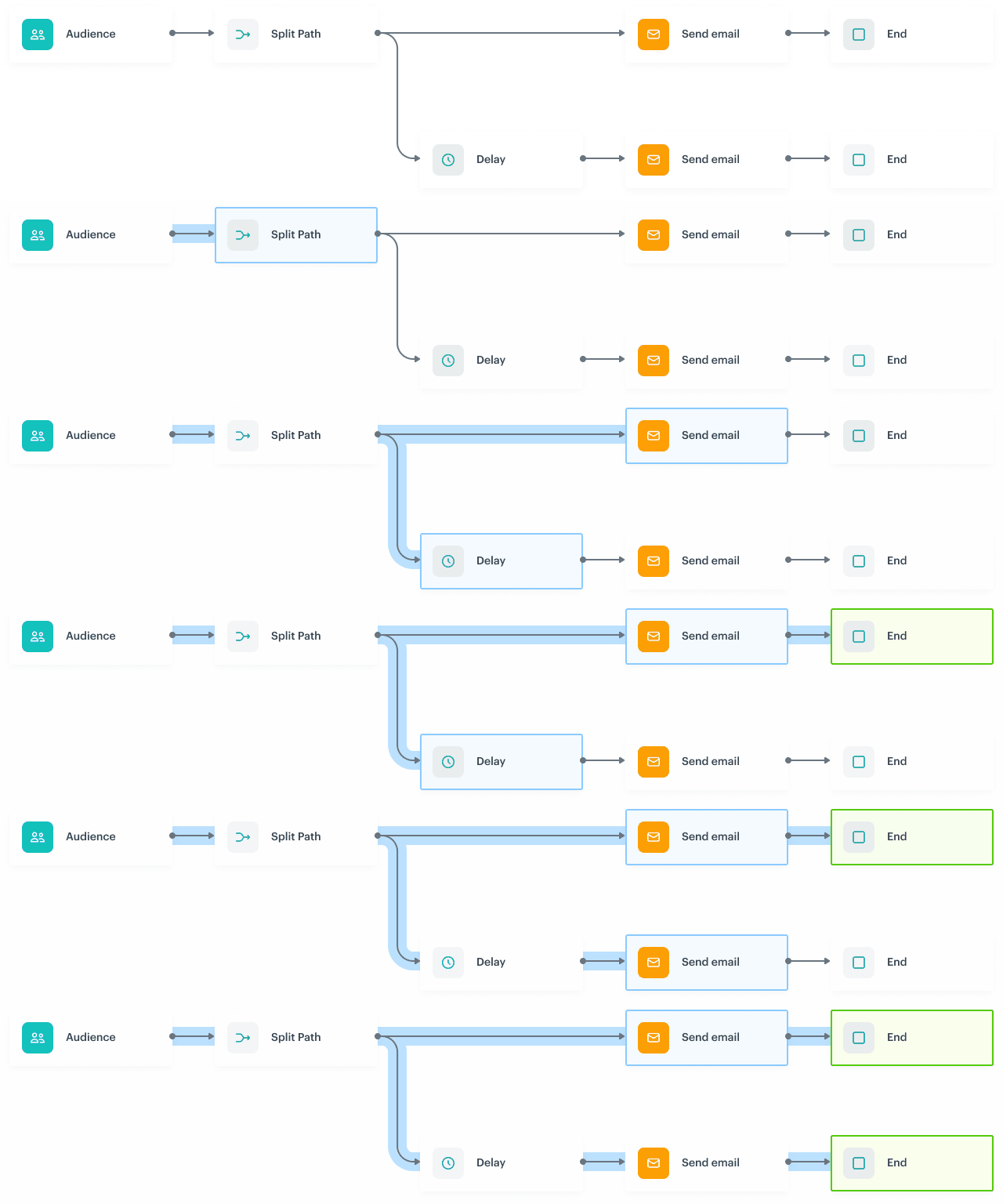
        <img src="/api/docs/image/54176ad07f146575310749eba44b7c2f42c1b327/docs/automation/_gfx/paralell.gif" alt="Paralell" class="full">  
        In the example above, the Delay path could be finished after the first path arrived to the final node.  

### Nodes

Nodes are the elements that a workflow is built with. There are seven types of nodes:

- [Triggers](/docs/automation/triggers) - When their conditions are met, they launch a workflow.
- [Conditions](/docs/automation/conditions) - Condition nodes narrow down the number of customers and eliminate those who shouldn't be the subject of further actions.
- [Actions](/docs/automation/actions) - Action nodes define the type of activity undertaken towards the audience as a response of the circumstances defined in a workflow.
- [Flow control](/docs/automation/flow-control) - These nodes organize the flow of a workflow.  
- [Transformations and data operators](/docs/automation/data-transformation-and-imports/transformations-and-data-operators) - These nodes are used to build data transformation workflows.
- [Operation](/docs/automation/operation) - These nodes let you transfer files and reuse the [transformation rules](/docs/automation/data-transformation-and-imports/creating-data-transformation)


  <div class="admonition admonition-important"><div class="admonition-icon"><svg xmlns="http://www.w3.org/2000/svg" fill="none" viewBox="0 0 24 24" stroke="currentColor" stroke-width="2.5"><path stroke-linecap="round" stroke-linejoin="round" d="M12 8v4m0 4h.01M21 12a9 9 0 11-18 0 9 9 0 0118 0z" /></svg></div><div class="admonition-body"><div class="admonition-content">

  Segmentation, expression, and aggregate definitions are cached for 20 minutes after a node with the analysis is activated in a journey.<br>
  When another journey in the Automation Hub requests a result of the same analysis in that period, the cached definition is used to calculate the results. This means that if you edit a segmentation, aggregate, or expression used in a workflow, it takes 20 minutes for the new version to start being used in journeys.<br>
  This includes definitions of segmentations, expressions, and aggregates nested in other analyses and used in Inserts.

  </div></div></div>


### Capping

To prevent some actions and processes from being unnecessarily repeated, there are several types of limits available in Automation Hub.

- Journey capping 
- Action limits
- Trigger limits
- Condition limits
- Data limits

Read more about [limits in Automation Hub](/docs/automation/automation-capping).

## Best practices
---

- **Self-optimization** - Try to come up with a workflow structure that facilitates collective rather than single and often-repeated processing. Group processing is more effective, as it decreases the number of operations between particular steps of a workflow, such as the number of connections to the database, or the number of requests. So for example, try to use conditions that check abandoned carts every 24 hours rather than using it as a trigger. 

- **Keep it simple** - However strong the temptation to create one complex workflow that would embrace the whole marketing strategy might be, such an approach is very risky. Instead of putting yourself in a position where you rely on one large process, try to create a number of smaller and simpler workflows. This way, you are able to track the soft spots of a given strategy, optimize it without impacting other workflows, and facilitate the undisturbed flow of customers from one process to the other. 

- While sticking to the "keep it simple" rule, try to create workflows in a way that customers proceed along only one path of a workflow. If your workflow contains split paths, make sure that the filter logic prevents customers from proceeding along more than one path. It's important because the system doesn't check for duplicates when customers reach the junction. To avoid situations in which a customer proceeds the same path several times and receive the same messages several times, set up the limits correctly.

- When you use a **Profile Filter** or an **Event Filter** condition, prepare an alternative path to prevent customers from being stuck in a workflow forever.

- **Holistic overview** - Try to keep a broad perspective on the workflows you create and the prerequisite materials you prepare for them, such as email templates, segmentations, metrics, web pushes, mobile pushes, and so on. Apart from that, keep in mind to schedule a **Delay** node for heavy traffic hours when you send emails. Also, if possible, do not schedule Delay nodes for the same fixed time in a number of workflows.

