This feature allows users to test outgoing integrations from workflows, specifically targeting HTTP-type integrations that connect to external APIs or services (for example, [Send offline conversion (Google Ads)](/docs/automation/integration/facebook/send-offline-transactions), [Send Custom Event (Facebook)](/docs/automation/integration/facebook/send-custom-event), [Outgoing Integration node](/docs/automation/actions/webhook-node)). You can run test requests for both business workflows and customer-oriented workflows in draft, paused, and active statuses.


This feature is available in the node settings in the **Test integration** section. This section opens a builder in which you can simulate integration requests by providing context from test profiles and historical events, enabling you to verify credential validity, connection status, and detect dynamic templating errors before deploying workflows live. Thanks to this, you can minimize errors, ensure proper rendering of dynamic values, and improve the reliability of integrations in production.  


<div class="admonition admonition-important"><div class="admonition-icon"><svg xmlns="http://www.w3.org/2000/svg" fill="none" viewBox="0 0 24 24" stroke="currentColor" stroke-width="2.5"><path stroke-linecap="round" stroke-linejoin="round" d="M12 8v4m0 4h.01M21 12a9 9 0 11-18 0 9 9 0 0118 0z" /></svg></div><div class="admonition-body"><div class="admonition-content">

Testing requests works exclusively with test data (test profiles and their generated events); testing on production data is not possible.

</div></div></div>


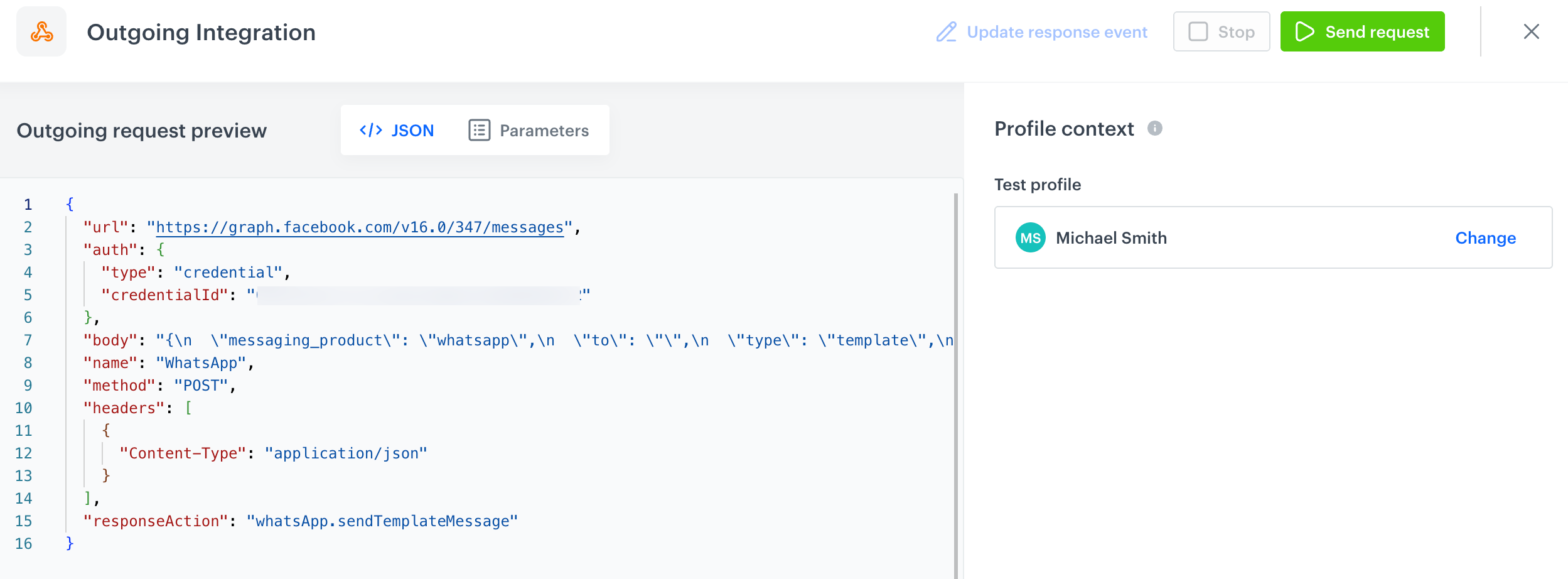
<figure><img src="/api/docs/image/54176ad07f146575310749eba44b7c2f42c1b327/docs/automation/_gfx/example-test-request.png" class="full" alt="A preview of a request body in a test request builder"><figcaption>A preview of a request body in a test request builder</figcaption></figure>

## Prerequisites
---
Your workspace must contain [test profiles](/docs/settings/configuration/test-profiles). 

## Key features
---

### Selecting data for context

Not all integrations convey dynamic data, as some requests transmit static data. However, if the request body contains dynamic references — such as [profile attributes](/developers/inserts/automation#profile-attributes) (`{{ customer.firstName }}`) or an [event reference](/developers/inserts/automation#event-parameters), then in the test request builder, you must:

- Select a **test profile** to provide context values related to profile information.
- Select an **event** (for example, `page.visit`) from the test profile’s historical events.
- If the event doesn’t exist, you can create a custom event payload for testing.


### Dynamic context rendering

If your outgoing request includes dynamic values — such as [event context](/developers/inserts/automation#event-parameters), profile attributes, item catalog fields, or analytics data — these will be rendered automatically. This makes it easy to validate your syntax, confirm business assumptions, and review the final rendered output.


### Response handling

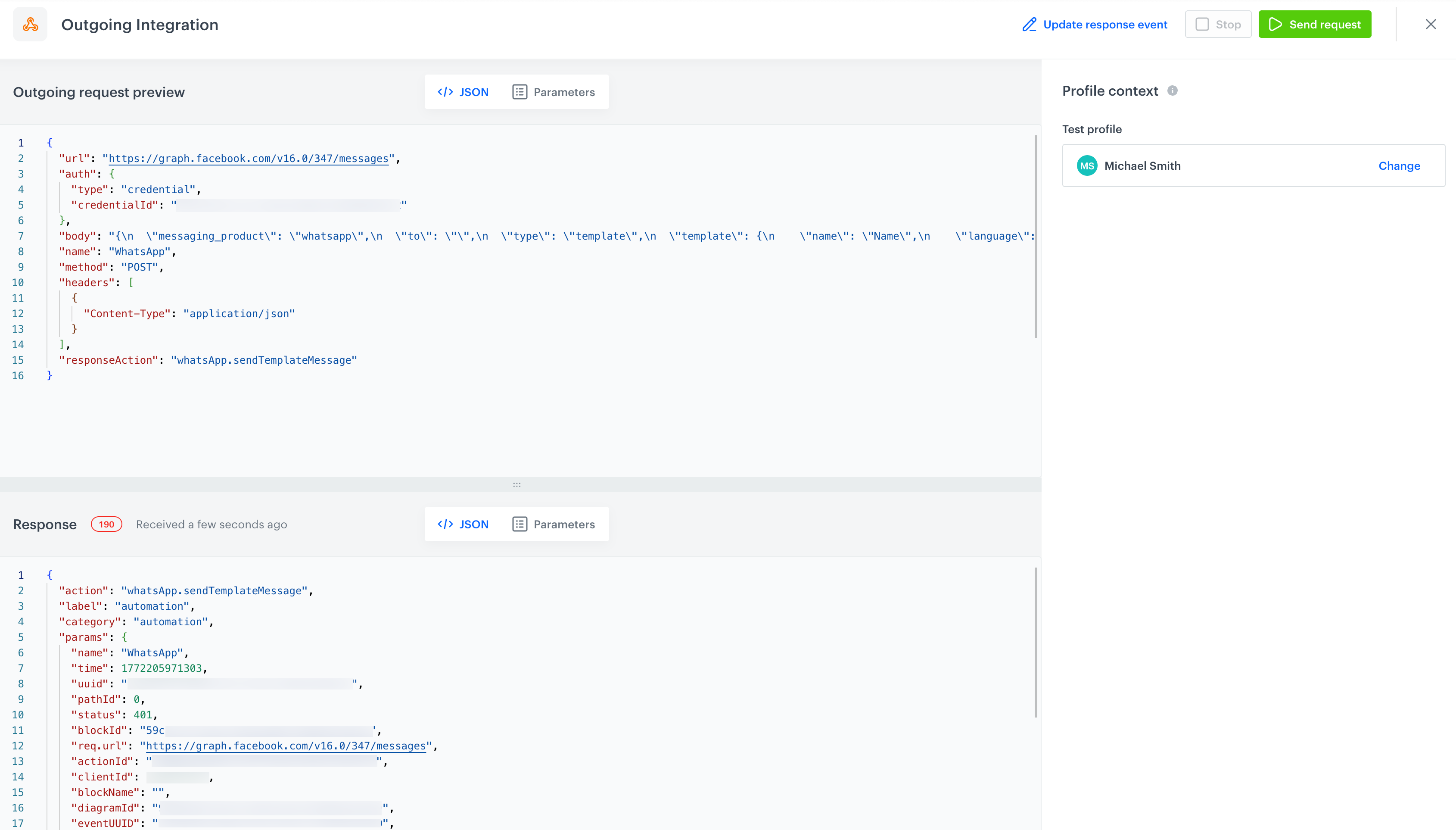
- The test result can be saved as an event in **Data Modeling Hub > Events**. Depending on the tested integration, the response action event will be either the one specified in the integration configuration (the name of the event is included in the request body preview) or the [predefined action corresponding to a given integration](/docs/assets/events/event-reference/integration).
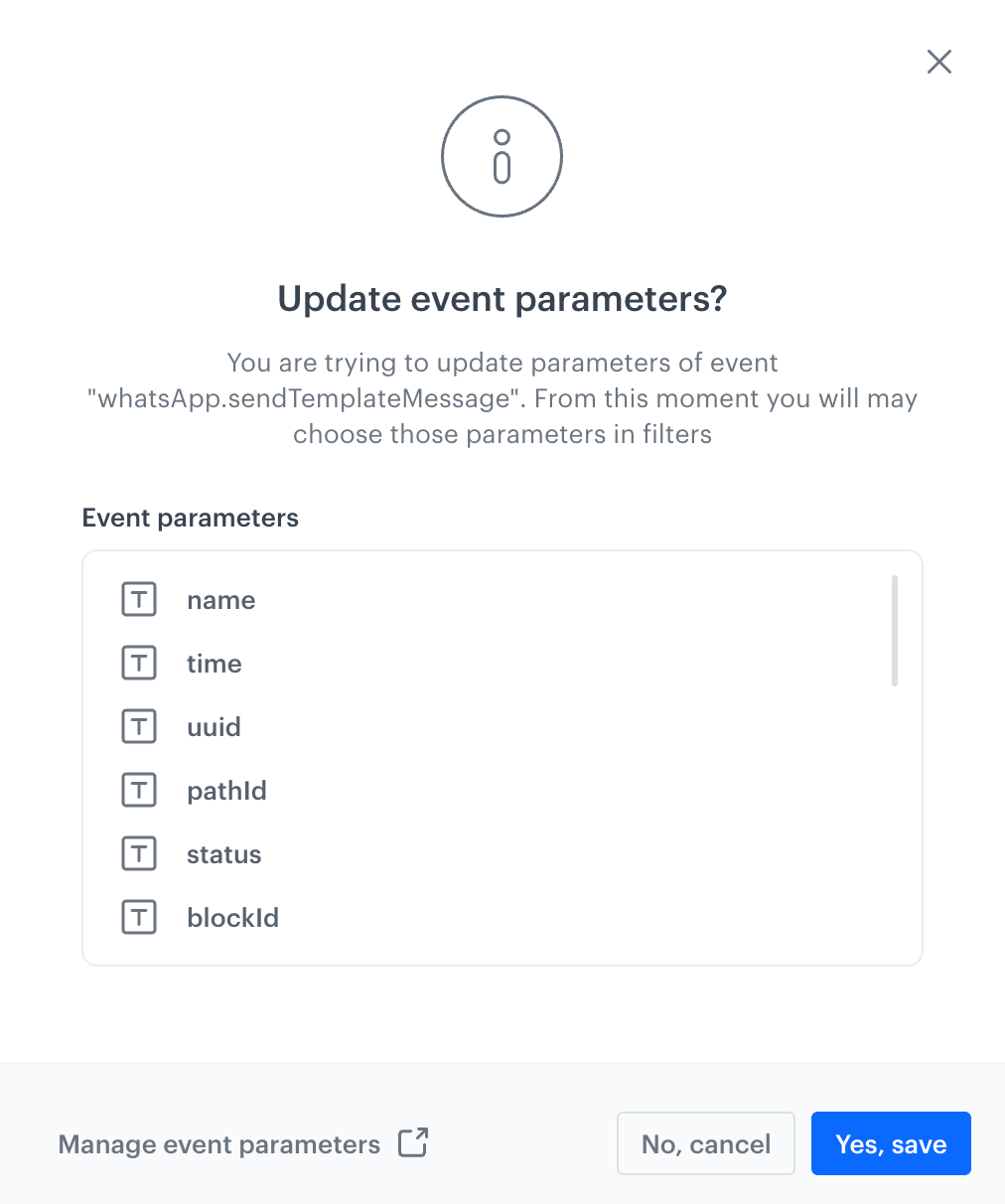
- If the response event already exists, you can update it with new parameters.
- This response event can then be reused in workflows.

### Error detection

- The test verifies credential validity and connection status (for example, expired tokens or invalid credentials).
- Dynamic templating errors (for example, missing or failing variable rendering in the integration request) are surfaced during the test.
- You get immediate feedback if values cannot be rendered properly or if the external service returns an error.

### No impact on live workflows

- Test requests are sent on a separate path that does not affect active workflows or production data.
- You can run multiple tests repeatedly without pausing or disrupting live integrations.

### Audit logging

- Every test request is logged in **Settings > Audit Log** with full traceability.
- This ensures transparency and accountability of test executions, preventing unauthorized or accidental data transmissions.


## Flow
---


<div class="admonition admonition-note"><div class="admonition-icon"><svg xmlns="http://www.w3.org/2000/svg" fill="none" viewBox="0 0 24 24" stroke="currentColor" stroke-width="2.5"><path stroke-linecap="round" stroke-linejoin="round" d="M13 16h-1v-4h-1m1-4h.01M21 12a9 9 0 11-18 0 9 9 0 0118 0z" /></svg></div><div class="admonition-body"><div class="admonition-content">

Detailed instructions on filling out the **Test integration** section is available in the documentation of the nodes in which this section is available, for example,  [Send offline conversion (Google Ads)](/docs/automation/integration/facebook/send-offline-transactions), [Send Custom Event (Facebook)](/docs/automation/integration/facebook/send-custom-event), [Outgoing Integration node](/docs/automation/actions/webhook-node)
</div></div></div>


1. Fill out the integration node configuration (for example, [Outgoing Integration node](/docs/automation/actions/webhook-node)) as usual and in the **Test integration** section, click **Send test request**.
2. In the test request builder:
   - provide a profile context, if required.
   - provide the event context, if required.  
   The right-hand panel used to supply the test with data context is built dynamically based on the integration configuration. If there are no references to profile data or event context, it may be empty (you don't need to do anything). However, if there is a reference to event context and the right-hand panel remains empty, make sure that the nodes you are referencing have assigned names.  

   
   <div class="admonition admonition-warning"><div class="admonition-icon"><svg xmlns="http://www.w3.org/2000/svg" fill="none" viewBox="0 0 24 24" stroke="currentColor" stroke-width="2.5"><path stroke-linecap="round" stroke-linejoin="round" d="M12 9v2m0 4h.01m-6.938 4h13.856c1.54 0 2.502-1.667 1.732-2.5L13.732 4c-.77-.833-1.964-.833-2.732 0L4.082 16.5c-.77.833.192 2.5 1.732 2.5z" /></svg></div><div class="admonition-body"><div class="admonition-content">

   You can [refer to the event context from the preceding nodes](/developers/inserts/automation#event-parameters) only by using the following syntax in the request body: `{{ automationPathSteps['nodeName'].event.params['paramName']`

   </div></div></div>


   <figure><img src="/api/docs/image/54176ad07f146575310749eba44b7c2f42c1b327/docs/automation/_gfx/example-test-request.png" class="full" alt="A preview of a request body in a test request builder"><figcaption>A preview of a request body in a test request builder</figcaption></figure>  

3. Send the test request to the external integration endpoint.
4. The system receives and displays the response immediately in a readable format (JSON or parameters view).  
   **Result**: An `AutomationTest` entry in the Audit Log (**Settings > Audit Log**) is generated by the `automation-bat` service.
   <figure><img src="/api/docs/image/54176ad07f146575310749eba44b7c2f42c1b327/docs/automation/_gfx/example-test-request-response.png" class="full" alt="A preview of a response to a test request in a test request builder"><figcaption>A preview of a response to a test request in a test request builder</figcaption></figure>
5. Optionally, you can update the response event with new parameters, by clicking **Update response event** in the upper-right corner. 
   <figure><img src="/api/docs/image/54176ad07f146575310749eba44b7c2f42c1b327/docs/automation/_gfx/update-response-event.png" class="medium" alt="A pop-up with a summary of updated parameters in a response event"><figcaption>A pop-up with a summary of updated parameters in a response event</figcaption></figure>
6. Confirm by clicking **Yes, save**.  
   **Result**: You can select these parameters across filters in the Synerise platform.