Event aggregates let you analyze an occurrence of an event and occurrences before it. These aggregates act like custom event parameters which can be used in filters. You can select the event aggregate in the filters (as a [property or value](/docs/analytics/i_events-parameter-value#synerise-objects)) of other analyses, allowing for its application to events beyond those included in the aggregate.

There is no preview option for this type of aggregates.

### Example

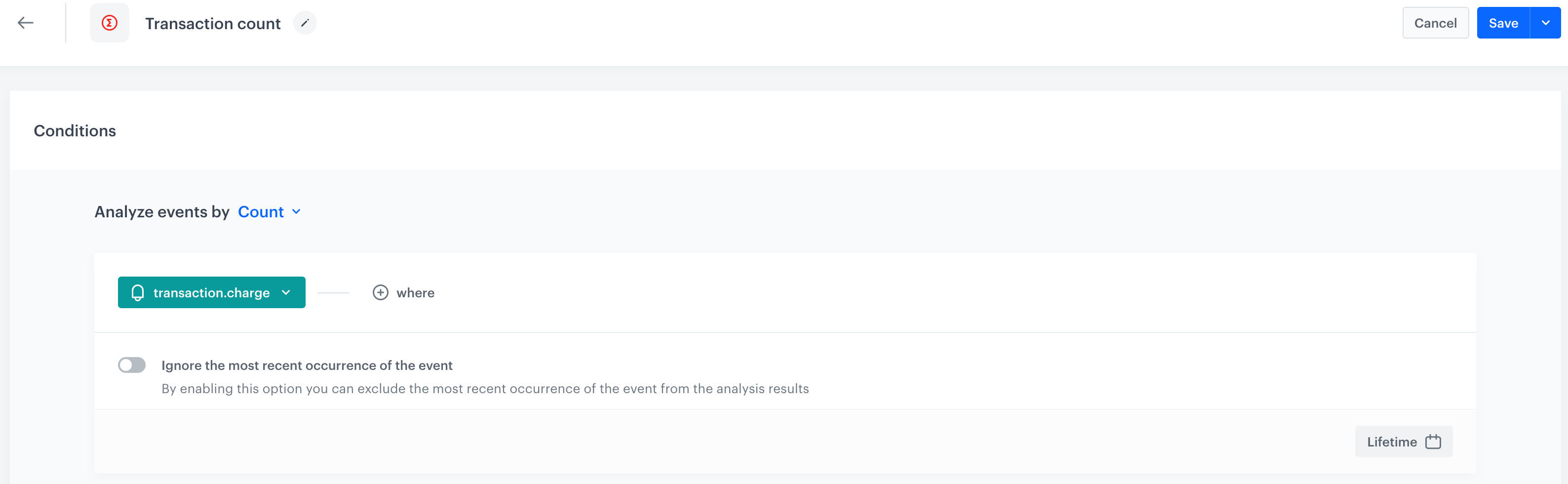
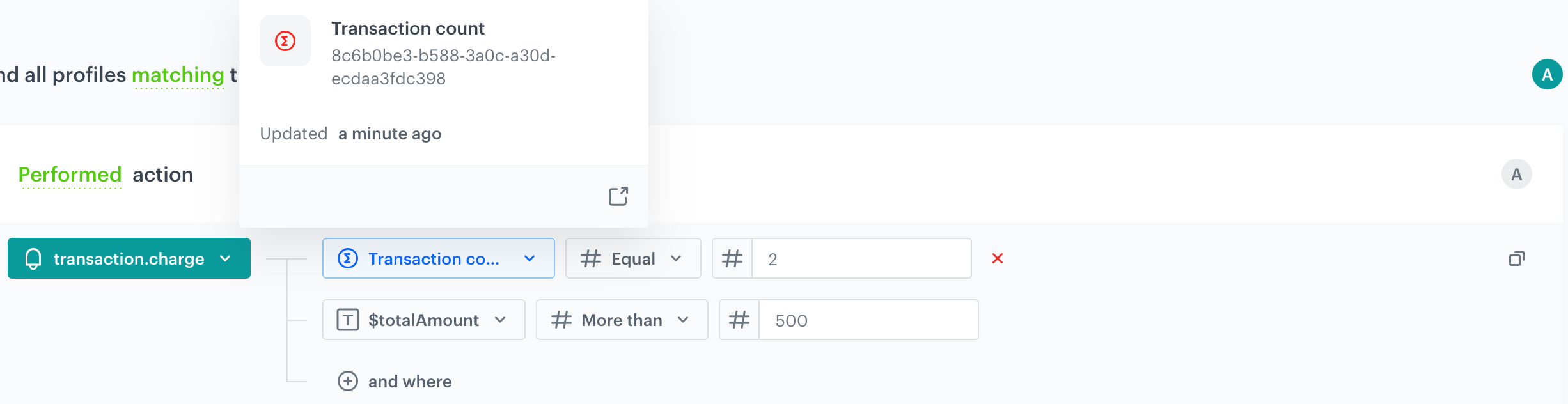
To illustrate this definition with a real-life example, let's examine the event aggregate below, which is generated from a `transaction.charge` event containing a transaction summary. This aggregate will be used in the condition of the segmentation to analyze the second transaction in the customer's history. The other condition in this segmentation is transaction value of over $500, allowing you to group customers with a second purchase value exceeding $500.

#### Transaction count

This aggregate runs from now to the past and stops at every occurrence of a `transaction.charge` event in order to return the total number of transactions made so far. 
<figure><img src="/api/docs/image/f8f2cd0367a41d3e7612c2fc2e6f0ff32442c96a/docs/analytics/_gfx/event-aggregate-count.png" class="large" alt="The configuration of an aggregate that returns the number transaction that have been made"><figcaption>The configuration of an aggregate that returns the number transaction that have been made</figcaption></figure>

Now, you can use this aggregate in a segmentation to group customers whose value of the second transaction exceeds $500. 

<figure><img src="/api/docs/image/f8f2cd0367a41d3e7612c2fc2e6f0ff32442c96a/docs/analytics/_gfx/segmentation-event-aggregate-example.png" class="full" alt="The configuration of a one-step funnel that filters in customers whose value of the second transaction exceeds $500"><figcaption>The configuration of a one-step funnel that filters in customers whose value of the second transaction exceeds $500</figcaption></figure>

## Creating an event aggregate
---

1. Go to <img src="/api/docs/image/f8f2cd0367a41d3e7612c2fc2e6f0ff32442c96a/icons/behavioral-data-hub-icon.svg" alt="Behavioral Data Hub icon" class="icon"> **Behavioral Data Hub Hub > Aggregates > Create aggregate**.
2. As the aggregate type, select **Event**.  
2. Enter the name of the aggregate.
4. By clicking the <img src="/api/docs/image/f8f2cd0367a41d3e7612c2fc2e6f0ff32442c96a/docs/analytics/_gfx/blue-arrow.png" alt="Expander arrow icon" class="icon"> button next to **Analyze events by**, define the function according to which events will be aggregated:  

    | Function | Description | Profile aggregate | Event aggregate |
    |---|---|:---:|:---:|
    | **Exists** | Returns a boolean value informing you whether a chosen event occurred in the selected time range. | <img src="/api/docs/image/f8f2cd0367a41d3e7612c2fc2e6f0ff32442c96a/icons/check-s.svg" class="icon" alt="Green checkmark"> | <img src="/api/docs/image/f8f2cd0367a41d3e7612c2fc2e6f0ff32442c96a/icons/check-s.svg" class="icon" alt="Green checkmark"> |
    | **Sum** | Returns the total value of an event parameter from all matching event occurrences. | <img src="/api/docs/image/f8f2cd0367a41d3e7612c2fc2e6f0ff32442c96a/icons/check-s.svg" class="icon" alt="Green checkmark"> | <img src="/api/docs/image/f8f2cd0367a41d3e7612c2fc2e6f0ff32442c96a/icons/check-s.svg" class="icon" alt="Green checkmark"> |
    | **Min** | Returns the minimal value of an event parameter. | <img src="/api/docs/image/f8f2cd0367a41d3e7612c2fc2e6f0ff32442c96a/icons/check-s.svg" class="icon" alt="Green checkmark"> | <img src="/api/docs/image/f8f2cd0367a41d3e7612c2fc2e6f0ff32442c96a/icons/check-s.svg" class="icon" alt="Green checkmark"> |
    | **Median** | Returns the value separating the higher half from the lower half. For example, if you examine the total value of purchases for a single profile, the aggregate returns the middle value of amounts spent. | <img src="/api/docs/image/f8f2cd0367a41d3e7612c2fc2e6f0ff32442c96a/icons/check-s.svg" class="icon" alt="Green checkmark"> | <img src="/api/docs/image/f8f2cd0367a41d3e7612c2fc2e6f0ff32442c96a/icons/check-s.svg" class="icon" alt="Green checkmark"> |
    | **Quantile** | Returns the value dividing the ordered statistical population into equal parts. For example, selecting the `80` quantile shows the value above which 20% of results are higher and the rest are lower. | <img src="/api/docs/image/f8f2cd0367a41d3e7612c2fc2e6f0ff32442c96a/icons/check-s.svg" class="icon" alt="Green checkmark"> | <img src="/api/docs/image/f8f2cd0367a41d3e7612c2fc2e6f0ff32442c96a/icons/check-s.svg" class="icon" alt="Green checkmark"> |
    | **Max** | Returns the maximal value of an event parameter. | <img src="/api/docs/image/f8f2cd0367a41d3e7612c2fc2e6f0ff32442c96a/icons/check-s.svg" class="icon" alt="Green checkmark"> | <img src="/api/docs/image/f8f2cd0367a41d3e7612c2fc2e6f0ff32442c96a/icons/check-s.svg" class="icon" alt="Green checkmark"> |
    | **Average** | Returns the average value of an event parameter. | <img src="/api/docs/image/f8f2cd0367a41d3e7612c2fc2e6f0ff32442c96a/icons/check-s.svg" class="icon" alt="Green checkmark"> | <img src="/api/docs/image/f8f2cd0367a41d3e7612c2fc2e6f0ff32442c96a/icons/check-s.svg" class="icon" alt="Green checkmark"> |
    | **Count** | Returns the number of event occurrences. | <img src="/api/docs/image/f8f2cd0367a41d3e7612c2fc2e6f0ff32442c96a/icons/check-s.svg" class="icon" alt="Green checkmark"> | <img src="/api/docs/image/f8f2cd0367a41d3e7612c2fc2e6f0ff32442c96a/icons/check-s.svg" class="icon" alt="Green checkmark"> |
    | **Count Distinct** | Returns the number of unique occurrences of an event parameter. | <img src="/api/docs/image/f8f2cd0367a41d3e7612c2fc2e6f0ff32442c96a/icons/check-s.svg" class="icon" alt="Green checkmark"> | <img src="/api/docs/image/f8f2cd0367a41d3e7612c2fc2e6f0ff32442c96a/icons/check-s.svg" class="icon" alt="Green checkmark"> |
    | **Last** | Returns the latest value of an event parameter. | <img src="/api/docs/image/f8f2cd0367a41d3e7612c2fc2e6f0ff32442c96a/icons/check-s.svg" class="icon" alt="Green checkmark"> | <img src="/api/docs/image/f8f2cd0367a41d3e7612c2fc2e6f0ff32442c96a/icons/check-s.svg" class="icon" alt="Green checkmark"> |
    | **Last - Time Window** | Works the same as Last, with the addition of a time window that limits results to event occurrences within a defined period. The maximum time window is 5 years. | <img src="/api/docs/image/f8f2cd0367a41d3e7612c2fc2e6f0ff32442c96a/icons/close-s.svg" class="icon" alt="Red checkmark"> | <img src="/api/docs/image/f8f2cd0367a41d3e7612c2fc2e6f0ff32442c96a/icons/check-s.svg" class="icon" alt="Green checkmark"> |
    | **First** | Returns the first value of an event parameter. | <img src="/api/docs/image/f8f2cd0367a41d3e7612c2fc2e6f0ff32442c96a/icons/check-s.svg" class="icon" alt="Green checkmark"> | <img src="/api/docs/image/f8f2cd0367a41d3e7612c2fc2e6f0ff32442c96a/icons/check-s.svg" class="icon" alt="Green checkmark"> |
    | **First - Time Window** | Works the same as First, with the addition of a time window that limits results to event occurrences within a defined period. The maximum time window is 5 years. | <img src="/api/docs/image/f8f2cd0367a41d3e7612c2fc2e6f0ff32442c96a/icons/close-s.svg" class="icon" alt="Red checkmark"> | <img src="/api/docs/image/f8f2cd0367a41d3e7612c2fc2e6f0ff32442c96a/icons/check-s.svg" class="icon" alt="Green checkmark"> |
    | **First Multi** | Returns a list (of a size you define) of items. The list can include parameters from only the first event, or from the first event and subsequent events if the first one did not contain enough items. | <img src="/api/docs/image/f8f2cd0367a41d3e7612c2fc2e6f0ff32442c96a/icons/check-s.svg" class="icon" alt="Green checkmark"> | <img src="/api/docs/image/f8f2cd0367a41d3e7612c2fc2e6f0ff32442c96a/icons/check-s.svg" class="icon" alt="Green checkmark"> |
    | **First Multi - Time Window** | Works the same as First Multi, with the addition of a time window that limits results to event occurrences within a defined period. The maximum time window is 5 years. | <img src="/api/docs/image/f8f2cd0367a41d3e7612c2fc2e6f0ff32442c96a/icons/close-s.svg" class="icon" alt="Red checkmark"> | <img src="/api/docs/image/f8f2cd0367a41d3e7612c2fc2e6f0ff32442c96a/icons/check-s.svg" class="icon" alt="Green checkmark"> |
    | **Last Multi** | Returns a list (of a size you define) of items. The list can include parameters from only the last event, or from the last event and preceding events if the last one did not contain enough items. | <img src="/api/docs/image/f8f2cd0367a41d3e7612c2fc2e6f0ff32442c96a/icons/check-s.svg" class="icon" alt="Green checkmark"> | <img src="/api/docs/image/f8f2cd0367a41d3e7612c2fc2e6f0ff32442c96a/icons/check-s.svg" class="icon" alt="Green checkmark"> |
    | **Last Multi - Time Window** | Works the same as Last Multi, with the addition of a time window that limits results to event occurrences within a defined period. The maximum time window is 5 years. | <img src="/api/docs/image/f8f2cd0367a41d3e7612c2fc2e6f0ff32442c96a/icons/close-s.svg" class="icon" alt="Red checkmark"> | <img src="/api/docs/image/f8f2cd0367a41d3e7612c2fc2e6f0ff32442c96a/icons/check-s.svg" class="icon" alt="Green checkmark"> |
    | **Top** | Returns the most popular occurrence of an event parameter. | <img src="/api/docs/image/f8f2cd0367a41d3e7612c2fc2e6f0ff32442c96a/icons/check-s.svg" class="icon" alt="Green checkmark"> | <img src="/api/docs/image/f8f2cd0367a41d3e7612c2fc2e6f0ff32442c96a/icons/check-s.svg" class="icon" alt="Green checkmark"> |
    | **Bottom** | Returns the rarest occurrence of an event parameter. | <img src="/api/docs/image/f8f2cd0367a41d3e7612c2fc2e6f0ff32442c96a/icons/check-s.svg" class="icon" alt="Green checkmark"> | <img src="/api/docs/image/f8f2cd0367a41d3e7612c2fc2e6f0ff32442c96a/icons/check-s.svg" class="icon" alt="Green checkmark"> |
    | **Top Multi** | Returns a list (of a size you define) of items, showing the most popular occurrences of an event parameter. | <img src="/api/docs/image/f8f2cd0367a41d3e7612c2fc2e6f0ff32442c96a/icons/check-s.svg" class="icon" alt="Green checkmark"> | <img src="/api/docs/image/f8f2cd0367a41d3e7612c2fc2e6f0ff32442c96a/icons/check-s.svg" class="icon" alt="Green checkmark"> |
    | **Bottom Multi** | Returns a list (of a size you define) of items, showing the least popular occurrences of an event parameter. | <img src="/api/docs/image/f8f2cd0367a41d3e7612c2fc2e6f0ff32442c96a/icons/check-s.svg" class="icon" alt="Green checkmark"> | <img src="/api/docs/image/f8f2cd0367a41d3e7612c2fc2e6f0ff32442c96a/icons/check-s.svg" class="icon" alt="Green checkmark"> |


5. From the **Choose event** dropdown list, select an event. 
6. In the **Size** field, define the number of items to return.
7. For Time Window functions (for example, **First - Time Window**), in the **Time window** field, enter a numeric value and select the interval (**days**, **hours**, or **minutes**). The maximum allowed time window is 5 years.
8. If you want to be more specific and analyze a particular aspect of the event, click the **Where** button, to select [event parameters](/docs/analytics/i_events-parameter-value).  
9. To exclude the event occurrence for which you are calculating this aggregate, enable **Ignore the most recent occurrence of the event**.  
10. To determine the time range from which the data will be analyzed, click the calendar icon.
11. To complete the process, click the **Save** button.