## Related terms

- workspace
- user
- settings
- segmentation
- campaign

See the [glossary](/glossary.md) for definitions.

---

# System Agent


<div class="admonition admonition-important"><div class="admonition-icon"><svg xmlns="http://www.w3.org/2000/svg" fill="none" viewBox="0 0 24 24" stroke="currentColor" stroke-width="2.5"><path stroke-linecap="round" stroke-linejoin="round" d="M12 8v4m0 4h.01M21 12a9 9 0 11-18 0 9 9 0 0118 0z" /></svg></div><div class="admonition-body"><div class="admonition-content">

This feature is available in [public preview](/docs/log-in-and-navigate-synerise-platform#public-preview) mode.

</div></div></div>


In the **System Agent** settings, you decide what the [System Agent](/docs/ai-hub/synerise-system-agent/introduction-to-the-system-agent) can access in your workspace and which actions it can perform there. For information about costs, see [Usage limits](/docs/ai-hub/synerise-system-agent/introduction-to-the-system-agent#usage-limits).

## Prerequisites
---

Only users with the PROFILE_ADMIN role can change these settings. Users with other roles can only view them.

## Access levels
---

| Option | What the agent can do |
|---|---|
| **Disabled** | The agent isn't available in the workspace. |
| **Documentation only** (default) | The agent answers questions using only the Synerise documentation. It has no access to the resources in your workspace, so you can't ask it, for example, about a segmentation you created. |
| **Workspace resources** | The agent uses the documentation and the resources in your workspace, such as campaigns, analyses, and profiles. For example, you can ask it to preview a segmentation or list your campaigns. |


<div class="admonition admonition-note"><div class="admonition-icon"><svg xmlns="http://www.w3.org/2000/svg" fill="none" viewBox="0 0 24 24" stroke="currentColor" stroke-width="2.5"><path stroke-linecap="round" stroke-linejoin="round" d="M13 16h-1v-4h-1m1-4h.01M21 12a9 9 0 11-18 0 9 9 0 0118 0z" /></svg></div><div class="admonition-body"><div class="admonition-content">

Before you select **Workspace resources**, see [System Agent FAQ](/docs/ai-hub/synerise-system-agent/faq) for information about how the System Agent processes data.

</div></div></div>


## Allowed actions
---

When you select **Workspace resources**, you also decide which actions the agent can perform on the resources:

- **Read** - the agent can browse and view resources, for example, summarize a campaign or preview a segmentation. This action is always enabled.
- **Write** - the agent can also create and edit resources, for example, build a segmentation. This action is optional.

The **Delete** and **Execute** actions can't be selected.

### Allowed actions and user permissions

The agent acts on behalf of the user who chats with it, so it can only perform actions that are both allowed in the workspace settings and permitted by that user's [permissions](/docs/settings/identity-access-management/permissions). For example, if a user has no access to campaigns, the agent can't access campaigns for that user, even if **Read** is allowed in the workspace.

When **Workspace resources** is selected, the **AI Agents** > **Platform Agent** permission appears in the role permission matrix. By default, this permission is granted to the [basic roles](/docs/settings/identity-access-management/permissions#basic-roles) (PROFILE_ADMIN and PROFILE_MANAGER) and to the [predefined Synerise roles](/docs/settings/identity-access-management/permissions#predefined-synerise-roles), so users with these roles can use the agent with workspace resources without any changes to their roles. For custom roles, you must grant the permission yourself in the [role permission matrix](/docs/settings/identity-access-management/permissions#permissions). You can also use the permission to limit the agent's actions for specific roles. For example, you can allow **Write** in the workspace, but let only selected roles create and edit resources through the agent. For details, see ["AI Hub permissions"](/docs/settings/identity-access-management/permissions/ai-hub-permissions#use-the-system-agent-with-workspace-resources). Changes to the **Platform Agent** permission in a role can take up to 5 minutes to take effect.


<div class="admonition admonition-note"><div class="admonition-icon"><svg xmlns="http://www.w3.org/2000/svg" fill="none" viewBox="0 0 24 24" stroke="currentColor" stroke-width="2.5"><path stroke-linecap="round" stroke-linejoin="round" d="M13 16h-1v-4h-1m1-4h.01M21 12a9 9 0 11-18 0 9 9 0 0118 0z" /></svg></div><div class="admonition-body"><div class="admonition-content">

The permissions of predefined Synerise roles are fixed, so you can't remove the **Platform Agent** permission from these roles.

</div></div></div>


## Configuring access
---

1. Go to <img src="/api/docs/image/12052597dc27ec063ccaf318d610624067207409/icons/settings-icon.svg" alt="Settings icon" class="icon"> **Settings > System Agent**.
2. Click **Show**.
3. In the **Access** section, select **Disabled**, **Documentation only**, or **Workspace resources**. For details about the options, see [Access levels](#access-levels).
4. Optionally, if you selected **Workspace resources**, in the **Allowed actions** section, select **Write** to let the agent create and edit resources.
5. Click **Apply**.  
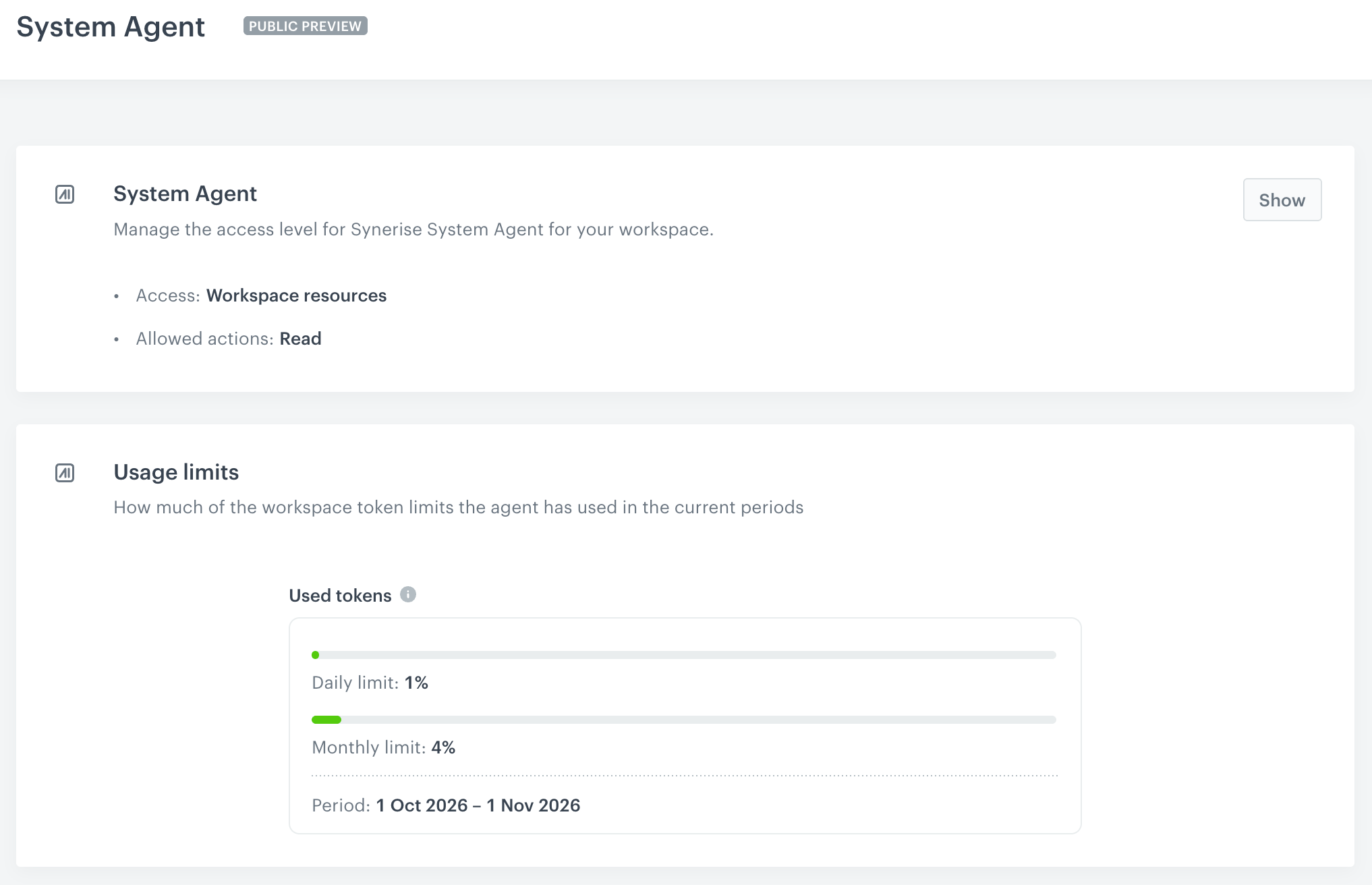
    **Result**: The settings summary shows the selected access level and allowed actions.

Below the settings, the **Usage limits** section shows how much of the workspace token limits the agent has used in the current periods. For details, see [Usage limits](/docs/ai-hub/synerise-system-agent/introduction-to-the-system-agent#usage-limits).

<figure><img src="/api/docs/image/12052597dc27ec063ccaf318d610624067207409/docs/settings/_gfx/system-agent-settings.png" class="large" alt="System Agent settings page with a summary of the access level and allowed actions, and the Usage limits section showing the percentage of the daily and monthly token limits used in the current period"><figcaption>System Agent settings and usage limits</figcaption></figure>

## Related articles
---

- [Introduction to the System Agent](/docs/ai-hub/synerise-system-agent/introduction-to-the-system-agent)
- [System Agent FAQ](/docs/ai-hub/synerise-system-agent/faq)
- [Synerise MCP Server](/docs/settings/agentic-ai/external-ai-clients-mcp)
