This article describes the [permissions](/docs/settings/identity-access-management/permissions) needed to access the [Settings](/docs/settings).
To set the permissions, you need to create a user role or edit an existing one and open the Permissions matrix. In the matrix, the permissions are collected into groups. Some of these groups can be expanded to set more granular permissions.
## How to read this list
In this article, each heading describes an action. The permissions for that action are described in the form of breadcrumbs.
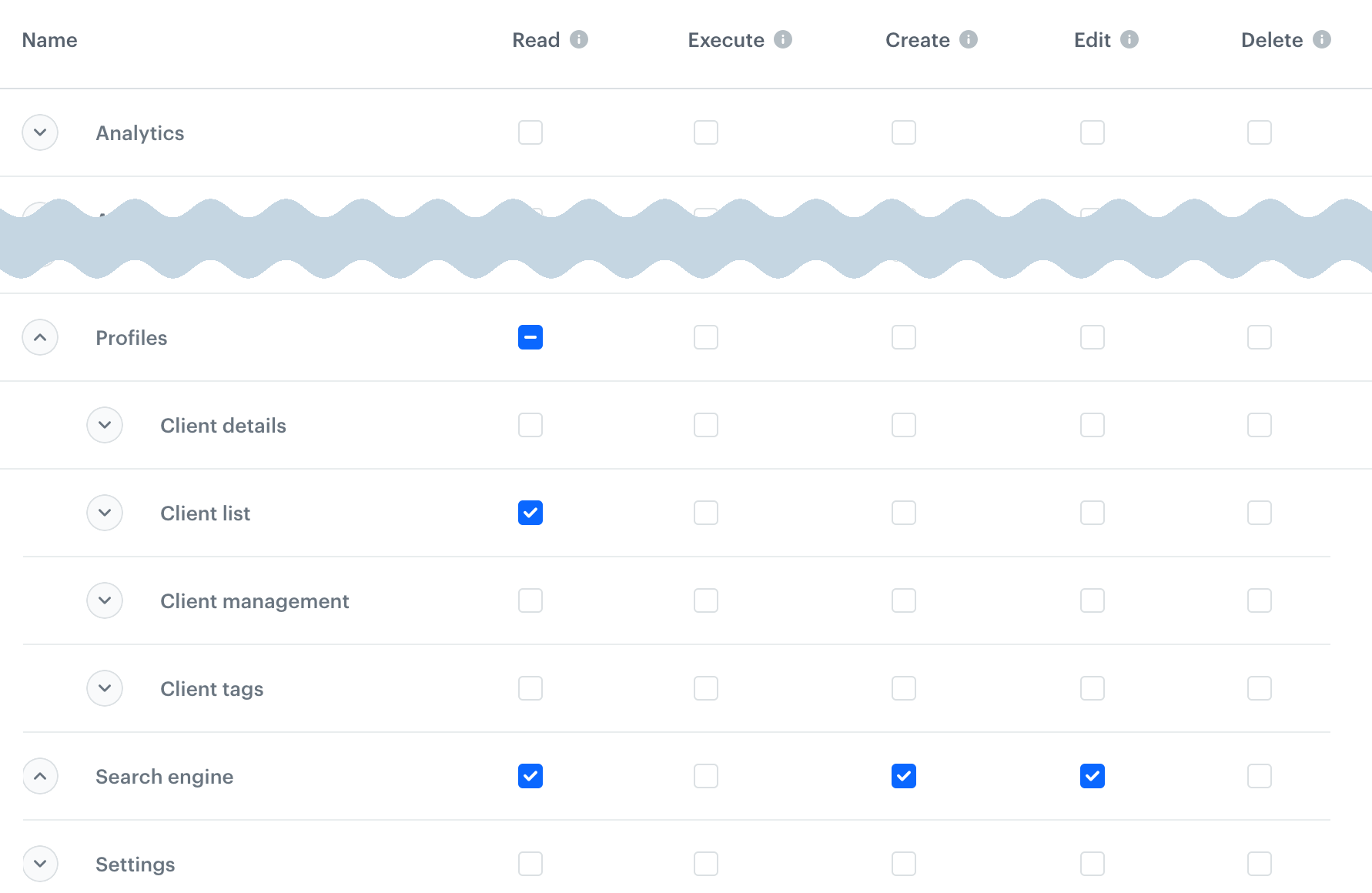
**For example**, if the required permissions are:
- **Profiles** > **Client list**: `read`
- **Search engine**: `create`, `edit`
The permission matrix needs to look like this:
Permission example, see description above figure.
The `read` permission is not explicitly listed when any higher permission is required - the portal enables it automatically.
## I want to...
### access the settings module
No permissions are required, but you can only see your own account data.
### see and edit my own account (for example, password)
No permissions are required.
### access workspace details
**Settings** > **Business Profile**: `edit` - required to see and change the settings
### access the Audit Log
**Audit Log**: `read`
### access the cloning logs
**Settings** > **Cloning jobs**: `read`
### clone objects
In the source and target workspace, you need:
- **Cloning**: `create`
- `create` and `edit` permissions for the cloned object and all nested objects that will also be cloned in the process
To learn more about cloning, see [Cloning objects to other workspaces](/docs/settings/workspace/cloning-objects).
### see and accept approval requests
- **Settings** > **Approval settings**:
- `read`: to see the list of approval requests
- `edit`: to approve templates
- **Templates**: `read` - required to see the template
- **Communication** > _campaign type_: `create` - required to see the template
### manage workspace users
Only users with the PROFILE_MANAGER or PROFILE_ADMIN role can invite new users and assign users to groups.
- **Settings** > **Business Profile** > Managed domains: `read`
- **Settings** > **Users**:
- `read` - to see the user list
- `edit` - to change the expiration time of an existing user's access
- `delete` - to revoke a user's access
### manage user roles and groups
- **Settings** > **Users**: `read` - to see the user list when working with roles
- **Settings** > **Roles**:
- `read`- to see the roles
- `create`, `edit` - to create and update roles and groups
- **If [PII protection](/docs/settings/pii-protection) is enabled**: to see the PII settings for a role, you need **Settings** > **PII settings**: `read`
### manage access control
- **Settings** > **User Access Management** > **_category_**: `create`, `edit` - required to see and change a setting
- **Settings** > **Business Profile** > **Managed Domains**: `create` - required to open the Access Control menu
- **Settings** > **Users**: `read` - required to open the Access Control menu
- **Settings** > **Customers IAM** > **Password Policy**: `create`, `edit` - required to change password settings
### manage API keys
- **Settings** > **API keys**:
- `read` - to see the list and key details
- `edit` - to update key settings
- `create` - to create a key
- `delete` - to delete a key
- **If [PII protection](/docs/settings/pii-protection) is enabled**: to see the PII settings for the API key, you need **Settings** > **PII settings**: `read`
### manage connections
Connections are used in [Automation Hub](/docs/automation). They are used in many nodes in the [Integration](/docs/automation/integration) section and described there.
- **Settings** > **Connections**:
- `read` - to see connections
- `edit` - to update connections
- `create` - to create connections
- `delete` - to delete connections
- **Settings** > **API key**: `read` - to access the list of API keys in connections which require them
### manage tracking codes
**Settings** > **Tracker**:
- `read` - to see the list of tracking codes and code details
- `create` - to create and update tracking codes
- `delete` - to delete tracking codes
### manage integrations in the Apps & Services menu
**Settings** > **Integrations**:
- `read` - to see the current settings
- `create`, `edit` - to configure integrations
- `delete` - to disable integrations
### manage authentication for mobile apps
- **Settings** > **Business Profile**: `read` - required to access the settings
- **Settings** > **Customer IAM** >
- **Account confirmation**:
- `read`- to see the settings
- `edit` - to update the settings
- **OAuth**:
- `read` - to see settings in the **Authentication methods** section
- `edit` - to change those settings
- **Locking policy**:
- `read` - to see settings in the **Access control** section
- `edit` - to change those settings
- **Templates**:
- `read` - to see email templates and select them for use
- `create` - to create new templates
- **Assets** > **Code pools**: `read` - to select a code pool for loyalty card assignment
- **Settings** > **API keys**:
- `read` - to see keys in the **Simple authentication** section
- `create`, `edit` - to create new keys
### manage Global Control Group
- **Settings** > **Global Control Group**:
- `read` - to see the settings
- `edit` - to update the settings
- **Analytics** > **Segmentations**: `read` - to see available segmentations and the control group size
### configure AI Engine
You need these permissions to access the menu and see the item feeds:
- **Settings** > **AI engine configuration**: `read`
- **Assets** > **Catalogs**: `read`
- **Search engine**: `read`
Additionally:
- To open item feed details:
- **Communications** > **Recommendations**: `read`
- To create and edit item feeds:
- **Settings** > **AI engine configuration**: `create`, `edit`
- To see Predictions configuration:
- **Settings** > **Predictions**: `read`
- **Predictions**: `read`
- To update Predictions configuration:
- **Settings** > **AI engine configuration**: `edit`
- **Settings** > **Predictions**: `edit`
- To configure Time Optimizer:
- **Settings** > **AI engine configuration**: `edit`
### manage approval services
These settings only manage services needed to set up approvals. The settings required to use the approvals are described in ["See and accept approval requests"](#see-and-accept-approval-requests).
- **Settings** > Approval settings:
- `read` - to see the service settings
- `create`, `edit` - to create and edit services
- `create`, `edit` - to delete a service
- **Settings** > **Users**: `read` - to see the list of users required for the settings
- **Analytics** (any): `create` - to create an approval service
### manage communication limits
**Settings** > **Newsletter**: `edit` - to see and edit the limits
### manage email accounts
- **Settings** > **Mail accounts**: `read`
- **Settings** > **Integrations**:
- `read` - to see the settings
- `create`, `edit` - to add and edit accounts
- `execute` - to send test emails
- `delete` - to delete accounts
### manage SMS accounts
**Settings** > **Integrations**:
- `read` - to see the settings
- `create`, `edit` - to add and edit accounts
- `delete` - to delete accounts
### manage Web push accounts
**Settings** > **Integrations**:
- `read` - to see the settings
- `create`, `edit` - to add and edit accounts
- `delete` - to delete accounts
### manage calendars
- **Settings** > **Calendar**: `create`, `edit`
- **Settings** > **Calendars import**: `create`, `edit`
### manage identifiers
- **Assets** > **Attributes**: `read`
- **Settings** > **Identification and merging rules**:
- `read` - to see the settings
- `edit` - to update the settings
### export data
- **Profiles** > **Client details** (all): `read`
- **Settings** > **Export**:
- `read` - to see the list of exports and download data
- `create` - to create an export
### use encryption keys
**Settings** > **Encryption keys**:
- `read` - to see and use encryption keys
- `edit`, `create` - to create encryption keys
- `edit` - to revoke encryption keys
To learn about encryption keys, see [Data exchange encryption](/docs/settings/data-exchange-encryption).