 **Settings > Authentication for mobile apps**.
1. In the **Unknown device control** section, click **Show**.
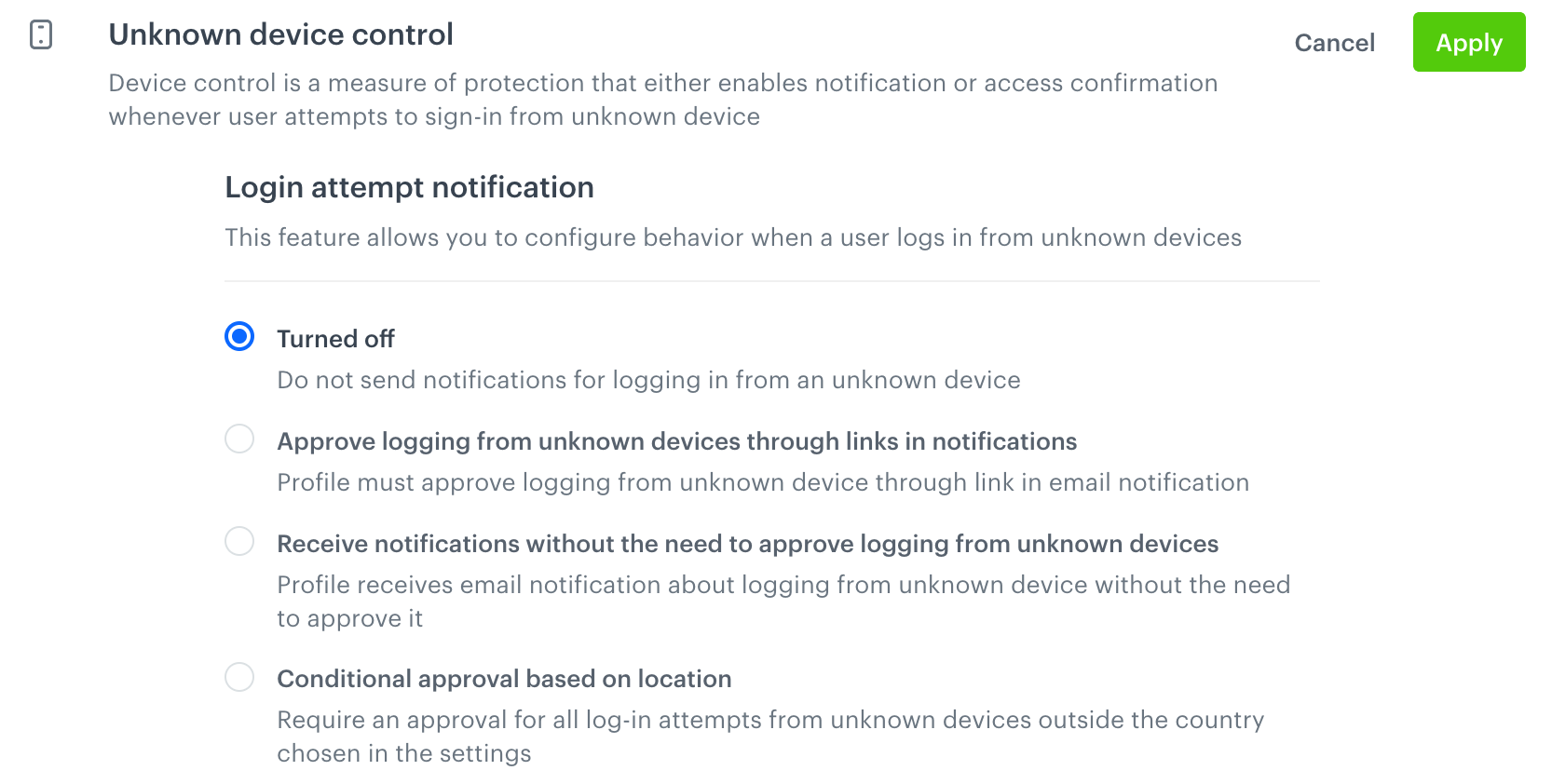
1. Select one of the modes:
- **Turned off** (default setting)
- Authentication is allowed even if a given device was never used before.
- Customers are not notified when a new device is used.
- **Approve logging from unknown devices through links in notifications**
When a new device is used, the customer receives an email. They can only complete the log-in by clicking the link in the email.
- **Receive notifications without the need to approve logging from unknown devices**
When a new device is used, the log-in proceeds without any confirmation, but the customer receives an email notification.
- **Conditional approval based on location**
- If a log-in attempt from an unknown device is detected in the country selected as the default location, authentication is allowed.
- If a log-in attempt from an unknown device is detected outside the country selected as the default location, authentication requires a confirmation by clicking a link in an email.
**Settings > Authentication for mobile apps**.
1. In the **Unknown device control** section, click **Show**.
1. Select one of the modes:
- **Turned off** (default setting)
- Authentication is allowed even if a given device was never used before.
- Customers are not notified when a new device is used.
- **Approve logging from unknown devices through links in notifications**
When a new device is used, the customer receives an email. They can only complete the log-in by clicking the link in the email.
- **Receive notifications without the need to approve logging from unknown devices**
When a new device is used, the log-in proceeds without any confirmation, but the customer receives an email notification.
- **Conditional approval based on location**
- If a log-in attempt from an unknown device is detected in the country selected as the default location, authentication is allowed.
- If a log-in attempt from an unknown device is detected outside the country selected as the default location, authentication requires a confirmation by clicking a link in an email.
| Data Insert | Description |
|---|---|
| {% customer PARAM %} | Inserts a profile's parameter or attribute, for example {% customer firstName %}; {% customer attributes.customAttribute %} |
| {{email}} | Inserts the customer's email, the same that was used in the log-in attempt. |
| {{device_control_url}} | Inserts the link that authorizes the device. |
| {{device_control_token}} | Inserts the token that authorizes the device. Can be used to build your own URL for use with a mobile app. |
| {{country}} | Inserts the country of the log-in attempt (based on IP geolocation). |
| {{ip}} | Inserts the IP address of the device used in the log-in attempt. |
| {{login_time}} | Inserts the time of the log-in attempt. |

<!DOCTYPE HTML PUBLIC "-//W3C//DTD HTML 4.01 Transitional//EN" "http://www.w3.org/TR/html4/loose.dtd"> <html lang="en"> <head> <meta http-equiv="Content-Type" content="text/html; charset=UTF-8"> <meta name="viewport" content="width=device-width, initial-scale=1"> <meta http-equiv="X-UA-Compatible" content="IE=edge"> <style type="text/css"> /* Outlines the grid, remove when sending */ table td { /* border: 1px solid cyan; */ } /* CLIENT-SPECIFIC STYLES */ body, table, td, a { -webkit-text-size-adjust: 100%; -ms-text-size-adjust: 100%; } table, td { mso-table-lspace: 0pt; mso-table-rspace: 0pt; } img { -ms-interpolation-mode: bicubic; } /* RESET STYLES */ img { border: 0; outline: none; text-decoration: none; } table { border-collapse: collapse !important; } body { margin: 0 !important; padding: 0 !important; width: 100% !important; } /* iOS BLUE LINKS */ a[x-apple-data-detectors] { color: inherit !important; text-decoration: none !important; font-size: inherit !important; font-family: Arial, sans-serif !important; font-weight: inherit !important; line-height: inherit !important; } /* ANDROID CENTER FIX */ div[style*="margin: 16px 0;"] { margin: 0 !important; } </style> </head> <body style="margin:0; padding:0; background-color:#fff;"> <center> <div style="background-color:#fff; max-width: 600px; margin: auto;"> <!--[if mso]> <table role="presentation" width="600" cellspacing="0" cellpadding="0" border="0" align="center"> <tr> <td> <![endif]--> <table width="600" cellspacing="0" cellpadding="0" border="0" align="center" style="max-width:600px; width:100%;" bgcolor="#FFFFFF"> <tr> <td align="center" valign="middle" style="padding:5px 10px;"> <table width="600" cellspacing="0" cellpadding="0" border="0" align="center" style="max-width:600px; width:100%;"> <tr> <td align="center" valign="middle" style="padding:10px;"></td> </tr> </table> </td> </tr> </table> <table width="600" cellspacing="0" cellpadding="0" border="0" align="center" style="max-width:600px; width:100%;" bgcolor="#FFFFFF"> <tr> <td align="center" valign="middle" style="padding:5px 10px;"> <table width="600" cellspacing="0" cellpadding="0" border="0" align="center" style="max-width:600px; width:100%;"> <tr> <td width="200" align="left" valign="middle" style="padding:10px;"> <img alt="Synerise" src="https://upload.snrcdn.net/9bbb7035ecf3565cceed63d321d7d9b31236850d/default/origin/030d47ff7f497bf302d3248641a216ad.png" style="width: 140px;"> </td> <td width="200" align="center" valign="middle" style="padding:10px;"></td> <td width="200" align="center" valign="middle" style="padding:10px;"></td> </tr> </table> </td> </tr> </table> <table width="600" cellspacing="0" cellpadding="0" border="0" align="center" style="max-width:600px; width:100%;" bgcolor="#FFFFFF"> <tr> <td align="center" valign="middle" style="padding:5px 10px;"> <table width="600" cellspacing="0" cellpadding="0" border="0" align="center" style="max-width:600px; width:100%;"> <tr> <td width="400" align="left" valign="middle" style="padding:10px; font-weight: bold; font-size: 28px; font-family: Arial, sans-serif; color:#384350"> Hi, {% user firstname %} </td> <td width="200" align="center" valign="middle" style="padding:10px;"> <img width="91" src="https://upload.snrcdn.net/9bbb7035ecf3565cceed63d321d7d9b31236850d/default/origin/38937e17f860105ccfea3df81558734b.png" alt="" /> </td> </tr> <tr> <td width="400" align="left" valign="middle" style="padding:10px; font-weight: bold; font-size: 22px; font-family: Arial, sans-serif; color:#384350"> There was a new sign-in attempt to your account. Was it you? </td> </tr> </table> </td> </tr> </table> <table width="600" cellspacing="0" cellpadding="0" border="0" align="center" style="max-width:600px; width:100%;" bgcolor="#FFFFFF"> <tr> <td align="center" valign="middle" style="padding:5px 10px;"> <table width="600" cellspacing="0" cellpadding="0" border="0" align="center" style="max-width:600px; width:100%;"> <tr> <td width="400" align="left" valign="middle" style="padding:10px; font-size: 14px;font-family: Arial, sans-serif; color:#384350;line-height: 22px;"> We have spotted a new sign in to your account <strong>{{ email }}</strong>. We want to make sure that it was you. Have a look at the details: <br><br></td> <td width="200" align="center" valign="middle" style="padding:10px;"></td> </tr> </table> </td> </tr> </table> <table width="600" cellspacing="0" cellpadding="0" border="0" align="center" style="max-width:600px; width:100%;" bgcolor="#FFFFFF"> <tr> <td align="center" valign="middle" style="padding:5px 10px;"> <table width="600" cellspacing="0" cellpadding="0" border="0" align="center" style="max-width:600px; width:100%;"> <tr> <td width="50" align="left" valign="middle" style="padding:10px 10px 0px 10px; font-size: 14px;font-family: Arial, sans-serif; color:#384350;line-height: 22px;"> <strong>Country:</strong> </td> <td width="550" align="left" valign="middle" style="padding:10px 10px 0px 10px; font-size: 14px;font-family: Arial, sans-serif; color:#384350;line-height: 22px;"> {{ country }}</td> </tr> <tr> <td width="50" align="left" valign="middle" style="padding:10px 10px 0px 10px; font-size: 14px;font-family: Arial, sans-serif; color:#384350;line-height: 22px;"> <strong>IP address:</strong> </td> <td width="550" align="left" valign="middle" style="padding:10px 10px 0px 10px; font-size: 14px;font-family: Arial, sans-serif; color:#384350;line-height: 22px;"> {{ ip }}</td> </tr> <tr> <td width="50" align="left" valign="middle" style="padding:0px 10px 10px 10px; font-size: 14px;font-family: Arial, sans-serif; color:#384350;line-height: 22px;"> <strong>Time: </strong> </td> <td width="550" align="left" valign="middle" style="padding:0px 10px 10px 10px; font-size: 14px;font-family: Arial, sans-serif; color:#384350;line-height: 22px;"> {{ login_time }}</td> </tr> </table> </td> </tr> </table> <table width="600" cellspacing="0" cellpadding="0" border="0" align="center" style="max-width:600px; width:100%;" bgcolor="#FFFFFF"> <tr> <td align="center" valign="middle" style="padding:5px 10px;"> <table width="600" cellspacing="0" cellpadding="0" border="0" align="center" style="max-width:600px; width:100%;"> <tr> <td align="left" valign="middle" style="padding:10px; font-size: 14px;font-family: Arial, sans-serif; color:#384350;line-height: 22px;"> If it was you and you recognize this sign-in attempt, please click the link below to confirm that device (this will enable it for sign-in to your account) </td> </tr> </table> </td> </tr> </table> <table width="600" cellspacing="0" cellpadding="0" border="0" align="center" style="max-width:600px; width:100%;" bgcolor="#FFFFFF"> <tr> <td align="center" valign="middle" style="padding:5px 10px;"> <table width="600" cellspacing="0" cellpadding="0" border="0" align="center" style="max-width:600px; width:100%;"> <tr> <td align="center" valign="middle" style="padding:10px; font-size: 14px;font-family: Arial, sans-serif; color:#384350;line-height: 22px;"> <a href="{{ device_control_url }}" style="color: #0c68ff; font-weight: bold;">Yes, it's me!</a> </tr> </table> </td> </tr> </table> <table width="600" cellspacing="0" cellpadding="0" border="0" align="center" style="max-width:600px; width:100%;" bgcolor="#FFFFFF"> <tr> <td align="center" valign="middle" style="padding:5px 10px;"> <table width="600" cellspacing="0" cellpadding="0" border="0" align="center" style="max-width:600px; width:100%;"> <tr> <td align="left" valign="middle" style="padding:10px; font-size: 14px;font-family: Arial, sans-serif; color:#384350;line-height: 22px;"> If you find results related to you on either of these sites, we strongly recommend to review your passwords across all online services you use. </td> </tr> </table> </td> </tr> </table> <table width="600" cellspacing="0" cellpadding="0" border="0" align="center" style="max-width:600px; width:100%;" bgcolor="#FFFFFF"> <tr> <td align="center" valign="middle" style="padding:5px 10px;"> <table width="600" cellspacing="0" cellpadding="0" border="0" align="center" style="max-width:600px; width:100%;"> <tr> <td align="left" valign="middle" style="padding:10px; font-size: 14px;font-family: Arial, sans-serif; color:#384350;line-height: 22px;"> <a href="#" style="color: #0c68ff; font-weight: bold;">haveibeenpwned.com</a><br /> <a href="#" style="color: #0c68ff; font-weight: bold;">monitor.firefox.com</a> </td> </tr> </table> </td> </tr> </table> <table width="600" cellspacing="0" cellpadding="0" border="0" align="center" style="max-width:600px; width:100%;" bgcolor="#FFFFFF"> <tr> <td align="center" valign="middle" style="padding:5px 10px;"> <table width="600" cellspacing="0" cellpadding="0" border="0" align="center" style="max-width:600px; width:100%;"> <tr> <td align="left" valign="middle" style="padding:10px; font-size: 14px;font-family: Arial, sans-serif; color:#384350;line-height: 22px;"> If you do not recognize this sign-in attempt, we recommend you to change your password directly in the app and also check if your email account is not a part of any known password leaks. You can do that at: </td> </tr> </table> </td> </tr> </table> <table width="600" cellspacing="0" cellpadding="0" border="0" align="center" style="max-width:600px; width:100%;" bgcolor="#FFFFFF"> <tr> <td align="center" valign="middle" style="padding:5px 10px;"> <table width="600" cellspacing="0" cellpadding="0" border="0" align="center" style="max-width:600px; width:100%;"> <tr> <td align="center" valign="middle" style="padding:10px;"></td> </tr> </table> </td> </tr> </table> <table width="600" cellspacing="0" cellpadding="0" border="0" align="center" style="max-width:600px; width:100%;" bgcolor="#FFFFFF"> <tr> <td align="center" valign="middle" style="padding:5px 10px;"> <table width="600" cellspacing="0" cellpadding="0" border="0" align="center" style="max-width:600px; width:100%;"> <tr> <td align="left" valign="middle" style="padding:10px; font-size: 14px;font-family: Arial, sans-serif; color:#384350;line-height: 22px;"> Have a good day,<br /> The Synerise Team </td> </tr> </table> </td> </tr> </table> <table width="600" cellspacing="0" cellpadding="0" border="0" align="center" style="max-width:600px; width:100%;" bgcolor="#FFFFFF"> <tr> <td align="center" valign="middle" style="padding:5px 10px;"> <table width="600" cellspacing="0" cellpadding="0" border="0" align="center" style="max-width:600px; width:100%;"> <tr> <td align="center" valign="middle" style="padding:10px;"> <hr style="border: 1px solid #e5e5e5;" /> </td> </tr> </table> </td> </tr> </table> <table width="600" cellspacing="0" cellpadding="0" border="0" align="center" style="max-width:600px; width:100%;" bgcolor="#FFFFFF"> <tr> <td align="center" valign="middle" style="padding:5px 10px;"> <table width="600" cellspacing="0" cellpadding="0" border="0" align="center" style="max-width:600px; width:100%;"> <tr> <td align="left" valign="middle" style="padding:10px; font-size: 14px;font-family: Arial, sans-serif; color:#b6bdc4;line-height: 22px;"> Have questions? The Synerise Team is here to help.<br /> Please contact <a href="support@synerise.com" style="color: #0c68ff; font-weight: bold;">support@synerise.com</a> </td> </tr> </table> </td> </tr> </table> <table width="600" cellspacing="0" cellpadding="0" border="0" align="center" style="max-width:600px; width:100%;" bgcolor="#FFFFFF"> <tr> <td align="center" valign="middle" style="padding:5px 10px;"> <table width="600" cellspacing="0" cellpadding="0" border="0" align="center" style="max-width:600px; width:100%;"> <tr> <td width="25" align="center" valign="middle" style="padding:10px;"> <a href="https://www.facebook.com/synerise"><img src="https://upload.snrcdn.net/9bbb7035ecf3565cceed63d321d7d9b31236850d/default/origin/778ed84375be209b05f2fb333f7bbb16.png" width="20" style="margin:0; padding:0; border:none; display:block;" border="0" class="img" alt=""></a> </td> <td width="25" align="center" valign="middle" style="padding:10px;"> <a href="https://www.youtube.com/c/Synerise/"><img src="https://upload.snrcdn.net/9bbb7035ecf3565cceed63d321d7d9b31236850d/default/origin/eadde6165d2421eb5f98d9654006d9ee.png" width="20" style="margin:0; padding:0; border:none; display:block;" border="0" class="img" alt=""></a> </td> <td width="25" align="center" valign="middle" style="padding:10px;"> <a href="https://www.linkedin.com/company/synerise/"><img src="https://upload.snrcdn.net/9bbb7035ecf3565cceed63d321d7d9b31236850d/default/origin/42126cc8dfb468a79dc4b37c45082b78.png" width="20" style="margin:0; padding:0; border:none; display:block;" border="0" class="img" alt=""></a> </td> <td width="25" align="center" valign="middle" style="padding:10px;"> <a href="https://twitter.com/synerise"><img src="https://upload.snrcdn.net/9bbb7035ecf3565cceed63d321d7d9b31236850d/default/origin/f2512acc01435e5cd10edfc0e419908b.png" width="20" style="margin:0; padding:0; border:none; display:block;" border="0" class="img" alt=""></a> </td> <td width="500" align="center" valign="middle" style="padding:10px;"></td> </tr> </table> </td> </tr> </table> <table width="600" cellspacing="0" cellpadding="0" border="0" align="center" style="max-width:600px; width:100%;" bgcolor="#FFFFFF"> <tr> <td align="center" valign="middle" style="padding:5px 10px;"> <table width="600" cellspacing="0" cellpadding="0" border="0" align="center" style="max-width:600px; width:100%;"> <tr> <td align="left" valign="middle" style="padding:10px; font-size: 10px;font-family: Arial, sans-serif; color:#b6bdc4;line-height: 16px;">The administrator of your personal data is SYNERISE S.A. with its registered office at ul. Lubostroń 1, 30-383 Kraków,entered into the Register of Entrepreneurs of the National Court Register by the District Court for Kraków-Śródmieście in Kraków, 11th Commercial Division of the National Court Register under the number: 0000468034. You can contact the Administrator regarding the protection of personal data by email at the followingaddress: <a target="_blank" href="mailto:iod@synerise.com">iod@synerise.com</a>, or by traditional mail sent to the address of the Administrator's seat, i.e. SYNERISE S.A. ul. Lubostroń 1.30-383 Kraków. </td> </tr> </table> </td> </tr> </table> <table width="600" cellspacing="0" cellpadding="0" border="0" align="center" style="max-width:600px; width:100%;" bgcolor="#FFFFFF"> <tr> <td align="center" valign="middle" style="padding:5px 10px;"> <table width="600" cellspacing="0" cellpadding="0" border="0" align="center" style="max-width:600px; width:100%;"> <tr> <td align="center" valign="middle" style="padding:10px;"></td> </tr> </table> </td> </tr> </table> <!--[if mso]> </td> </tr> </table> <![endif]--> </div> </center> </body> </html>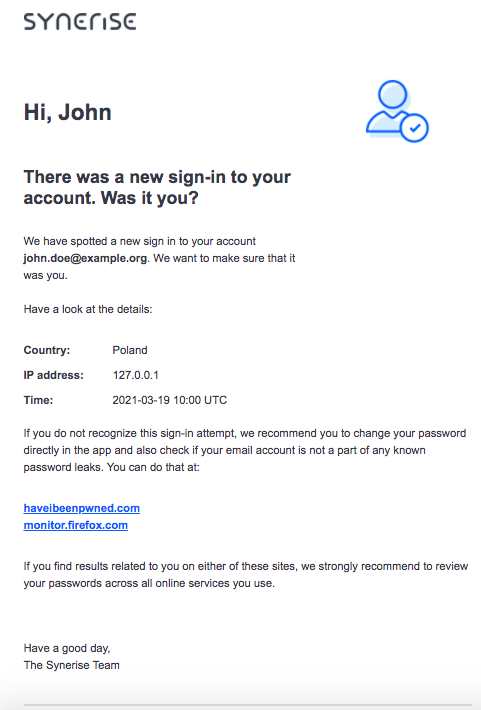
<!DOCTYPE HTML PUBLIC "-//W3C//DTD HTML 4.01 Transitional//EN" "http://www.w3.org/TR/html4/loose.dtd"> <html lang="en"> <head> <meta http-equiv="Content-Type" content="text/html; charset=UTF-8"> <meta name="viewport" content="width=device-width, initial-scale=1"> <meta http-equiv="X-UA-Compatible" content="IE=edge"> <style type="text/css"> /* Outlines the grid, remove when sending */ table td { /* border: 1px solid cyan; */ } /* CLIENT-SPECIFIC STYLES */ body, table, td, a { -webkit-text-size-adjust: 100%; -ms-text-size-adjust: 100%; } table, td { mso-table-lspace: 0pt; mso-table-rspace: 0pt; } img { -ms-interpolation-mode: bicubic; } /* RESET STYLES */ img { border: 0; outline: none; text-decoration: none; } table { border-collapse: collapse !important; } body { margin: 0 !important; padding: 0 !important; width: 100% !important; } /* iOS BLUE LINKS */ a[x-apple-data-detectors] { color: inherit !important; text-decoration: none !important; font-size: inherit !important; font-family: Arial, sans-serif !important; font-weight: inherit !important; line-height: inherit !important; } /* ANDROID CENTER FIX */ div[style*="margin: 16px 0;"] { margin: 0 !important; } </style> </head> <body style="margin:0; padding:0; background-color:#fff;"> <center> <div style="background-color:#fff; max-width: 600px; margin: auto;"> <!--[if mso]> <table role="presentation" width="600" cellspacing="0" cellpadding="0" border="0" align="center"> <tr> <td> <![endif]--> <table width="600" cellspacing="0" cellpadding="0" border="0" align="center" style="max-width:600px; width:100%;" bgcolor="#FFFFFF"> <tr> <td align="center" valign="middle" style="padding:5px 10px;"> <table width="600" cellspacing="0" cellpadding="0" border="0" align="center" style="max-width:600px; width:100%;"> <tr> <td align="center" valign="middle" style="padding:10px;"></td> </tr> </table> </td> </tr> </table> <table width="600" cellspacing="0" cellpadding="0" border="0" align="center" style="max-width:600px; width:100%;" bgcolor="#FFFFFF"> <tr> <td align="center" valign="middle" style="padding:5px 10px;"> <table width="600" cellspacing="0" cellpadding="0" border="0" align="center" style="max-width:600px; width:100%;"> <tr> <td width="200" align="left" valign="middle" style="padding:10px;"> <img alt="Synerise" src="https://upload.snrcdn.net/9bbb7035ecf3565cceed63d321d7d9b31236850d/default/origin/030d47ff7f497bf302d3248641a216ad.png" style="width: 140px;"> </td> <td width="200" align="center" valign="middle" style="padding:10px;"></td> <td width="200" align="center" valign="middle" style="padding:10px;"></td> </tr> </table> </td> </tr> </table> <table width="600" cellspacing="0" cellpadding="0" border="0" align="center" style="max-width:600px; width:100%;" bgcolor="#FFFFFF"> <tr> <td align="center" valign="middle" style="padding:5px 10px;"> <table width="600" cellspacing="0" cellpadding="0" border="0" align="center" style="max-width:600px; width:100%;"> <tr> <td width="400" align="left" valign="middle" style="padding:10px; font-weight: bold; font-size: 28px; font-family: Arial, sans-serif; color:#384350"> Hi, {% user firstname %} </td> <td width="200" align="center" valign="middle" style="padding:10px;"> <img width="91" src="https://upload.snrcdn.net/9bbb7035ecf3565cceed63d321d7d9b31236850d/default/origin/38937e17f860105ccfea3df81558734b.png" alt="" /> </td> </tr> <tr> <td width="400" align="left" valign="middle" style="padding:10px; font-weight: bold; font-size: 22px; font-family: Arial, sans-serif; color:#384350"> There was a new sign-in to your account. Was it you? </td> </tr> </table> </td> </tr> </table> <table width="600" cellspacing="0" cellpadding="0" border="0" align="center" style="max-width:600px; width:100%;" bgcolor="#FFFFFF"> <tr> <td align="center" valign="middle" style="padding:5px 10px;"> <table width="600" cellspacing="0" cellpadding="0" border="0" align="center" style="max-width:600px; width:100%;"> <tr> <td width="400" align="left" valign="middle" style="padding:10px; font-size: 14px;font-family: Arial, sans-serif; color:#384350;line-height: 22px;"> We have spotted a new sign in to your account <strong>{{ email }}</strong>. We want to make sure that it was you. <br><br>Have a look at the details: </td> <td width="200" align="center" valign="middle" style="padding:10px;"></td> </tr> </table> </td> </tr> </table> <table width="600" cellspacing="0" cellpadding="0" border="0" align="center" style="max-width:600px; width:100%;" bgcolor="#FFFFFF"> <tr> <td align="center" valign="middle" style="padding:5px 10px;"> <table width="600" cellspacing="0" cellpadding="0" border="0" align="center" style="max-width:600px; width:100%;"> <tr> <td width="50" align="left" valign="middle" style="padding:10px 10px 0px 10px; font-size: 14px;font-family: Arial, sans-serif; color:#384350;line-height: 22px;"> <strong>Country:</strong> </td> <td width="550" align="left" valign="middle" style="padding:10px 10px 0px 10px; font-size: 14px;font-family: Arial, sans-serif; color:#384350;line-height: 22px;"> {{ country }}</td> </tr> <tr> <td width="50" align="left" valign="middle" style="padding:10px 10px 0px 10px; font-size: 14px;font-family: Arial, sans-serif; color:#384350;line-height: 22px;"> <strong>IP address:</strong> </td> <td width="550" align="left" valign="middle" style="padding:10px 10px 0px 10px; font-size: 14px;font-family: Arial, sans-serif; color:#384350;line-height: 22px;"> {{ ip }}</td> </tr> <tr> <td width="50" align="left" valign="middle" style="padding:0px 10px 10px 10px; font-size: 14px;font-family: Arial, sans-serif; color:#384350;line-height: 22px;"> <strong>Time: </strong> </td> <td width="550" align="left" valign="middle" style="padding:0px 10px 10px 10px; font-size: 14px;font-family: Arial, sans-serif; color:#384350;line-height: 22px;"> {{ login_time }}</td> </tr> </table> </td> </tr> </table> <table width="600" cellspacing="0" cellpadding="0" border="0" align="center" style="max-width:600px; width:100%;" bgcolor="#FFFFFF"> <tr> <td align="center" valign="middle" style="padding:5px 10px;"> <table width="600" cellspacing="0" cellpadding="0" border="0" align="center" style="max-width:600px; width:100%;"> <tr> <td align="left" valign="middle" style="padding:10px; font-size: 14px;font-family: Arial, sans-serif; color:#384350;line-height: 22px;"> If you do not recognize this sign-in attempt, we recommend you to change your password directly in the app and also check if your email account is not a part of any known password leaks. You can do that at: </td> </tr> </table> </td> </tr> </table> <table width="600" cellspacing="0" cellpadding="0" border="0" align="center" style="max-width:600px; width:100%;" bgcolor="#FFFFFF"> <tr> <td align="center" valign="middle" style="padding:5px 10px;"> <table width="600" cellspacing="0" cellpadding="0" border="0" align="center" style="max-width:600px; width:100%;"> <tr> <td align="left" valign="middle" style="padding:10px; font-size: 14px;font-family: Arial, sans-serif; color:#384350;line-height: 22px;"> <a href="#" style="color: #0c68ff; font-weight: bold;">haveibeenpwned.com</a><br /> <a href="#" style="color: #0c68ff; font-weight: bold;">monitor.firefox.com</a> </td> </tr> </table> </td> </tr> </table> <table width="600" cellspacing="0" cellpadding="0" border="0" align="center" style="max-width:600px; width:100%;" bgcolor="#FFFFFF"> <tr> <td align="center" valign="middle" style="padding:5px 10px;"> <table width="600" cellspacing="0" cellpadding="0" border="0" align="center" style="max-width:600px; width:100%;"> <tr> <td align="left" valign="middle" style="padding:10px; font-size: 14px;font-family: Arial, sans-serif; color:#384350;line-height: 22px;"> If you find results related to you on either of these sites, we strongly recommend to review your passwords across all online services you use. </td> </tr> </table> </td> </tr> </table> <table width="600" cellspacing="0" cellpadding="0" border="0" align="center" style="max-width:600px; width:100%;" bgcolor="#FFFFFF"> <tr> <td align="center" valign="middle" style="padding:5px 10px;"> <table width="600" cellspacing="0" cellpadding="0" border="0" align="center" style="max-width:600px; width:100%;"> <tr> <td align="center" valign="middle" style="padding:10px;"></td> </tr> </table> </td> </tr> </table> <table width="600" cellspacing="0" cellpadding="0" border="0" align="center" style="max-width:600px; width:100%;" bgcolor="#FFFFFF"> <tr> <td align="center" valign="middle" style="padding:5px 10px;"> <table width="600" cellspacing="0" cellpadding="0" border="0" align="center" style="max-width:600px; width:100%;"> <tr> <td align="left" valign="middle" style="padding:10px; font-size: 14px;font-family: Arial, sans-serif; color:#384350;line-height: 22px;"> Have a good day,<br /> The Synerise Team </td> </tr> </table> </td> </tr> </table> <table width="600" cellspacing="0" cellpadding="0" border="0" align="center" style="max-width:600px; width:100%;" bgcolor="#FFFFFF"> <tr> <td align="center" valign="middle" style="padding:5px 10px;"> <table width="600" cellspacing="0" cellpadding="0" border="0" align="center" style="max-width:600px; width:100%;"> <tr> <td align="center" valign="middle" style="padding:10px;"> <hr style="border: 1px solid #e5e5e5;" /> </td> </tr> </table> </td> </tr> </table> <table width="600" cellspacing="0" cellpadding="0" border="0" align="center" style="max-width:600px; width:100%;" bgcolor="#FFFFFF"> <tr> <td align="center" valign="middle" style="padding:5px 10px;"> <table width="600" cellspacing="0" cellpadding="0" border="0" align="center" style="max-width:600px; width:100%;"> <tr> <td align="left" valign="middle" style="padding:10px; font-size: 14px;font-family: Arial, sans-serif; color:#b6bdc4;line-height: 22px;"> Have questions? The Synerise Team is here to help.<br /> Please contact <a href="support@synerise.com" style="color: #0c68ff; font-weight: bold;">support@synerise.com</a> </td> </tr> </table> </td> </tr> </table> <table width="600" cellspacing="0" cellpadding="0" border="0" align="center" style="max-width:600px; width:100%;" bgcolor="#FFFFFF"> <tr> <td align="center" valign="middle" style="padding:5px 10px;"> <table width="600" cellspacing="0" cellpadding="0" border="0" align="center" style="max-width:600px; width:100%;"> <tr> <td width="25" align="center" valign="middle" style="padding:10px;"> <a href="https://www.facebook.com/synerise"><img src="https://upload.snrcdn.net/9bbb7035ecf3565cceed63d321d7d9b31236850d/default/origin/778ed84375be209b05f2fb333f7bbb16.png" width="20" style="margin:0; padding:0; border:none; display:block;" border="0" class="img" alt=""></a> </td> <td width="25" align="center" valign="middle" style="padding:10px;"> <a href="https://www.youtube.com/c/Synerise/"><img src="https://upload.snrcdn.net/9bbb7035ecf3565cceed63d321d7d9b31236850d/default/origin/eadde6165d2421eb5f98d9654006d9ee.png" width="20" style="margin:0; padding:0; border:none; display:block;" border="0" class="img" alt=""></a> </td> <td width="25" align="center" valign="middle" style="padding:10px;"> <a href="https://www.linkedin.com/company/synerise/"><img src="https://upload.snrcdn.net/9bbb7035ecf3565cceed63d321d7d9b31236850d/default/origin/42126cc8dfb468a79dc4b37c45082b78.png" width="20" style="margin:0; padding:0; border:none; display:block;" border="0" class="img" alt=""></a> </td> <td width="25" align="center" valign="middle" style="padding:10px;"> <a href="https://twitter.com/synerise"><img src="https://upload.snrcdn.net/9bbb7035ecf3565cceed63d321d7d9b31236850d/default/origin/f2512acc01435e5cd10edfc0e419908b.png" width="20" style="margin:0; padding:0; border:none; display:block;" border="0" class="img" alt=""></a> </td> <td width="500" align="center" valign="middle" style="padding:10px;"></td> </tr> </table> </td> </tr> </table> <table width="600" cellspacing="0" cellpadding="0" border="0" align="center" style="max-width:600px; width:100%;" bgcolor="#FFFFFF"> <tr> <td align="center" valign="middle" style="padding:5px 10px;"> <table width="600" cellspacing="0" cellpadding="0" border="0" align="center" style="max-width:600px; width:100%;"> <tr> <td align="left" valign="middle" style="padding:10px; font-size: 10px;font-family: Arial, sans-serif; color:#b6bdc4;line-height: 16px;">The administrator of your personal data is SYNERISE S.A. with its registered office at ul. Lubostroń 1, 30-383 Kraków,entered into the Register of Entrepreneurs of the National Court Register by the District Court for Kraków-Śródmieście in Kraków, 11th Commercial Division of the National Court Register under the number: 0000468034. You can contact the Administrator regarding the protection of personal data by email at the followingaddress: <a target="_blank" href="mailto:iod@synerise.com">iod@synerise.com</a>, or by traditional mail sent to the address of the Administrator's seat, i.e. SYNERISE S.A. ul. Lubostroń 1.30-383 Kraków. </td> </tr> </table> </td> </tr> </table> <table width="600" cellspacing="0" cellpadding="0" border="0" align="center" style="max-width:600px; width:100%;" bgcolor="#FFFFFF"> <tr> <td align="center" valign="middle" style="padding:5px 10px;"> <table width="600" cellspacing="0" cellpadding="0" border="0" align="center" style="max-width:600px; width:100%;"> <tr> <td align="center" valign="middle" style="padding:10px;"></td> </tr> </table> </td> </tr> </table> <!--[if mso]> </td> </tr> </table> <![endif]--> </div> </center> </body> </html> **Settings > Authentication for mobile apps**.
2. In the **Fail 2 ban settings** section, click **Show**.
3. Define the settings for each stage of the ban:
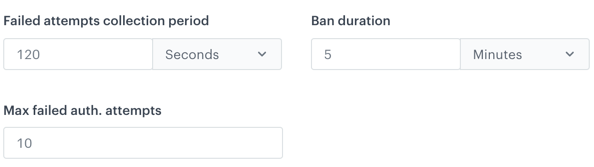
1. In the **Failed attempts collection period**, enter the time during which the login attempts are tracked. It is counted from the first attempt of logging in. If the allowed number of failed attempts is exceeded in this period, the ban is applied.
2. In the **Ban duration**, enter the time during which a customer can't log in to the application.
3. In the **Max failed auth. attempts**, enter the number of failed attempts allowed in the selected period.
**Example**:
**Settings > Authentication for mobile apps**.
2. In the **Fail 2 ban settings** section, click **Show**.
3. Define the settings for each stage of the ban:
1. In the **Failed attempts collection period**, enter the time during which the login attempts are tracked. It is counted from the first attempt of logging in. If the allowed number of failed attempts is exceeded in this period, the ban is applied.
2. In the **Ban duration**, enter the time during which a customer can't log in to the application.
3. In the **Max failed auth. attempts**, enter the number of failed attempts allowed in the selected period.
**Example**: