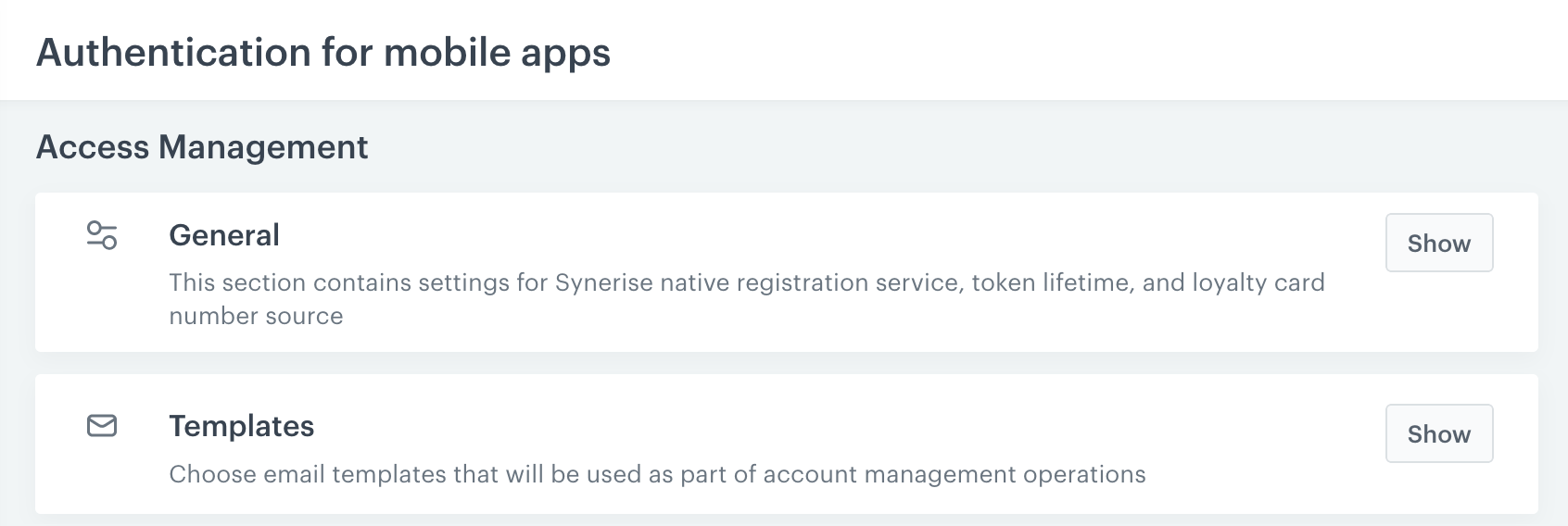
 **Settings > Authentication for mobile apps**.
1. Open the general settings by clicking **Show** in the **General** section.
4. Configure the settings as described below and to save them, click **Apply**.
### Loyalty card assignment
**Settings > Authentication for mobile apps**.
1. In the **Templates** section, click **Show**.
2. In the upper part, configure the email that the customer receives for confirming the address change:
1. Enter a subject.
4. Expand the dropdown and select a template or [create a new one](/docs/campaign/e-mail/creating-email-templates) by clicking **Create new template**.
3. In the lower part, configure the email sent to the customer after the address changes:
1. Enter a subject.
4. Expand the dropdown and select a template or [create a new one](/docs/campaign/e-mail/creating-email-templates) by clicking **Create new template**.
4. Click **Apply**.
### Jinjava for email change templates
In email change templates, you can use Jinjava described in [Inserts](/developers/inserts) and inserts specific to email changes:
| Insert | Description |
| --- | --- |
| `{{client_email_change_url}}` | Provides a generic Synerise link for an email change process, for example: `https://api.synerise.com/sauth/clients/email-change/form/_profile_hash_/{{client_email_change_token}}` |
| `{{client_email_change_token}}` | Provides a confirmation token that can be used when you want to pass a confirmation token through the API/SDK or through your own website when you want Universal Links to be captured by a mobile application. |
| `{{new_email}}` | Inserts the new email that was provided in the email change request. |
### Example email change templates
You can use the examples to base your own templates on them.
**Settings > Authentication for mobile apps**.
1. Open the general settings by clicking **Show** in the **General** section.
4. Configure the settings as described below and to save them, click **Apply**.
### Loyalty card assignment
**Settings > Authentication for mobile apps**.
1. In the **Templates** section, click **Show**.
2. In the upper part, configure the email that the customer receives for confirming the address change:
1. Enter a subject.
4. Expand the dropdown and select a template or [create a new one](/docs/campaign/e-mail/creating-email-templates) by clicking **Create new template**.
3. In the lower part, configure the email sent to the customer after the address changes:
1. Enter a subject.
4. Expand the dropdown and select a template or [create a new one](/docs/campaign/e-mail/creating-email-templates) by clicking **Create new template**.
4. Click **Apply**.
### Jinjava for email change templates
In email change templates, you can use Jinjava described in [Inserts](/developers/inserts) and inserts specific to email changes:
| Insert | Description |
| --- | --- |
| `{{client_email_change_url}}` | Provides a generic Synerise link for an email change process, for example: `https://api.synerise.com/sauth/clients/email-change/form/_profile_hash_/{{client_email_change_token}}` |
| `{{client_email_change_token}}` | Provides a confirmation token that can be used when you want to pass a confirmation token through the API/SDK or through your own website when you want Universal Links to be captured by a mobile application. |
| `{{new_email}}` | Inserts the new email that was provided in the email change request. |
### Example email change templates
You can use the examples to base your own templates on them.
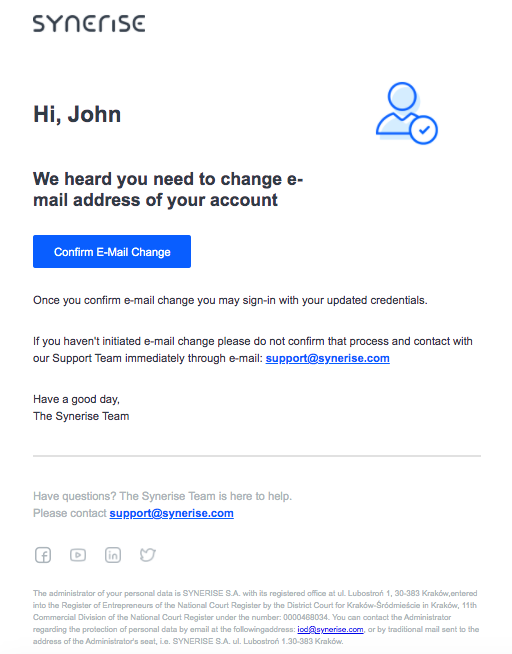
<!DOCTYPE HTML PUBLIC "-//W3C//DTD HTML 4.01 Transitional//EN" "http://www.w3.org/TR/html4/loose.dtd"> <html lang="en"> <head> <meta http-equiv="Content-Type" content="text/html; charset=UTF-8"> <meta name="viewport" content="width=device-width, initial-scale=1"> <meta http-equiv="X-UA-Compatible" content="IE=edge"> <style type="text/css"> /* Outlines the grid, remove when sending */ table td { /* border: 1px solid cyan; */ } /* CLIENT-SPECIFIC STYLES */ body, table, td, a { -webkit-text-size-adjust: 100%; -ms-text-size-adjust: 100%; } table, td { mso-table-lspace: 0pt; mso-table-rspace: 0pt; } img { -ms-interpolation-mode: bicubic; } /* RESET STYLES */ img { border: 0; outline: none; text-decoration: none; } table { border-collapse: collapse !important; } body { margin: 0 !important; padding: 0 !important; width: 100% !important; } /* iOS BLUE LINKS */ a[x-apple-data-detectors] { color: inherit !important; text-decoration: none !important; font-size: inherit !important; font-family: Arial, sans-serif !important; font-weight: inherit !important; line-height: inherit !important; } /* ANDROID CENTER FIX */ div[style*="margin: 16px 0;"] { margin: 0 !important; } </style> </head> <body style="margin:0; padding:0; background-color:#fff;"> <center> <div style="background-color:#fff; max-width: 600px; margin: auto;"> <!--[if mso]> <table role="presentation" width="600" cellspacing="0" cellpadding="0" border="0" align="center"> <tr> <td> <![endif]--> <table width="600" cellspacing="0" cellpadding="0" border="0" align="center" style="max-width:600px; width:100%;" bgcolor="#FFFFFF"> <tr> <td align="center" valign="middle" style="padding:5px 10px;"> <table width="600" cellspacing="0" cellpadding="0" border="0" align="center" style="max-width:600px; width:100%;"> <tr> <td align="center" valign="middle" style="padding:10px;"></td> </tr> </table> </td> </tr> </table> <table width="600" cellspacing="0" cellpadding="0" border="0" align="center" style="max-width:600px; width:100%;" bgcolor="#FFFFFF"> <tr> <td align="center" valign="middle" style="padding:5px 10px;"> <table width="600" cellspacing="0" cellpadding="0" border="0" align="center" style="max-width:600px; width:100%;"> <tr> <td width="200" align="left" valign="middle" style="padding:10px;"> <img alt="Synerise" src="https://upload.snrcdn.net/9bbb7035ecf3565cceed63d321d7d9b31236850d/default/origin/030d47ff7f497bf302d3248641a216ad.png" style="width: 140px;"> </td> <td width="200" align="center" valign="middle" style="padding:10px;"></td> <td width="200" align="center" valign="middle" style="padding:10px;"></td> </tr> </table> </td> </tr> </table> <table width="600" cellspacing="0" cellpadding="0" border="0" align="center" style="max-width:600px; width:100%;" bgcolor="#FFFFFF"> <tr> <td align="center" valign="middle" style="padding:5px 10px;"> <table width="600" cellspacing="0" cellpadding="0" border="0" align="center" style="max-width:600px; width:100%;"> <tr> <td width="400" align="left" valign="middle" style="padding:10px; font-weight: bold; font-size: 28px; font-family: Arial, sans-serif; color:#384350"> Hi, {% user firstname %} </td> <td width="200" align="center" valign="middle" style="padding:10px;"> <img width="91" src="https://upload.snrcdn.net/9bbb7035ecf3565cceed63d321d7d9b31236850d/default/origin/38937e17f860105ccfea3df81558734b.png" alt="" /> </td> </tr> <tr> <td width="400" align="left" valign="middle" style="padding:10px; font-weight: bold; font-size: 22px; font-family: Arial, sans-serif; color:#384350"> We heard you need to change e-mail address of your account</td> </tr> </table> </td> </tr> </table> <table width="600" cellspacing="0" cellpadding="0" border="0" align="center" style="max-width:600px; width:100%;" bgcolor="#FFFFFF"> <tr> <td align="center" valign="middle" style="padding:5px 10px;"> <table width="600" cellspacing="0" cellpadding="0" border="0" align="center" style="max-width:600px; width:100%;"> <tr> <td align="left" valign="middle" style="padding:10px"> <a style="background-color: #0c68ff;border-color: #0c68ff;color: #ffffff;cursor: pointer;display: inline-block;font-size: 14px;font-weight: 500;margin: 0;padding: 12px 25px;text-decoration: none;text-transform: capitalize; border: solid 1px #0c68ff;border-radius: 3px;box-sizing: border-box;font-family: Arial, sans-serif;" href="{{client_email_change_url}}" target="_blank">Confirm e-mail change</a> </td> </tr> </table> </td> </tr> </table> <table width="600" cellspacing="0" cellpadding="0" border="0" align="center" style="max-width:600px; width:100%;" bgcolor="#FFFFFF"> <tr> <td align="center" valign="middle" style="padding:5px 10px;"> <table width="600" cellspacing="0" cellpadding="0" border="0" align="center" style="max-width:600px; width:100%;"> <tr> <td align="left" valign="middle" style="padding:10px; font-size: 14px;font-family: Arial, sans-serif; color:#384350;line-height: 22px;"> Once you confirm e-mail change you may sign-in with your updated credentials. </td> </tr> </table> </td> </tr> </table> <table width="600" cellspacing="0" cellpadding="0" border="0" align="center" style="max-width:600px; width:100%;" bgcolor="#FFFFFF"> <tr> <td align="center" valign="middle" style="padding:5px 10px;"> <table width="600" cellspacing="0" cellpadding="0" border="0" align="center" style="max-width:600px; width:100%;"> <tr> <td align="left" valign="middle" style="padding:10px; font-size: 14px;font-family: Arial, sans-serif; color:#384350;line-height: 22px;"> If you haven't initiated e-mail change please do not confirm that process and contact with our Support Team immediately through e-mail: <a href="mailto:support@synerise.com" style="color: #0c68ff; font-weight: bold;">support@synerise.com</a> </td> </tr> </table> </td> </tr> </table> <table width="600" cellspacing="0" cellpadding="0" border="0" align="center" style="max-width:600px; width:100%;" bgcolor="#FFFFFF"> <tr> <td align="center" valign="middle" style="padding:5px 10px;"> <table width="600" cellspacing="0" cellpadding="0" border="0" align="center" style="max-width:600px; width:100%;"> <tr> <td align="left" valign="middle" style="padding:10px; font-size: 14px;font-family: Arial, sans-serif; color:#384350;line-height: 22px;"> Have a good day,<br /> The Synerise Team </td> </tr> </table> </td> </tr> </table> <table width="600" cellspacing="0" cellpadding="0" border="0" align="center" style="max-width:600px; width:100%;" bgcolor="#FFFFFF"> <tr> <td align="center" valign="middle" style="padding:5px 10px;"> <table width="600" cellspacing="0" cellpadding="0" border="0" align="center" style="max-width:600px; width:100%;"> <tr> <td align="center" valign="middle" style="padding:10px;"> <hr style="border: 1px solid #e5e5e5;" /> </td> </tr> </table> </td> </tr> </table> <table width="600" cellspacing="0" cellpadding="0" border="0" align="center" style="max-width:600px; width:100%;" bgcolor="#FFFFFF"> <tr> <td align="center" valign="middle" style="padding:5px 10px;"> <table width="600" cellspacing="0" cellpadding="0" border="0" align="center" style="max-width:600px; width:100%;"> <tr> <td align="left" valign="middle" style="padding:10px; font-size: 14px;font-family: Arial, sans-serif; color:#b6bdc4;line-height: 22px;"> Have questions? The Synerise Team is here to help.<br /> Please contact <a href="support@synerise.com" style="color: #0c68ff; font-weight: bold;">support@synerise.com</a> </td> </tr> </table> </td> </tr> </table> <table width="600" cellspacing="0" cellpadding="0" border="0" align="center" style="max-width:600px; width:100%;" bgcolor="#FFFFFF"> <tr> <td align="center" valign="middle" style="padding:5px 10px;"> <table width="600" cellspacing="0" cellpadding="0" border="0" align="center" style="max-width:600px; width:100%;"> <tr> <td width="25" align="center" valign="middle" style="padding:10px;"> <a href="https://www.facebook.com/synerise"><img src="https://upload.snrcdn.net/9bbb7035ecf3565cceed63d321d7d9b31236850d/default/origin/778ed84375be209b05f2fb333f7bbb16.png" width="20" style="margin:0; padding:0; border:none; display:block;" border="0" class="img" alt=""></a> </td> <td width="25" align="center" valign="middle" style="padding:10px;"> <a href="https://www.youtube.com/c/Synerise/"><img src="https://upload.snrcdn.net/9bbb7035ecf3565cceed63d321d7d9b31236850d/default/origin/eadde6165d2421eb5f98d9654006d9ee.png" width="20" style="margin:0; padding:0; border:none; display:block;" border="0" class="img" alt=""></a> </td> <td width="25" align="center" valign="middle" style="padding:10px;"> <a href="https://www.linkedin.com/company/synerise/"><img src="https://upload.snrcdn.net/9bbb7035ecf3565cceed63d321d7d9b31236850d/default/origin/42126cc8dfb468a79dc4b37c45082b78.png" width="20" style="margin:0; padding:0; border:none; display:block;" border="0" class="img" alt=""></a> </td> <td width="25" align="center" valign="middle" style="padding:10px;"> <a href="https://twitter.com/synerise"><img src="https://upload.snrcdn.net/9bbb7035ecf3565cceed63d321d7d9b31236850d/default/origin/f2512acc01435e5cd10edfc0e419908b.png" width="20" style="margin:0; padding:0; border:none; display:block;" border="0" class="img" alt=""></a> </td> <td width="500" align="center" valign="middle" style="padding:10px;"></td> </tr> </table> </td> </tr> </table> <table width="600" cellspacing="0" cellpadding="0" border="0" align="center" style="max-width:600px; width:100%;" bgcolor="#FFFFFF"> <tr> <td align="center" valign="middle" style="padding:5px 10px;"> <table width="600" cellspacing="0" cellpadding="0" border="0" align="center" style="max-width:600px; width:100%;"> <tr> <td align="left" valign="middle" style="padding:10px; font-size: 10px;font-family: Arial, sans-serif; color:#b6bdc4;line-height: 16px;">The administrator of your personal data is SYNERISE S.A. with its registered office at ul. Lubostroń 1, 30-383 Kraków,entered into the Register of Entrepreneurs of the National Court Register by the District Court for Kraków-Śródmieście in Kraków, 11th Commercial Division of the National Court Register under the number: 0000468034. You can contact the Administrator regarding the protection of personal data by email at the followingaddress: <a target="_blank" href="mailto:iod@synerise.com">iod@synerise.com</a>, or by traditional mail sent to the address of the Administrator's seat, i.e. SYNERISE S.A. ul. Lubostroń 1.30-383 Kraków. </td> </tr> </table> </td> </tr> </table> <table width="600" cellspacing="0" cellpadding="0" border="0" align="center" style="max-width:600px; width:100%;" bgcolor="#FFFFFF"> <tr> <td align="center" valign="middle" style="padding:5px 10px;"> <table width="600" cellspacing="0" cellpadding="0" border="0" align="center" style="max-width:600px; width:100%;"> <tr> <td align="center" valign="middle" style="padding:10px;"></td> </tr> </table> </td> </tr> </table> <!--[if mso]> </td> </tr> </table> <![endif]--> </div> </center> </body> </html>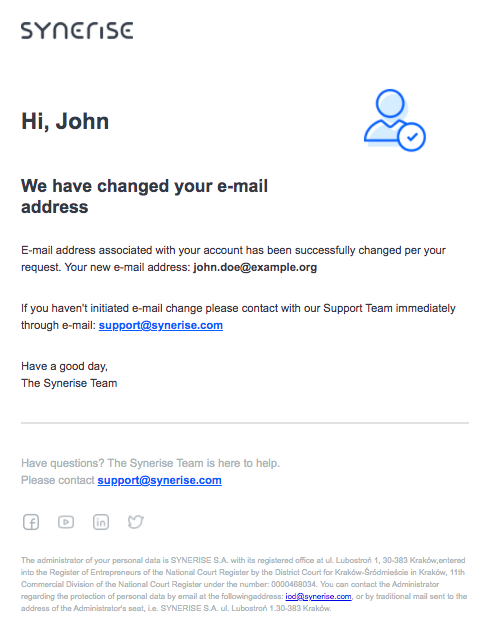
<!DOCTYPE HTML PUBLIC "-//W3C//DTD HTML 4.01 Transitional//EN" "http://www.w3.org/TR/html4/loose.dtd"> <html lang="en"> <head> <meta http-equiv="Content-Type" content="text/html; charset=UTF-8"> <meta name="viewport" content="width=device-width, initial-scale=1"> <meta http-equiv="X-UA-Compatible" content="IE=edge"> <style type="text/css"> /* Outlines the grid, remove when sending */ table td { /* border: 1px solid cyan; */ } /* CLIENT-SPECIFIC STYLES */ body, table, td, a { -webkit-text-size-adjust: 100%; -ms-text-size-adjust: 100%; } table, td { mso-table-lspace: 0pt; mso-table-rspace: 0pt; } img { -ms-interpolation-mode: bicubic; } /* RESET STYLES */ img { border: 0; outline: none; text-decoration: none; } table { border-collapse: collapse !important; } body { margin: 0 !important; padding: 0 !important; width: 100% !important; } /* iOS BLUE LINKS */ a[x-apple-data-detectors] { color: inherit !important; text-decoration: none !important; font-size: inherit !important; font-family: Arial, sans-serif !important; font-weight: inherit !important; line-height: inherit !important; } /* ANDROID CENTER FIX */ div[style*="margin: 16px 0;"] { margin: 0 !important; } </style> </head> <body style="margin:0; padding:0; background-color:#fff;"> <center> <div style="background-color:#fff; max-width: 600px; margin: auto;"> <!--[if mso]> <table role="presentation" width="600" cellspacing="0" cellpadding="0" border="0" align="center"> <tr> <td> <![endif]--> <table width="600" cellspacing="0" cellpadding="0" border="0" align="center" style="max-width:600px; width:100%;" bgcolor="#FFFFFF"> <tr> <td align="center" valign="middle" style="padding:5px 10px;"> <table width="600" cellspacing="0" cellpadding="0" border="0" align="center" style="max-width:600px; width:100%;"> <tr> <td align="center" valign="middle" style="padding:10px;"></td> </tr> </table> </td> </tr> </table> <table width="600" cellspacing="0" cellpadding="0" border="0" align="center" style="max-width:600px; width:100%;" bgcolor="#FFFFFF"> <tr> <td align="center" valign="middle" style="padding:5px 10px;"> <table width="600" cellspacing="0" cellpadding="0" border="0" align="center" style="max-width:600px; width:100%;"> <tr> <td width="200" align="left" valign="middle" style="padding:10px;"> <img alt="Synerise" src="https://upload.snrcdn.net/9bbb7035ecf3565cceed63d321d7d9b31236850d/default/origin/030d47ff7f497bf302d3248641a216ad.png" style="width: 140px;"> </td> <td width="200" align="center" valign="middle" style="padding:10px;"></td> <td width="200" align="center" valign="middle" style="padding:10px;"></td> </tr> </table> </td> </tr> </table> <table width="600" cellspacing="0" cellpadding="0" border="0" align="center" style="max-width:600px; width:100%;" bgcolor="#FFFFFF"> <tr> <td align="center" valign="middle" style="padding:5px 10px;"> <table width="600" cellspacing="0" cellpadding="0" border="0" align="center" style="max-width:600px; width:100%;"> <tr> <td width="400" align="left" valign="middle" style="padding:10px; font-weight: bold; font-size: 28px; font-family: Arial, sans-serif; color:#384350"> Hi, {% user firstname %} </td> <td width="200" align="center" valign="middle" style="padding:10px;"> <img width="91" src="https://upload.snrcdn.net/9bbb7035ecf3565cceed63d321d7d9b31236850d/default/origin/38937e17f860105ccfea3df81558734b.png" alt="" /> </td> </tr> <tr> <td width="400" align="left" valign="middle" style="padding:10px; font-weight: bold; font-size: 22px; font-family: Arial, sans-serif; color:#384350"> We have changed your e-mail address</td> </tr> </table> </td> </tr> </table> <table width="600" cellspacing="0" cellpadding="0" border="0" align="center" style="max-width:600px; width:100%;" bgcolor="#FFFFFF"> <tr> <td align="center" valign="middle" style="padding:5px 10px;"> <table width="600" cellspacing="0" cellpadding="0" border="0" align="center" style="max-width:600px; width:100%;"> <tr> <td align="left" valign="middle" style="padding:10px; font-size: 14px;font-family: Arial, sans-serif; color:#384350;line-height: 22px;"> E-mail address associated with your account has been successfully changed per your request. Your new e-mail address: {{new_email}}</td> </tr> </table> </td> </tr> </table> <table width="600" cellspacing="0" cellpadding="0" border="0" align="center" style="max-width:600px; width:100%;" bgcolor="#FFFFFF"> <tr> <td align="center" valign="middle" style="padding:5px 10px;"> <table width="600" cellspacing="0" cellpadding="0" border="0" align="center" style="max-width:600px; width:100%;"> <tr> <td align="left" valign="middle" style="padding:10px; font-size: 14px;font-family: Arial, sans-serif; color:#384350;line-height: 22px;"> If you haven't initiated e-mail change please contact with our Support Team immediately through e-mail: <a href="mailto:support@synerise.com" style="color: #0c68ff; font-weight: bold;">support@synerise.com</a> </td> </tr> </table> </td> </tr> </table> <table width="600" cellspacing="0" cellpadding="0" border="0" align="center" style="max-width:600px; width:100%;" bgcolor="#FFFFFF"> <tr> <td align="center" valign="middle" style="padding:5px 10px;"> <table width="600" cellspacing="0" cellpadding="0" border="0" align="center" style="max-width:600px; width:100%;"> <tr> <td align="left" valign="middle" style="padding:10px; font-size: 14px;font-family: Arial, sans-serif; color:#384350;line-height: 22px;"> Have a good day,<br /> The Synerise Team </td> </tr> </table> </td> </tr> </table> <table width="600" cellspacing="0" cellpadding="0" border="0" align="center" style="max-width:600px; width:100%;" bgcolor="#FFFFFF"> <tr> <td align="center" valign="middle" style="padding:5px 10px;"> <table width="600" cellspacing="0" cellpadding="0" border="0" align="center" style="max-width:600px; width:100%;"> <tr> <td align="center" valign="middle" style="padding:10px;"> <hr style="border: 1px solid #e5e5e5;" /> </td> </tr> </table> </td> </tr> </table> <table width="600" cellspacing="0" cellpadding="0" border="0" align="center" style="max-width:600px; width:100%;" bgcolor="#FFFFFF"> <tr> <td align="center" valign="middle" style="padding:5px 10px;"> <table width="600" cellspacing="0" cellpadding="0" border="0" align="center" style="max-width:600px; width:100%;"> <tr> <td align="left" valign="middle" style="padding:10px; font-size: 14px;font-family: Arial, sans-serif; color:#b6bdc4;line-height: 22px;"> Have questions? The Synerise Team is here to help.<br /> Please contact <a href="support@synerise.com" style="color: #0c68ff; font-weight: bold;">support@synerise.com</a> </td> </tr> </table> </td> </tr> </table> <table width="600" cellspacing="0" cellpadding="0" border="0" align="center" style="max-width:600px; width:100%;" bgcolor="#FFFFFF"> <tr> <td align="center" valign="middle" style="padding:5px 10px;"> <table width="600" cellspacing="0" cellpadding="0" border="0" align="center" style="max-width:600px; width:100%;"> <tr> <td width="25" align="center" valign="middle" style="padding:10px;"> <a href="https://www.facebook.com/synerise"><img src="https://upload.snrcdn.net/9bbb7035ecf3565cceed63d321d7d9b31236850d/default/origin/778ed84375be209b05f2fb333f7bbb16.png" width="20" style="margin:0; padding:0; border:none; display:block;" border="0" class="img" alt=""></a> </td> <td width="25" align="center" valign="middle" style="padding:10px;"> <a href="https://www.youtube.com/c/Synerise/"><img src="https://upload.snrcdn.net/9bbb7035ecf3565cceed63d321d7d9b31236850d/default/origin/eadde6165d2421eb5f98d9654006d9ee.png" width="20" style="margin:0; padding:0; border:none; display:block;" border="0" class="img" alt=""></a> </td> <td width="25" align="center" valign="middle" style="padding:10px;"> <a href="https://www.linkedin.com/company/synerise/"><img src="https://upload.snrcdn.net/9bbb7035ecf3565cceed63d321d7d9b31236850d/default/origin/42126cc8dfb468a79dc4b37c45082b78.png" width="20" style="margin:0; padding:0; border:none; display:block;" border="0" class="img" alt=""></a> </td> <td width="25" align="center" valign="middle" style="padding:10px;"> <a href="https://twitter.com/synerise"><img src="https://upload.snrcdn.net/9bbb7035ecf3565cceed63d321d7d9b31236850d/default/origin/f2512acc01435e5cd10edfc0e419908b.png" width="20" style="margin:0; padding:0; border:none; display:block;" border="0" class="img" alt=""></a> </td> <td width="500" align="center" valign="middle" style="padding:10px;"></td> </tr> </table> </td> </tr> </table> <table width="600" cellspacing="0" cellpadding="0" border="0" align="center" style="max-width:600px; width:100%;" bgcolor="#FFFFFF"> <tr> <td align="center" valign="middle" style="padding:5px 10px;"> <table width="600" cellspacing="0" cellpadding="0" border="0" align="center" style="max-width:600px; width:100%;"> <tr> <td align="left" valign="middle" style="padding:10px; font-size: 10px;font-family: Arial, sans-serif; color:#b6bdc4;line-height: 16px;">The administrator of your personal data is SYNERISE S.A. with its registered office at ul. Lubostroń 1, 30-383 Kraków,entered into the Register of Entrepreneurs of the National Court Register by the District Court for Kraków-Śródmieście in Kraków, 11th Commercial Division of the National Court Register under the number: 0000468034. You can contact the Administrator regarding the protection of personal data by email at the followingaddress: <a target="_blank" href="mailto:iod@synerise.com">iod@synerise.com</a>, or by traditional mail sent to the address of the Administrator's seat, i.e. SYNERISE S.A. ul. Lubostroń 1.30-383 Kraków. </td> </tr> </table> </td> </tr> </table> <table width="600" cellspacing="0" cellpadding="0" border="0" align="center" style="max-width:600px; width:100%;" bgcolor="#FFFFFF"> <tr> <td align="center" valign="middle" style="padding:5px 10px;"> <table width="600" cellspacing="0" cellpadding="0" border="0" align="center" style="max-width:600px; width:100%;"> <tr> <td align="center" valign="middle" style="padding:10px;"></td> </tr> </table> </td> </tr> </table> <!--[if mso]> </td> </tr> </table> <![endif]--> </div> </center> </body> </html>