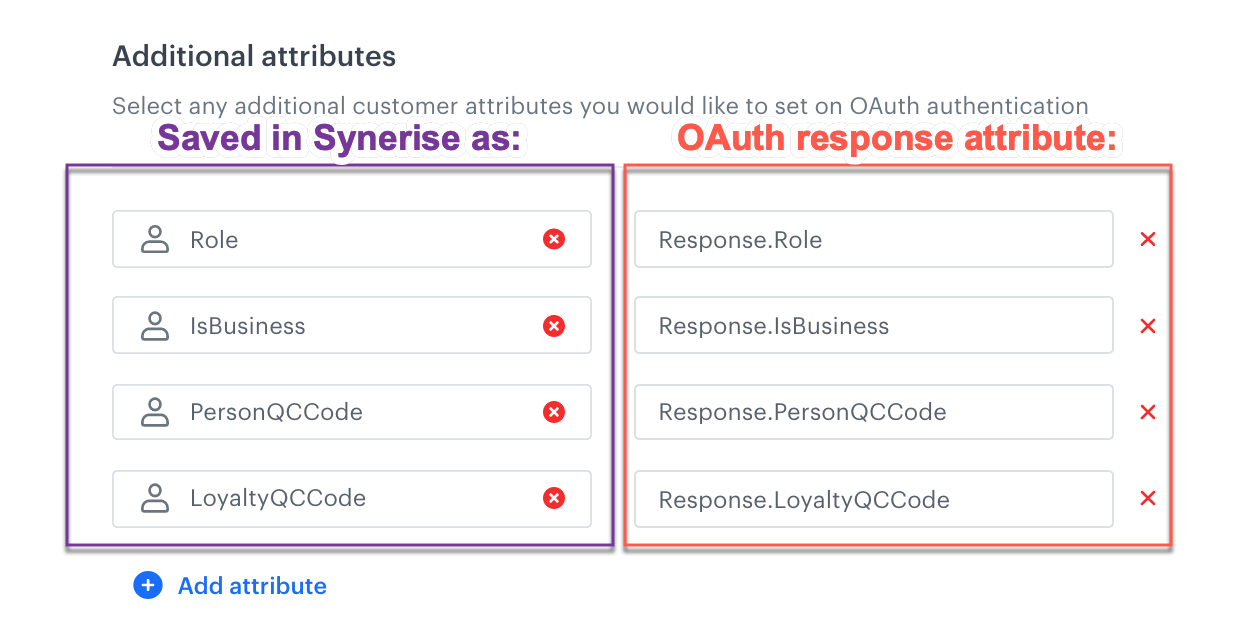
This feature lets you configure authentication through your existing IT systems that have RESTful APIs, allowing you to authenticate a profile through an HTTP call to an endpoint (checking if the provided token is valid and returning a response with the user's data).
OAuth process diagram
Example response from the OAuth server:
## Configuration
1. Go to **Settings > Authentication for mobile apps**.
2. In the **OAuth** section, click **Show**.
3. Enable the **Sign-in with OAuth** toggle.
**Result**: The OAuth settings appear.
3. In the **Endpoint Configuration** section, in the **Endpoint name** field, enter the name.
You can enter any name - depending on further settings, it may be used to name the attribute which stores the profile identifier provided by your OAuth server.
4. From the **Authentication method** dropdown, select how you want to confirm customer credentials:
- **SERVER** - A request with a token is sent to the external identity provider to confirm user credentials.
- **JWT_TOKEN** - Use JSON Web Token (JWT) verified by a JSON Web Key (JWK).
4. Enter the URI:
- for **SERVER**: URI of the OAuth endpoint (GET method)
- for **JWT_TOKEN**: URI of the JWK
5. **SERVER method only**: In the **Headers** section, enter all headers required by the endpoint you entered in the previous step.
If you want to inject a JWT from Synerise in the headers, enter the following value: `Bearer {{_snrs_access_token}}`
6. In the **Identification based on OAuth response data** section, you can:
- Leave the setting at default (enabled) - the identifier from OAuth is saved in the Profile as the `-oauthId` attribute. This identifier is used in subsequent requests to your OAuth server.
1. In the **OAuth unique identifier key** field, enter the name of the profile's unique identifier attribute in the OAuth response.
- Disable the setting - when logging in, the user is identified by `customId` sent in the authentication request. The profile must have a `customId`.
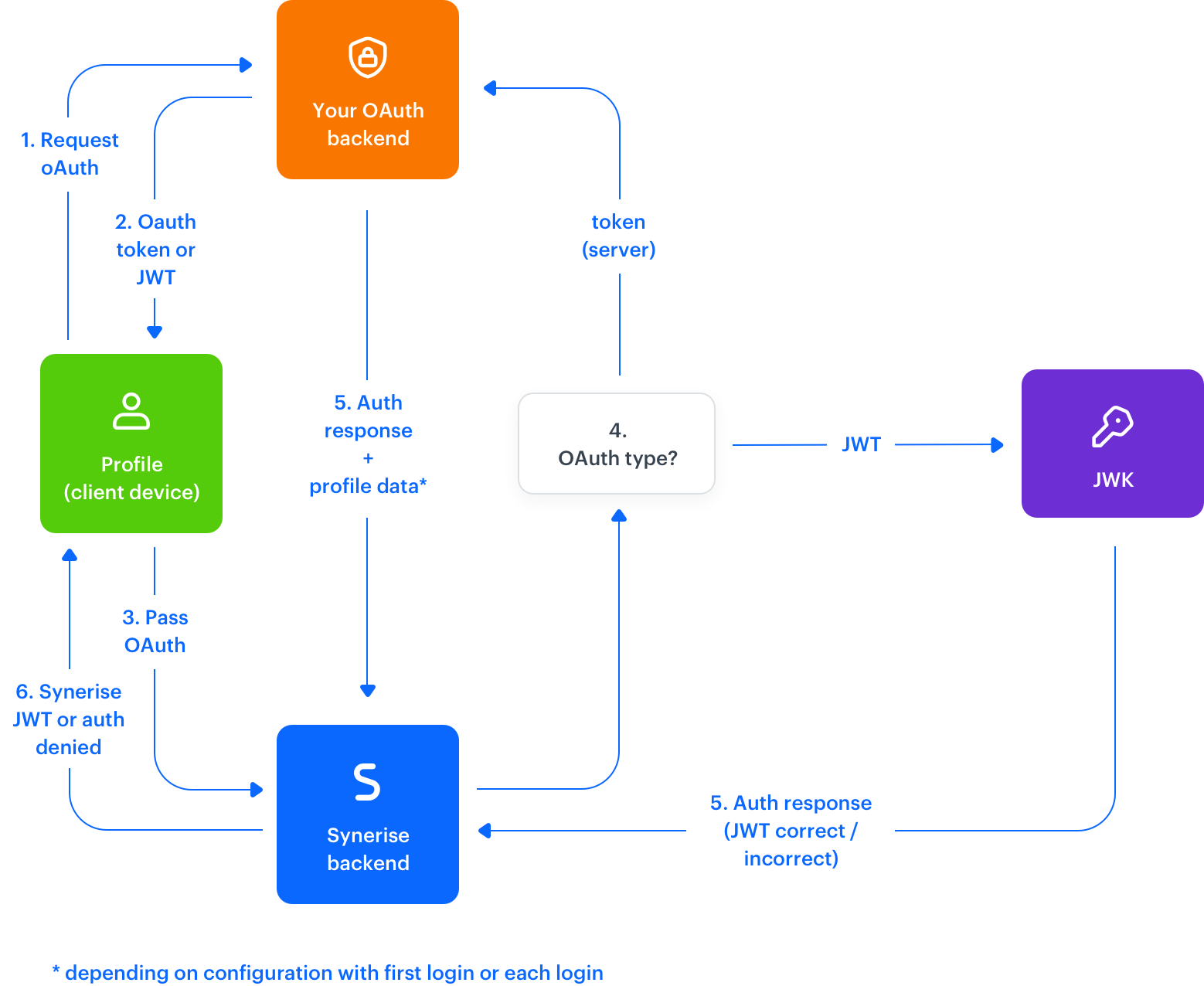
7. In the **Additional attributes** section, from the dropdown list, select the attributes to be passed to Synerise from the OAuth response after the authorization. To retrieve data from the response, use the following pattern: `Response.AttributeName`.
On the left, enter the name of the attribute saved in Synerise. On the right, enter the name of the attribute in the OAuth response.
Example additional attributes
2. In the **Claims** section, add claims that will be added to the JWT payload.
This lets you differentiate between JWTs generated from the same JWK.
8. In the **Data synchronization while logging in** section, you can enable data synchronization with the OAuth server every time a customer logs in.
When this option is disabled, the data from the OAuth server is saved to Synerise only during the first log-in.
## Implementation
After you configure OAuth, you can implement it in your applications with:
- [Mobile SDK methods](/developers/mobile-sdk/user-identification-and-authorization/oauth#authentication-methods)
- API methods ([`/v3/auth/login/client`](https://developers.synerise.com/IdentityandAccessManagement/IdentityandAccessManagement.html#operation/authenticateUsingPOST_v3) and [`/v3/auth/login/client/conditional`](https://developers.synerise.com/IdentityandAccessManagement/IdentityandAccessManagement.html#operation/authenticateConditionalUsingPOSTv3))
 **Settings > Authentication for mobile apps**.
2. In the **OAuth** section, click **Show**.
3. Enable the **Sign-in with OAuth** toggle.
**Result**: The OAuth settings appear.
3. In the **Endpoint Configuration** section, in the **Endpoint name** field, enter the name.
You can enter any name - depending on further settings, it may be used to name the attribute which stores the profile identifier provided by your OAuth server.
4. From the **Authentication method** dropdown, select how you want to confirm customer credentials:
- **SERVER** - A request with a token is sent to the external identity provider to confirm user credentials.
- **JWT_TOKEN** - Use JSON Web Token (JWT) verified by a JSON Web Key (JWK).
4. Enter the URI:
- for **SERVER**: URI of the OAuth endpoint (GET method)
- for **JWT_TOKEN**: URI of the JWK
5. **SERVER method only**: In the **Headers** section, enter all headers required by the endpoint you entered in the previous step.
If you want to inject a JWT from Synerise in the headers, enter the following value: `Bearer {{_snrs_access_token}}`
6. In the **Identification based on OAuth response data** section, you can:
- Leave the setting at default (enabled) - the identifier from OAuth is saved in the Profile as the `
**Settings > Authentication for mobile apps**.
2. In the **OAuth** section, click **Show**.
3. Enable the **Sign-in with OAuth** toggle.
**Result**: The OAuth settings appear.
3. In the **Endpoint Configuration** section, in the **Endpoint name** field, enter the name.
You can enter any name - depending on further settings, it may be used to name the attribute which stores the profile identifier provided by your OAuth server.
4. From the **Authentication method** dropdown, select how you want to confirm customer credentials:
- **SERVER** - A request with a token is sent to the external identity provider to confirm user credentials.
- **JWT_TOKEN** - Use JSON Web Token (JWT) verified by a JSON Web Key (JWK).
4. Enter the URI:
- for **SERVER**: URI of the OAuth endpoint (GET method)
- for **JWT_TOKEN**: URI of the JWK
5. **SERVER method only**: In the **Headers** section, enter all headers required by the endpoint you entered in the previous step.
If you want to inject a JWT from Synerise in the headers, enter the following value: `Bearer {{_snrs_access_token}}`
6. In the **Identification based on OAuth response data** section, you can:
- Leave the setting at default (enabled) - the identifier from OAuth is saved in the Profile as the `