---
This procedure is required only if you want to use Synerise promotions in your VTEX store. Synerise serves as the **primary** platform for managing promotions then.
If you don't want to use the Synerise promotions feature, skip this article.
The instructions in this document are compatible with:
- VTEX FastStore framework,
- VTEX Store Framework.
## Synchronization frequency
---
- Synchronization is one-directional (from Synerise to VTEX), meaning updates to promotions in VTEX do not reflect back to Synerise. Changes made in Synerise overwrite modifications in VTEX.
- Promotions are synchronized to VTEX only when they are created, updated, or deleted in Synerise.
## Additional information
---
- Certain VTEX settings can only managed by including custom parameters in the Synerise promotion settings (instructions available further in this document).
- Some promotion settings in Synerise may not align with VTEX promotions and will not synchronize.
## Scope of synchronized information
---
The following information is synchronized from Synerise to VTEX:
- [Cart value threshold](#cart-value-threshold)
- [Discount type](#discount-type)
- [Discount value](#discount-value)
- [Information on whether the promotion applies to the cheapest or most expensive item](#applies-to-the-most-expensive)
- [Information on whether the promotion combines with others](#combining-promotions)
- [Items included in the promotion or items excluded from the promotion](#including-or-excluding-items)
- [Number of times a customer can use a promotion](#limits-per-customer)
- [Number of items to which a promotion will be applied](#number-of-items-promotion-applies-to)
- [Promotion duration](#promotion-duration)
- [Promotion ID](#promotion-id)
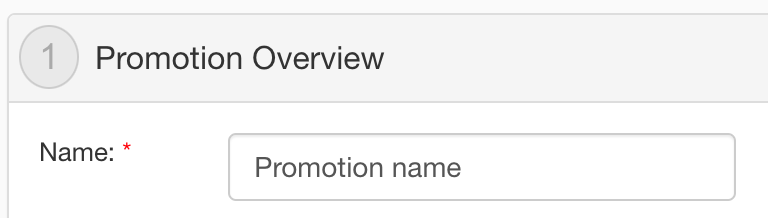
- [Promotion name](#promotion-name)
- [Promotion status](#promotion-status)
The following data from the Synerise promotions remain **unsynchronized**:
| Section name | Option name |
|--------------|--------------------------------------------------------------------------------------------------------|
| **Audience** | All options in this section. |
| **Contents** | - Price before discount, - Display name, - Long description, - Thumbnails, - Images |
| **Store** | All options in this section. |
| **Loyalty** | All options in this section. |
## Synchronization scenarios
---
| Scenario | Required actions |
|----------------------------------|----------------------------------------------------------------------------------------------------------------------------------------|
| Promotions in VTEX already exist | [Create equivalent VTEX promotions in Synerise](#creating-promotions-in-synerise) with the required settings: - [`vtex-promotion` tag](#promotion-tag) - [VTEX promotion ID](#vtex-promotion-id). |
| No promotions in VTEX yet | Start with [creating promotions in Synerise](#creating-promotions-in-synerise); once saved or published, they will automatically synchronize to VTEX. |
## Enabling synchronization
---
1. In your VTEX workspace, navigate to **Apps > (Synerise) Access to VTEX** and [grant Synerise access to VTEX API](/docs/settings/tool/vtex/vtex-integration#schedule-synchronization).
2. In Synerise, go to **Data Modeling Hub > Tags**.
3. Find the predefined **promotions** folder in **Data Modeling Hub > Tags**.
1. On the left side menu, select the promotion tag folder you crated in the previous step.
2. Click **Add tag**.
3. In the name field, enter `vtex-promotion`
4. You can define additional settings of the tag according to the instructions in ["Add new tag" section](/docs/assets/tags#adding-tags).
4. Make sure equivalent promotions exist in both Synerise and VTEX.
- If you have already created promotions in VTEX, see the **Promotions in VTEX already exist** scenario in ["Synchronization scenarios" section](#synchronization-scenarios). You can use [mapping guide](#mapping) to make sure the options are the same in Synerise and VTEX.
- If you haven't created any promotion in VTEX yet, start with [creating promotions in Synerise](#creating-promotions-in-synerise). You can check the [mapping guide](#mapping) to understand how the options from the Synerise promotions will be reflected in the equivalent VTEX promotion.
6. In Synerise, add the `vtex-promotion` tag to the promotions that you want to synchronize.
## Pausing synchronization
---
To prevent synchronizing promotions to VTEX, remove the [vtex-promotion tag](#promotion-tag) from the settings of selected promotions in Synerise.
## Creating promotions in Synerise
---
1. In Synerise, go to **AI Hub > Regular Promotions > Add promotion**.
2. In the **Content** section, add the [`vtex-promotions` tag](#promotion-tag) required for synchronization.
2. Configure the remaining settings of the promotion.
You can skip or use default values for the parameters that aren't synchronized. See ["Scope of synchronized information"](#scope-of-synchronized-information).
For detailed instructions on creating promotions, see:
- [Promotions for selected items](/docs/ai-hub/promotions/creating-promotions)
- [Promotions for entire cart](/docs/ai-hub/promotions/creating-promotions-for-entire-basket)
3. When you finish creating the promotion, click **Finish later** or **Publish**.
The promotion will be synchronized to VTEX immediately. It will be assigned Paused or Active status in VTEX, respectively.
### Restrictions
- While [selecting or excluding items](#including-or-excluding-items) from a promotion:
- do not use the **Filtered items** option. It's not supported for VTEX synchronization.
- keep in mind that including and excluding items from a promotion (available in the **Items** and **Exclude items** sections, respectively) at the same time is not allowed.
## Mapping
---
This section shows how Synerise promotion settings will be mapped in VTEX.
### Promotion type
In Synerise there are two promotion types:
- For selected items
- For entire cart
This information isn't mapped.
### Promotion name
This is the title of the promotion.
| Setting in Synerise promotion | Its counterpart in VTEX promotion |
|-------------------------------|-----------------------------------|
| | |
### Promotion status
This is the status of the promotion. In Synerise, on the user interface the promotion can have the following statuses and they map in VTEX as follows:
| Statis in Synerise promotion | Its counterpart in VTEX promotion |
|-------------------------------|-----------------------------------|
| | |
| Published | Active |
| Draft | Paused |
| Hidden | Inactive |
### Promotion ID
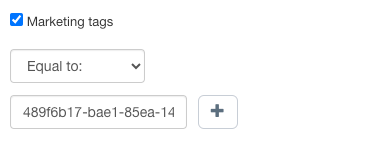
This is a unique identifier of a promotion in Synerise. It's generated automatically. As a result of synchronization, the marketing tag is created in the VTEX promotion with the value of Promotion ID.
| Setting in Synerise promotion | Its counterpart in VTEX promotion |
|-------------------------------|-----------------------------------|
| | |
### Promotion tag
To be able to synchronize Synerise promotions to VTEX, the promotion must be assigned with the `vtex-promotions` tag. This promotion component doesn't have its counterpart in VTEX.
You can assign the tag to the promotion in the promotion configuration form in the **Contents** tab.
The vtex-promotions tag
### VTEX promotion ID
- The `idCalculatorConfiguration` parameter contains the ID of the promotion in VTEX.
- It's used only in the configuration of the Synerise promotions.
- This parameter can be added to **Params (JSON code)** field in the **Content** section.
- To locate the VTEX promotion's ID, enter the editing mode of that promotion. The ID is added to the final part of the URL.
| Scenario | Result |
|---------------------|--------------------------------------------------------------------------------------------------------------------------------------------------------------------------------------------------------------------------------------------------------------------------------------------------------------------------------------------------------------------|
| You add this parameter to a promotion | The promotion with this ID in VTEX will be overwritten with the settings of the Synerise promotion which contains this reference. |
| You create a promotion without this parameter | A synchronization request is made to VTEX. In response, Synerise receives the ID of that promotion in VTEX and adds it as `idCalculatorConfiguration` to the settings of that promotion in Synerise. |
| Setting in Synerise promotion | Its counterpart in VTEX promotion |
|-------------------------------|-----------------------------------|
| | |
### Combining promotions
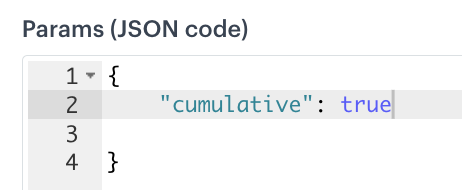
To let a Synerise promotion be applied with other promotions, add a `"cumulative": true` parameter in the JSON in the configuration form of the promotion, in the **Contents** tab.
| Setting in Synerise promotion | Its counterpart in VTEX promotion |
|-------------------------------|-----------------------------------|
| | |
### Number of items promotion applies to
To set the number of eligible items in each cart, add a `maxNumberOfAffectedItems` custom parameter in the JSON in the configuration form of the promotion, in the **Contents** tab. The value must be an integer, for example:
{
    "maxNumberOFAffectedItems": 1
}
| Setting in Synerise promotion | Its counterpart in VTEX promotion |
|-------------------------------|-----------------------------------|
| | |
### Applies to the most expensive?
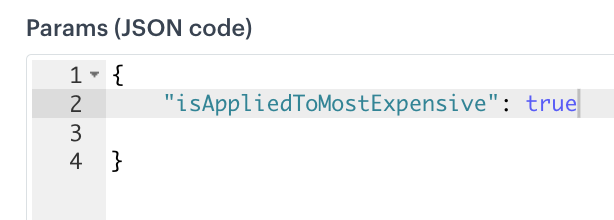
To define whether the promotion will be applied to the most expensive or cheapest items, add a custom parameter in the JSON snippet available in the configuration form of the promotion in the **Contents** tab. Use the `isAppliedToMostExpensive` parameter which accepts boolean values. Setting the parameter to:
- `true` causes application of the promotion to the most expensive item,
- `false` causes application of the promotion to the cheapest item.
{
      "isAppliedToMostExpensive": true
  }
| Setting in Synerise promotion | Its counterpart in VTEX promotion |
|-------------------------------|-----------------------------------|
| | |
### Including or excluding items
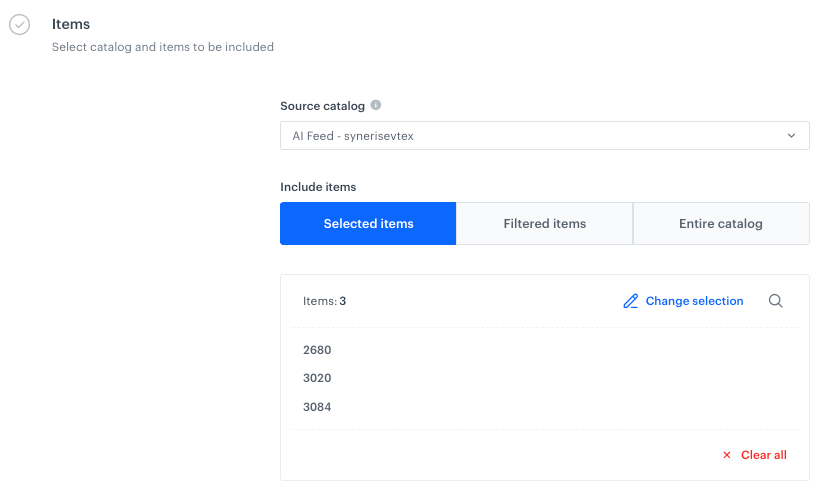
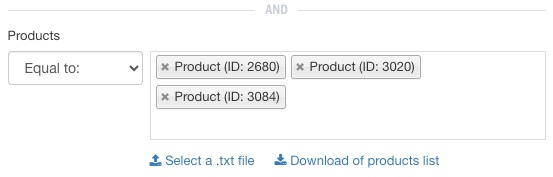
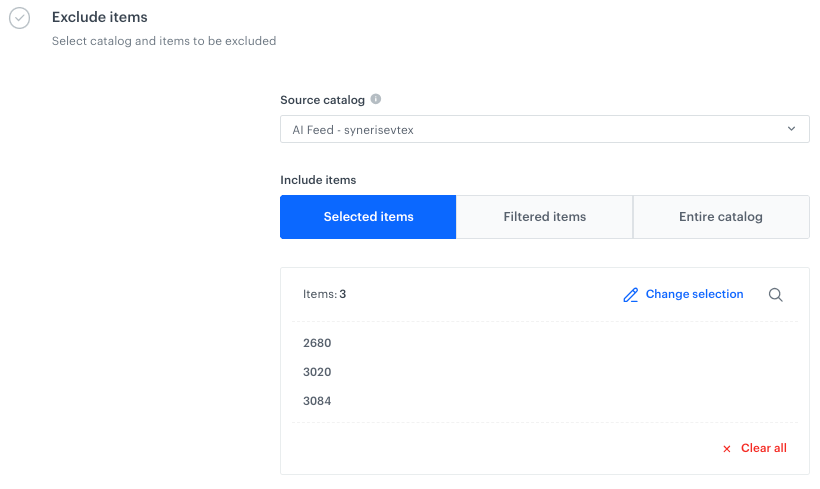
In Synerise promotion, you can select items from an item feed to be included or excluded from the promotion (the exclude option is available only for promotions for entire basket).
Including and excluding items allows the following options:
- selecting items from item feed
- selecting the entire item feed as the scope of items included in the promotion
- filtering items is NOT available for VTEX integrations
In the context of synchronization of promotions between Synerise and VTEX:
- Do not use the filtering items option during synchronization as it is not supported.
- Do not combine the include and exclude options together. If you do so, only included items (defined in the **Items** section) will be synchronized.
Including and excluding based on item attributes is covered in ["Including or excluding item attributes"](#including-or-excluding-item-attributes).
#### Include items
| Setting in Synerise promotion | Its counterpart in VTEX promotion |
|-------------------------------|-----------------------------------|
| | |
#### Exclude items
| Setting in Synerise promotion | Its counterpart in VTEX promotion |
|-------------------------------|-----------------------------------|
| | |
### Including or excluding item attributes
#### Including
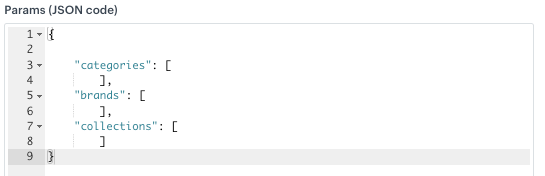
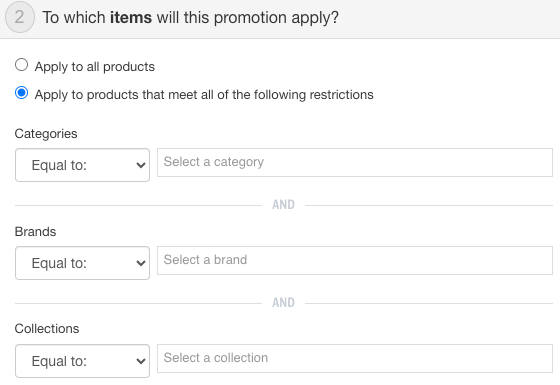
To include items from specific category, brand, or collection, you must provide their IDs. For that purpose, use `categories`, `brand`, and `collection` and as their values provide an array of attribute value IDs you want to include in a promotion. For example:
| Setting in Synerise promotion | Its counterpart in VTEX promotion |
|-------------------------------|-----------------------------------|
| | |
#### Excluding
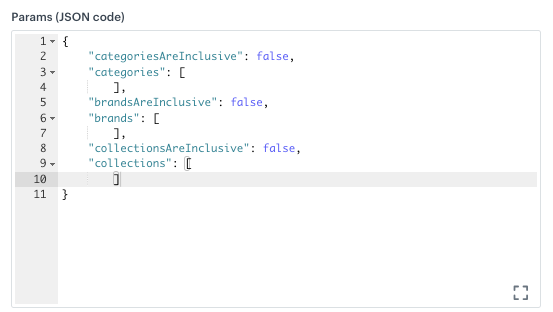
To exclude items from specific category, brand, or collection, you must use the following parameters, respectively:
- `categoriesAreInclusive`
- `brandsAreInclusive`
- `collectionsAreInclusive`
These parameters accept boolean values. Setting them to `false` excludes specified item attributes from promotion. After each parameter, you must provide an array with IDs of categories, brands, or collections. For example:
| Setting in Synerise promotion | Its counterpart in VTEX promotion |
|-------------------------------|-----------------------------------|
| | |
### Limits per customer
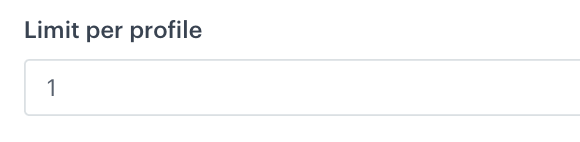
This option lets you specify the maximum number of times a customer can use a promotion. Once the defined limit is reached, the promotion will no longer be available for that customer.
| Setting in Synerise promotion | Its counterpart in VTEX promotion |
|-------------------------------|-----------------------------------|
| | |
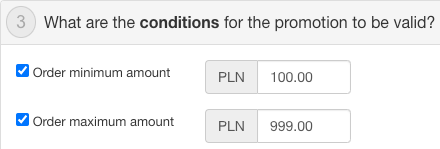
### Cart value threshold
*Available only for [Promotions for entire cart](/docs/ai-hub/promotions/creating-promotions-for-entire-basket).*
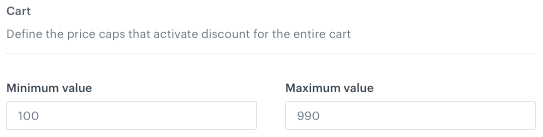
This option allows you to set the minimum and maximum values that a shopping cart must meet in order to be eligible for a promotion. Only shopping carts within the specified value range will qualify for the promotion.
| Setting in Synerise promotion | Its counterpart in VTEX promotion |
|-------------------------------|-----------------------------------|
| | |
### Discount type
In Synerise, you can choose from the following discount types:
- **Percentage** - This option sets the discount amount as a percentage of the original price.
- **Amount** - This option sets a fixed discount amount to subtract from the original price.
| Discount type in Synerise promotion | Its counterpart in VTEX promotion |
|-------------------------------|-----------------------------------|
| | |
| Percentage | Percentage |
| Amount | Fixed amount |
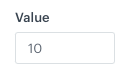
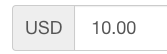
### Discount value
This is the value for the selected [discount type](#discount-type).
| Setting in Synerise promotion | Its counterpart in VTEX promotion |
|-------------------------------|-----------------------------------|
| | |
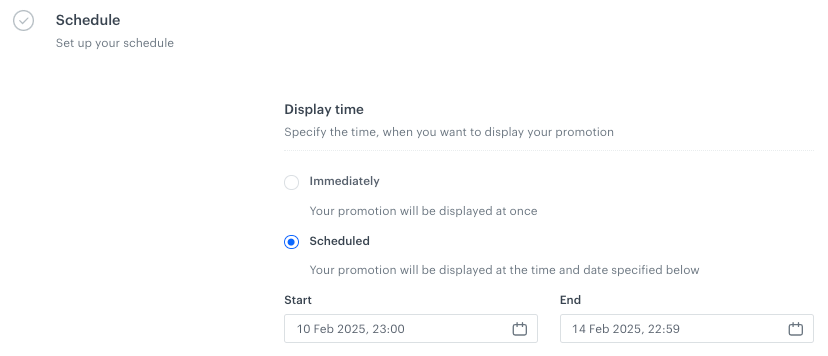
### Promotion duration
This option defines the time promotion will be available for use.
| Setting in Synerise promotion | Its counterpart in VTEX promotion |
|-------------------------------|-----------------------------------|
| | |

 |
|  |
### Promotion status
This is the status of the promotion. In Synerise, on the user interface the promotion can have the following statuses and they map in VTEX as follows:
| Statis in Synerise promotion | Its counterpart in VTEX promotion |
|-------------------------------|-----------------------------------|
|
|
### Promotion status
This is the status of the promotion. In Synerise, on the user interface the promotion can have the following statuses and they map in VTEX as follows:
| Statis in Synerise promotion | Its counterpart in VTEX promotion |
|-------------------------------|-----------------------------------|
|  |
|  |
| Published | Active |
| Draft | Paused |
| Hidden | Inactive |
### Promotion ID
This is a unique identifier of a promotion in Synerise. It's generated automatically. As a result of synchronization, the marketing tag is created in the VTEX promotion with the value of Promotion ID.
| Setting in Synerise promotion | Its counterpart in VTEX promotion |
|-------------------------------|-----------------------------------|
|
|
| Published | Active |
| Draft | Paused |
| Hidden | Inactive |
### Promotion ID
This is a unique identifier of a promotion in Synerise. It's generated automatically. As a result of synchronization, the marketing tag is created in the VTEX promotion with the value of Promotion ID.
| Setting in Synerise promotion | Its counterpart in VTEX promotion |
|-------------------------------|-----------------------------------|
|  |
|  |
### Promotion tag
To be able to synchronize Synerise promotions to VTEX, the promotion must be assigned with the `vtex-promotions` tag. This promotion component doesn't have its counterpart in VTEX.
You can assign the tag to the promotion in the promotion configuration form in the **Contents** tab.
|
### Promotion tag
To be able to synchronize Synerise promotions to VTEX, the promotion must be assigned with the `vtex-promotions` tag. This promotion component doesn't have its counterpart in VTEX.
You can assign the tag to the promotion in the promotion configuration form in the **Contents** tab.
 |
|  |
### Combining promotions
To let a Synerise promotion be applied with other promotions, add a `"cumulative": true` parameter in the JSON in the configuration form of the promotion, in the **Contents** tab.
| Setting in Synerise promotion | Its counterpart in VTEX promotion |
|-------------------------------|-----------------------------------|
|
|
### Combining promotions
To let a Synerise promotion be applied with other promotions, add a `"cumulative": true` parameter in the JSON in the configuration form of the promotion, in the **Contents** tab.
| Setting in Synerise promotion | Its counterpart in VTEX promotion |
|-------------------------------|-----------------------------------|
|  |
|  |
### Number of items promotion applies to
To set the number of eligible items in each cart, add a `maxNumberOfAffectedItems` custom parameter in the JSON in the configuration form of the promotion, in the **Contents** tab. The value must be an integer, for example:
|
### Number of items promotion applies to
To set the number of eligible items in each cart, add a `maxNumberOfAffectedItems` custom parameter in the JSON in the configuration form of the promotion, in the **Contents** tab. The value must be an integer, for example:
 |
|  |
### Applies to the most expensive?
To define whether the promotion will be applied to the most expensive or cheapest items, add a custom parameter in the JSON snippet available in the configuration form of the promotion in the **Contents** tab. Use the `isAppliedToMostExpensive` parameter which accepts boolean values. Setting the parameter to:
- `true` causes application of the promotion to the most expensive item,
- `false` causes application of the promotion to the cheapest item.
|
### Applies to the most expensive?
To define whether the promotion will be applied to the most expensive or cheapest items, add a custom parameter in the JSON snippet available in the configuration form of the promotion in the **Contents** tab. Use the `isAppliedToMostExpensive` parameter which accepts boolean values. Setting the parameter to:
- `true` causes application of the promotion to the most expensive item,
- `false` causes application of the promotion to the cheapest item.
 |
|  |
### Including or excluding items
In Synerise promotion, you can select items from an item feed to be included or excluded from the promotion (the exclude option is available only for promotions for entire basket).
Including and excluding items allows the following options:
- selecting items from item feed
- selecting the entire item feed as the scope of items included in the promotion
- filtering items is NOT available for VTEX integrations
In the context of synchronization of promotions between Synerise and VTEX:
- Do not use the filtering items option during synchronization as it is not supported.
- Do not combine the include and exclude options together. If you do so, only included items (defined in the **Items** section) will be synchronized.
Including and excluding based on item attributes is covered in ["Including or excluding item attributes"](#including-or-excluding-item-attributes).
#### Include items
| Setting in Synerise promotion | Its counterpart in VTEX promotion |
|-------------------------------|-----------------------------------|
|
|
### Including or excluding items
In Synerise promotion, you can select items from an item feed to be included or excluded from the promotion (the exclude option is available only for promotions for entire basket).
Including and excluding items allows the following options:
- selecting items from item feed
- selecting the entire item feed as the scope of items included in the promotion
- filtering items is NOT available for VTEX integrations
In the context of synchronization of promotions between Synerise and VTEX:
- Do not use the filtering items option during synchronization as it is not supported.
- Do not combine the include and exclude options together. If you do so, only included items (defined in the **Items** section) will be synchronized.
Including and excluding based on item attributes is covered in ["Including or excluding item attributes"](#including-or-excluding-item-attributes).
#### Include items
| Setting in Synerise promotion | Its counterpart in VTEX promotion |
|-------------------------------|-----------------------------------|
|  |
|  |
#### Exclude items
| Setting in Synerise promotion | Its counterpart in VTEX promotion |
|-------------------------------|-----------------------------------|
|
|
#### Exclude items
| Setting in Synerise promotion | Its counterpart in VTEX promotion |
|-------------------------------|-----------------------------------|
|  |
|  |
### Including or excluding item attributes
#### Including
To include items from specific category, brand, or collection, you must provide their IDs. For that purpose, use `categories`, `brand`, and `collection` and as their values provide an array of attribute value IDs you want to include in a promotion. For example:
|
### Including or excluding item attributes
#### Including
To include items from specific category, brand, or collection, you must provide their IDs. For that purpose, use `categories`, `brand`, and `collection` and as their values provide an array of attribute value IDs you want to include in a promotion. For example:
 |
|  |
#### Excluding
To exclude items from specific category, brand, or collection, you must use the following parameters, respectively:
- `categoriesAreInclusive`
- `brandsAreInclusive`
- `collectionsAreInclusive`
These parameters accept boolean values. Setting them to `false` excludes specified item attributes from promotion. After each parameter, you must provide an array with IDs of categories, brands, or collections. For example:
|
#### Excluding
To exclude items from specific category, brand, or collection, you must use the following parameters, respectively:
- `categoriesAreInclusive`
- `brandsAreInclusive`
- `collectionsAreInclusive`
These parameters accept boolean values. Setting them to `false` excludes specified item attributes from promotion. After each parameter, you must provide an array with IDs of categories, brands, or collections. For example:
 |
|  |
### Limits per customer
This option lets you specify the maximum number of times a customer can use a promotion. Once the defined limit is reached, the promotion will no longer be available for that customer.
| Setting in Synerise promotion | Its counterpart in VTEX promotion |
|-------------------------------|-----------------------------------|
|
|
### Limits per customer
This option lets you specify the maximum number of times a customer can use a promotion. Once the defined limit is reached, the promotion will no longer be available for that customer.
| Setting in Synerise promotion | Its counterpart in VTEX promotion |
|-------------------------------|-----------------------------------|
|  |
|  |
### Cart value threshold
*Available only for [Promotions for entire cart](/docs/ai-hub/promotions/creating-promotions-for-entire-basket).*
This option allows you to set the minimum and maximum values that a shopping cart must meet in order to be eligible for a promotion. Only shopping carts within the specified value range will qualify for the promotion.
| Setting in Synerise promotion | Its counterpart in VTEX promotion |
|-------------------------------|-----------------------------------|
|
|
### Cart value threshold
*Available only for [Promotions for entire cart](/docs/ai-hub/promotions/creating-promotions-for-entire-basket).*
This option allows you to set the minimum and maximum values that a shopping cart must meet in order to be eligible for a promotion. Only shopping carts within the specified value range will qualify for the promotion.
| Setting in Synerise promotion | Its counterpart in VTEX promotion |
|-------------------------------|-----------------------------------|
|  |
|  |
### Discount type
In Synerise, you can choose from the following discount types:
- **Percentage** - This option sets the discount amount as a percentage of the original price.
- **Amount** - This option sets a fixed discount amount to subtract from the original price.
| Discount type in Synerise promotion | Its counterpart in VTEX promotion |
|-------------------------------|-----------------------------------|
|
|
### Discount type
In Synerise, you can choose from the following discount types:
- **Percentage** - This option sets the discount amount as a percentage of the original price.
- **Amount** - This option sets a fixed discount amount to subtract from the original price.
| Discount type in Synerise promotion | Its counterpart in VTEX promotion |
|-------------------------------|-----------------------------------|
|  |
|  |
| Percentage | Percentage |
| Amount | Fixed amount |
### Discount value
This is the value for the selected [discount type](#discount-type).
| Setting in Synerise promotion | Its counterpart in VTEX promotion |
|-------------------------------|-----------------------------------|
|
|
| Percentage | Percentage |
| Amount | Fixed amount |
### Discount value
This is the value for the selected [discount type](#discount-type).
| Setting in Synerise promotion | Its counterpart in VTEX promotion |
|-------------------------------|-----------------------------------|
|  |
|  |
### Promotion duration
This option defines the time promotion will be available for use.
| Setting in Synerise promotion | Its counterpart in VTEX promotion |
|-------------------------------|-----------------------------------|
|
|
### Promotion duration
This option defines the time promotion will be available for use.
| Setting in Synerise promotion | Its counterpart in VTEX promotion |
|-------------------------------|-----------------------------------|
|  |
|  |
|