## Related terms
- workspace
- workflow
See the [glossary](/glossary.md) for definitions.
---
# Audit Log
You can use the Audit log to monitor and review the actions taken by users within a workspace. By selecting a specific service that represents a feature (e.g., `Automation` for creating and managing workflows in Automation Hub), you can see which records and Synerise objects have been interacted with and by whom, along with the type of action and when it occurred. This provides a detailed account of the activities within the workspace, ensuring transparency and accountability in tracking and monitoring user activities, as well as strengthening security measures.
## Accessing the Audit Log
You can access the Audit Log in the following ways:
- **Global audit log** - Go to **Settings > Audit Log** to view all actions across the workspace.
- **Analysis-specific audit log** - Open an analysis configuration, in the upper right corner, click the icon , and select **Show audit log** to view the history of changes for that specific analysis.
- **AI feature-specific audit log** - Available only for AI recommendation campaigns, AI Search indexes, and Predictions. Open the configuration details of the feature, in the upper right corner, click the icon, and select **Show audit log** to view the history of changes for that specific feature.
- **Automation-specific audit log** - Open a workflow configuration, in the upper right corner, click the icon, and select **Show audit log** to view the history of changes for that specific workflow.
- **Campaign-specific audit log** - Available for all campaign types except landing pages (email, SMS, dynamic content, mobile push, web push, screen view, and in-app message campaigns). Open the campaign configuration, in the upper right corner, click the icon, and select **Show audit log** to view the history of changes for that specific campaign.
## Information scope
- **Subject** - the type and ID of an object which was created, modified, or deleted
- **Action** - describes what has happened to the object
- **Date** - when the action happened
- **Modified by** - the author of the change (either workspace user or a workspace)
## Previewing and comparing versions
In the audit log, you can preview the details of a logged action and compare the object with its other versions. This is available in the global audit log and in the audit logs of specific objects, for all services and action types.
Versions in the audit log are states of an object saved by each logged action. They aren't the same as [workflow versions](/docs/automation/workflow-versioning). For workflows, the JSON of an entry includes the following fields:
- `versionName`, `versionOrdinal`, and `versionDescription`: the workflow version that the action concerns,
- `publicVersionName`, `publicVersionOrdinal`, and `publicVersionDescription`: the Public version after the action. For example, in the entry for setting v2 as Public, these fields show v2,
- `deletedVersionName`, `deletedVersionOrdinal`, and `deletedVersionDescription`: the removed version, in the entry for removing a version.
1. Open the audit log in one of the ways described in [Accessing the Audit Log](#accessing-the-audit-log).
2. On the list of actions, click an entry.
**Result**: The **Preview record** pop-up opens. It shows the object's data in JSON format, as it was saved by this action.
3. In the upper-right corner of the pop-up, click **Version history**.
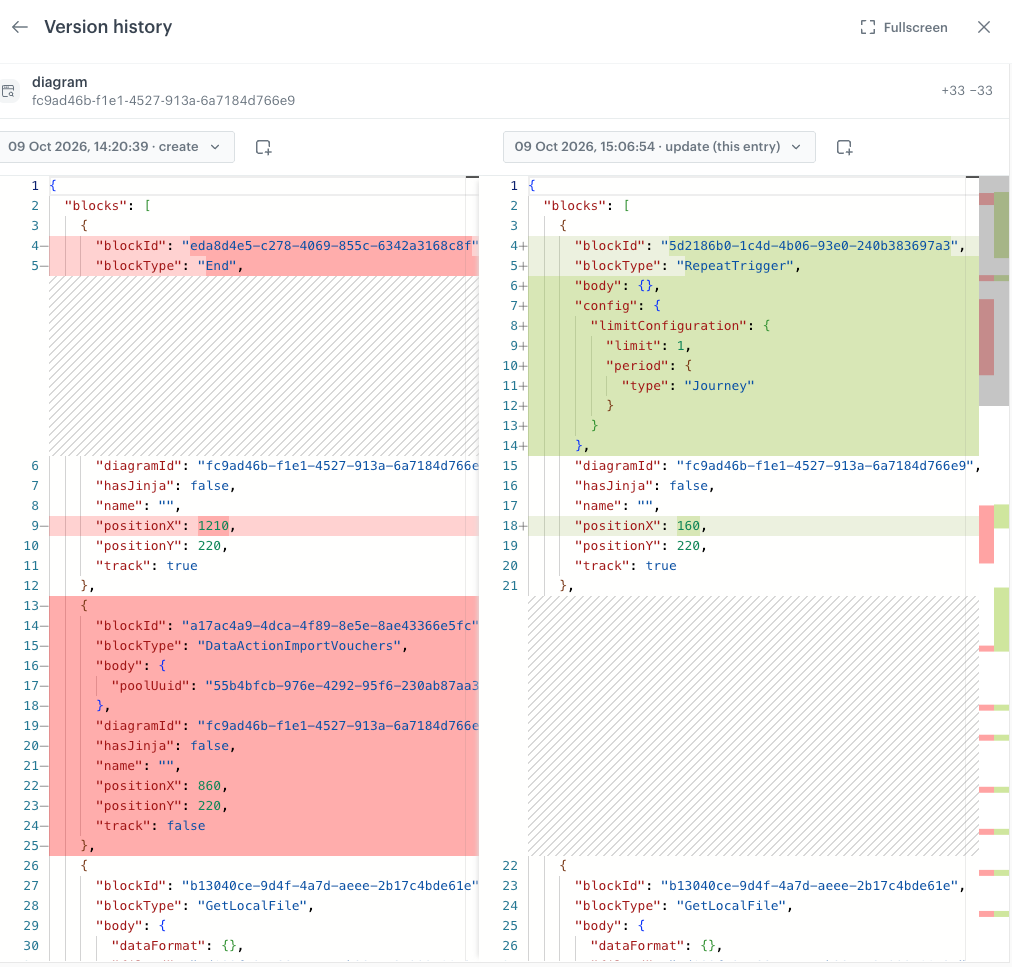
**Result**: A comparison of two versions of the object opens:
- The right side shows the version saved by the selected action. In the list of versions, it is labeled **(this entry)**.
- The left side shows the previous version of the object.
- Removed lines are highlighted in red, added lines in green.
- The number of added and removed lines is shown in the upper-right corner.
Comparison of two versions of an object
4. Optionally, to compare other versions, select them from the lists above each side of the comparison. Each version is labeled with its date, time, and action type.
5. Optionally, to copy the JSON of a version, click the copy icon next to the list.
6. Optionally, to expand the view, click **Fullscreen**.
## Service reference
The following list of services is ordered according to the positioning of modules in the left menu of the Synerise Platform.
### AI Hub
| Service name | Description |
|-----------------------|--------------------------------------------------------------------------------------------------|
| Items Search: Config | Log of actions related to [ search index ]( /docs/ai-hub/ai-search/create-index/ ) |
| Item Search: Rules | Log of actions related to [ rules ]( /docs/ai-hub/ai-search/query-rules/ ) |
| Item Search: Synonyms | Log of actions related to [ synonyms ]( /docs/ai-hub/ai-search/add-synonyms/ ) |
| Promotions | Log of actions related to [ promotions ]( /docs/ai-hub/promotions/ ) |
| Personalized promotions | Log of actions related to [ personalized promotions ]( /docs/ai-hub/personalized-promotions/introduction-to-ai-promotions/ ) |
| Recommendations | Log of actions related to [ AI recommendation campaigns ]( /docs/ai-hub/recommendations-v2/introduction-to-recommendation-campaigns/ ) |
| Optimizer Manager | Log of actions related to [ recommendation A/B/X testing ]( /docs/ai-hub/recommendations-v2/recommendation-abx-test/ ) |
| Predictions: module settings | Log of actions related to [ configuration of prediction model settings ]( /docs/ai-hub/predictions/enabling-predictions/ ) and [ time optimizer ]( /docs/settings/configuration/time-optimizer/ ) |
| Predictions: model configuration | Log of actions related to [predictions]( /docs/ai-hub/predictions/), such as creating or updating a prediction |
| Predictions: models configuration | Log related to monitoring the state of prediction and recommendation models |
### Data Modeling Hub
| Service name | Description |
|--------------|--------------|
| catalogs | Log of actions related to creating or deleting a [catalog](/docs/assets/catalogs), adding or removing catalogs from the [enrichment settings for events](/docs/assets/events/adding-event-parameters#enriching-events-with-data-from-catalogs). |
| brickworks | Log of actions related to creating, updating, and deleting [schemas](/docs/assets/brickworks/quick-start/creating-a-schema) and [records](/docs/assets/brickworks/quick-start/creating-a-record). |
### Decision Hub
| Service name | Description |
|--------------------------|------------------------------------------------------------------------------------------------------------------------------------------------------------------------------------------------------------------------------------------------------------------------------------------------------------------------------------------------------------------------------------------------------------------------------------------------------------------------------------------------------------------------------------------------------------------------------------------------------------------------------------------------------------------------------------------------------------------------------------------------------------------------------------------------------------------------------------------------------------------------------------------------------------------------------------------------------------------------------------------------|
| analytics-v2 | Log of actions related to [segmentations](/docs/analytics/segmentations/introduction-to-segmentations/ ), [reports](/docs/analytics/reports/introduction-to-reports), [trends](/docs/analytics/trends/introduction-to-trends), [histograms](/docs/analytics/histograms/introduction-to-histograms), [metrics](/docs/analytics/metrics/introduction-to-metrics), [funnels](/docs/analytics/funnels/introduction-to-funnels), [geoanalytics](/docs/analytics/geoanalytics/introduction-to-geoanalytics) (they are displayed in logs as a segmentation), [sankey diagrams](/docs/analytics/sankey-charts/introduction-to-sankey-charts), [dashboards](/docs/analytics/analytics-dashboard/introduction-to-dashboards) |
### Behavioral Data Hub
| Service name | Description |
|--------------|--------------|
| analytics-v2 | Logs of actions related to [aggregates]( /docs/crm/aggregates/introduction-to-aggregates/) and [expressions](/docs/crm/expressions/introduction-to-expressions) |
### Automation Hub
| Service name | Description |
|---------------------|-------------------------------------------------------------------------------------------------------------------------------------------------------------------------------------------------------------|
| Automation | Log of actions related to [ workflows ]( /docs/automation/creating-automation/ ) in Automation Hub and [ imports to Synerise ]( /docs/assets/imports/introduction-to-imports/ ) |
| Data Transformation | Log of actions related to [ data transformation rules ]( /docs/automation/data-transformation-and-imports/introduction/ ) and [ imports to Synerise ]( /docs/assets/imports/introduction-to-imports/ ) |
| automation-bat | A log of actions related to [sending test requests](/docs/automation/test-requests-for-outgoing-integrations) |
### Experience Hub
| Service name | Description |
|-------------------|-----------------------------------------------------------------------------------------------------------------------------------------------------------------------------------------------------------------------------------------------------------------------------------------------------------------------------------------------------------------------------------------------|
| Communications | Log of actions related to [email]( /docs/campaign/e-mail/introduction-to-email-campaigns/ ), [SMS](/docs/campaign/SMS/introduction-to-sms), [web push](/docs/campaign/Webpush/introduction-to-webpush), [mobile push](/docs/campaign/Mobile/mobile_campaign), and [dynamic content](/docs/campaign/dynamiccontent/introduction-to-dynamic-content) campaigns |
| Inn-App Messages | Log of actions related to [ in-app messages ]( /docs/campaign/in-app-messages/introduction-to-inapp-messages/ ) |
| Documents | Log of actions related to [ screen view campaigns ](/docs/campaign/screen-views/creating-screen-views#scheduling-screen-view-campaign) |
| Template Backend | Log of actions related to templates for campaigns and HTML blocks |
| Scheduler | Log of actions related to scheduling [screen view campaigns](/docs/campaign/screen-views/introduction-to-screen-views) |
### Settings
| Service name | Description |
|------------------------|-------------------------------------------------------------------------------------------------------------------------------------------------------------------------------------------------------------------------------------------------------------|
| Recommendations Config | Log of actions related to the recommendation settings in a feed in **Settings > AI Engine Configuration** |
| IAM for Applications | Log of actions related to the features available in **Settings > Authentication for mobile apps** |
| IAM | Log of actions related to [users](/docs/settings/identity-access-management/users), [roles]( /docs/settings/identity-access-management/permissions/), [access control features](/docs/settings/identity-access-management/access-control) |
| Items Properties | Log of actions related to feeds in **Settings > AI Engine Configuration** |
| credentials | Log of actions related to [connections](/docs/settings/tool/connections) |
| cwf-clean-up-catalog | Log of actions related to deleting [feeds](/docs/settings/configuration/ai-engine-configuration) from **Settings > AI Engine Configuration** |
 icon , and select **Show audit log** to view the history of changes for that specific analysis.
- **AI feature-specific audit log** - Available only for AI recommendation campaigns, AI Search indexes, and Predictions. Open the configuration details of the feature, in the upper right corner, click the