<div class="youtube-embed youtube-facade not-prose" data-youtube-id="PgCWniwUi6U" role="button" tabindex="0" aria-label="Play YouTube video"><img src="https://img.youtube.com/vi/PgCWniwUi6U/hq720.jpg" alt="YouTube video" class="youtube-facade-thumb" loading="lazy" /><span class="youtube-facade-play" aria-hidden="true"><svg viewBox="0 0 68 48" width="68" height="48"><path d="M66.52 7.74c-.78-2.93-2.49-5.41-5.42-6.19C55.79.13 34 0 34 0S12.21.13 6.9 1.55c-2.93.78-4.64 3.26-5.42 6.19C.06 13.05 0 24 0 24s.06 10.95 1.48 16.26c.78 2.93 2.49 5.41 5.42 6.19C12.21 47.87 34 48 34 48s21.79-.13 27.1-1.55c2.93-.78 4.64-3.26 5.42-6.19C67.94 34.95 68 24 68 24s-.06-10.95-1.48-16.26z" fill="red"/><path d="M45 24 27 14v20" fill="white"/></svg></span></div>

Before cloning messages between workspaces, we recommend reading [Introduction to cloning](/docs/settings/workspace/cloning-objects/introduction-to-cloning).

This article presents how to clone the following objects to another workspace:
- email
- in-app
- web push
- mobile push
- SMS
- dynamic content
- campaign templates (cloned in the same way as campaigns)

You can clone the whole campaign or just the template.
- When you clone a campaign, the campaign is cloned together with the content and settings (template used in the campaign isn't cloned).
- The "Schedule" section of the campaign isn't cloned.
- Each campaign is cloned in the "Draft" status.
- When you clone the template of the campaign separately, the cloned template is saved in **Experience Hub > Templates > Default**. 


### Cloned campaign elements

Together with the campaign or template, you can clone the objects it contains:

- AI Recommendation campaigns included in the content (together with the objects it contains, such as expressions, aggregates, metrics, and so on)
- Audience of the message (segmentation/s, aggregates, expressions)
- Analyses included in the template content (aggregates, expressions, metrics, segmentations)

There are some message elements which are cloned but they are transparent during the cloning process: 

- Email attachments - The attachment is cloned and available in a target workspace in the **Data Modeling Hub > Files**.
- Triggers (for example, occurrence of specific events for in-app messages) and display settings such as priority, frequency are cloned. 
- UTM & URL parameters are cloned.
- Additional parameters are cloned.
- The type of the builder in which the content/template was created - If you will edit the content/template in the target workspace, you will do it in the same type of editor that the original template was created in. 

### Not cloned elements

In the process of cloning your object, you map the elements contained in it which are not copied, but have an equivalent in the target workspace. Some of them must be created before cloning, others can be created as part of the cloning process. 


<div class="admonition admonition-important"><div class="admonition-icon"><svg xmlns="http://www.w3.org/2000/svg" fill="none" viewBox="0 0 24 24" stroke="currentColor" stroke-width="2.5"><path stroke-linecap="round" stroke-linejoin="round" d="M12 8v4m0 4h.01M21 12a9 9 0 11-18 0 9 9 0 0118 0z" /></svg></div><div class="admonition-body"><div class="admonition-content">

Dynamic content is the only campaign type that allows using references to AI Search. If your dynamic content template contains it, AI Search will not be cloned nor detected during the cloning process. You must launch it manually in the target workspace and modify the AI Search references (such as the index ID, and so on) in the content on the target workspace.

</div></div></div>


| Object              | Can be created while cloning? For more details, see [Prerequisites](#prerequisites) | Where does this object occur in the campaign? |
|---------------------|-------------------------------|----------------------------------------------------------|
| Catalog             | No                            | Content (as an insert)         |
| Customer attributes | Yes                           | Content (as an insert), Audience filters, trigger conditions (in-app messages)|
| Email/SMS account   | No                            | Campaign settings                                       |
| Events              | Yes, but these events will only have `name` and `display name` defined. The remaining metadata are empty and the JWT authorization settings for the event are disabled.                           | Conditions of the campaign audience, elements included in other objects used in the content (aggregates, expressions, metrics) or trigger conditions (in-app messages)                              |
| Event parameters    | Yes, but these parameters will only have `name` and `display name` defined. The remaining metadata are empty and the JWT authorization settings for the event are disabled.                           | Conditions of the campaign audience, elements included in other objects used in the content (aggregates, expressions, metrics) or trigger conditions (in-app messages)                                                      |
| Product feed        | No                            | Content (as an AI recommendation insert)                                                     |
| Promotions           | No                            | Content (as an insert) |
| Tags                | Yes                           | Content (as an insert) or filters of analyses used in content (aggregates, expressions, metrics) |
| Vouchers             | No                            | Content (as an insert) |


## Prerequisites
---
To clone objects between workspaces:
- You must be assigned a user role (**Settings > Roles**) that has all possible permissions in the source and target workspaces.
- In the target workspace, if you want to clone an email or SMS, you must configure an [email](/docs/campaign/e-mail/configuring-email-account)/[SMS](/docs/campaign/SMS/configuring-sms-gateway) account. Other campaign types don't require sender accounts.
- If the campaign/template you clone contains AI recommendations:
    - In the target workspace, enable [models for the types of recommendations you want to clone to the workspace](/docs/settings/configuration/ai-engine-configuration/engine-configuration-for-recommendations) and configure the recommendation attributes while configuring the AI engine.
    - Make sure the item attribute names (feed catalog columns) and value types in the item feeds in the source and target workspaces are the same. 
- If you refer in a message to:
    - a catalog - make sure you have a catalog with corresponding data and structure (column names and types of values) in the target workspace.
        - If the catalog on the source and target workspaces have the same structure (column names and value types), you don't have to do anything **after cloning is complete**.
        - If the catalog on the source and target workspaces have different structure (column names and value types), **after the cloning is complete**, the cloned message/template includes references to the columns and values from the catalog from the source workspace. You must replace them with the target workspace's catalog.
    - a voucher pool - make sure you have a voucher pool in the target workspace
    - promotions - make sure you have a corresponding promotion in the target workspace.
    - customer attributes - make sure you have equivalent customer attributes in the target workspace.
- If your campaign includes AI search: **After the cloning is complete**, the cloned message/template includes references to the search index from the source workspace. You must replace them with the target workspace's search index.


## Select a campaign/template to clone
---
1. Go to <img src="/api/docs/image/54176ad07f146575310749eba44b7c2f42c1b327/icons/experience-hub-icon.svg" alt="Experience Hub icon" class="icon"> **Experience Hub** and select the message type.  
    - If you want to clone a campaign: 
        1. On the list of campaigns, find the campaign you want to clone.
        2. To the right side of the campaign author information, click <img src="/api/docs/image/54176ad07f146575310749eba44b7c2f42c1b327/icons/threedoticon.png" alt="Three-dot icon" class="icon">.
    - If you want to clone a template:
        1. On the left pane, click **Templates**.
        2. Select the folder where the template is saved.
        3. On the template you want to clone, click <img src="/api/docs/image/54176ad07f146575310749eba44b7c2f42c1b327/icons/threedoticon.png" alt="Three-dot icon" class="icon">.
4. From the context menu, select **Clone to workspace**.  
    **Result**: The **Choose destination** pop-up appears.
5. On the pop-up, select up to 5 workspaces to which you want to clone your message.  
    <figure><img src="/api/docs/image/54176ad07f146575310749eba44b7c2f42c1b327/docs/settings/_gfx/choose-workspace-to-clone.png" class="large" alt="A pop-up with selection of workspaces"><figcaption>A pop-up with selection of workspaces</figcaption></figure>
6. Confirm your choice by clicking **Next**.  
    **Result**: The mapping wizard opens.

## Cloning
---
The procedure of cloning a campaign/template takes place in the mapping wizard and involves:

| Action/Section name             | Description                                                                                                                                                                                                                                                                                                                                                                                                                            | Section is available for                                            |
|--------------------------|----------------------------------------------------------------------------------------------------------------------------------------------------------------------------------------------------------------------------------------------------------------------------------------------------------------------------------------------------------------------------------------------------------------------------------------|-----------------------------------------------------------------------|
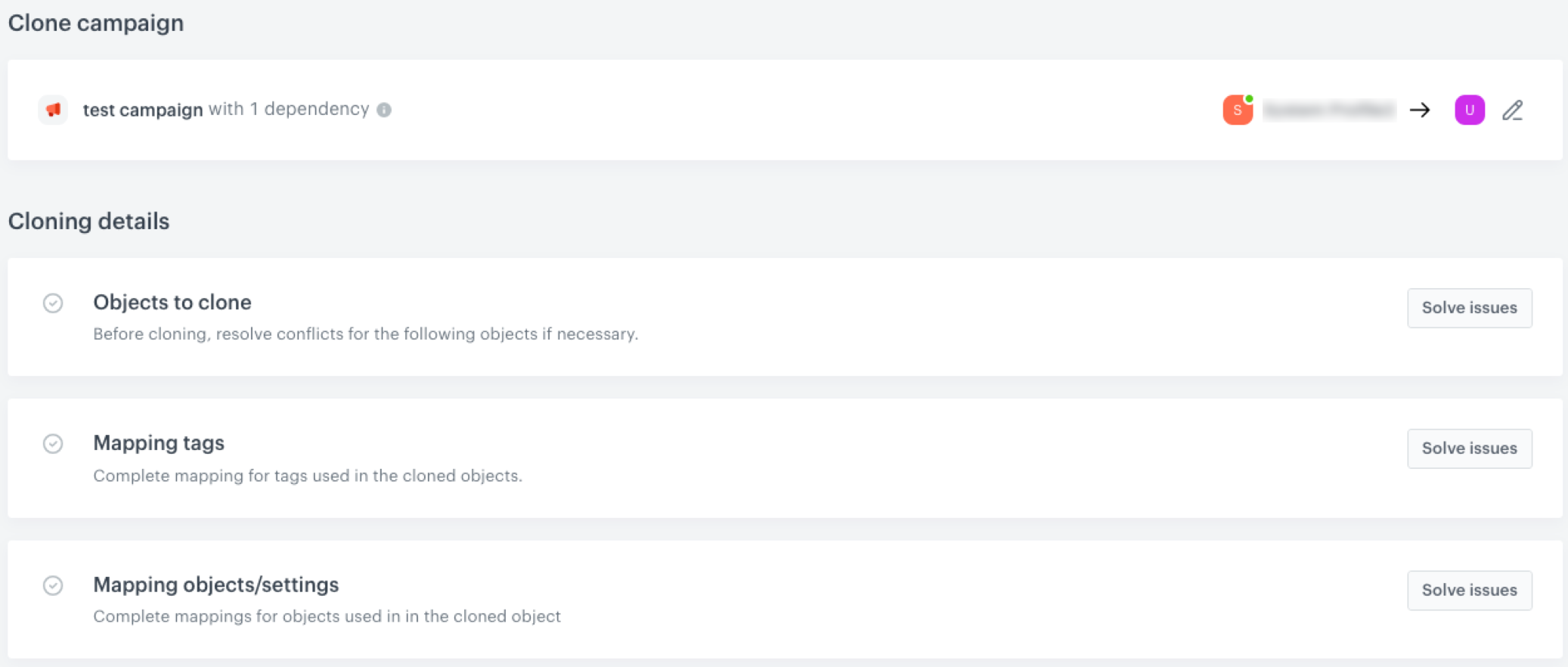
| Objects to clone         | This section contains a summary of objects (such as the whole campaign configuration, analyses, recommendations) which will be cloned to a target workspace. <br> - If there are no conflicts, no action is needed in this section. The listed objects will be cloned to the target workspace with the same names as in the source workspace. <br> - If there are conflicts (the same object types with the same names exist in the target workspace), you must [define the method of resolving the conflict](#resolving-cloning-issues). | All campaign types                                                     |
| Mapping events           | In this section, map events from analyses used in the message. If the system finds events with the same name in the target workspace, they are mapped automatically.                                                                                                                                                  | All campaign types that contain analyses                               |
| Mapping parameters       | In this section, map the attributes (for example, customer's name, size, email)  which you used to personalize the message. If the system finds the attributes with the same name in the target workspace, they are mapped automatically.                                                                                                                                                                         | All campaign types that contain references to customer attributes      |
| Mapping customer tags             | In this section, map customer tags which you used in the settings of the message. If the system finds tags with the same name in the target workspace, they are mapped automatically.                                                                                                                                                                                                                                                                                                                                                                | All campaign types that contain references to customer tags                                                     |
| Mapping product feed     | In this section, map the product feed and item attributes used in the message.                                                                                                                                                                                                                                                                                                                                                             | Any campaign which contains recommendations |
| Mapping settings/objects | In this section, map a sender account, voucher pools, promotions, and catalogs to which there is a reference in a message.   <div class="admonition admonition-important"><div class="admonition-icon"><svg xmlns="http://www.w3.org/2000/svg" fill="none" viewBox="0 0 24 24" stroke="currentColor" stroke-width="2.5"><path stroke-linecap="round" stroke-linejoin="round" d="M12 8v4m0 4h.01M21 12a9 9 0 11-18 0 9 9 0 0118 0z" /></svg></div><div class="admonition-body"><div class="admonition-content"> Voucher pools, sender accounts, promotions, and catalogs are not cloned. You can only indicate their equivalent in a target workspace. </div></div></div> |  - Sender account is available for email and SMS. <br> - Catalogs are available for all campaigns with references to catalogs. <br> - Vouchers are available for all campaigns with references to vouchers. <br> - Promotions are available for email and dynamic content with references to promotions.            |

## Cloning campaigns with AI Search references
---


<div class="admonition admonition-important"><div class="admonition-icon"><svg xmlns="http://www.w3.org/2000/svg" fill="none" viewBox="0 0 24 24" stroke="currentColor" stroke-width="2.5"><path stroke-linecap="round" stroke-linejoin="round" d="M12 8v4m0 4h.01M21 12a9 9 0 11-18 0 9 9 0 0118 0z" /></svg></div><div class="admonition-body"><div class="admonition-content">

Available only for cloning dynamic content.

</div></div></div>


While cloning a campaign that contains reference to AI Search, it will not be detected. This means, you won't be able to map the AI search  from source workspace with AI search from target workspace.

In such case, after cloning is complete, open the content of the cloned campaign and modify the reference with the AI search parameters from the target workspace.


## Resolving cloning issues
---
An issue occurs when:
- An object of the same type with the same name already exists in the target workspace
- The system could not find the equivalent events, attributes, tags, item feed, item attributes, sender account, catalog, promotion, or voucher pool

To resolve a problem, go to the details of each section whose button says **Solve issues**.

<figure><img src="/api/docs/image/54176ad07f146575310749eba44b7c2f42c1b327/docs/settings/_gfx/conflicts-general.png" class="full" alt="Conflict while cloning objects"><figcaption>Conflict while cloning objects</figcaption></figure>

| Section name             | Solution                                                                                                                                                                                                                                                                                                                                                                                                                                                                                                                                                                |
|--------------------------|----------------------------------------------------------------------------------------------------------------------------------------------------------------------------------------------------------------------------------------------------------------------------------------------------------------------------------------------------------------------------------------------------------------------------------------------------------------------------------------------------------------------------------------------------------------------------------|
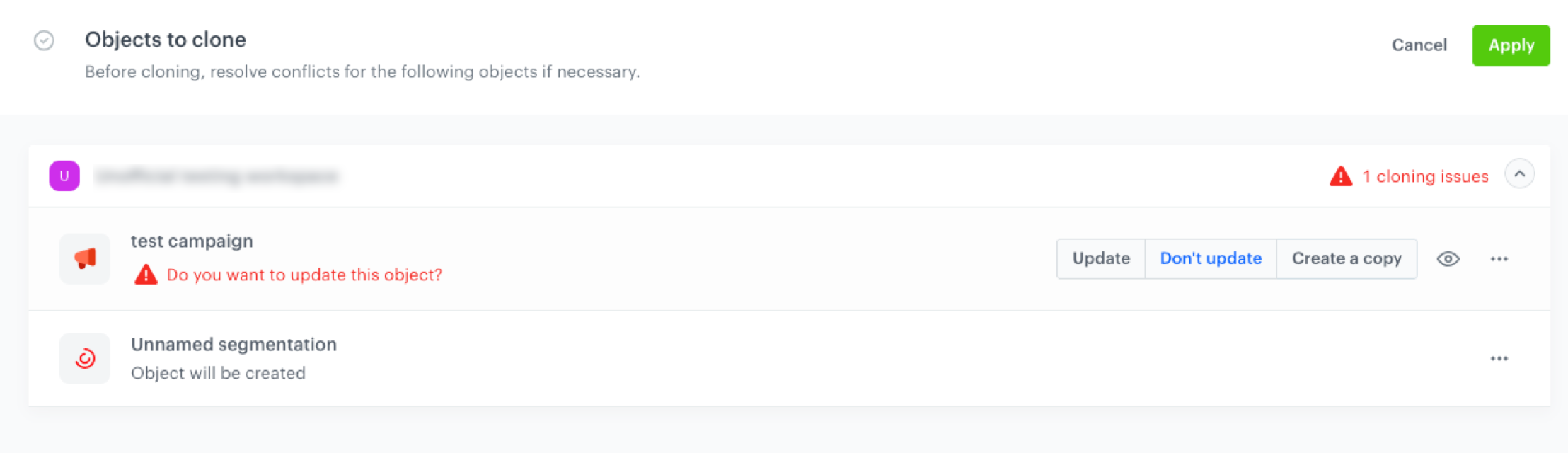
| Objects to clone         | You can select one of the following conflict solutions: <br> - Update - overwrite the object in the target workspaces with the object version from the source workspace <br> - Don't update - don’t overwrite (skip cloning) <br> - Create a copy - create a copy of the object version from the source workspace in the target workspaces, the copied object inherits the objects name from the source workspace. <br> <figure><img src="/api/docs/image/54176ad07f146575310749eba44b7c2f42c1b327/docs/settings/_gfx/clone-message-object-conflict.png" class="large" alt="Conflict while cloning objects"><figcaption>Conflict while cloning objects</figcaption></figure>                                                                                                                                                                                                                                |
| Mapping events           | From the dropdown list, select an equivalent event. If there is no equivalent event, you can create one by clicking **Create [event name]** on the top of the dropdown list.                                                                                                                                                                                                                                                                                                                                                                                                     |
| Mapping parameters       | From the dropdown list, select an equivalent customer attribute. There is no possibility of adding a new customer while cloning.                                                                                                                                                                                                                                                                                                                                                                                                                                                 |
| Mapping tags             | From the dropdown list, select an equivalent tag. If there is no equivalent tag, you can create one by clicking **Create [tag name]** on the top of the dropdown list.                                                                                                                                                                                                                                                                                                                                                                                                           |
| Mapping product feed     | From the dropdown list, select an equivalent item feed. If there is no equivalent item feed, you must go to the target workspace and [create one](/docs/settings/configuration/ai-engine-configuration/engine-configuration-for-recommendations#adding-item-feed).                                                                                                                                                                                                                                                                                                              |
| Mapping settings/objects | In this section, you can resolve conflicts connected with sender account, voucher pool, promotion, and/or a catalog by selecting their equivalents from a dropdown list. If equivalents don't exist, go to the target workspace and create them. <br> - [Creating email account](/docs/campaign/e-mail/configuring-email-account) <br> - [Creating SMS account](/docs/campaign/SMS/configuring-sms-gateway) <br> - [Creating voucher pool](/docs/assets/code-pools) <br> - [Creating a promotion](/docs/ai-hub/promotions) <br> - [Creating a catalog](/docs/assets/catalogs/creating-catalogs) <br> |


## Objects created during cloning
---

The elements created during cloning are available in their respective modules on target workspace, for example events are added in **Data Modeling Hub > Events**.

## Jinjava-related issues
---
The mapping of objects such as catalogs, voucher pools, promotions is available only when the campaign template contains Jinjava code referencing these objects. When it comes to Jinjava references to AI recommendations, aggregates, and other analysis types, mapping isn't necessary, because these objects are cloned automatically to the target workspace.

Possible issues in detecting dependencies:

- If the Jinjava is incorrect (for example, missing `endif`), the dependency may not be detected.
- If you clone a campaign that doesn't support a particular Jinjava tag (for example, the `socialproof` tag in email template) and the campaign contains the reference to such a tag, the dependency will not be detected. See [inserts documentation](/developers/inserts) for detailed info.
- If the Jinjava code is inserted in the comment snippet `{# commentary #}`, the dependency to such Jinjava will not be detected.
- If you used a variable in the content replacing an element of Jinjava code with a dependency, the dependency will not be detected. For example, if you used a [Synerise insert select](/docs/campaign/e-mail/creating-email-templates/email-code-editor#adding-a-variable), after cloning, you must open the content of the cloned campaign in the target workspace and select the insert manually in the content.
- If you used a Jinjava variable instead of directly using the ID of the object being the subject of dependency, the dependency will not be detected. You must open the cloned campaign content or template in the target workspace and replace the object ID manually. See the example below:
    
  <pre><code class="language-jinja">{% set dynamic_object = {'Reco id': 'xyz'} %}

      {% macro withParam(param)%}
          {{ dynamic_object.get(param) }}
      {% endmacro %}

      {% recommendations3 campaignId={{ withParam('Reco id') }} %}
          // logic of displaying the recommendation
      {% endrecommendations3 %}</code></pre>