Before cloning AI recommendations between workspaces, we recommend reading the [Introduction to cloning](/docs/settings/workspace/cloning-objects/introduction-to-cloning) article.

## Prerequisites
---
- To clone objects between workspaces, you must be assigned a user role that has the following permissions in the source and target workspaces:
    - The Cloning module set to **Read** and **Create**.
    - In the Communication module, enable the permission to **Read**, **Create**, and **Update** recommendations.
- In the target workspace, enable [models for the types of recommendations you want to clone to the workspace](/docs/settings/configuration/ai-engine-configuration/engine-configuration-for-recommendations) and configure the recommendation attributes while configuring the AI engine.
- Make sure item feeds in the source and target workspaces have equivalent attributes. 

## Select recommendation to clone
---
1. Go to **AI Hub** <img src="/api/docs/image/54176ad07f146575310749eba44b7c2f42c1b327/icons/ai-hub-icon.svg" alt="AI Hub icon" class="icon"> > **(AI Recommendations) Models**.
2. On the list of recommendations, find the recommendation you want to clone.
3. To the right side of the recommendation author information, click <img src="/api/docs/image/54176ad07f146575310749eba44b7c2f42c1b327/icons/threedoticon.png" alt="Three-dot icon" class="icon">.
4. From the context menu, select **Clone to workspace**.  
    **Result**: The **Choose destination** pop-up appears.
5. On the pop-up, select up to 5 workspaces to which you want to clone your recommendation.  
    <figure><img src="/api/docs/image/54176ad07f146575310749eba44b7c2f42c1b327/docs/settings/_gfx/choose-workspace-to-clone.png" class="large" alt="A pop-up with selection of workspaces"><figcaption>A pop-up with selection of workspaces</figcaption></figure>
6. Confirm your choice by clicking **Next**.  
    **Result**: You are directed to the mapping wizard.

## Cloning a recommendation
---

The procedure of cloning a recommendation takes place in the mapping wizard and involves:
- selecting [an item feed](/docs/ai-hub/recommendations-v2/configure-item-feed-ai-recommendations) in the target workspace based on which you will map recommendation elements (such as filters, metrics, and so on)
- mapping the elements of the recommendations (see the full list below)  
    
  <div class="admonition admonition-important"><div class="admonition-icon"><svg xmlns="http://www.w3.org/2000/svg" fill="none" viewBox="0 0 24 24" stroke="currentColor" stroke-width="2.5"><path stroke-linecap="round" stroke-linejoin="round" d="M12 8v4m0 4h.01M21 12a9 9 0 11-18 0 9 9 0 0118 0z" /></svg></div><div class="admonition-body"><div class="admonition-content">

  You can't add new item attributes to the item feed in the target workspace while mapping. Make sure item feeds in the source and target workspaces have equivalent attributes.

  </div></div></div>


| Element name                  | Description                                                                                                                                                                                                                                                                                                               | Available for recommendation types                                                 |
|-------------------------------|---------------------------------------------------------------------------------------------------------------------------------------------------------------------------------------------------------------------------------------------------------------------------------------------------------------------------|------------------------------------------------------------------------------------|
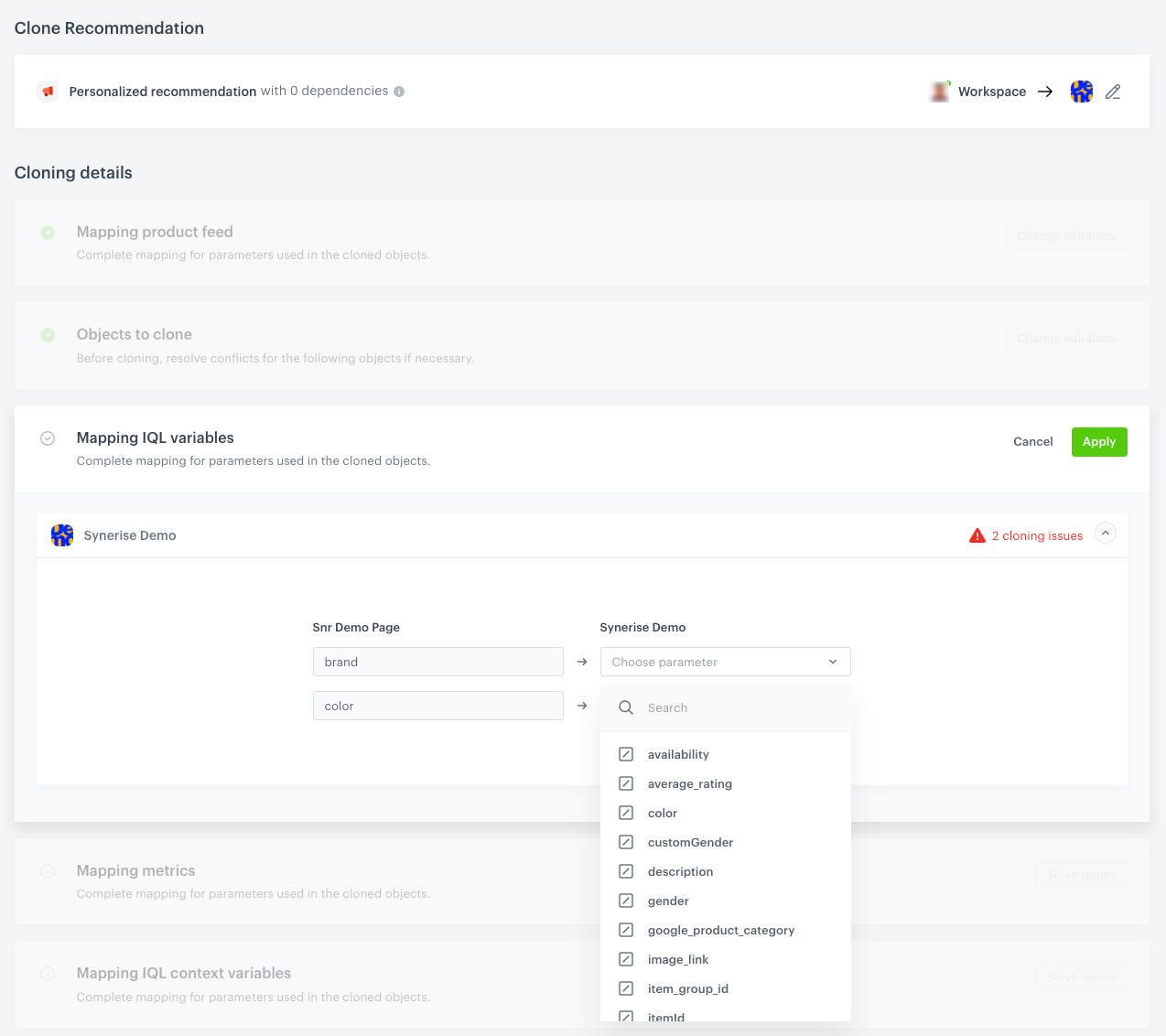
| Mapping IQL variables         | It involves mapping the item attributes used in the filters of the cloned recommendations with the attributes of the selected item feed in the target workspace.                                                                                                                                                          | All recommendation types                                                           |
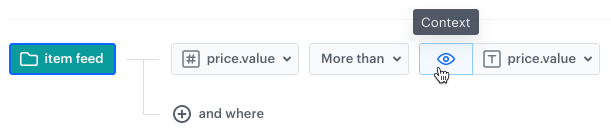
| Mapping IQL context variables | Is required only if the filters of the cloned recommendation include the condition for filtering items according to the value of the attribute of currently displayed item. <figure><img src="/api/docs/image/54176ad07f146575310749eba44b7c2f42c1b327/docs/settings/_gfx/context-filter-example.png" class="large" alt="Context used in a filter"><figcaption>Context used in a filter</figcaption></figure> It involves mapping item attributes used in the recommendation filters with the attributes of the selected item feed in the target workspace. | All recommendation types                                                           |
| Mapping distinct attributes   | Is required only if the cloned recommendation has conditions defined in the Distinct filter. It involves mapping attributes used in the filters with the attributes of the selected item feed in the target workspace. <figure><img src="/api/docs/image/54176ad07f146575310749eba44b7c2f42c1b327/docs/settings/_gfx/distinct-filter-reco.png" class="large" alt="The distinct filter"><figcaption>The distinct filter </figcaption></figure>                                                                                           | All recommendation types, except for the Attribute recommendations                 |
| Mapping metrics               | Is required only if the cloned recommendation uses metrics for boosting or sorting items. Those metrics must be mapped with their equivalents in the target workspace.                                                                                                                                                    | All recommendation types except for the Section page and Attribute recommendations |
| Mapping metadata feeds        | It involves mapping the attributes stored in the [metadata catalog](/docs/ai-hub/item-feed/metadata-catalog) with their equivalents in the target workspace.                                                                                                                           | Section page, Attribute                                                            |
| Mapping item attributes       | It involves mapping the attributes selected in the **Item attribute** field with their equivalent in the target workspace. <figure><img src="/api/docs/image/54176ad07f146575310749eba44b7c2f42c1b327/docs/settings/_gfx/item-attribute-field.png" class="large" alt="The item attribute field"><figcaption>The item attribute field </figcaption></figure>                                                                                                                                                                                                                          | Section page, Attribute                                                            |
| Mapping display attributes    | It involves mapping the comparison attributes selected in the settings of the cloned recommendation with their equivalents in the target workspace.                                                                                                                                                                          | Item comparison                                                                    |
| Mapping events                | It involves mapping the event or events of the aggregate selected in the settings of the cloned recommendation with their equivalents in the target workspace.                                                                                                                                                            | Recent interactions                                                                |
| Mapping parameter             | It involves mapping the event parameters of the aggregate selected in the settings of the cloned recommendation with their equivalents in the target workspace.                                                                                                                                                           | Recent interactions                                                                |
| Mapping tags                  | It involves mapping tags used in the filter conditions with their equivalents in the target workspace.                                                                                                                                                                                                                    | All recommendation types                                                           |

### Procedure

1. In the **Mapping product feed** section, click **Solve issues**.  
2. From the dropdown list, for the target workspace, select the item feed based on which you will map the elements from the cloned recommendation with their equivalents in the target workspace.
3. If:
    - the button on the **Objects to clone** section says **Change solution**, this means the recommendation with this name does not exist in the target workspace. Then, follow [this procedure](#a-recommendation-does-not-exist-yet-in-the-target-workspace).
    - the button on the **Objects to clone** section says **Solve issues**, the recommendation with this name already exists in the target workspace. In such case, follow [this procedure](#a-recommendation-already-exists-in-the-target-workspace).

### A recommendation does not exist yet in the target workspace

1. After you select the item feed in the target workspace, map the recommendation settings with their equivalents in the target workspace by clicking **Solve conflicts** in each section and selecting the equivalent attributes/metrics/events/tags. 
    <figure><img src="/api/docs/image/54176ad07f146575310749eba44b7c2f42c1b327/docs/settings/_gfx/cloning-reco-standard.png" class="large" alt="Mapping attributes used in the recommendation filter"><figcaption>Mapping attributes used in the recommendation filter</figcaption></figure>
2. Confirm the settings in each section by clicking **Apply**.
3. Before cloning, at the bottom of the page, you may preview the summary of mapping by clicking **Summary**.
4. When you complete mapping, in the upper right corner, to clone the recommendation to the target workspace, click **Clone**.


### A recommendation already exists in the target workspace

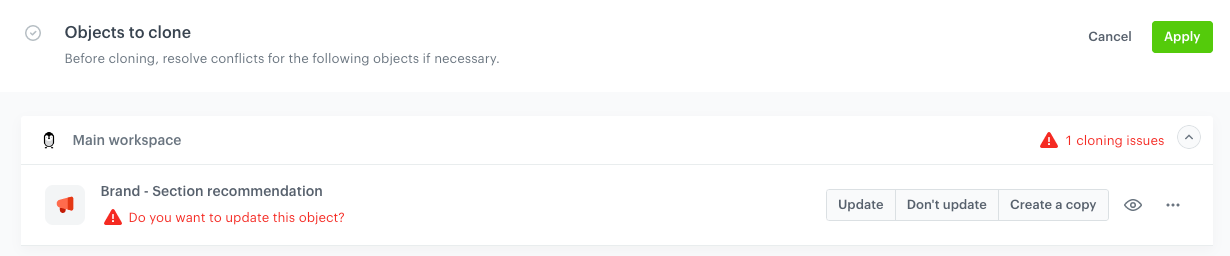
When you clone a recommendation and the recommendation with the same name and of the same type exists, you need to resolve the conflict. 

1. In the **Objects to clone** section, click **Solve issues**.  
2. Next to the target workspace name, click the downward arrow icon.  
    **Result**: The list displays the recommendation to be cloned which also exists in the target workspace. 
3. You can perform one of the following actions for each conflicting object:
    - To overwrite the object in the target workspace with the object from the source workspace, click **Update**. 
        
      <div class="admonition admonition-important"><div class="admonition-icon"><svg xmlns="http://www.w3.org/2000/svg" fill="none" viewBox="0 0 24 24" stroke="currentColor" stroke-width="2.5"><path stroke-linecap="round" stroke-linejoin="round" d="M12 8v4m0 4h.01M21 12a9 9 0 11-18 0 9 9 0 0118 0z" /></svg></div><div class="admonition-body"><div class="admonition-content">

      Remember that recommendations may be named identically by coincidence. Before you decide to use the "update" option, make sure that you're not overwriting something that should not be overwritten.

      </div></div></div>
 
    - To skip cloning the object to the target workspace, click **Don't update**.  
    - To create a copy of the object from the source workspace in the target workspace, click **Create a copy**. The word `copy` will be added to the name of the cloned object in the target workspace.

    <figure><img src="/api/docs/image/54176ad07f146575310749eba44b7c2f42c1b327/docs/settings/_gfx/clone-existing-objects-reco.png" class="large" alt="Resolving conflicts"><figcaption>Resolving conflicts</figcaption></figure>

5. If applicable, repeat steps 2 and 3 for other workspaces.
4. Confirm the settings by clicking **Apply**.
5. In the remaining sections in **Cloning details**, map the recommendation settings with their equivalents in the target workspace by clicking **Solve conflicts** in each section and selecting the equivalent attributes/metrics/events/tags. Confirm the settings in each section by clicking **Apply**.
    <figure><img src="/api/docs/image/54176ad07f146575310749eba44b7c2f42c1b327/docs/settings/_gfx/cloning-reco-standard.png" class="large" alt="Mapping attributes used in the recommendation filter"><figcaption>Mapping attributes used in the recommendation filter</figcaption></figure>
3. Before cloning, at the bottom of the page, you may preview the summary of mapping by clicking **Summary**.
4. When you complete mapping, in the upper right corner, to clone the recommendation to the target workspace, click **Clone**.


## Events and tags created while cloning

### Events

Events and their parameters created while cloning will be available in the target workspace in **Data Modeling Hub > Events**.


<div class="admonition admonition-important"><div class="admonition-icon"><svg xmlns="http://www.w3.org/2000/svg" fill="none" viewBox="0 0 24 24" stroke="currentColor" stroke-width="2.5"><path stroke-linecap="round" stroke-linejoin="round" d="M12 8v4m0 4h.01M21 12a9 9 0 11-18 0 9 9 0 0118 0z" /></svg></div><div class="admonition-body"><div class="admonition-content">

These events/parameters will only have `name` and `display name` defined. The remaining metadata are empty and the JWT authorization settings for the event are disabled.

</div></div></div>


### Tags

Tags created while cloning will be available in the target workspace in **Data Modeling Hub > Tags**.

## Cloning logs

To check whether the recommendations were successfully cloned, go to **Settings > Cloning logs**.