 How to create and manage a successful loyalty program
How and where you have to start you loyalty journey
What types of scenarios you can use
How to create and manage a successful loyalty program
How and where you have to start you loyalty journey
What types of scenarios you can use





 **DOCUMENTATION**
 **DOCUMENTATION**
**DOCUMENTATION**
**DOCUMENTATION**
**DOCUMENTATION**
**DOCUMENTATION**
 **DOCUMENTATION**

 **USE CASES**
 |
**USE CASES**
|
**USE CASES**
|
**USE CASES**
|
**USE CASES**
|
**USE CASES**
|
**USE CASES**
 |
---
**BLOG POST**
|
---
**BLOG POST**
 |
**BLOG POST**
|
---
**DOCUMENTATION**
**USE CASES**
|
**BLOG POST**
|
---
**DOCUMENTATION**
**USE CASES**
 |
---
**USE CASES**
|
**USE CASES**
|
**USE CASES**
|
**USE CASES**
|
**USE CASES**
|
---
### Explore other scenarios
If the scenarios above don't meet your needs, expand the list of inspirations by clicking **Earn & Burn - Examples of use**
**DOCUMENTATION**
**DOCUMENTATION**
**DOCUMENTATION**
|
---
**USE CASES**
|
**USE CASES**
|
**USE CASES**
|
**USE CASES**
|
**USE CASES**
|
---
### Explore other scenarios
If the scenarios above don't meet your needs, expand the list of inspirations by clicking **Earn & Burn - Examples of use**
**DOCUMENTATION**
**DOCUMENTATION**
**DOCUMENTATION**
 **USE CASES**
|
**USE CASES**
|
**USE CASES**
|
**USE CASES**
|
---
**USE CASES**
|
**USE CASES**
|
---
**USE CASES**
|
**USE CASES**
|
**USE CASES**
|
**USE CASES**
|
---
**USE CASES**
|
**USE CASES**
|
---
 **DOCUMENTATION**
 **BLOG POST**
 **USE CASES**
|
**BLOG POST**
**USE CASES**
|
**BLOG POST**
 **USE CASES**
**USE CASES**
**USE CASES**
**USE CASES**
**USE CASES**
**USE CASES**
**USE CASES**
 **DOCUMENTATION**
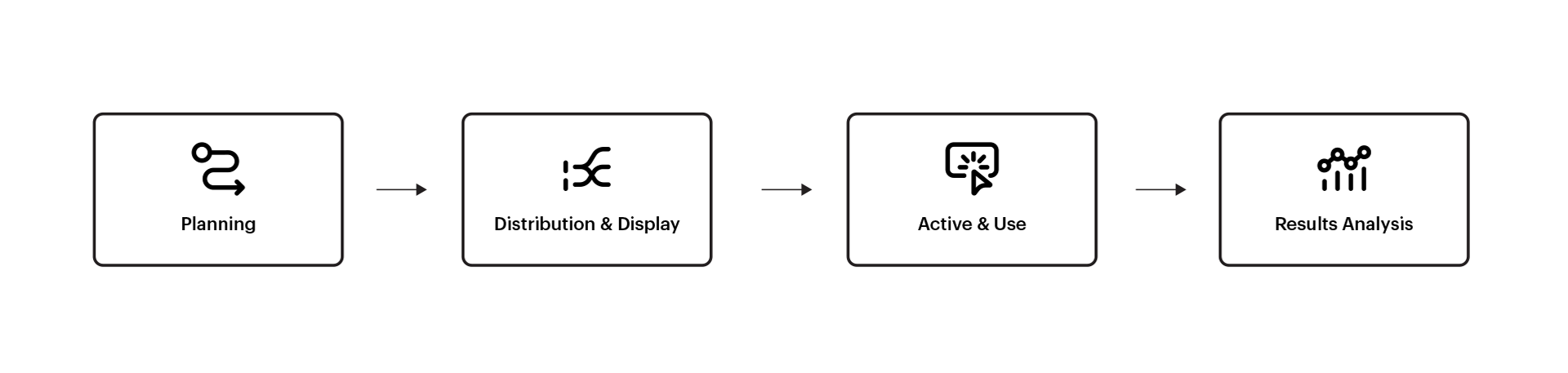
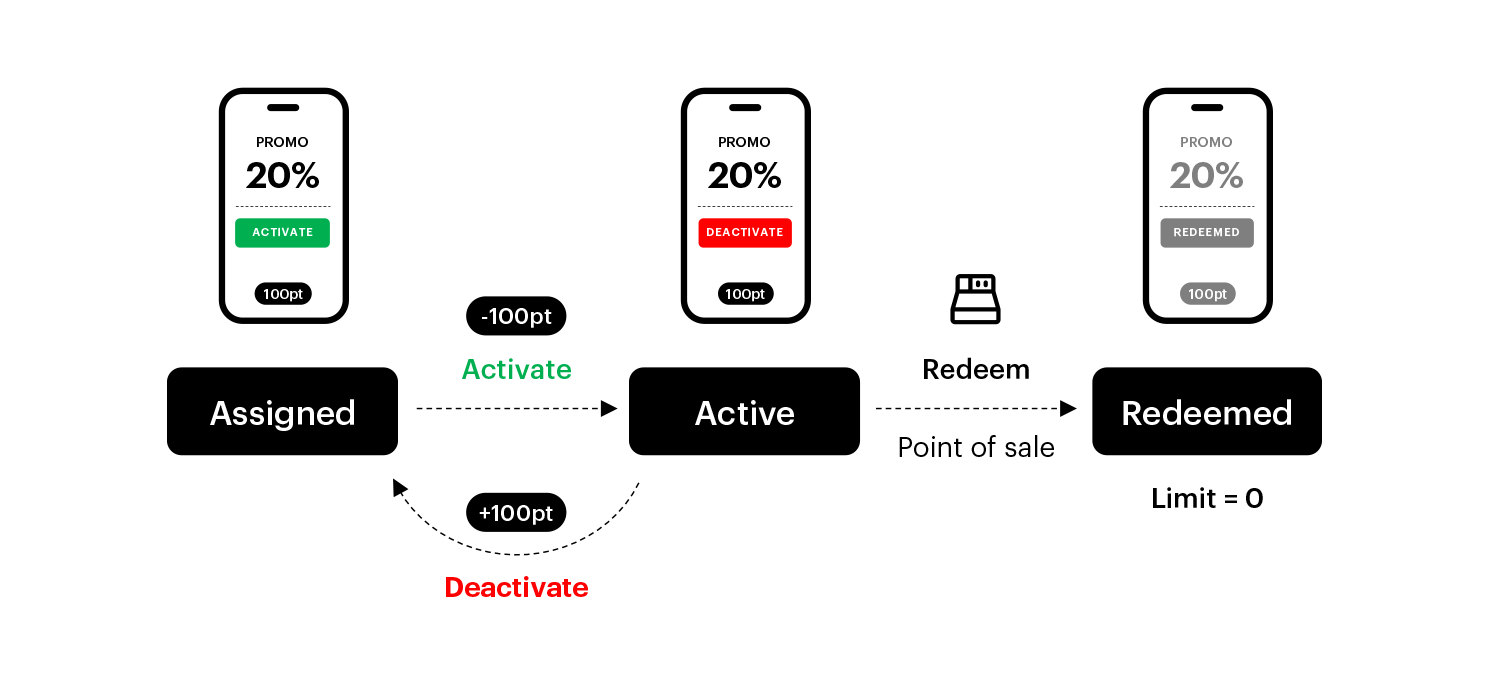 - **Assigned** – If the promotion meets all the display conditions, and user belongs to promotion's segment, the promotion receives the status of “assigned" for this user.
- **Active** – The "Active" status is given to a promotion that was assigned to and activated by end-user. Activation may redeem user's points or be free of charge, depending on configuration of the promotion.
- **Redeemed** – Some promotions have usage limits; if a customer utilizes it, the promotion moves to the “redeem” status, indicating that the personalized promotion cannot be activated and used again by this specific user.
In Synerise, promotions do not have a visible code to the user; necessary information is communicated between the cash/commerce system and Synerise. The only crucial element is identification of the customer at the time of purchase unless you want the promotion to be used by anyone.
For complete reference of promotion statuses, go to the ["Promotion statuses" section](/docs/ai-hub/promotions/introduction-to-promotions#promotion-statuses)
### STAGE 4: Results analysis
Regularly tracking and analyzing promotional results, such as sales metrics, customer engagement, ROI, or website traffic growth, is critical. It helps gauge the effectiveness of promotional spend and assess the success of the promotion.
Based on the data obtained, conclusions and recommendations can be drawn for further marketing activities and possible improvements for future promotions.
**DOCUMENTATION**
- **Assigned** – If the promotion meets all the display conditions, and user belongs to promotion's segment, the promotion receives the status of “assigned" for this user.
- **Active** – The "Active" status is given to a promotion that was assigned to and activated by end-user. Activation may redeem user's points or be free of charge, depending on configuration of the promotion.
- **Redeemed** – Some promotions have usage limits; if a customer utilizes it, the promotion moves to the “redeem” status, indicating that the personalized promotion cannot be activated and used again by this specific user.
In Synerise, promotions do not have a visible code to the user; necessary information is communicated between the cash/commerce system and Synerise. The only crucial element is identification of the customer at the time of purchase unless you want the promotion to be used by anyone.
For complete reference of promotion statuses, go to the ["Promotion statuses" section](/docs/ai-hub/promotions/introduction-to-promotions#promotion-statuses)
### STAGE 4: Results analysis
Regularly tracking and analyzing promotional results, such as sales metrics, customer engagement, ROI, or website traffic growth, is critical. It helps gauge the effectiveness of promotional spend and assess the success of the promotion.
Based on the data obtained, conclusions and recommendations can be drawn for further marketing activities and possible improvements for future promotions.
**DOCUMENTATION**