## Managing items


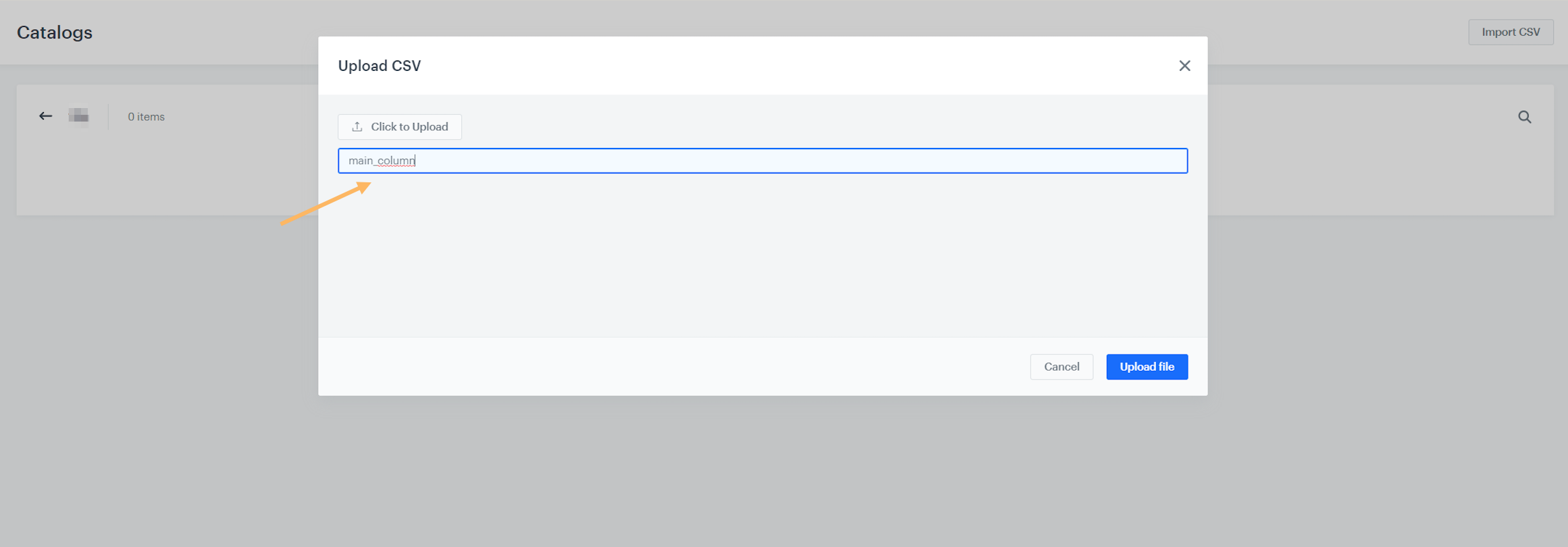
<details class="accordion"><summary>I can't upload a catalog</summary><div class="accordion-content"><p>Check if you have a minimum of 2 columns in the file and the format of your file is <code>.csv</code> (values separated by commas). The CSV file must be UTF-8 encoded. Remember that one of the columns must include unique keys, for example customer IDs, product SKUs, or some other unique identifier for the entry (CSV row). When uploading the file to Synerise, the system will ask you which column includes the keys.</p> <p><img src="/api/docs/image/54176ad07f146575310749eba44b7c2f42c1b327/troubleshooting/assets/_gfx/assets3.png" alt="image"></p></div></details>


<details class="accordion"><summary>I can't upload a code pool file</summary><div class="accordion-content"><p>Check if your file is made up of one column, being the list of coupons, and that each coupon is unique. Also, note that your <code>.csv</code> file must be UTF-8 encoded and should not exceed 100 000 coupons. If you want to upload more than 100 000 coupons, do more imports in separate <code>.csv</code> files.</p></div></details>


<details class="accordion"><summary>I can't edit a code pool file</summary><div class="accordion-content"><p>Code pools cannot be edited. You can delete a code pool and upload a new one to replace it.</p></div></details>


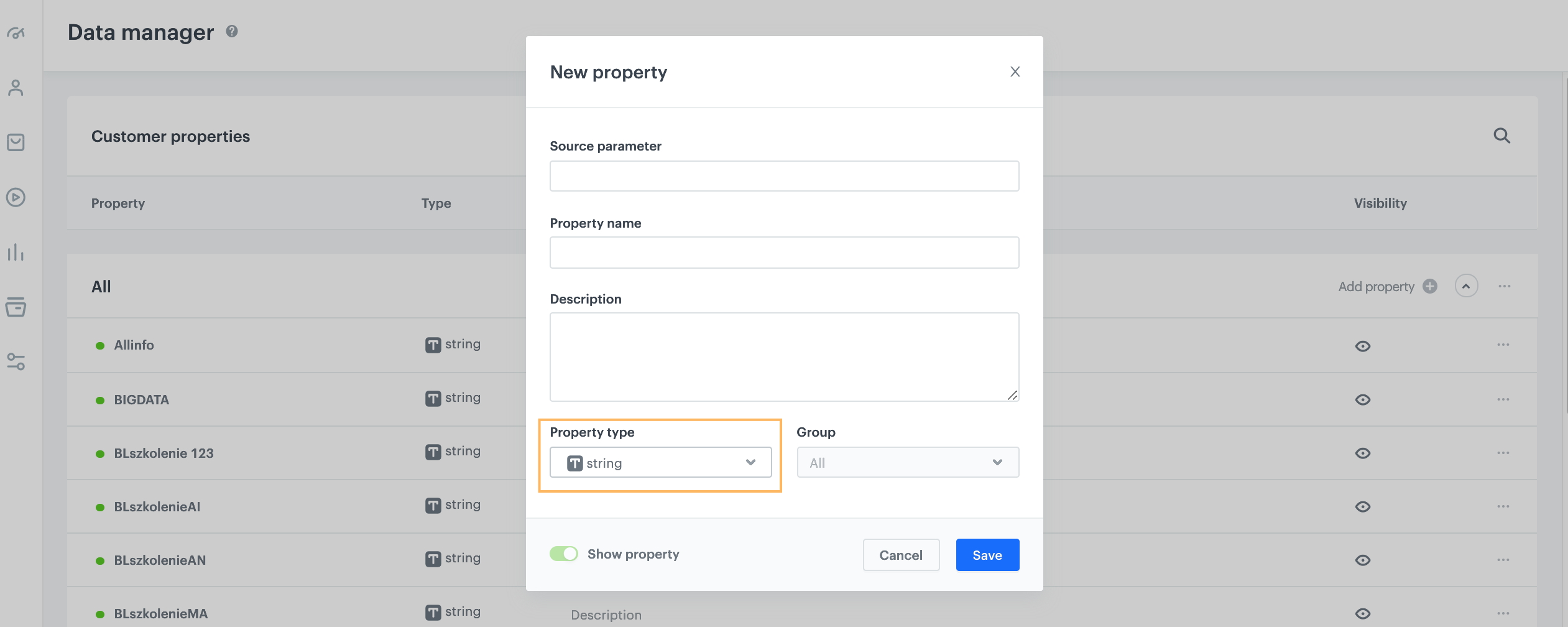
<details class="accordion"><summary>I have a problem with using attributes</summary><div class="accordion-content"><p>Check if the property type of your attribute is correct.</p> <p><img src="/api/docs/image/54176ad07f146575310749eba44b7c2f42c1b327/troubleshooting/assets/_gfx/assets1.png" alt="image"></p> <p>Check if the property type of your attribute is correct. For example, if you add attributes that define marketing agreements and accept the following values: 1 for &quot;yes&quot; and 2 for &quot;no&quot;, choose the <code>number</code> property type.</p></div></details>


## Events


<details class="accordion"><summary>Why isn't the form.submit event sent every time it's supposed to?</summary><div class="accordion-content"><p>Verify that your script is executed before redirecting the user to another website. If the script executes simultaneously with or after the redirect, the request to Synerise may not be sent.</p></div></details>


<details class="accordion"><summary>I received a "Read timeout" error for the message.notSent event</summary><div class="accordion-content"><p>A <code>message.notSent</code> event with the description:</p> <pre><code class="language-plaintext">An exception occurred: Exception reading response cause java.net.SocketTimeoutException: Read timed out</code></pre> <p>occurs when you select the SSL protocol. In your SMTP integration settings, change the protocol to TLS and verify that the correct port is entered.</p></div></details>


<details class="accordion"><summary>I received the push.notSent event</summary><div class="accordion-content"><p>The following list contains reasons why this event was generated:</p> <ul> <li>If you created the mobile push template by using the code creator, check if the <code>priority</code> parameter is in line with the FCM documentation (<a href="https://firebase.google.com/docs/cloud-messaging/http-server-ref">Firebase Cloud Messaging HTTP protocol</a>). The default values are <code>high</code> or <code>normal</code>.</li> <li>If you received the event with a <code>message key duplicated</code> error, it means that there were multiple attempts to send the message in too short intervals. In general, it means that deduplication worked correctly and one message has been sent instead of multiple identical messages.</li> </ul></div></details>


<details class="accordion"><summary>I received the sms.notSent event with an error message</summary><div class="accordion-content"><p>If you receive an <code>sms.notSent</code> event with the following error message: <code>Sending date does not fulfill the time limit set on your account</code>, check the SMS provider panel - you may have scheduled the messages for a time that exceeds the permitted hourly limit.</p></div></details>


<div class="admonition admonition-note"><div class="admonition-icon"><svg xmlns="http://www.w3.org/2000/svg" fill="none" viewBox="0 0 24 24" stroke="currentColor" stroke-width="2.5"><path stroke-linecap="round" stroke-linejoin="round" d="M13 16h-1v-4h-1m1-4h.01M21 12a9 9 0 11-18 0 9 9 0 0118 0z" /></svg></div><div class="admonition-body"><div class="admonition-content">

If you didn't find the answer to your issue, please collect all relevant information and provide our [help desk](https://hgintelligence.atlassian.net/servicedesk/customer/portal/1) with examples or screenshots.

</div></div></div>