Instead of wasting your resources for SMS campaigns which don't bring satisfying results, you can use them for sending messages only to those customers who are most likely to make a purchase. This way you can lower the campaign costs and increase the revenue at the same time.

For this purpose, in Predictions, you can calculate propensity to buy items for the customers who has agreed to receive SMS communication and then prepare the segmentation that contains customers with the highest score (the highest tendency to buy). This way, you will find out who is almost ready to make a purchase and just need a small incentive.

## Prerequisites
---
- Implement a [tracking code](/developers/web/installation-and-configuration).
- [Enable the Propensity predictions](/docs/ai-hub/predictions/enabling-predictions#enabling-propensity-and-best-fit-predictions).
- In **Settings > AI Engine Configuration**, upload item feed.
- The attributes that you want to use for propensity predictions must be configured as [filterable attributes](/docs/settings/configuration/ai-engine-configuration/engine-configuration-for-propensity#selecting-filters). In this use case, this attribute is the availability of the item.

## Process
---
In this use case, you will go through the following steps:
1. [Create a prediction](/use-cases/decrease-sms-campaign-cost#create-a-prediction) to calculate the customers' propensity for purchase.
2. [Create an aggregate](/use-cases/decrease-sms-campaign-cost#create-an-aggregate) to enable using the result of the latest prediction as a customer attribute.
3. [Create a segmentation](/use-cases/decrease-sms-campaign-cost#create-a-segmentation-based-on-the-prediction-results) based on that attribute to set an audience for use in communication.

## Create a prediction
---
As the first part of the process, configure a Propensity (to buy) prediction to find the customers who are most likely to make a purchase among all the customers in your database who agreed to SMS communication.

The result of the prediction is a `snr.propensity.score` event on the profiles of customers (who agreed to SMS communication) for whom there is enough data to calculate scoring. The `percentile` parameter of the event will be used in the further parts of the process to create a group of customers with high score.

1. Go to **Predictions > New prediction**.  
2. As the type of prediction, select **Propensity**.  
3. In the **Audience** section, click **Define**.  
    1. Click **Choose segmentation**.  
    2. At the bottom of the dropdown list, select **Create new**.  
    3. Enter the name of the segmentation.  
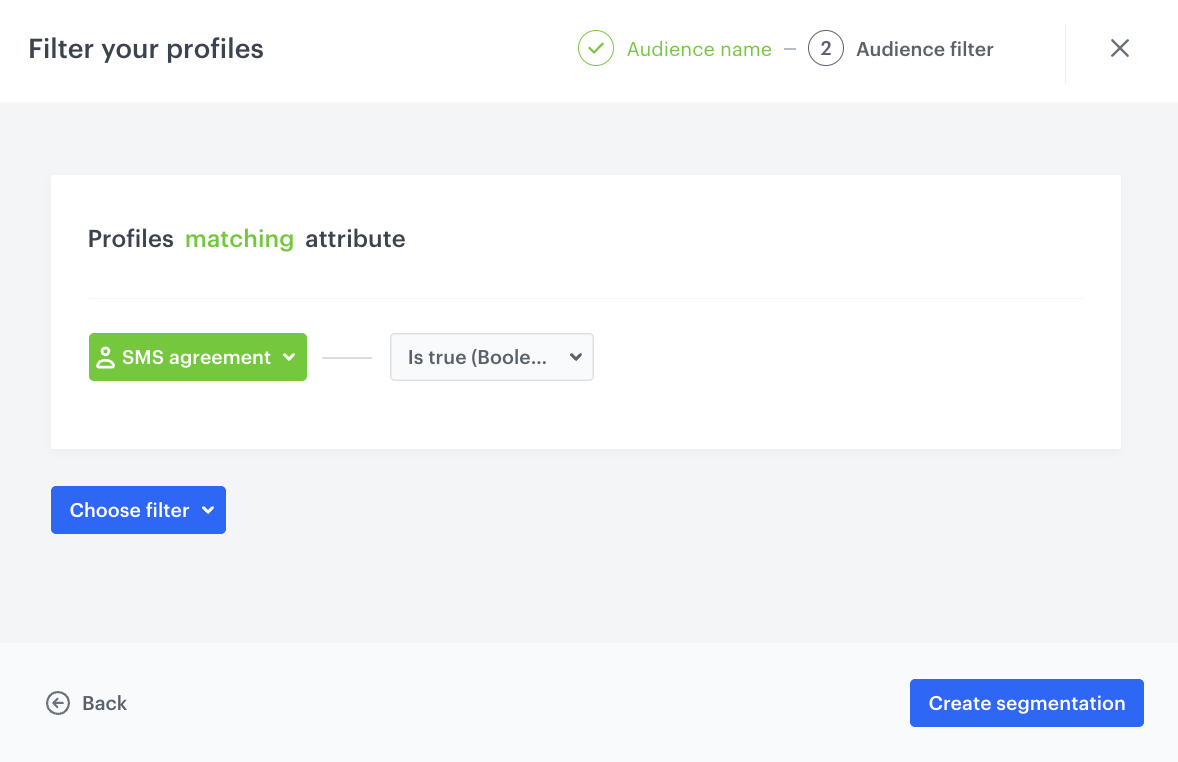
    4. Click **Choose filter**.  
    5. From the dropdown list, select the attribute that signifies the SMS consent.  
    6. On the logical operator dropdown list, click the <img src="/api/docs/image/54176ad07f146575310749eba44b7c2f42c1b327/icons/boolean-icon.png" alt="Boolean icon" class="icon" > icon.  
    7. Select **Is true**.  
        <figure><img src="/api/docs/image/54176ad07f146575310749eba44b7c2f42c1b327/use-cases/all-cases/_gfx/sms-consent.png" class="large" alt="The configuration of the segmentation"><figcaption>The configuration of the segmentation</figcaption></figure>  
    8. Click **Create segmentation**.  
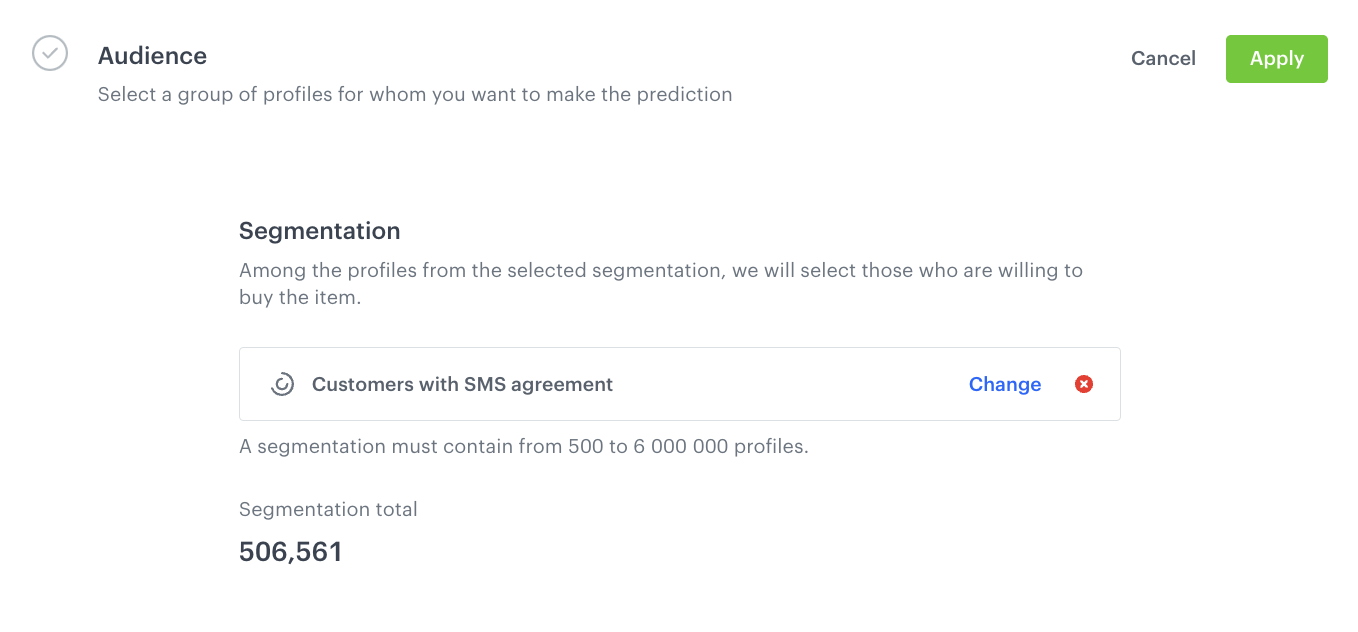
      <figure><img src="/api/docs/image/54176ad07f146575310749eba44b7c2f42c1b327/use-cases/all-cases/_gfx/sms-audience.png" class="full" alt="The Audience section configured"><figcaption>The Audience section configured</figcaption></figure>
4.  Click **Apply**.  
5. In the **Item selection** section, click **Define**.  
    1. Click **Choose items feed**.  
    2. From the dropdown list, select the feed. 
    3. In the **Item filter** section, click **Define item filter**.  
    4. On the pop-up, click **Select attribute**.  
    5. Select the attribute that signifies availability of the items.  
    6. As the logical operator, select **Equal**.  
    5. As the value, select **in stock**.    
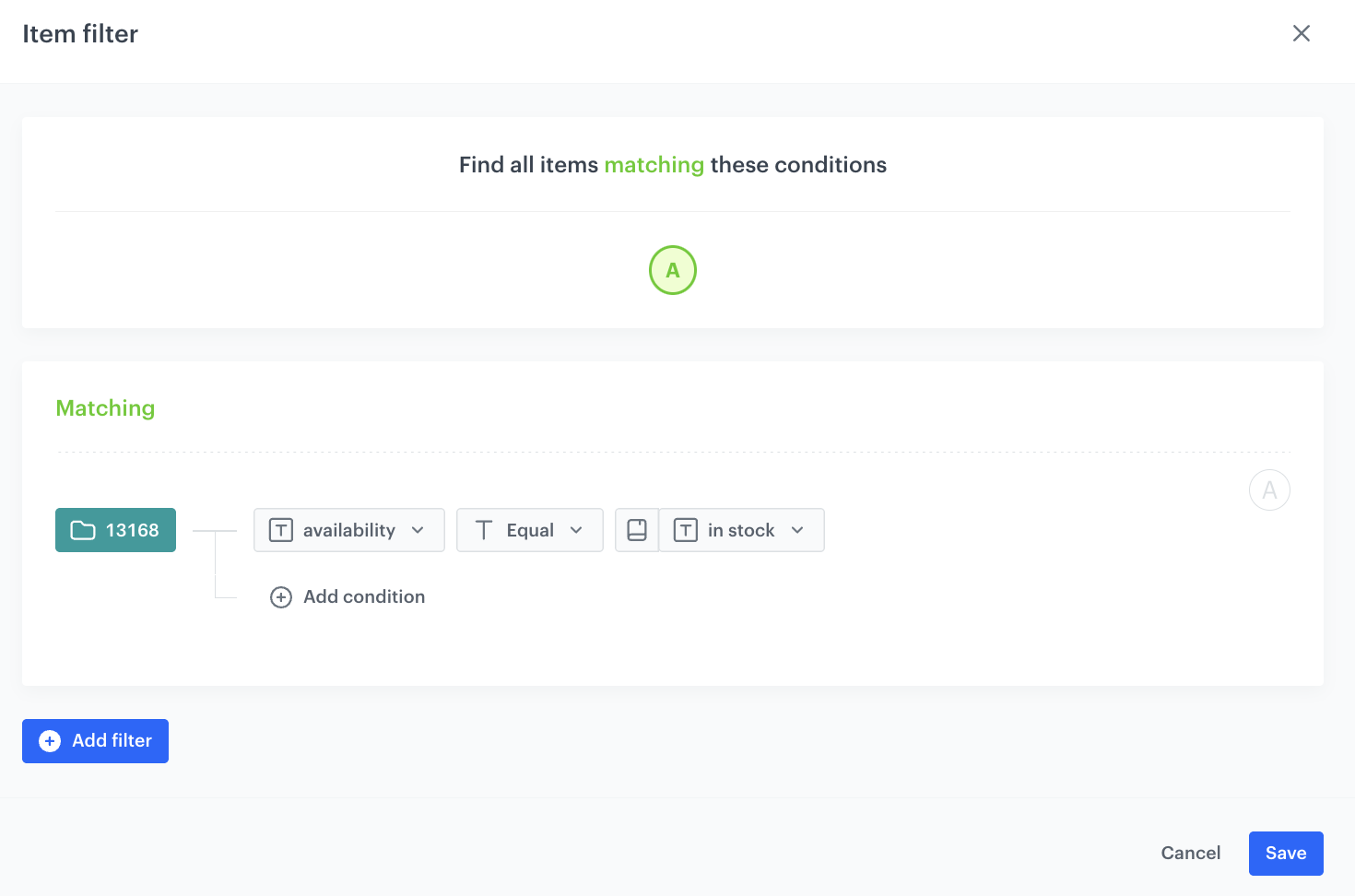
    This way, the customer's propensity for purchasing any available item will be calculated.   
       <figure><img src="/api/docs/image/54176ad07f146575310749eba44b7c2f42c1b327/use-cases/all-cases/_gfx/item-filter-availability.png" class="full" alt="The configuration of the filter - it matches only items which are available"><figcaption>The configuration of the filter - it matches only items which are available </figcaption></figure>   
    6. Click **Save**.  
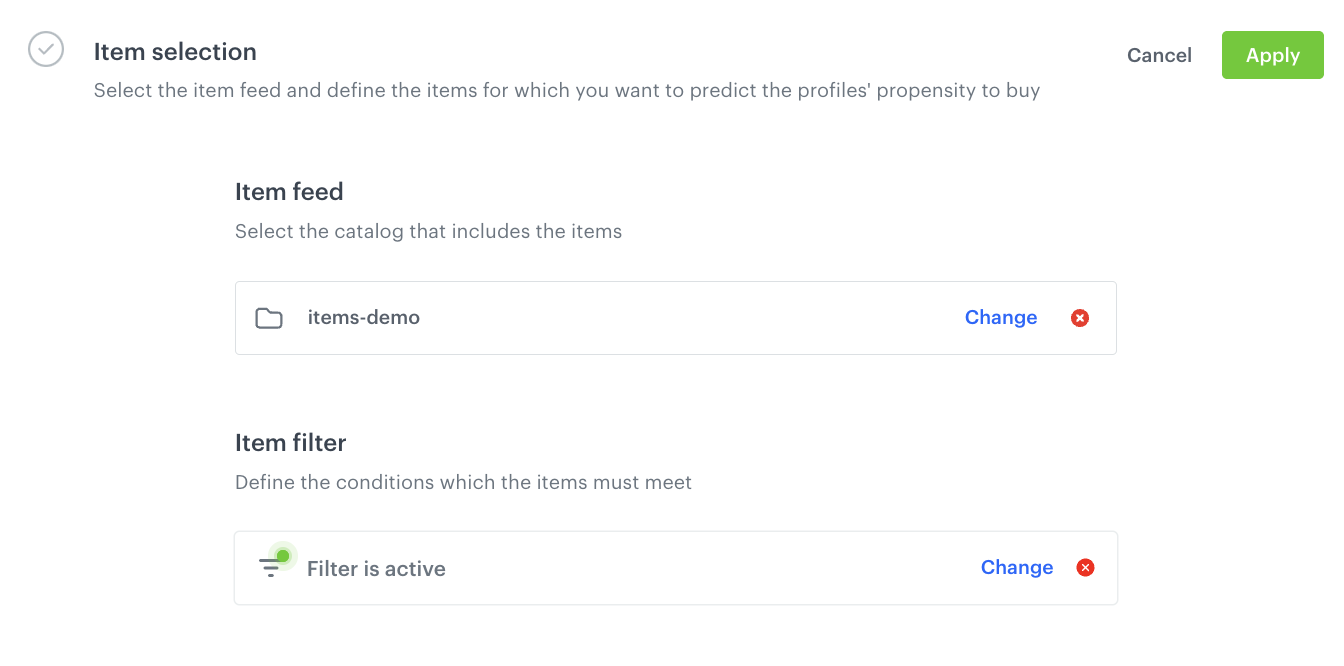
    <figure><img src="/api/docs/image/54176ad07f146575310749eba44b7c2f42c1b327/use-cases/all-cases/_gfx/item-selection-sms.png" class="full" alt="The final configuration of the Item selection section"><figcaption>The final configuration of the Item selection section</figcaption></figure>   
6. Click **Apply**.  
7. In the **Settings** section, click **Define**.  
8. Select the **Set up recurring prediction calculation** checkbox.  
9. As the model training frequency, select 30 days.  
10. Click **Apply**.

## Create an aggregate
---
Based on the `snr.propensity.score` event, create an aggregate that returns for a customer the most recent value of the [percentile](/docs/glossary#percentiles) parameter.


<div class="admonition admonition-tip"><div class="admonition-icon"><svg xmlns="http://www.w3.org/2000/svg" fill="none" viewBox="0 0 24 24" stroke="currentColor" stroke-width="2.5"><path stroke-linecap="round" stroke-linejoin="round" d="M9.663 17h4.673M12 3v1m6.364 1.636l-.707.707M21 12h-1M4 12H3m3.343-5.657l-.707-.707m2.828 9.9a5 5 0 117.072 0l-.548.547A3.374 3.374 0 0014 18.469V19a2 2 0 11-4 0v-.531c0-.895-.356-1.754-.988-2.386l-.548-.547z" /></svg></div><div class="admonition-body"><div class="admonition-content">

In this step, you will need the ID of the prediction you created in previous part of the process. In the list of predictions, click the <img src="/api/docs/image/54176ad07f146575310749eba44b7c2f42c1b327/icons/threedoticon.png" alt="Three dot icon" class="icon" > icon on the prediction and the ID will be available at the bottom of the context menu.

</div></div></div>


1. Go to <img src="/api/docs/image/54176ad07f146575310749eba44b7c2f42c1b327/icons/behavioral-data-hub-icon.svg" alt="Behavioral Data Hub icon" class="icon"> **Behavioral Data Hub > Live Aggregates > Create aggregate**.
2. As the aggregate type, select **Profile**.  
2. Enter the name of the aggregate.  
3. Click **Analyze profiles by** and select **Last**.  
4. Click **Choose event**.  
5. From the dropdown list, select **snr.prediction.score**.  
6. As the parameter, select **percentile**.  
7. Click **+ where**.
8. From the dropdown list, select **modelId**.  
9. As the logical operator, select **Equal**.  
10. In the text field, enter the ID of [the prediction you created](/use-cases/decrease-sms-campaign-cost#create-a-prediction) in the previous part of the process.  
11. As the date range, select **Last 30 days**.  
12. Confirm by clicking **Save**. 
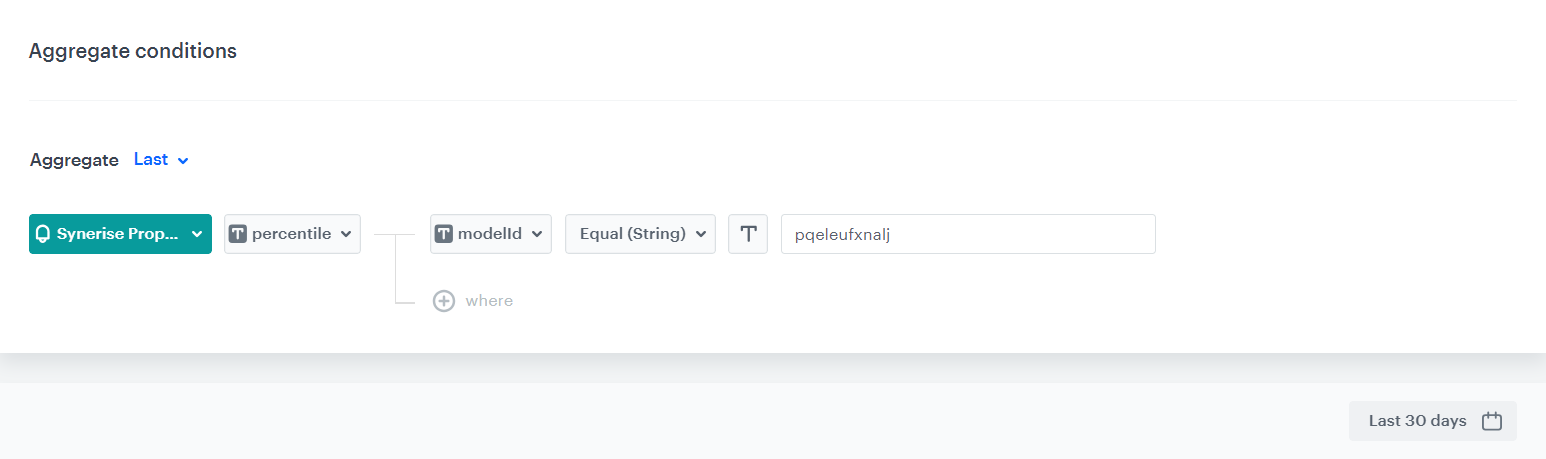
    <figure><img src="/api/docs/image/54176ad07f146575310749eba44b7c2f42c1b327/use-cases/all-cases/_gfx/propensity-aggregate.png" class="full" alt="The final configuration of the aggregate"><figcaption>The final configuration of the aggregate </figcaption></figure>

## Create a segmentation based on the prediction results
---
Create a segmentation of customers based on the results of [the aggregate you created](/use-cases/decrease-sms-campaign-cost#create-an-aggregate) in the previous part of the process. This segmentation contains 80% of customers with the highest scoring. The remaining 20% are customers with low scoring and no scoring (due to lack of data).


<div class="admonition admonition-tip"><div class="admonition-icon"><svg xmlns="http://www.w3.org/2000/svg" fill="none" viewBox="0 0 24 24" stroke="currentColor" stroke-width="2.5"><path stroke-linecap="round" stroke-linejoin="round" d="M9.663 17h4.673M12 3v1m6.364 1.636l-.707.707M21 12h-1M4 12H3m3.343-5.657l-.707-.707m2.828 9.9a5 5 0 117.072 0l-.548.547A3.374 3.374 0 0014 18.469V19a2 2 0 11-4 0v-.531c0-.895-.356-1.754-.988-2.386l-.548-.547z" /></svg></div><div class="admonition-body"><div class="admonition-content">

You can modify the segmentation by changing the percentile value depending on your business needs.

</div></div></div>


1. Go to **Decision Hub > Segmentations > New segmentation**.  
2. Enter the name of the segmentation.  
3. Click **Choose filter**.  
4. From the dropdown list, select the [aggregate you created before](/use-cases/decrease-sms-campaign-cost#create-an-aggregate).  
5. As the logical operator, select **More than**.  
6. In the text field, enter `20`.
7. Save the segmentation.  

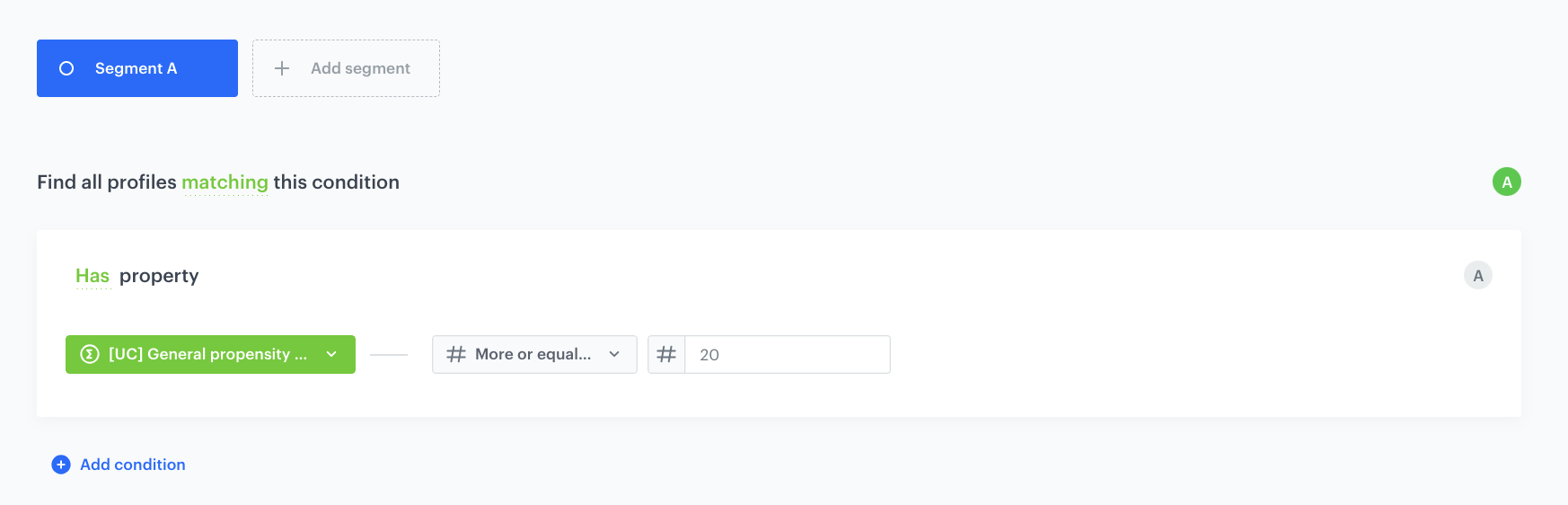
  <figure><img src="/api/docs/image/54176ad07f146575310749eba44b7c2f42c1b327/use-cases/all-cases/_gfx/decrease-smscampaign-cost-segmentation.png" class="full" alt="The final configuration of the segmentation"><figcaption>The final configuration of the segmentation </figcaption></figure>

## What's next
---
Go to **Experience Hub > SMS** and create the SMS communication. As the audience of the communication, use [the segmentation you created](/use-cases/decrease-sms-campaign-cost#create-a-segmentation-based-on-the-prediction-results). 

## Check the use case set up on the Synerise Demo workspace
---
You can check the configuration of every element of this process directly in Synerise Demo workspace:

- [Propensity prediction](https://app.synerise.com/ai-v2/predictions/propensity/kubupuewqkbr)
- [Aggregate](https://app.synerise.com/analytics/aggregates/482a13ee-bafd-394a-ba4e-88e0a8c2b32d)
- [Segmentation](https://app.synerise.com/analytics-v2/segmentations/8d7bf3e9-9fb4-4153-80d1-c0031dcb97af)

If you’re our partner or client, you already have automatic access to the **Synerise Demo workspace (1590)**, where you can explore all the configured elements of this use case and copy them to your workspace.  

If you’re not a partner or client yet, we encourage you to fill out the contact [form](https://demo.synerise.com/request) to schedule a meeting with our representatives. They’ll be happy to show you how our demo works and discuss how you can apply this use case in your business.

## Read more
---
- [Prediction overview](/docs/ai-hub/predictions/predictions-introduction)
- [Propensity predictions](/docs/ai-hub/predictions/propensity)
- [Segmentation](/docs/analytics/segmentations)
- [SMS communication](/docs/campaign/SMS)