A properly designed and executed mobile push campaign can help attract users' attention and increase the conversion rate. Sending a push notification at the optimal time, when the customer is active in the app, increases the chances that the customer will read the communication, use the promo code, and finalize the purchase.
This use case describes the process of sending a mobile push with a promo code at the best time in the next seven days to customers who have added a product to their cart and have not completed the purchase process.
## Prerequisites
---
- [Implement Synerise SDK in your mobile application](/developers/mobile-sdk).
- Implement mobile push notifications in your mobile application: [iOS](/developers/mobile-sdk/configuring-push-notifications/ios), [Android](/developers/mobile-sdk/configuring-push-notifications/android).
- Implement transaction events using [API](https://developers.synerise.com/DataManagement/DataManagement.html#tag/Events).
- [Implement **Add to cart** event in your mobile application](/developers/mobile-sdk/event-tracking#product-added-to-cart).
- [Enable time optimizer](/docs/settings/configuration/time-optimizer#enabling-time-optimizer).
- [Create a Mobile mode](/docs/settings/configuration/time-optimizer#creating-modes) for Time Optimizer that will calculate the time when the customer is most active in the mobile application based on the events such as `screen.view` and `screen.interaction`.
- [Create a mobile push template](/docs/campaign/Mobile/simple_push) with a promo code.
For promo codes, you can use our [Voucher pools](/docs/assets/code-pools), which allows you to assign a unique coupon from a specified pool for each customer.
## Create a workflow
---
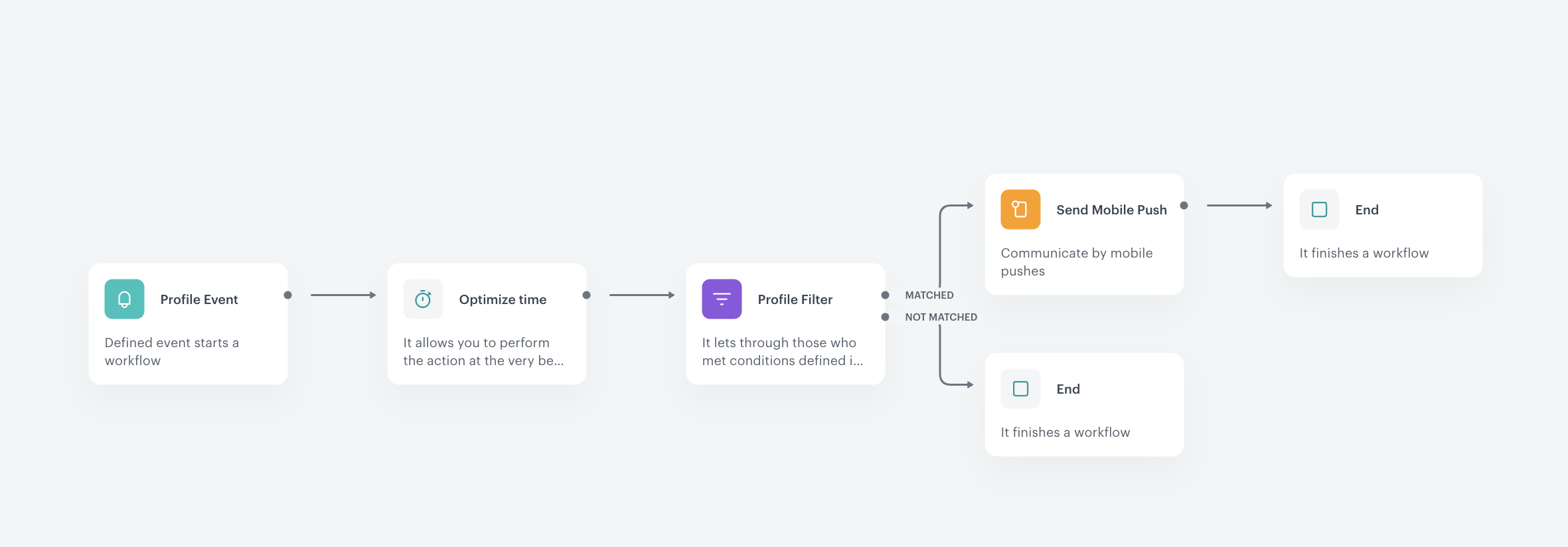
Create a workflow that sends a mobile push notification to customers on the day they are most likely to visit the site and who have previously added products to their shopping cart but have not completed the purchase process.
1. Go to **Automation Hub > Workflows > New workflow**.
2. Enter the name of the workflow.
3. As the first node of the workflow, add **Profile Event**. In the node settings:
1. In the **Choose event** field, select the `product.addToCart` event.
2. Confirm by clicking **Apply**.
4. Add an **Optimize Time** node. In the configuration of the node:
1. Select the **Mobile mode**.
2. Set the time period to analyze to **Next 7 days**.
3. Confirm by clicking **Apply**.
5. Add the **Profile Filter** node. In the configuration of the node:
1. In the **Choose filter** field, select the `transaction.charge` event.
2. Set the time period to the **last 7 days**.
3. Confirm by clicking **Apply**.
6. To the **Matched** path, add the **End** node.
7. To the **Not matched** path, add the **Send Mobile Push** node. In the node settings:
1. In the **Template type**, select the mobile push type according to your business needs.
2. Select proper **Push template** that you created earlier.
3. Confirm by clicking **Apply**.
8. Add the **End** node.
The final workflow configuration
## Check the use case set up on the Synerise Demo workspace
---
You can check the [workflow configuration](https://app.synerise.com/automations/automation-diagram/da91ac01-907d-4053-9382-bf2c5d33d39b) directly in Synerise Demo workspace.
If you’re our partner or client, you already have automatic access to the **Synerise Demo workspace (1590)**, where you can explore all the configured elements of this use case and copy them to your workspace.
If you’re not a partner or client yet, we encourage you to fill out the contact [form](https://demo.synerise.com/request) to schedule a meeting with our representatives. They’ll be happy to show you how our demo works and discuss how you can apply this use case in your business.
## Read more
---
- [Configuring mobile notifications](/docs/campaign/Mobile/mobile_campaign)
- [Mobile push](/docs/campaign/Mobile/simple_push)
- [Time optimizer](/docs/settings/configuration/time-optimizer)
- [Workflow](/docs/automation/creating-automation)