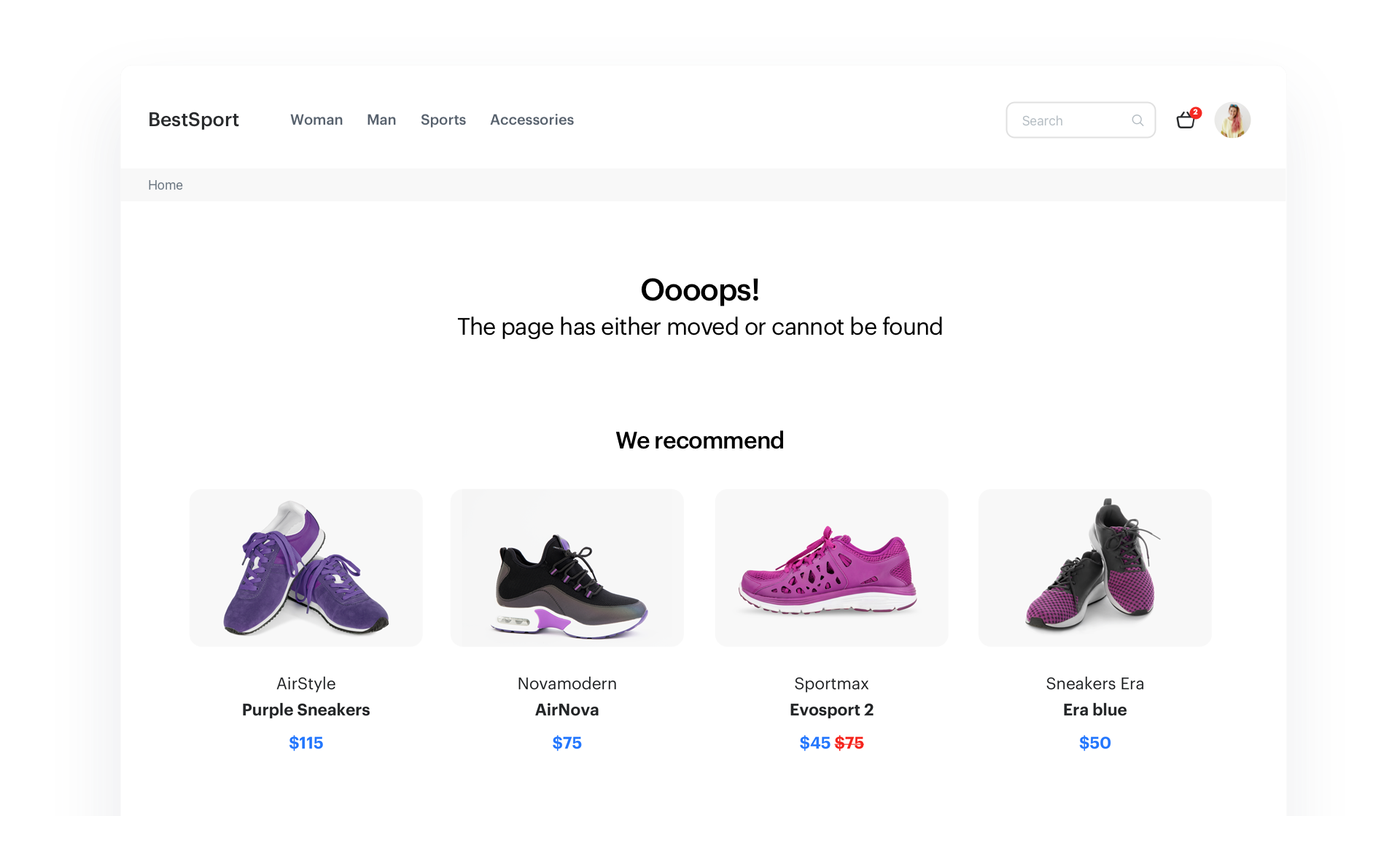
There are many reasons why users may end up on a 404 error page, including situations when the user mistyped the URL. It is very important to have an optimized 404 page, as it significantly affects the user experience. By providing personalized recommendations or any alternative content on the error page, you can prevent users from feeling lost or frustrated and keep them engaged by encouraging them to continue browsing your site. A well-designed and informative 404 page can help improve user satisfaction, reduce bounce rates, and ultimately drive conversions.

This use case describes the creation of personalized recommendations on a 404 page that will display items most relevant to the user's interests based on their activity on the site.

<figure>
<img src="/api/docs/image/54176ad07f146575310749eba44b7c2f42c1b327/use-cases/all-cases/_gfx/404-page.png" alt="Personalized recommendations on 404 error page"  class="full no-frame">
</figure>

## Prerequisites 
---
- Implement a [tracking code](/developers/web/installation-and-configuration) into your website.
- The [item feed](/docs/ai-hub/recommendations-v2/item-feed-requirements) must be provided.
- [Configure an item catalog for recommendations](/docs/settings/configuration/ai-engine-configuration/engine-configuration-for-recommendations). Enable the personalized recommendations.

## Process 
---
In this use case, you will go through the following steps:
1. [Create AI recommendations](/use-cases/personalized-reco-on-error-page#prepare-ai-recommendations) with personalized products.
2. [Create a dynamic content campaign](/use-cases/personalized-reco-on-error-page#create-dynamic-content).

## Prepare AI recommendations
---
In this step, create an AI recommendation campaign that will be used to display products on page 404.

1. Go to <img src="/api/docs/image/54176ad07f146575310749eba44b7c2f42c1b327/icons/ai-hub-icon.svg" alt="AI Hub icon" class="icon" > **AI Hub > (AI Recommendations) Models > Add recommendation**.
2. Enter the name of the recommendation (it is only visible on the list of recommendations).
3. In the **Type & Items feed** section, click **Define**.
4. From the **Items feed** dropdown list, select a product feed.
5. Select the **Personalized** recommendation type.  
6. Confirm the recommendation type by clicking **Apply**.  
6. In the **Items** section, click **Define**.  
7. Click **Add slot**.  
8. Click **Unnamed slot** that was created.    
8. Define the minimum and maximum number of products displayed in the frame according to your needs.
9. Optionally, you can use filters to include specific items in the recommendation frame.

   <div class="admonition admonition-note"><div class="admonition-icon"><svg xmlns="http://www.w3.org/2000/svg" fill="none" viewBox="0 0 24 24" stroke="currentColor" stroke-width="2.5"><path stroke-linecap="round" stroke-linejoin="round" d="M13 16h-1v-4h-1m1-4h.01M21 12a9 9 0 11-18 0 9 9 0 0118 0z" /></svg></div><div class="admonition-body"><div class="admonition-content">

   Learn about the difference among [elastic, static filters](/docs/ai-hub/recommendations-v2/creating-recommendation-campaign#select-conditions-of-displaying-items), and [distinct filters](/docs/ai-hub/recommendations-v2/creating-recommendation-campaign#distinct-filter).

   </div></div></div>

10. Confirm the configuration by clicking **Apply**. 
11. Optionally, you can use boosting option to promote or demote any items attributes in the recommendation frame. 
12. Optionally, you can also define the settings in the **Additional settings** tab according to your needs.
13. Click **Save**.

## Create dynamic content
---
Use dynamic content to insert recommendations in the specific place on your 404 page. The most efficient way to do so is to use a unique CSS selector which is added only to the 404 page. In our case, we use the `body.cms-no-route` selector. 


<div class="admonition admonition-tip"><div class="admonition-icon"><svg xmlns="http://www.w3.org/2000/svg" fill="none" viewBox="0 0 24 24" stroke="currentColor" stroke-width="2.5"><path stroke-linecap="round" stroke-linejoin="round" d="M9.663 17h4.673M12 3v1m6.364 1.636l-.707.707M21 12h-1M4 12H3m3.343-5.657l-.707-.707m2.828 9.9a5 5 0 117.072 0l-.548.547A3.374 3.374 0 0014 18.469V19a2 2 0 11-4 0v-.531c0-.895-.356-1.754-.988-2.386l-.548-.547z" /></svg></div><div class="admonition-body"><div class="admonition-content">

If you don’t want to use dynamic content, you can retrieve recommendations through API, [using this method](https://developers.synerise.com/AIRecommendations/AIRecommendations.html#operation/GetRecommendationsByCampaignV2).

</div></div></div>


To prepare dynamic content:
1. Go to <img src="/api/docs/image/54176ad07f146575310749eba44b7c2f42c1b327/icons/experience-hub-icon.svg" alt="Image presents the Experience Hub icon" class="icon"> **Experience Hub > Dynamic content > Create new**.
2. Enter the name of the dynamic content.
1. Choose the **Insert Object** type.
2. In the **Audience** section, select **Everyone**.
3. In the **Content** section specify the CSS selector where you want to insert recommendations.
4. In the **Content** tab, click **Create Message**.
5. In the code editor, insert Jinjava with the AI recommendation and add your own CSS. 

    
   <details class="accordion"><summary>Click to see Jinjava</summary><div class="accordion-content"><p>Replace <code>your_campaign_ID</code> with the ID of the AI recommendation. The ID of the AI campaign is contained in the URL of the recommendation.</p> <pre><code class="language-jinja">&lt;!-- Downloading the AI campaign --&gt; {% recommendations3 campaignId=your_campaign_ID %} {% for p in recommended_products3 %} &lt;li data-snr-ai-product-id="{{p.itemId}}"&gt; &lt;a class="snrs-AI--item-link" href="{{p.link}}" title="{{p.title}}"&gt; &lt;img src="{{ p.imageLink }}"class="products-slider__item-image snrAI-product-image snrAI-product-image-{{p.itemId}}" width="90" alt="{{p.title}}" id="snrAI-image-{{p.itemId}}"&gt; &lt;h3 class="snrs-AI-product--product-name"&gt; &lt;span class="snrs-AI-product--name-first"&gt;{{p.title}}&lt;/span&gt; &lt;/h3&gt; &lt;span class="snrs-AI-product--series"&gt;{{p.attributes.series}}&lt;/span&gt; &lt;/a&gt; &lt;/li&gt; {% endfor %} {% endrecommendations3 %}</code></pre></div></details>
  

6. Save the template.
7. In the **Schedule** section, select the date when the dynamic content is activated.
8. In **Display settings**, define the circumstances for displaying the content.
    
   <div class="admonition admonition-note"><div class="admonition-icon"><svg xmlns="http://www.w3.org/2000/svg" fill="none" viewBox="0 0 24 24" stroke="currentColor" stroke-width="2.5"><path stroke-linecap="round" stroke-linejoin="round" d="M13 16h-1v-4h-1m1-4h.01M21 12a9 9 0 11-18 0 9 9 0 0118 0z" /></svg></div><div class="admonition-body"><div class="admonition-content">

   Instructions how to do it are available [here](/docs/campaign/dynamiccontent/creating-dynamic-content/creating-dynamic-content).

   </div></div></div>

9. Confirm by clicking **Apply**.
10. In the **UTM & URL parameters** section, click **Skip step**.  
11. Activate the dynamic content.  
    **Result**: The recommendation frames are displayed on the website.

 ## Check the use case set up on the Synerise Demo workspace
---
You can check the [recommendations settings](https://app.synerise.com/ai-v2/recommendations/y9BygrOc69U0) and [dynamic content campaign](https://app.synerise.com/campaigns/preview/b2229cd9-5021-4629-9e66-60a99bd284ae) in Synerise Demo workspace.

If you’re our partner or client, you already have automatic access to the **Synerise Demo workspace (1590)**, where you can explore all the configured elements of this use case and copy them to your workspace.  

If you’re not a partner or client yet, we encourage you to fill out the contact [form](https://demo.synerise.com/request) to schedule a meeting with our representatives. They’ll be happy to show you how our demo works and discuss how you can apply this use case in your business.

## Read more
---
- [Dynamic content](/docs/campaign/dynamiccontent)
- [Recommendations](/docs/ai-hub/recommendations-v2/recommendation-statistics)
- [Using recommendations in dynamic content](/developers/inserts/recommendations-v2)

