Your search engine should understand even poorly worded queries and return a good set of results – you can optimise it using [Synerise AI search](/use-cases/search-multiple-languages). It will handle misspellings, but what’s more, you can use synonyms and query rules to help customers find what they are looking for. 

But if you don’t use AI search yet, or your clients are searching for new queries, don’t let them waste time on a ‘No Results’ page. Instead of this, prepare personalized recommendations, which will show products suited to users based on their activity. 
 
## Example of use - Home appliances industry

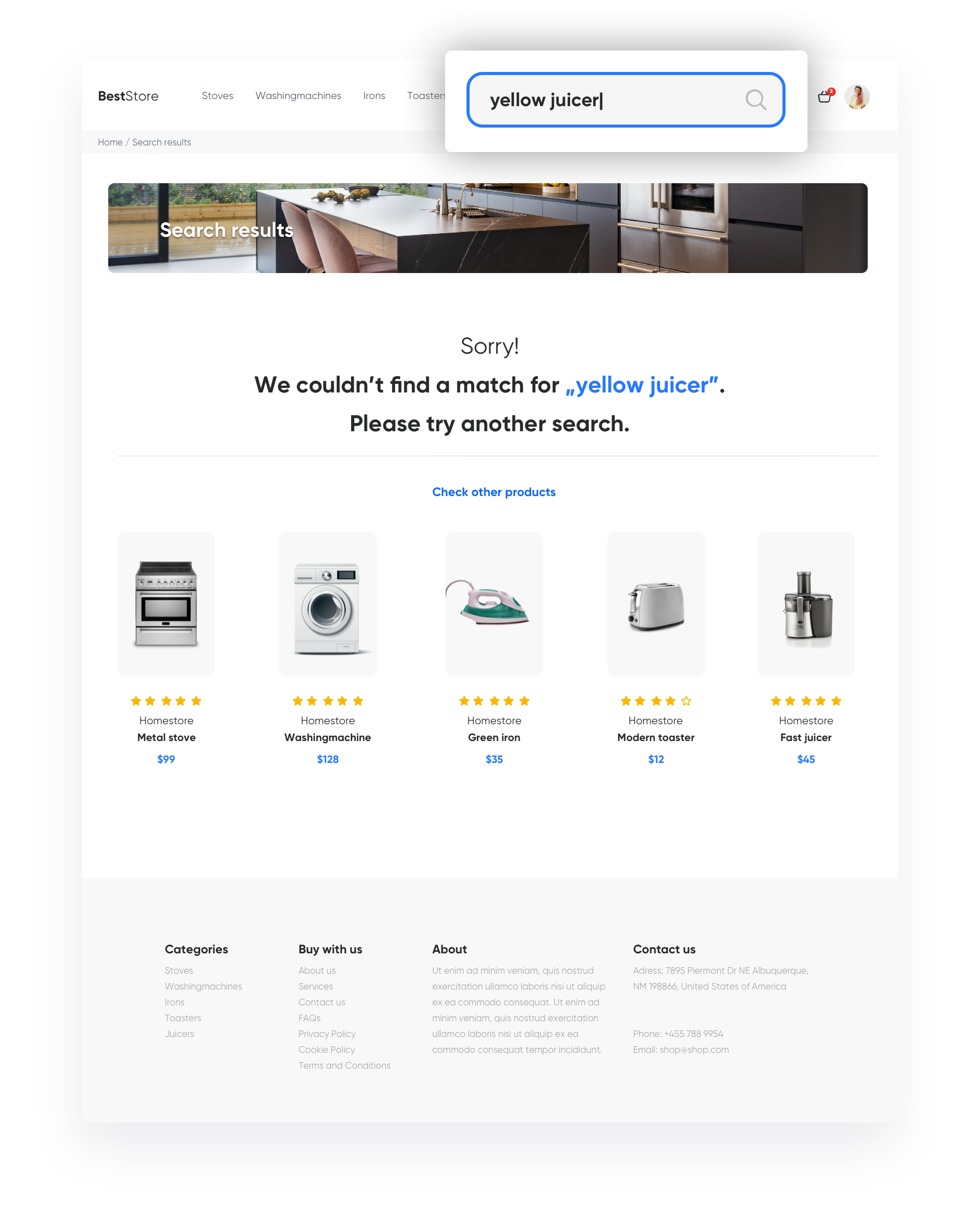
A client from the electronics industry had their own search solution, but noticed that very often users were getting **zero page results**. The fastest way to improve the customer experience was to add additional recommendation frames on such subpages. Users were informed that there were no results matching their queries, but maybe they will be interested in some recommended products.  

 <figure>
   <img src="/api/docs/image/54176ad07f146575310749eba44b7c2f42c1b327/use-cases/all-cases/_gfx/no-results-personalized.png" alt="Screenshot presenting personalized search on a website with no results" class="full no-frame">
   <figcaption> Search on a website with no results </figcaption>
   </figure>

**Results**

- **3,1%** CTR

## Prerequisites 
---

To implement this use case:
- Add [tracking code](/docs/settings/tool/tracking_codes) to your website.
- Import [product feed](/developers/product-feed).
- Import [transaction events](/developers/web/transactions-sdk).

## Process
---
To create AI recommendation adjusted to the customer's preferences, perform the steps in the following order:

1. [Prepare AI recommendation](/use-cases/personalized-search-no-results#prepare-ai-recommendation).
2. [Prepare dynamic content ](/use-cases/personalized-search-no-results#prepare-dynamic-content).

## Prepare AI recommendation 
---

To show recommendations on the website, first you must prepare AI recommendations. 

1. Go to **Experience Hub** > **Recommendations**.
2. Add **New recommendation**. 
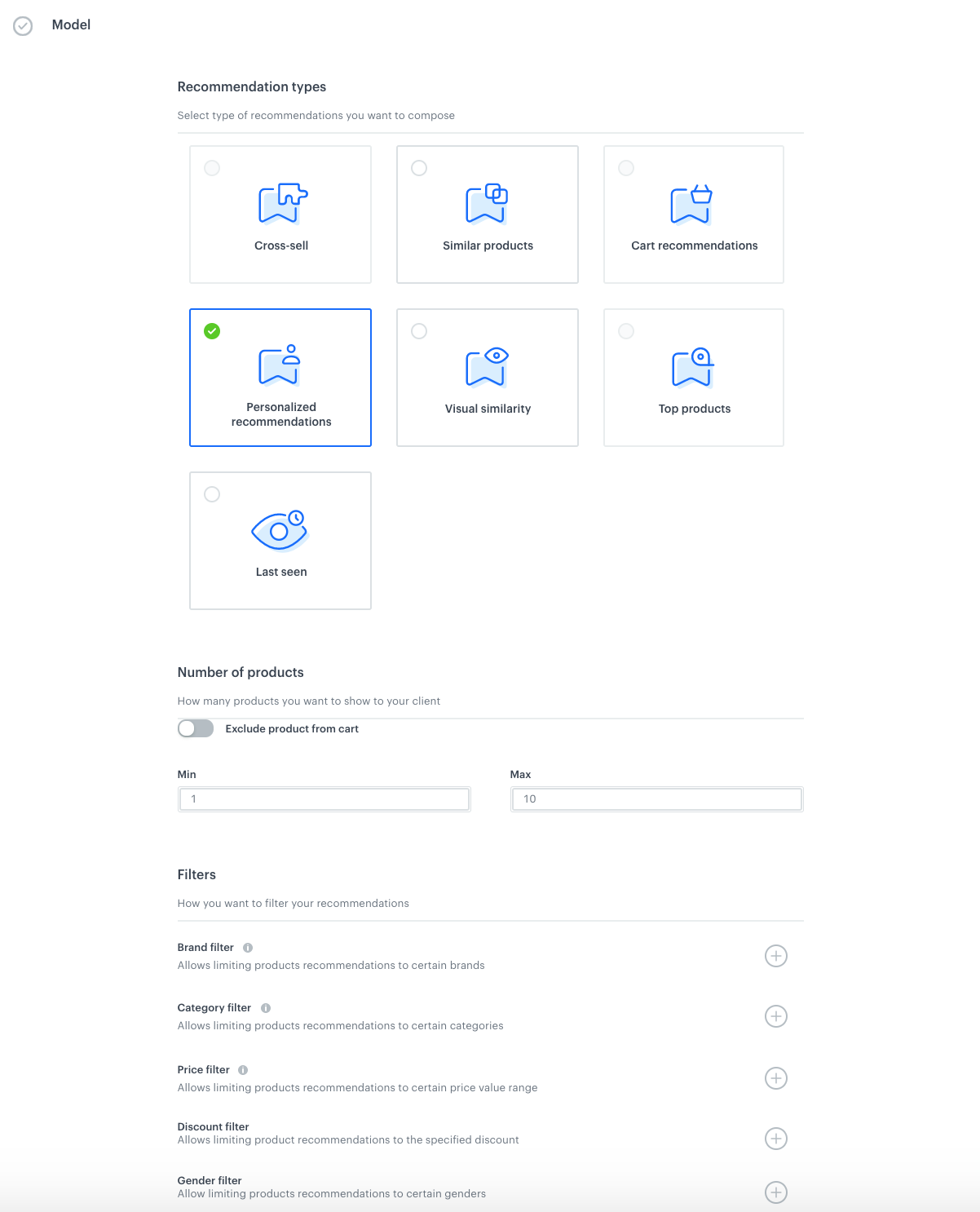
3. Choose personalized recommendation type and define the number of products you want to show in the frame. You can add additional filters if needed. 


   <div class="admonition admonition-tip"><div class="admonition-icon"><svg xmlns="http://www.w3.org/2000/svg" fill="none" viewBox="0 0 24 24" stroke="currentColor" stroke-width="2.5"><path stroke-linecap="round" stroke-linejoin="round" d="M9.663 17h4.673M12 3v1m6.364 1.636l-.707.707M21 12h-1M4 12H3m3.343-5.657l-.707-.707m2.828 9.9a5 5 0 117.072 0l-.548.547A3.374 3.374 0 0014 18.469V19a2 2 0 11-4 0v-.531c0-.895-.356-1.754-.988-2.386l-.548-.547z" /></svg></div><div class="admonition-body"><div class="admonition-content">

   more information about using filters you will find in [these](/docs/ai-hub/recommendations-v2/recommendation-filters) articles.

   </div></div></div>


<figure>
<img src="/api/docs/image/54176ad07f146575310749eba44b7c2f42c1b327/use-cases/all-cases/_gfx/landingpage4a.png" 
alt="`AI campaign`" class="large">
<figcaption> AI campaign </figcaption>
</figure>

## Prepare dynamic content 
---

Use dynamic content to insert recommendations in the specific place on your website - you can recognize zero search results in two ways:
- You can prepare a unique CSS selector which will be added only on zero search result pages.
- If you won’t have such a selector, you will have to additionally use JS to check if there is no product on the page. It will depend on your website structure how to check it. 

To prepare dynamic content: 

1. Go to **Experience Hub > Dynamic content > Add new**
2. Choose **Insert Object** type.
2. Select **Everyone** in the Audience.
3. In **Content** section, select **Simple message**, and specify CSS selector in which you want to insert recommendations.
4. In the **Content** tab, add appropriate **CSS selector** and click **Create message**. Insert Jinjava code with AI recommendation - let’s look at how to prepare the appropriate Jijnava code (you will have to add your own CSS to it). 

    
   <details class="accordion"><summary>Check the jinja code</summary><div class="accordion-content"><pre><code class="language-jinja">&lt;!-- Downloading the AI campaign --&gt; {% recommendations2 campaignId=cg3HBgRC5P2h %} {% for p in recommended_products2 %} &lt;li data-snr-ai-product-id="{{p.productRetailerPartNo}}"&gt; &lt;a class="snrs-AI--item-link" href="{{p.link}}" title="{{p.title}}"&gt; &lt;img src="{{ p.imageLink }}" class="products-slider__item-image snrAI-product-image snrAI-product-image-{{p.productRetailerPartNo}}" width="90" alt="{{p.title}}" id="snrAI-image-{{p.productRetailerPartNo}}"&gt; &lt;h3 class="snrs-AI-product--product-name"&gt; &lt;span class="snrs-AI-product--name-first"&gt;{{p.title}}&lt;/span&gt; &lt;/h3&gt; &lt;/a&gt; &lt;/li&gt; {% endfor %} {% endrecommendations2 %}</code></pre></div></details>


5. Schedule when the dynamic content has to be active.
6. In **Display settings**, specify that dynamic content has to be shown **Always, On landing, on Specific URL** which indicates its search page. 
 

   <div class="admonition admonition-tip"><div class="admonition-icon"><svg xmlns="http://www.w3.org/2000/svg" fill="none" viewBox="0 0 24 24" stroke="currentColor" stroke-width="2.5"><path stroke-linecap="round" stroke-linejoin="round" d="M9.663 17h4.673M12 3v1m6.364 1.636l-.707.707M21 12h-1M4 12H3m3.343-5.657l-.707-.707m2.828 9.9a5 5 0 117.072 0l-.548.547A3.374 3.374 0 0014 18.469V19a2 2 0 11-4 0v-.531c0-.895-.356-1.754-.988-2.386l-.548-.547z" /></svg></div><div class="admonition-body"><div class="admonition-content">

   If you don’t want to use dynamic content, you can implement recommendations via API request, you can find details [here.](https://developers.synerise.com/AIRecommendations/AIRecommendations.html#tag/Recommendations/)

   </div></div></div>


## Read more
---

- [AI API](https://developers.synerise.com/AIRecommendations/AIRecommendations.html#tag/Recommendations/)
- [Dynamic content](/docs/campaign/dynamiccontent)
- [Jinjava inserts](/developers/inserts/insert-usage)
- [Personalized recommendations](/docs/ai-hub/recommendations-v2/recommendation-types#personalized)

