
Once you have the basics of a loyalty program in place, you may want to think about implementing unique scenarios that fit the specifications of your business. There are many scenarios you can implement, and one of them may include refining the way points are rewarded. You may want to exclude certain products or product groups from rewarding points for specific business reasons.

This use case describes the process of how you can create such an exclusion by making minor modifications to an already created points scheme described in [this use case](/use-cases/loyalty-programs-basics). The points scheme is based on rewarding points for each transaction based on a predefined rule in the expression, which adds 1 point for each PLN spent and additionally rounds down to full units. 

As a part of this use case, we will want to exclude the following items from rewarding of loyalty points:

- cancelled products
- products from **category1**
- products from **category2**


  <div class="admonition admonition-note"><div class="admonition-icon"><svg xmlns="http://www.w3.org/2000/svg" fill="none" viewBox="0 0 24 24" stroke="currentColor" stroke-width="2.5"><path stroke-linecap="round" stroke-linejoin="round" d="M13 16h-1v-4h-1m1-4h.01M21 12a9 9 0 11-18 0 9 9 0 0118 0z" /></svg></div><div class="admonition-body"><div class="admonition-content">

  This use case presents one of the ways to exclude product categories from accruing loyalty points. You can find an alternative solution [in this use case](/use-cases/product-category-exclusion-with-workflow). Your choice of one of the scenarios will depend on the implementation of your loyalty program. You can always customize any solution to meet your specific business needs.

  </div></div></div>


## Prerequisites 
---
Implement [loyalty programs basics](/use-cases/loyalty-programs-basics)

## Security configuration
---
Before you start working with this hub, if you are a Synerise customer or partner, consider reading [the section about denylisting events](/docs/settings/tool/api#denylist). This natively accessible configuration will allow you to manage the restrictions in points management that may help you prevent fraud.

## Modify an aggregate counting money spent on every product within transaction
---
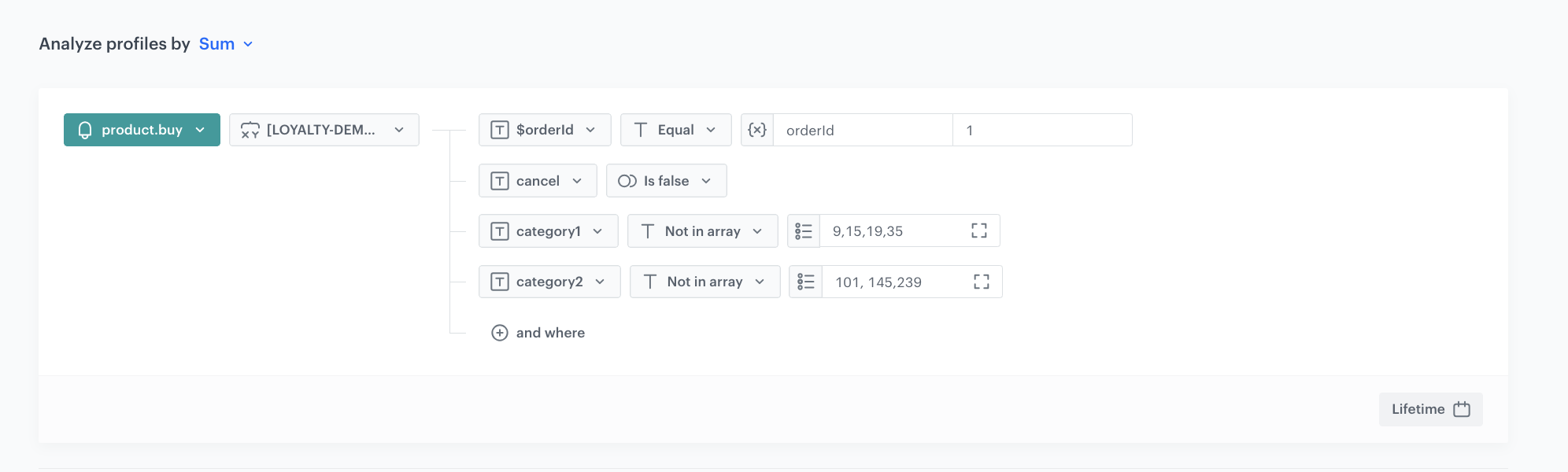
In this step, you will complete the already created [aggregate](/use-cases/loyalty-programs-basics#create-an-aggregate-which-counts-number-of-productbuy-events-in-a-single-transaction) with the product categories you want to exclude from accruing loyalty points for them.

1. Click the **+ where** and as the parameter select the `cancel`.  
2. From the **Choose operator** dropdown list, select **Is false (Boolean)**.

   <div class="admonition admonition-note"><div class="admonition-icon"><svg xmlns="http://www.w3.org/2000/svg" fill="none" viewBox="0 0 24 24" stroke="currentColor" stroke-width="2.5"><path stroke-linecap="round" stroke-linejoin="round" d="M13 16h-1v-4h-1m1-4h.01M21 12a9 9 0 11-18 0 9 9 0 0118 0z" /></svg></div><div class="admonition-body"><div class="admonition-content">

   The `cancel` parameter used in this use case refers to products that were previously selected by the customer, but were canceled for some reason during the purchase process. You can use any other nomenclature for this type of action while implementing transaction events.

   </div></div></div>

3. Click the **+ where** and as the parameter select the `category1`. 

   <div class="admonition admonition-note"><div class="admonition-icon"><svg xmlns="http://www.w3.org/2000/svg" fill="none" viewBox="0 0 24 24" stroke="currentColor" stroke-width="2.5"><path stroke-linecap="round" stroke-linejoin="round" d="M13 16h-1v-4h-1m1-4h.01M21 12a9 9 0 11-18 0 9 9 0 0118 0z" /></svg></div><div class="admonition-body"><div class="admonition-content">

   In this use case, we use the `category1` and `category2` parameters, which correspond to different levels of product categories - from once more general, to once more specific. You can use any other nomenclature for the indication of your categories.
   </div></div></div>
 
4. From the **Choose operator** dropdown list, select **Not in Array**.
5. In the next field, enter the values of the categories you want to exclude from loyalty point accrual. 
6. Repeat steps **3-5** for other categories that you want to exclude. 
7. Click **Save**.  

As a result, you have set up an exclusion mechanism that will exclude certain categories from rewarding loyalty points during each customer transaction. 

<figure>
<figure>
<img src="/api/docs/image/54176ad07f146575310749eba44b7c2f42c1b327/use-cases/all-cases/_gfx/loyalty_category_exclusions.png" alt="Aggregate settings"  class="full">
<figcaption>Aggregate counting money spent on every product within transaction excluding specific categories</figcaption></figure>
</figure> 

## Check the use case set up on the Synerise Demo workspace
---
You can check the configuration of the [described aggregate](https://app.synerise.com/analytics/aggregates/763410fc-0774-3848-b06a-d91333db2aa0) directly in Synerise Demo workspace:

If you’re our partner or client, you already have automatic access to the **Synerise Demo workspace (1590)**, where you can explore all the configured elements of this use case and copy them to your workspace.  

If you’re not a partner or client yet, we encourage you to fill out the contact [form](https://demo.synerise.com/request) to schedule a meeting with our representatives. They’ll be happy to show you how our demo works and discuss how you can apply this use case in your business. 

## Read more
---
- [Aggregates](/docs/analytics/aggregates) 

Check our loyalty use cases [here](/use-cases/?ordering=DESC&sortBy=publishDate&filters=tags%3D%3D%22loyalty%22)
