Promotions with a limited number of uses per user have a unique appeal in the marketing field because of their ability to create a sense of exclusivity and urgency. This exclusivity factor is a powerful tool for effectively engaging customers and has numerous benefits. When customers are aware that an offer is only available a limited number of times, they tend to act quickly. This urgency can significantly increase conversion rates and drive sales.

This use case describes a scenario in which a special promotion is created for members of a loyalty program. The product included in the promotion is coffee, which each loyalty program member can get for free 5 extra coffees.

## Prerequisites
---
- POS must be integrated with Synerise promotion engine to calculate the promotion limits per user directly in the offline store.
- Apply [the Process basket method](https://developers.synerise.com/LoyaltyandEngagement/LoyaltyandEngagement.html#operation/processSale_POST) which sends information to Synerise about the transaction such as basket value and transaction items made at the checkout to Synerise (both in online and offline stores). This way, we can determine whether the transaction qualifies for being included in this specific promotion.
- Implement transaction events using [SDK](/developers/web/transactions-sdk) or [API](https://developers.synerise.com/DataManagement/DataManagement.html#operation/CreateATransaction).
- Implement promotions in your [mobile application](/developers/mobile-sdk/loyalty), website or through [API](https://developers.synerise.com/LoyaltyandEngagement/LoyaltyandEngagement.html#operation/profileLogin).


  <div class="admonition admonition-note"><div class="admonition-icon"><svg xmlns="http://www.w3.org/2000/svg" fill="none" viewBox="0 0 24 24" stroke="currentColor" stroke-width="2.5"><path stroke-linecap="round" stroke-linejoin="round" d="M13 16h-1v-4h-1m1-4h.01M21 12a9 9 0 11-18 0 9 9 0 0118 0z" /></svg></div><div class="admonition-body"><div class="admonition-content">

  This use case only works when Synerise is the main source of promotion calculation.

  </div></div></div>


## Process 
---

In this use case, you will go through the following steps:
1. [Prepare a segmentation](/use-cases/promotion-limit-per-user/#prepare-a-segmentation) of customers who are members of the loyalty program.
2. [Create a promotion](/use-cases/promotion-limit-per-user#create-a-promotion).

## Prepare a segmentation
---
In this part of the process, create a segmentation of customers who are members of the company's loyalty program.

1. Go to <img src="/api/docs/image/54176ad07f146575310749eba44b7c2f42c1b327/icons/decision-hub-icon.svg" alt="Behavioral Data Hub icon" class="icon"> **Decision Hub > Segmentations > New segmentation**.
2. Enter the name of segmentation. 
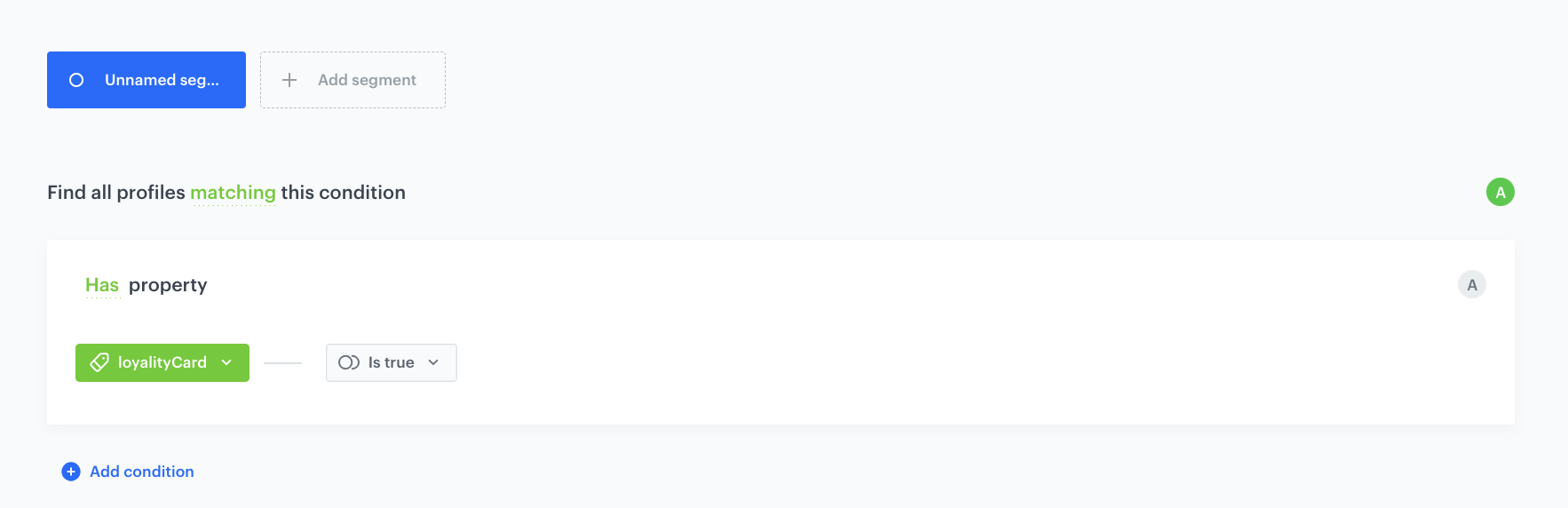
3. From the **Choose filter** dropdown list, select the **loyaltyCard** attribute.
4. As the logical operator, select a boolean value: **Is true**.

    
   <div class="admonition admonition-important"><div class="admonition-icon"><svg xmlns="http://www.w3.org/2000/svg" fill="none" viewBox="0 0 24 24" stroke="currentColor" stroke-width="2.5"><path stroke-linecap="round" stroke-linejoin="round" d="M12 8v4m0 4h.01M21 12a9 9 0 11-18 0 9 9 0 0118 0z" /></svg></div><div class="admonition-body"><div class="admonition-content">

   The conditions used in the segmentation will vary depending on your loyalty program integration (for example, the name of the attribute may be different). You must define the segmentation accordingly.

   </div></div></div>
  

5. Click **Save**. 

<figure>
<img src="/api/docs/image/54176ad07f146575310749eba44b7c2f42c1b327/use-cases/all-cases/_gfx/segment-loyalty-program-members.png" class="full" alt="An example of a customer segment that participates in a loyalty program">
<figcaption>An example of a customer segment that participates in a loyalty program</figcaption>
</figure>

## Create a promotion
---
In this part of the process, create a promotion for specific products (coffee) with usage limits (maximum 5) per user.

1. Go to <img src="/api/docs/image/54176ad07f146575310749eba44b7c2f42c1b327/icons/ai-hub-icon.svg" alt="AI Hub icon" class="icon" > **AI Hub > Regular Promotions > Add promotion**. 
2. Select the **For selected items** option.
3. In the **Audience** section, select the segmentation created in ["Prepare a segmentation"](/use-cases/promotion-limit-per-user#prepare-a-segmentation).  
4. In the **Content** section, define the name, description, and an image of the promotion. Confirm the settings by clicking **Apply**.
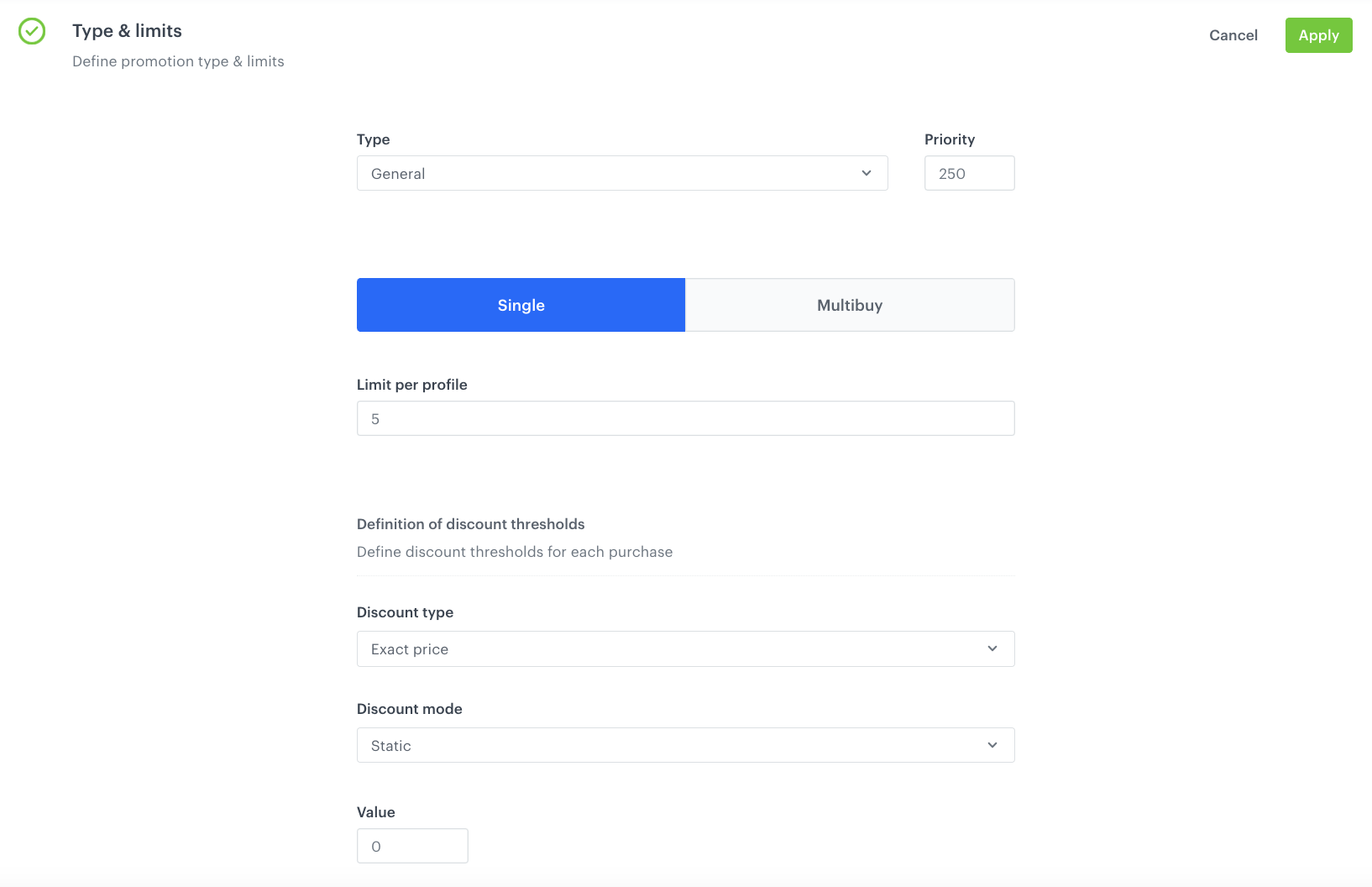
5. In **Type & limits** section:  
    1. As **Discount type**, choose **Exact price**.
    2. In the **Value** field, enter the amount of discount - in our case - `0` because the coffee is for free.
    5. Apply changes.
    <figure>
    <img src="/api/docs/image/54176ad07f146575310749eba44b7c2f42c1b327/use-cases/all-cases/_gfx/promolimit.png" class="full" alt="The view of the configuration of the promotion">
    <figcaption>Configuration of the promotion</figcaption>
    </figure>

6. In the **Schedule** section, define the distribution period.
7. In the **Stores** section, select stores where the profiles can redeem the promotion.
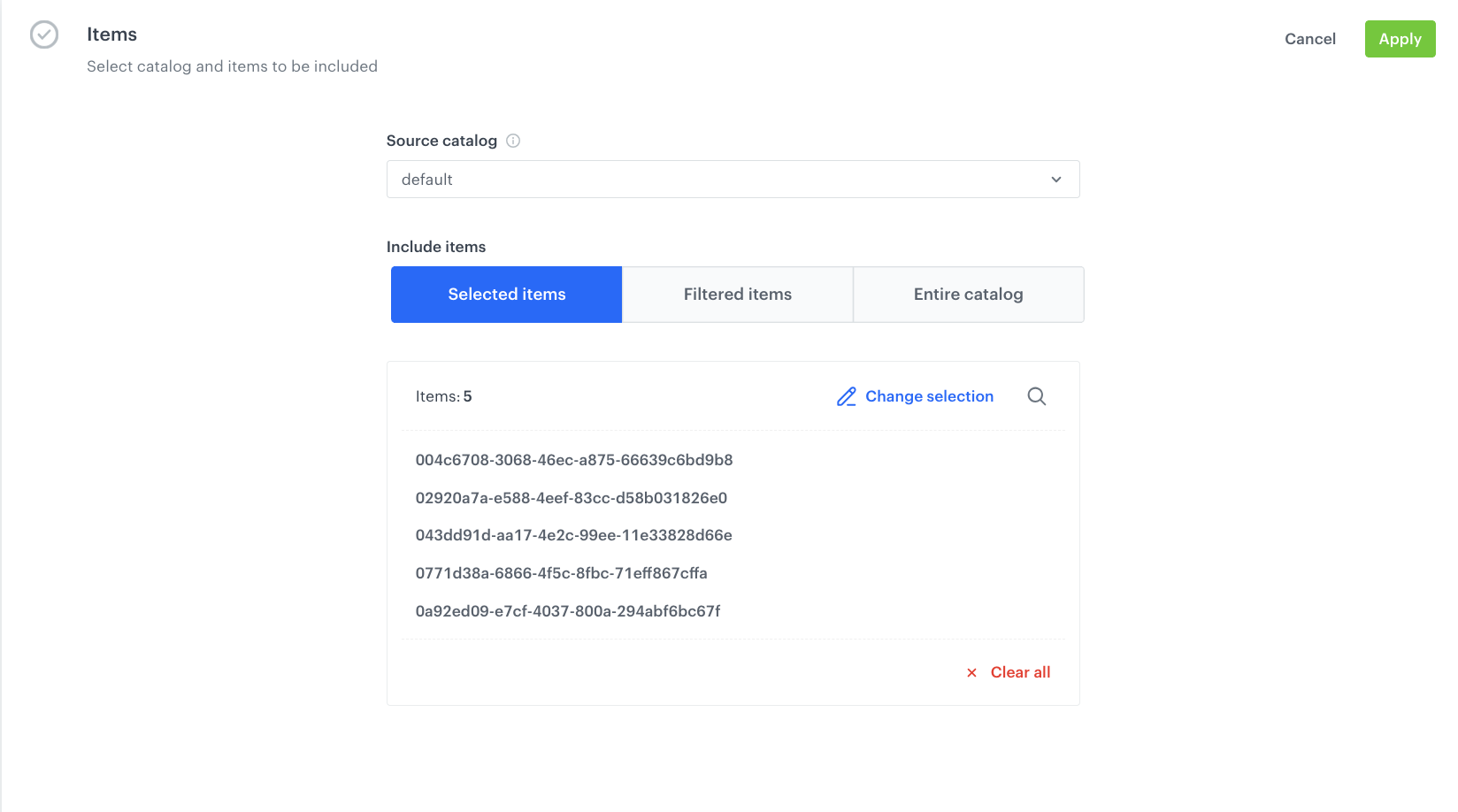
8. In the **Items** section, select the catalog and specific items to be included.

    <figure>
    <img src="/api/docs/image/54176ad07f146575310749eba44b7c2f42c1b327/use-cases/all-cases/_gfx/promolimit2.png" class="full" alt="The view of the configuration of the promotion">
    <figcaption>Configuration of the promotion</figcaption>
    </figure>

8. To apply all changes and run the promotion, click **Publish**.


   <div class="admonition admonition-note"><div class="admonition-icon"><svg xmlns="http://www.w3.org/2000/svg" fill="none" viewBox="0 0 24 24" stroke="currentColor" stroke-width="2.5"><path stroke-linecap="round" stroke-linejoin="round" d="M13 16h-1v-4h-1m1-4h.01M21 12a9 9 0 11-18 0 9 9 0 0118 0z" /></svg></div><div class="admonition-body"><div class="admonition-content">

   As the next step, you can create a [document](/docs/assets/documents) within Synerise that includes this promotion, so that it becomes visible, for example, in the mobile application. Thanks to this, you can enhance the promotion's reach and effectiveness, potentially increasing customer engagement and sales.

   </div></div></div>


## Check the use case set up on the Synerise Demo workspace
---
You can check the [promotion configuration](https://app.synerise.com/campaigns/promotions/7e83d2b5-c852-465d-b173-2651a730c54d) directly in Synerise Demo workspace. 

If you’re our partner or client, you already have automatic access to the **Synerise Demo workspace (1590)**, where you can explore all the configured elements of this use case and copy them to your workspace.  

If you’re not a partner or client yet, we encourage you to fill out the contact [form](https://demo.synerise.com/request) to schedule a meeting with our representatives. They’ll be happy to show you how our demo works and discuss how you can apply this use case in your business.

## Read more
---
- [Promotions](/docs/ai-hub/promotions)
- [Segmentations](/docs/analytics/segmentations)