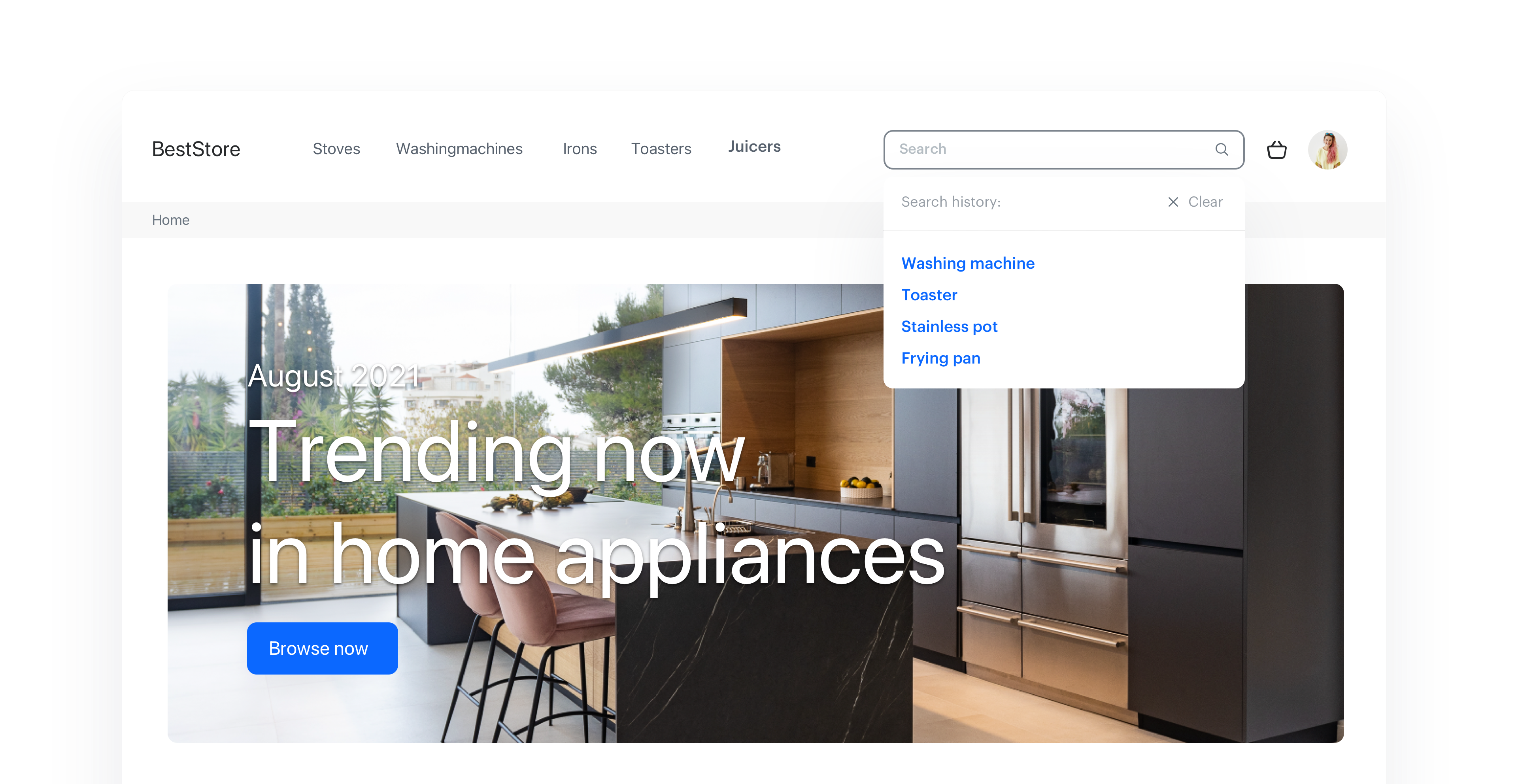
An AI-powered Search is a great tool that can help you to create greater customer satisfaction resulting in higher conversions. To ensure a seamless customer search experience, you must anticipate their expectations and needs.

One of the ways to do so is possible by displaying customers’ recent searches just before they start typing their queries. This way, you deliver personalized search results, which allow you to pursue the shopping path of customers and allow them to return in an easy way to the items which they were interested in earlier.

This use case describes the process of creating an AI search extension that will display customers’ recent searches before they start typing.

<figure>
<img src="/api/docs/image/54176ad07f146575310749eba44b7c2f42c1b327/use-cases/all-cases/_gfx/recent-search.png" alt="Recent customer search"  class="full no-frame">
</figure> 

## Prerequisites
---
- [Implement AI search](https://developers.synerise.com/AISearch/AISearch.html) in any of your channels (mobile app, website, and so on). 

## Create an aggregate
---
Create an aggregate based on `item.search` event which is collected on the customer's profile when they search for the certain phrase. 

   
<div class="admonition admonition-note"><div class="admonition-icon"><svg xmlns="http://www.w3.org/2000/svg" fill="none" viewBox="0 0 24 24" stroke="currentColor" stroke-width="2.5"><path stroke-linecap="round" stroke-linejoin="round" d="M13 16h-1v-4h-1m1-4h.01M21 12a9 9 0 11-18 0 9 9 0 0118 0z" /></svg></div><div class="admonition-body"><div class="admonition-content">

`item.search` is an event that our system generates automatically when a customer searches for a phrase, if our AI search is implemented somewhere in any of your channels. It contains `query` parameter which stores the phrase entered by the customer.

</div></div></div>


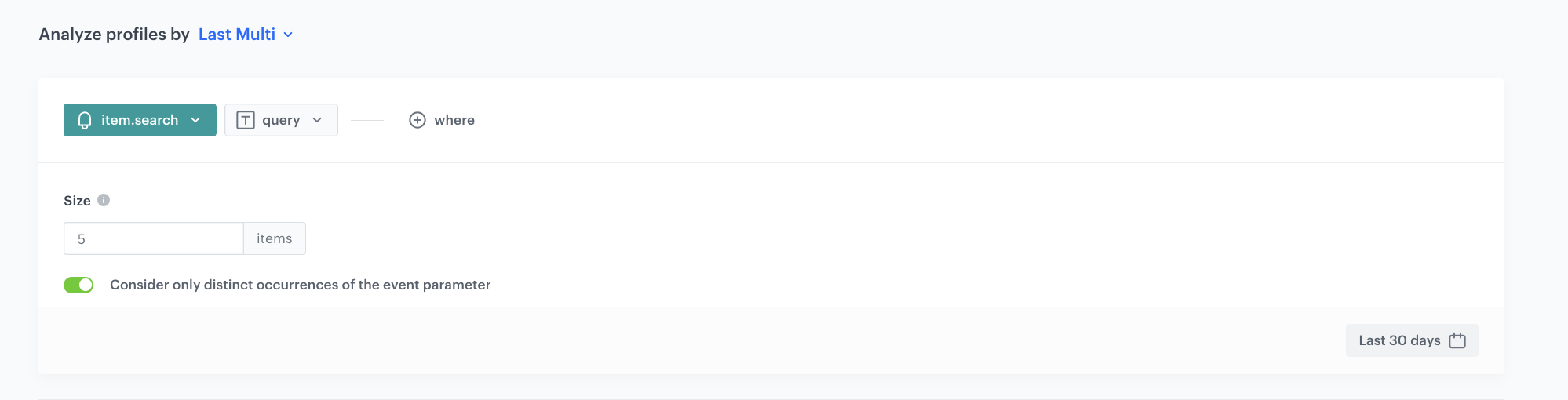
This aggregate returns last 5 searches for every customer from last 30 days. 

1. Go to <img src="/api/docs/image/54176ad07f146575310749eba44b7c2f42c1b327/icons/behavioral-data-hub-icon.svg" alt="Behavioral Data Hub icon" class="icon"> **Behavioral Data Hub > Live Aggregates > Create aggregate**.
2. As the aggregate type, select **Profile**.  
2. Enter the name of the aggregate.
3. Click **Analyze profiles by** and select **Last Multi** and as a size set `5`.
4. Select the `item.search` event.
5. As the event parameter, select `query`.
6. Set the period from which the aggregate will analyze the event to **last 30 days**.
7. Save the aggregate.
<figure>
<img src="/api/docs/image/54176ad07f146575310749eba44b7c2f42c1b327/use-cases/all-cases/_gfx/recent-customer-search.png" alt="Configuration of the aggregate" class="full no-frame">   
<figcaption> Configuration of the aggregate</figcaption></figure>


## What's next
---
Once the aggregate is configured, it needs to be implemented as an element of your search engine. You can use [dynamic content](/docs/campaign/dynamiccontent/creating-dynamic-content) to display phrase suggestions automatically when the customer clicks on the search input and [Jinjava code](/developers/inserts/insert-usage#aggregates) to insert aggregate result as the dynamic list of phrases the customer searched for recently, updated in realtime.

If you decide to use Dynamic Content, you need to implement [Synerise tracking code](/developers/web/installation-and-configuration#creating-a-tracking-code) on your website.


<div class="admonition admonition-tip"><div class="admonition-icon"><svg xmlns="http://www.w3.org/2000/svg" fill="none" viewBox="0 0 24 24" stroke="currentColor" stroke-width="2.5"><path stroke-linecap="round" stroke-linejoin="round" d="M9.663 17h4.673M12 3v1m6.364 1.636l-.707.707M21 12h-1M4 12H3m3.343-5.657l-.707-.707m2.828 9.9a5 5 0 117.072 0l-.548.547A3.374 3.374 0 0014 18.469V19a2 2 0 11-4 0v-.531c0-.895-.356-1.754-.988-2.386l-.548-.547z" /></svg></div><div class="admonition-body"><div class="admonition-content">

If you want to implement the recent searches list via API, you can use our dedicated [API method](https://developers.synerise.com/AISearch/AISearch.html#operation/GetRecentSearches) to retreive customer's recently searched phrases instead of [creating an aggregate](/use-cases/recent-customer-search#create-an-aggregate).

</div></div></div>


## Check the use case set up on the Synerise Demo workspace
---
Check the [aggregate](https://app.synerise.com/analytics/aggregates/1494a1c5-19b0-348d-8015-39745db35027) settings in Synerise Demo workspace.

If you’re our partner or client, you already have automatic access to the **Synerise Demo workspace (1590)**, where you can explore all the configured elements of this use case and copy them to your workspace.  

If you’re not a partner or client yet, we encourage you to fill out the contact [form](https://demo.synerise.com/request) to schedule a meeting with our representatives. They’ll be happy to show you how our demo works and discuss how you can apply this use case in your business.

## Read more
---
- [AI Search](/docs/ai-hub/ai-search) 
- [AI Search statistics](/docs/ai-hub/ai-search/ai-search-statistics)