You can use Synerise to manage your Custom Audience in Facebook and update it by adding or removing users based on all the data collected in Synerise, like customer activity and attributes. Removing profiles from audiences can be useful when we want to remove a club member when they unsubscribe, or we have an audience which abandoned shopping cart, and we want to remove from it customers who have made a purchase.
In this use case, you will use the native Facebook integration in Automation Hub to remove users from Facebook Audience after they withheld newsletter consent.
## Prerequisites
---
- [Generate the system user access token in Facebook](https://developers.facebook.com/docs/audience-network/optimization/report-api/system-user/); as the `scope` value, select `ads_management`.
- Have a [Custom Audience in Facebook](https://developers.facebook.com/docs/marketing-api/reference/custom-audience/) from which you would want to remove users, who withheld newsletter consent. Save the ID of the Custom Audience.
## Create a workflow
---
1. Go to **Automation Hub > Workflows > New workflow**.
2. Enter the name of the workflow
### Define the Profile Event trigger node
At this stage, we will configure the conditions that launch the workflow. As a trigger, we will use the `newsletter.unsubscribe` event, so each resignation from subscription will start a workflow.
1. On the dashboard, click the **Add trigger** icon.
3. From the dropdown list, select **Profile Event**.
**Results**: The **Profile Event** node is added to the dashboard.
4. Click the node.
**Result**: A pop-up appears.
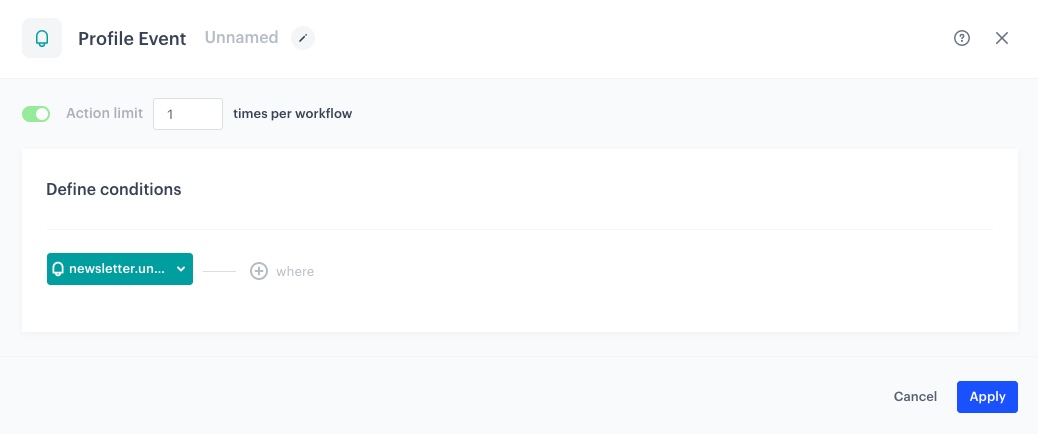
5. Click **Choose event** and from the dropdown list, select `newsletter.unsubscribe` event.
6. Confirm by clicking **Apply**.
Profile Event node configuration
### Define the Remove Profiles from Facebook Audience node
In this part of the process, you will configure the node which removes users from Facebook Audience.
1. As the second node of the workflow, add **Remove Profiles from Facebook Audience**.
2. Click the node.
3. Click **Select connection** and from the dropdown list, select the earlier established connection.
If you haven’t established a connection yet, see [Create a connection](/docs/automation/integration/facebook/send-custom-audience#create-a-connection).
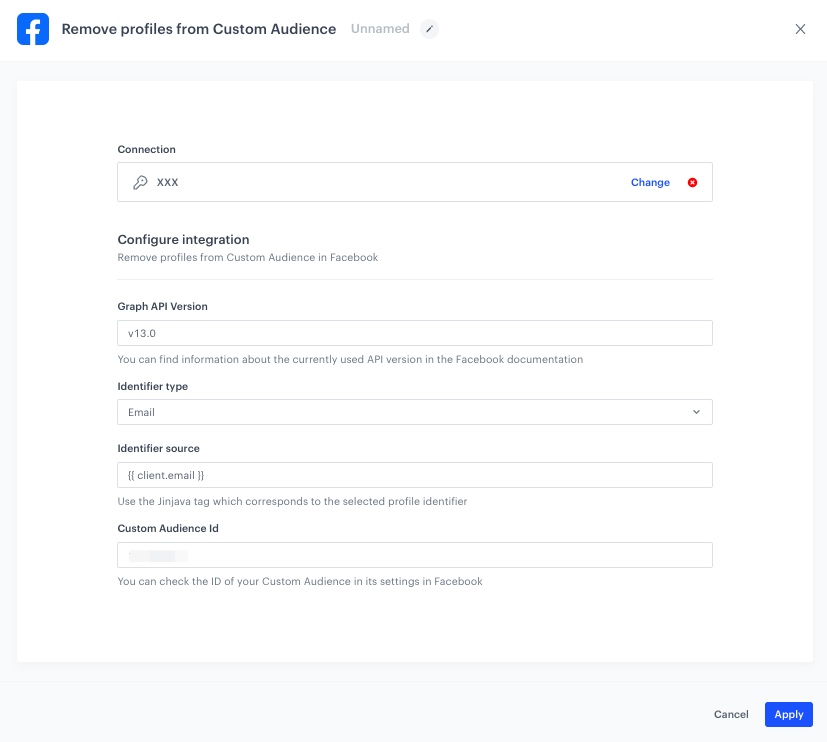
4. In the **Graph API version** field, enter the currently used version of Facebook API.
5. From the **Identifier type** dropdown list, as the identifier, select **Email**.
6. In the **Identifier source**, enter the following Jinjava tag: `{{ client.email }}`
7. In the **Custom Audience ID** field, enter the ID of the Custom Audience.
8. Confirm by clicking **Apply**.
Remove profiles from Facebook Audience node configuration
9. Add the **End** node and save your worfklow.
Workflow configuration
**Result:** From now on, users who unsubscribe from the newsletter, will be automatically removed from the audience selected in the **Remove profiles from Facebook Audience** node.
## Check the use case set up on the Synerise Demo workspace
---
You can check the [workflow configuration](https://app.synerise.com/automations/automation-diagram/714ee926-ca4e-4113-a752-3d0f220def7e) directly in Synerise Demo workspace.
If you’re our partner or client, you already have automatic access to the **Synerise Demo workspace (1590)**, where you can explore all the configured elements of this use case and copy them to your workspace.
If you’re not a partner or client yet, we encourage you to fill out the contact [form](https://demo.synerise.com/request) to schedule a meeting with our representatives. They’ll be happy to show you how our demo works and discuss how you can apply this use case in your business.
## Read more
---
- [Automation Hub](/docs/automation)
- [Facebook Integration](/docs/automation/integration/facebook)
 **Automation Hub > Workflows > New workflow**.
2. Enter the name of the workflow
### Define the Profile Event trigger node
At this stage, we will configure the conditions that launch the workflow. As a trigger, we will use the `newsletter.unsubscribe` event, so each resignation from subscription will start a workflow.
1. On the dashboard, click the **Add trigger** icon.
3. From the dropdown list, select **Profile Event**.
**Results**: The **Profile Event** node is added to the dashboard.
4. Click the node.
**Result**: A pop-up appears.
5. Click **Choose event** and from the dropdown list, select `newsletter.unsubscribe` event.
6. Confirm by clicking **Apply**.
**Automation Hub > Workflows > New workflow**.
2. Enter the name of the workflow
### Define the Profile Event trigger node
At this stage, we will configure the conditions that launch the workflow. As a trigger, we will use the `newsletter.unsubscribe` event, so each resignation from subscription will start a workflow.
1. On the dashboard, click the **Add trigger** icon.
3. From the dropdown list, select **Profile Event**.
**Results**: The **Profile Event** node is added to the dashboard.
4. Click the node.
**Result**: A pop-up appears.
5. Click **Choose event** and from the dropdown list, select `newsletter.unsubscribe` event.
6. Confirm by clicking **Apply**.