With Synerise AI search, you can effectively control how your search engine processes queries. By using synonyms, you can increase the reach of your products and make sure that customers always find what they are looking for.

This use case describes the process of creating synonyms for a headphones query. 

## Prerequisites
---
- An item feed must be provided.
- Enable [The Search Engine](/docs/ai-hub/ai-search/introduction-to-ai-search) for your workspace and create an [index](/docs/ai-hub/ai-search/create-index).
- [Implement AI search](https://developers.synerise.com/AISearch/AISearch.html) in any of your channels (mobile app, website etc.)

## Add synonyms
---
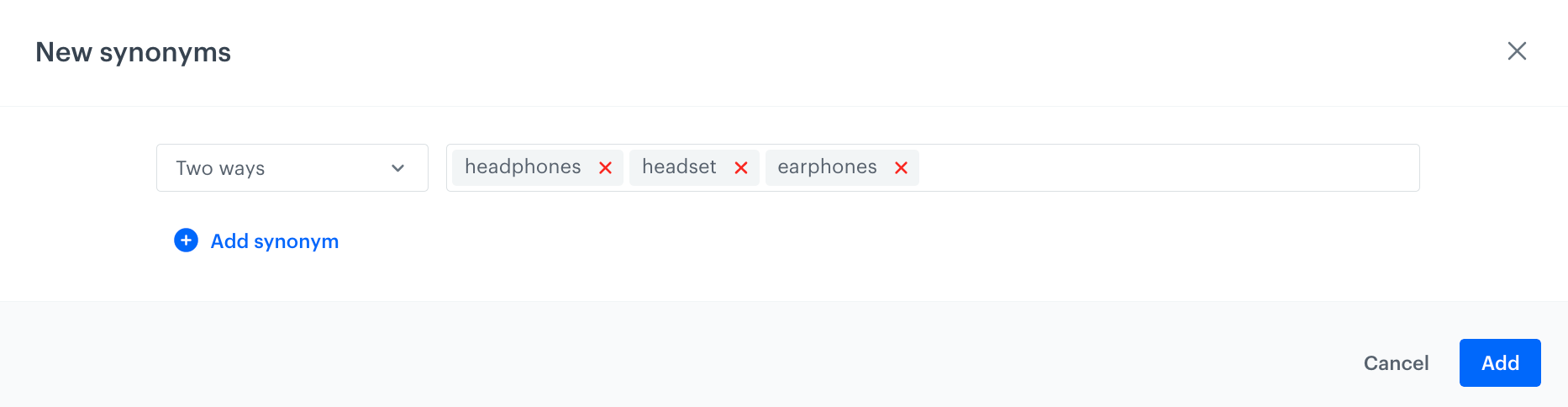
In this use case, you add synonyms to a set of words: **headphones, headsets, earphones** so that when a user types any of these words into a search engine, they are all treated as synonyms of each other and will produce relevant search results.

1. Go to <img src="/api/docs/image/54176ad07f146575310749eba44b7c2f42c1b327/icons/ai-hub-icon.svg" alt="AI Hub icon" class="icon" > **AI Hub > Indexes**.
2. Select an index from the list.
3. Click the **Synonyms** tab.
4. Click **Add synonym > Add synonym**. 
5. From the dropdown list, select **Two ways**.
5. In the **Synonyms** field, enter: `headphones, headsets, earphones` 
    In this configuration, each word in the list a synonym of the other words.
6. Confirm by clicking **Add**.

<figure><img src="/api/docs/image/54176ad07f146575310749eba44b7c2f42c1b327/use-cases/all-cases/_gfx/search-synonyms.png" class="full" alt="Example of synonym conditions"><figcaption>Example of synonym conditions</figcaption></figure>


<div class="admonition admonition-note"><div class="admonition-icon"><svg xmlns="http://www.w3.org/2000/svg" fill="none" viewBox="0 0 24 24" stroke="currentColor" stroke-width="2.5"><path stroke-linecap="round" stroke-linejoin="round" d="M13 16h-1v-4h-1m1-4h.01M21 12a9 9 0 11-18 0 9 9 0 0118 0z" /></svg></div><div class="admonition-body"><div class="admonition-content">

You can also import synonyms from a CSV file, follow instructions in the ["Add synonyms"](/docs/ai-hub/ai-search/add-synonyms#procedure) article.

</div></div></div>
  

## Check the use case set up on the Synerise Demo workspace
---

You can check the synonyms in [AI Search configuration](https://app.synerise.com/ai-v2/search/indices/bf68c73a3c0adae495e3dc67c8eb9b9a1657485148/synonyms) directly in Synerise Demo workspace.

If you’re our partner or client, you already have automatic access to the **Synerise Demo workspace (1590)**, where you can explore all the configured elements of this use case and copy them to your workspace.  

If you’re not a partner or client yet, we encourage you to fill out the contact [form](https://demo.synerise.com/request) to schedule a meeting with our representatives. They’ll be happy to show you how our demo works and discuss how you can apply this use case in your business.

## Read more
---

- [Configuring AI Search](/docs/ai-hub/ai-search/introduction-to-ai-search#configuring-ai-search).
