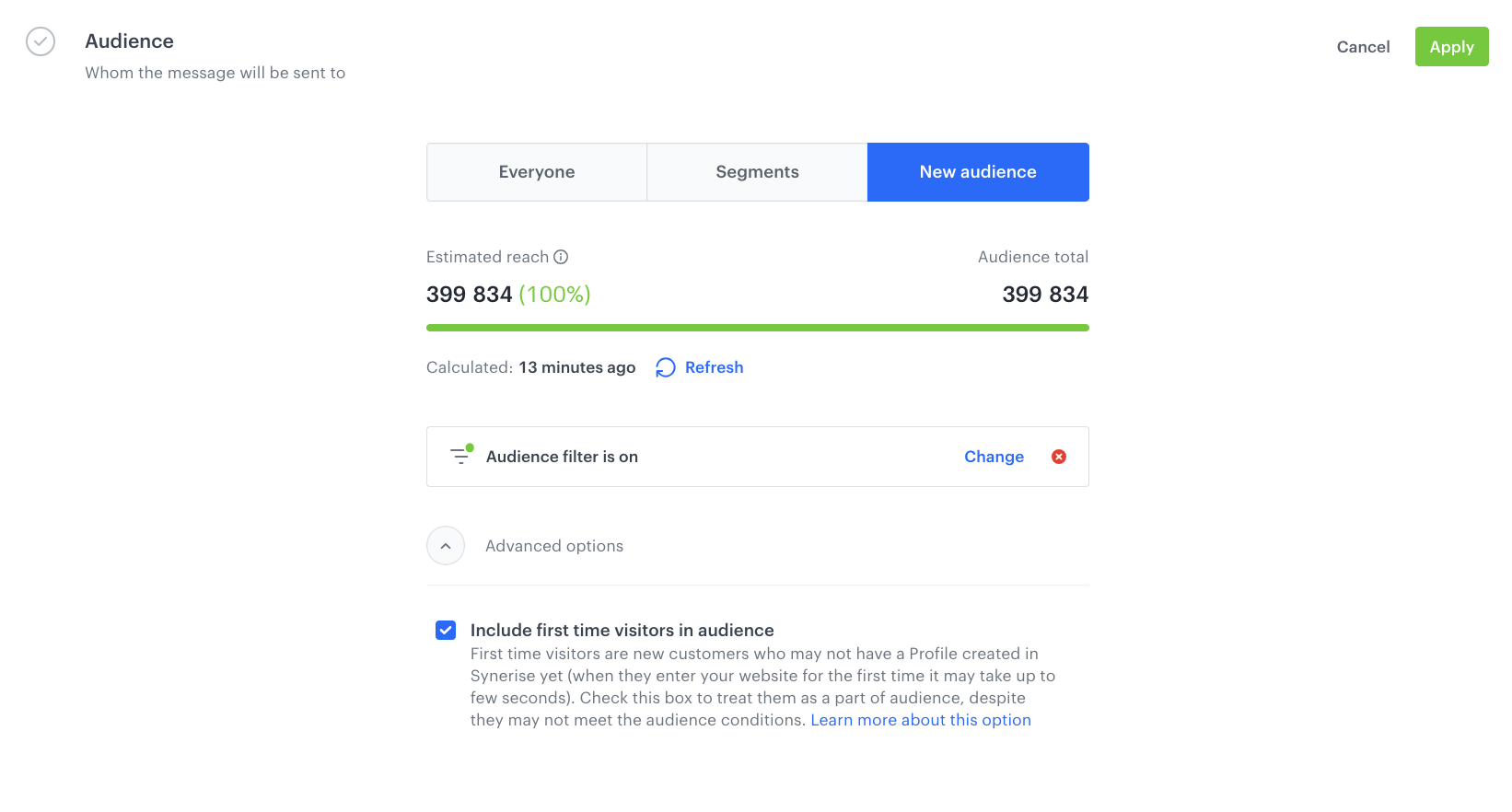
Engaging new visitors effectively is crucial for driving conversions and building customer loyalty. Dynamic Content campaigns tailored for first-time visitors, such as offering a voucher, can create a strong initial impression and encourage users to complete their first transaction. However, when running such campaigns, there is a risk of missing new users who are not in the database at the time of campaign launch. This is where the **Include first time visitors in audience** option becomes invaluable, ensuring convenient targeting for these users.

In this use case, we will describe a voucher campaign targeted at new users who have never made a transaction. By enabling the **Include first time visitors in audience** option in the campaign, we ensure that new users visiting the website are not overlooked. Even if they were not yet in the database at the moment the campaign started, they will still see the dynamic content and receive their voucher. This ensures that the campaign reaches its intended audience and no opportunities to engage first-time visitors are missed.

## Prerequisites  
---

[Implement a tracking code](/docs/settings/tool/tracking_codes).

## Process
---

In this use case, you will go through the following steps:
1. [Create a voucher pool](/use-cases/voucher-for-new-users-optimization#create-a-voucher-pool).
3. [Create a dynamic content](/use-cases/voucher-for-new-users-optimization#create-a-dynamic-content) campaign, which displays the voucher code on the website.


## Create a voucher pool
---
In this use case, the ID of this voucher pool will be used as a dynamic value during the message creation process, allowing discount codes to be assigned to each customer participating in this scenario.

1. Go to **Settings > [Voucher pools](https://app.synerise.com/spa/modules/vouchers/pools/)** and click **Add pool**.
2. In the voucher pool configuration form: 
    1. In the **Pool name** field, enter the name of the pool.
    2. Select the dates for the **Emission start** and **Emission end** fields.
    3. Complete the form by clicking **Apply**.  
       **Result**: The pool is created.
3. Open the voucher pool by clicking its name on the voucher pool list.
4. Add codes to the voucher pool by clicking **Add record** button.  
   You can also import records to the voucher pool. You can learn more about it in ["Importing vouchers"](/docs/assets/imports/importing-vouchers).

## Create a dynamic content
---
Create a dynamic content campaign. 

This dynamic content will be displayed on your site with the unique voucher from the voucher pool. 

1. Go to **Experience Hub > Dynamic content > Create new**.
2. Enter the name of the dynamic content.
1. Choose **Insert Object** type.
2. To select the recipients of the dynamic content, on the **Audience** tab, click **Define**.
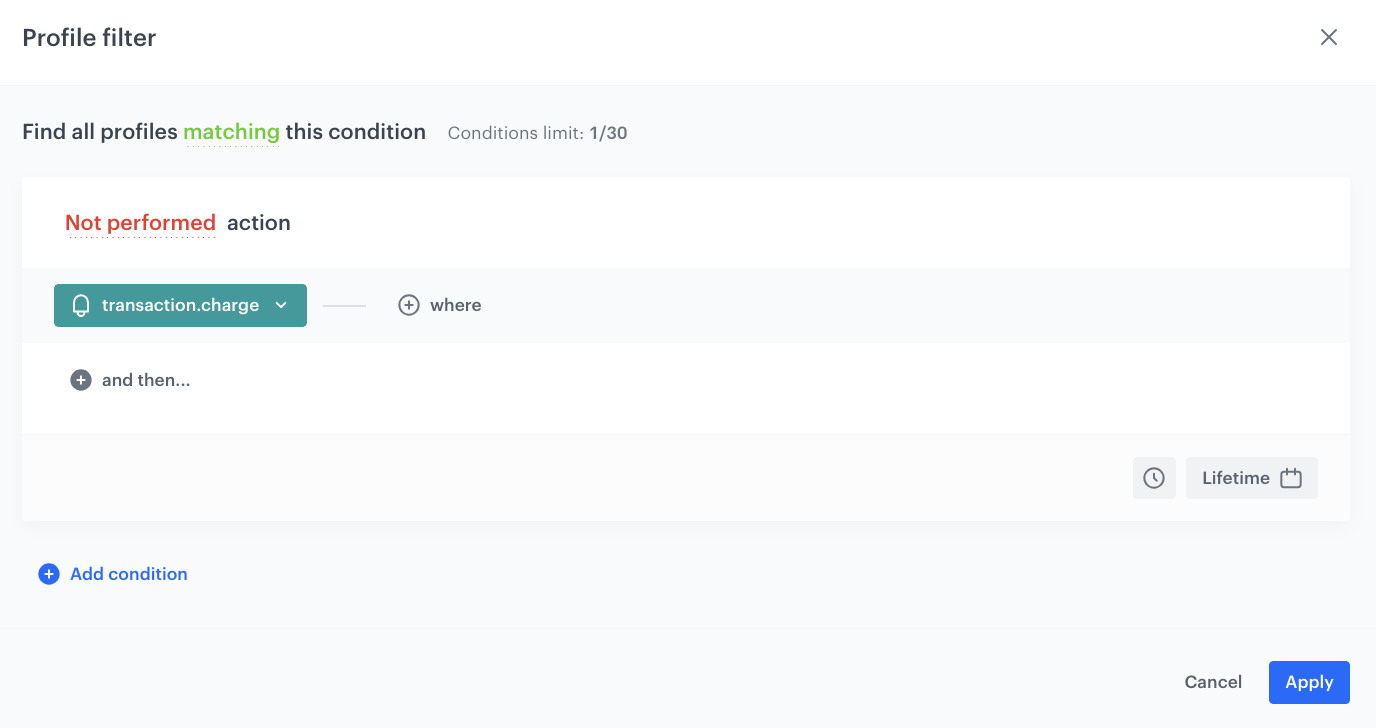
3. Select **New Audience** and click **Define conditions**. In this step, you define the group of customers who have never bought anything from your shop.
  1. Choose **Add condition** and find the `transaction.charge` event.
  5. Set the time as **Lifetime**.
  6. Click **Performed** and change it to **Not Performed**.
  7. Click **Apply**. 

      <figure>
      <img src="/api/docs/image/54176ad07f146575310749eba44b7c2f42c1b327/use-cases/all-cases/_gfx/profile-filter.png" alt="The audience settings" class="full" >
      <figcaption>The audience settings</figcaption>
      </figure>  

9. Click **Advanced options** and choose the **Include first time visitors in audience** option.
10. Click **Apply**.

<figure>
<img src="/api/docs/image/54176ad07f146575310749eba44b7c2f42c1b327/use-cases/all-cases/_gfx/profile-filter1.png" alt="The audience settings" class="full" >
<figcaption>The audience settings</figcaption>
</figure>  

### Create the Dynamic Content template

3. In the **Content** section, specify the CSS selector where you want to insert your campaign.
4. Click **Create Message**.
5. In the code editor, create a dynamic content campaign based on your preferences and your own CSS styles. Remember about the predefined templates in Synerise, which you can use to simplify the process and avoid building everything from scratch.
2. Click **Inserts** and **Pools** and choose the voucher pool created in the [previous step](#create-a-voucher-pool). 
      
   <div class="admonition admonition-note"><div class="admonition-icon"><svg xmlns="http://www.w3.org/2000/svg" fill="none" viewBox="0 0 24 24" stroke="currentColor" stroke-width="2.5"><path stroke-linecap="round" stroke-linejoin="round" d="M13 16h-1v-4h-1m1-4h.01M21 12a9 9 0 11-18 0 9 9 0 0118 0z" /></svg></div><div class="admonition-body"><div class="admonition-content">

   Check also the voucher pools inserts documentation, based on different possible options: 
      - [If you want to always display the same code for a customer,](/developers/inserts/insert-usage#retrieving-the-same-code-every-time)
      - [If you need to display barcodes.](/developers/inserts/insert-usage#barcodes)
   </div></div></div>

4. Customize the design and content of your dynamic content campaign to suit your business needs.
3. Click **Use in communication** and then click **Apply**.

### Define schedule and display settings 

1. In the **Schedule** section, click **Define** and set the time when the message will be active.
2. In the **Display Settings** section, click **Define** and specify circumstances for dynamic content to be displayed. Optionally, you can also define the Advanced options. You can define the frequency of dynamic content to be displayed. You can also define the type of device you want to show your dynamic content.
3. Optionally, you can define the type of device you want to show your dynamic content on.
4. Click **Apply**.
5. Optionally, you can define the UTM parameters and additional parameters for your dynamic content campaign.
6. Click **Activate**.

## Check the use case set up on the Synerise Demo workspace
---
You can check the configuration of [dynamic content campaign](https://app.synerise.com/campaigns/dynamic-content/create/1cb07032-a65c-44fe-9d09-1b3db3c811c0), directly in Synerise.

If you’re our partner or client, you already have automatic access to the **Synerise Demo workspace (1590)**, where you can explore all the configured elements of this use case and copy them to your workspace.  

If you’re not a partner or client yet, we encourage you to fill out the contact [form](https://demo.synerise.com/request) to schedule a meeting with our representatives. They’ll be happy to show you how our demo works and discuss how you can apply this use case in your business. 

## Read more
---

- [Dynamic content](/docs/campaign/dynamiccontent)
- [Voucher pools](/docs/assets/code-pools)