When Synerise determines which promotions a profile is eligible for, it evaluates each candidate promotion's audience in a fixed order: promotion-level settings, then the promotion's purchase filter, then its segmentation(s).
This article covers:
- How the audience is evaluated, including the segmentation limit
- Purchase filters, an audience-targeting option based on a profile's
product.buyhistory:- When to use a purchase filter instead of, or together with, a segmentation
- Limitations
NOTE: For steps to build a purchase filter, see the Audience section when creating a promotion.
How the audience is evaluated
When Synerise determines which promotions a profile is eligible for, it evaluates candidate promotions in stages:
- Promotion-level settings - whether the promotion is within its validity window, its global/per-profile limits haven't been exhausted, whether it needs to match a requested tag, and so on.
- Purchase filter - checked against the profile's
product.buyhistory, right before segmentations. A promotion is dropped here if its purchase filter doesn't match the profile. - Segmentations - whether the profile belongs to the promotion's selected segmentation(s). Checking segmentations across all remaining candidate promotions is subject to the 100 unique segmentations limit.
Whichever audience option a promotion uses — segmentation or purchase filter — whether a given profile is eligible for it is determined at the moment the profile's promotions are requested.
This affects the following operations, since they all determine which promotions a profile is currently eligible for:
- Get a Profile's promotion as Profile (
get-for-client) - Get Profile promotions by a custom filter (
get-for-client-by-custom-settings) - Process basket / Process anonymous Profile's basket, and the equivalent checkout methods
- Personalized promotion assignment, since candidate promotions for the AI promotion engine are sourced from regular promotions, including any purchase filter defined on them
Segmentation limit
After steps 1 and 2 have been applied for a profile in a single request, the remaining candidate promotions are sorted by their priority (1 is the highest). Synerise then collects the segmentations of these promotions in that order until it reaches 100 unique segmentations. Only these 100 segmentations are checked in step 3 above.
Because the purchase filter is evaluated before segmentations (step 2), it narrows down the candidate promotions first. Promotions that don't match the purchase filter are dropped before their segmentations are ever counted toward the limit - so using purchase filters lets you effectively work with more segmentations across your promotions without hitting the cap.
TIP: If you have a segmentation that combines a product.buy condition with other kinds of conditions (attributes, aggregates, expressions), split it up: move the product.buy condition into the promotion's purchase filter, and keep the rest of the conditions in a segmentation. Attach that (now smaller and more reusable) segmentation to the purchase filter. This reduces how many segmentations need to be checked against the limit, while keeping the same overall targeting logic.
Purchase filters
A purchase filter is an audience-targeting option for promotions and can only be built on the product.buy event and its parameters. Unlike a segmentation's Performed action condition, a purchase filter can't use profile attributes, aggregates, expressions, other segmentations, or dynamic value references - only the parameters of product.buy are available, and only the ones enabled in the Promotion settings section (you can select up to 10 parameters). If none are explicitly selected, a global default list applies (includes $sku).
IMPORTANT: Purchase filters are available only for regular promotions. They are supported across all promotion-related actions, such as getting promotions for a profile, applying them in personalized promotions, or during the process basket/ process checkout.
When to use a purchase filter
In the Audience section of a promotion, you choose one of three options: Everyone, Segments, or Purchase filters.
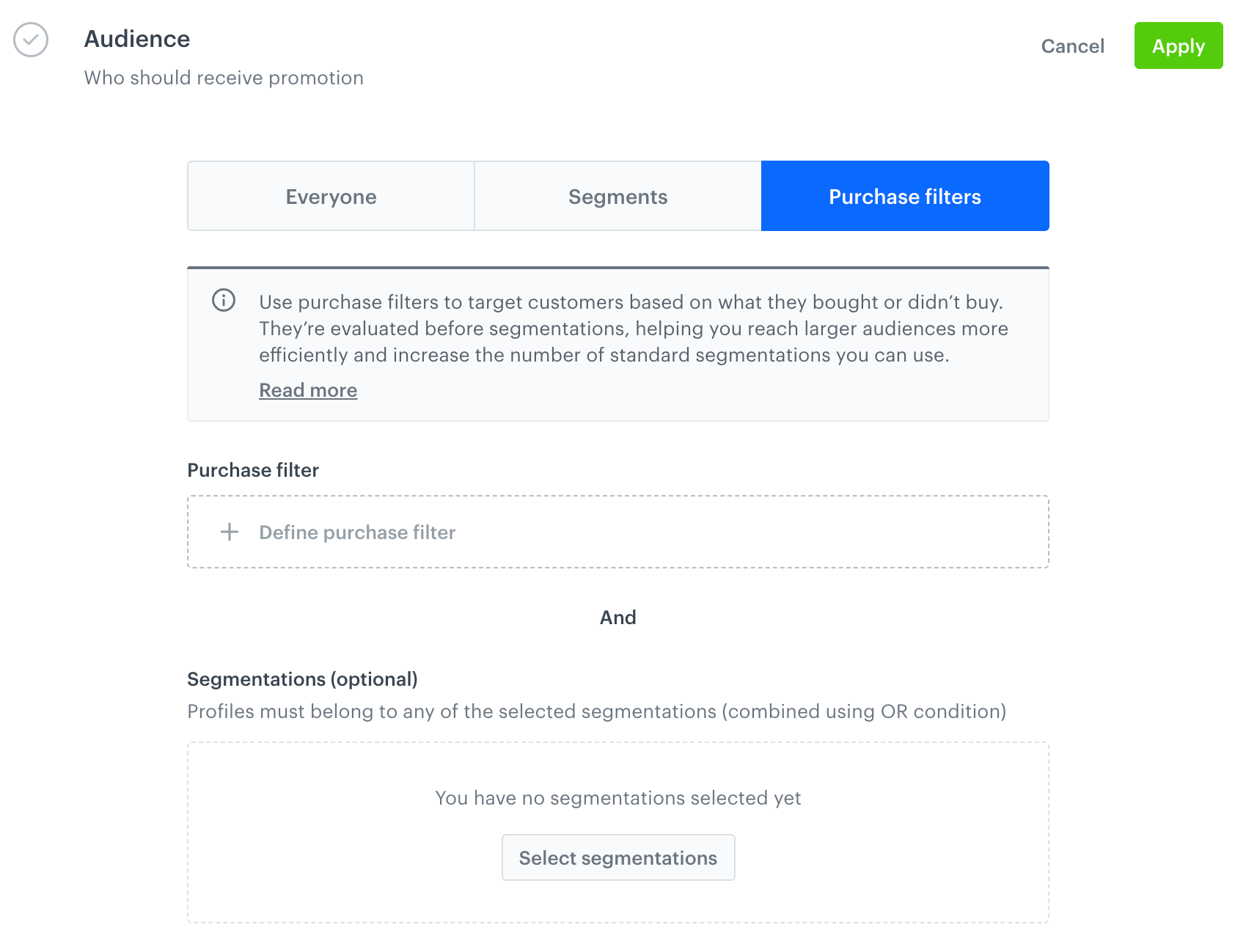
If eligibility depends on a profile's product.buy history, prefer a purchase filter over a product.buy-based segmentation by default, even if you don't otherwise need reuse. Because a purchase filter is checked before segmentations, using one instead of a segmentation reduces how many segmentations count toward the 100 unique segmentations limit for a given request - see How the audience is evaluated.
Use a segmentation instead when eligibility is based on a customer attribute, aggregate, expression, or any condition other than product.buy history, or when you need this exact condition as a reusable, named segmentation elsewhere - for example, in other promotions, campaigns, or reports, not just this one.
If a promotion needs both a product.buy condition and other kinds of conditions, split them: move the product.buy part into the purchase filter, and keep the rest in a segmentation attached to it. See the tip under Segmentation limit for details.
This distinction also matters when creating promotions through the API: a segmentation must be created upfront and referenced by its ID, while a purchase filter is defined inline, as an RSQL expression passed directly in the promotion's payload, without creating a separate object.
A purchase filter can be combined with a number of segmentations. When both are defined:
- a profile must match the purchase filter, and
- belong to at least one of the selected segmentations (the segmentations themselves are combined with OR).
The purchase filter and the segmentations are two separate conditions evaluated independently, not merged into a single query.
Limitations
- Maximum lookback of 365 days - A purchase filter's time window can't reach further back than 365 days from the moment the filter is evaluated. If the window is set to an absolute date, that date is clamped against the most recent 365 days at evaluation time: once it falls outside that range, the condition evaluates as not met, even if it matched previously.
- Maximum 5 conditions - A purchase filter can combine up to 5 conditions (each grouping a Performed / Not performed
product.buycondition). - Maximum 5 parameters in a single condition - Each condition can contain up to 5
product.buyparameter conditions. - Maximum 1000 values per In / Not in operator - The In and Not in operators each accept up to 1000 values.