Voucher pool is a place where you can import discount codes and coupons, which you can later use through many communication channels (email, SMS, mobile push, web push, dynamic content, and [promotions](/docs/ai-hub/promotions/creating-promotions#add-voucher-codes) (for selected items and entire cart)).

The discount codes and coupons get two forms: 
- a text string
- [a barcode](#supported-barcodes)   


  <div class="admonition admonition-warning"><div class="admonition-icon"><svg xmlns="http://www.w3.org/2000/svg" fill="none" viewBox="0 0 24 24" stroke="currentColor" stroke-width="2.5"><path stroke-linecap="round" stroke-linejoin="round" d="M12 9v2m0 4h.01m-6.938 4h13.856c1.54 0 2.502-1.667 1.732-2.5L13.732 4c-.77-.833-1.964-.833-2.732 0L4.082 16.5c-.77.833.192 2.5 1.732 2.5z" /></svg></div><div class="admonition-body"><div class="admonition-content">

  A voucher code must be unique across the entire workspace, which means it cannot be duplicated within any voucher pool.

  </div></div></div>


  It is important to note that the system does not provide automatic warnings in the following scenarios: 
- when the voucher pool used in a message is inactive, 
- when all codes within an active voucher pool have already been assigned 
- when a voucher pool is inactive but there are still unassigned codes remaining. 

Therefore, it is your responsibility to control and manage these aspects independently.

The voucher feature does not provide the logic of voucher usage. You will need to implement and integrate this logic in your applications and systems, ensuring that information about voucher usage is passed to Synerise.

### Supported barcodes

Accepted types of barcodes in Synerise: 

<table>
<tbody>
  <tr>
    <td>EAN_13</td>
    <td>EAN_8</td>
  </tr>
  <tr>
    <td>EAN_128</td>
    <td>CODE_39</td>
  </tr>
  <tr>
    <td>ITF_14</td>
    <td>CODE_128</td>
  </tr>
  <tr>
    <td>POSTNET</td>
    <td>QR-CODE</td>
  </tr>
  <tr>
    <td>UPC-A</td>
    <td>UPC-E</td>
  </tr>
</tbody>
</table>


### You may want to read
---
- Developer Guide: [Barcodes](/developers/inserts/insert-usage#barcodes)
- Use case: [Birthday email with coupon](/use-cases/birthday-coupon)
- Use case: [Coupon for membership anniversary](/use-cases/coupon_for_anniversary)
- Use case: [Discount coupon for installing the application](/use-cases/discount-for-app)

## Creating a code pool
---
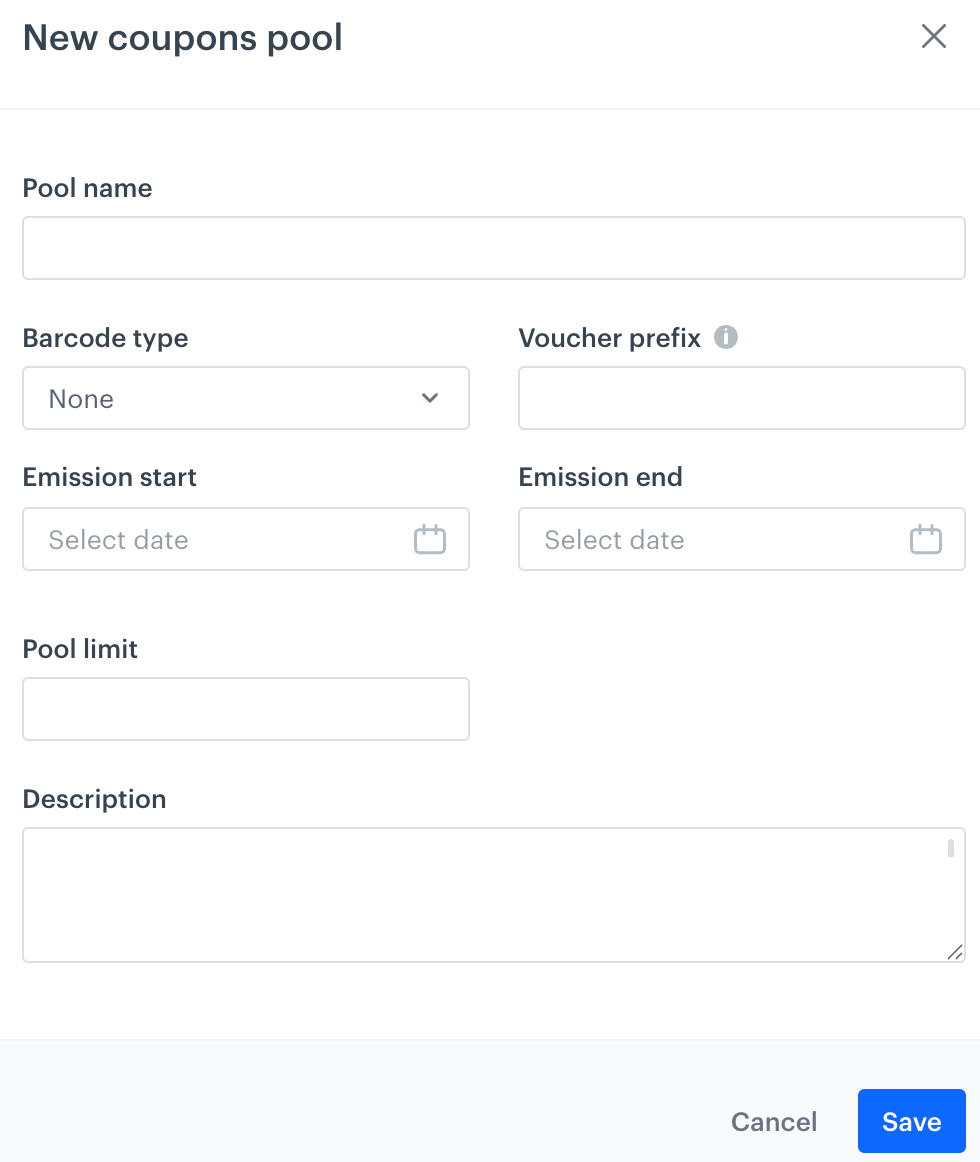
First, create a pool to which you will later import the codes.  

<figure>
<img src="/api/docs/image/54176ad07f146575310749eba44b7c2f42c1b327/docs/assets/_gfx/add-pool.png" alt="A form for adding a pool" class="medium" >
<figcaption> A form for adding a pool </figcaption>
</figure>

1. Go to <img src="/api/docs/image/54176ad07f146575310749eba44b7c2f42c1b327/icons/data-management-icon.png" alt="Image presents the Data Modeling Hub icon" class="icon"> **Data Modeling Hub > Voucher Pools > Add pool**.
2. On the pop-up, fill in the following fields:
    1. In the **Pool name** field, enter the name of the pool (the name is only visible on the list of the voucher pools).
    2. Optionally, from the **Barcode type** dropdown list, select the type of codes which will be imported in the CSV file to Synerise.  
      
       <div class="admonition admonition-important"><div class="admonition-icon"><svg xmlns="http://www.w3.org/2000/svg" fill="none" viewBox="0 0 24 24" stroke="currentColor" stroke-width="2.5"><path stroke-linecap="round" stroke-linejoin="round" d="M12 8v4m0 4h.01M21 12a9 9 0 11-18 0 9 9 0 0118 0z" /></svg></div><div class="admonition-body"><div class="admonition-content">

       The selection in the dropdown has no influence on the further process. It serves only informational purposes for the users.

       </div></div></div>

    3. Optionally, in the **Voucher prefix** field, enter a number that will be added to the beginning of each code.
    4. In the **Emission start** and **Emission end** fields, select the dates when the distribution of the codes starts and finishes, respectively.
    5. Optionally, to limit the size of the pool, fill in the **Pool limit** field.
    6. Optionally, in the **Description** field, enter the internal description of the pool that is visible only on the list of voucher pools.
3. Confirm by clicking **Apply**.  
  **Result**: Your code pool appears on the top of the list. 

## Importing codes to the pool
---
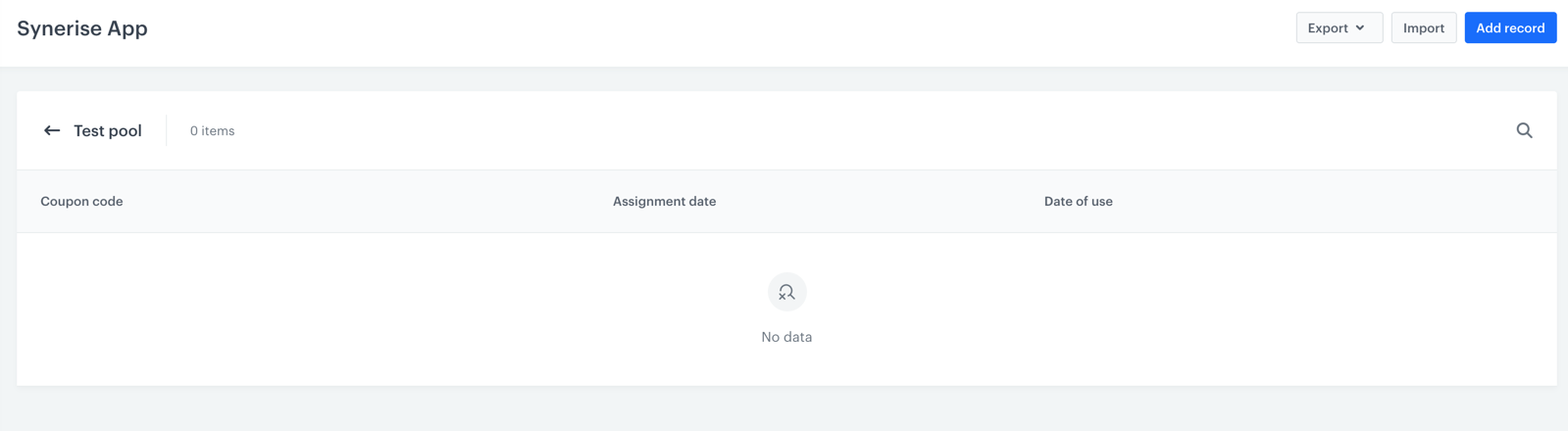
After you created a pool, add or import codes to the pool. You must also import the codes to your backend. 

<figure>
<img src="/api/docs/image/54176ad07f146575310749eba44b7c2f42c1b327/docs/assets/_gfx/importing-pool.png" alt="An empty voucher pool" class="full" >
<figcaption> An empty voucher pool</figcaption>
</figure>


<div class="admonition admonition-tip"><div class="admonition-icon"><svg xmlns="http://www.w3.org/2000/svg" fill="none" viewBox="0 0 24 24" stroke="currentColor" stroke-width="2.5"><path stroke-linecap="round" stroke-linejoin="round" d="M9.663 17h4.673M12 3v1m6.364 1.636l-.707.707M21 12h-1M4 12H3m3.343-5.657l-.707-.707m2.828 9.9a5 5 0 117.072 0l-.548.547A3.374 3.374 0 0014 18.469V19a2 2 0 11-4 0v-.531c0-.895-.356-1.754-.988-2.386l-.548-.547z" /></svg></div><div class="admonition-body"><div class="admonition-content">

Synerise does not validate if the codes you upload match the pool type.

</div></div></div>


1. Create a CSV file according to these [requirements](/docs/assets/imports/importing-vouchers#file-requirements).  
    
   <div class="admonition admonition-warning"><div class="admonition-icon"><svg xmlns="http://www.w3.org/2000/svg" fill="none" viewBox="0 0 24 24" stroke="currentColor" stroke-width="2.5"><path stroke-linecap="round" stroke-linejoin="round" d="M12 9v2m0 4h.01m-6.938 4h13.856c1.54 0 2.502-1.667 1.732-2.5L13.732 4c-.77-.833-1.964-.833-2.732 0L4.082 16.5c-.77.833.192 2.5 1.732 2.5z" /></svg></div><div class="admonition-body"><div class="admonition-content">

   There is a limit of 36 characters for the voucher code and the file can't exceed 200 MB.

   </div></div></div>

2. Go to <img src="/api/docs/image/54176ad07f146575310749eba44b7c2f42c1b327/icons/data-management-icon.png" alt="Image presents the Data Modeling Hub icon" class="icon"> **Data Modeling Hub > Voucher Pools**.
3. Double-click the code pool to which you want to import the file with codes.
4. Click **Import**. 
5. Proceed according to [this instruction from step 3 (selecting the import method)](/docs/assets/imports/importing-vouchers#procedure).  
  **Result**: A list of codes is uploaded.  


   <div class="admonition admonition-note"><div class="admonition-icon"><svg xmlns="http://www.w3.org/2000/svg" fill="none" viewBox="0 0 24 24" stroke="currentColor" stroke-width="2.5"><path stroke-linecap="round" stroke-linejoin="round" d="M13 16h-1v-4h-1m1-4h.01M21 12a9 9 0 11-18 0 9 9 0 0118 0z" /></svg></div><div class="admonition-body"><div class="admonition-content">

   You can also add the codes manually by clicking **Add record**.

   </div></div></div>


## Assigning a code to a customer
---

To limit code usage by redeeming, which is recommended when distributing unique codes to customers, you must first assign a code to the customer using the methods described in the table below. If you don't assign a code, it cannot be used. However, if you [distribute a code in a message](#distributing-codes), it will be assigned automatically.

This part of the process can be omitted in a scenario in which you display one, non-redeemable discount code which expires at a specific date.


| Method                                                                                                                                                   | API consumer                                                   | Description                                                             | Events generated           |
|---------------------------------------------------------------------------------------------------------------------------------------------------------------|----------------------------------------------------------------|-------------------------------------------------------------------------|----------------------------|
| [Assign a voucher from a pool to Profile](https://developers.synerise.com/LoyaltyandEngagement/LoyaltyandEngagement.html#operation/AssignAVoucherFromAPoolToAClient) <br> `/v4/vouchers/item/assign`                       | Profile (formerly client), Anonymous profile (formerly client) | This method lets you assign a code from a specific pool to a customer.  | [voucherCode.assigned](/docs/assets/events/event-reference/loyalty#vouchercodeassigned) |
| [Assign a voucher to a Profile](https://developers.synerise.com/LoyaltyandEngagement/LoyaltyandEngagement.html#operation/AssignAVoucherToAClient) <br> `/v4/vouchers/item/assign-for-client`                      | Workspace (formerly Business Profile), Synerise User | This method lets you assign a code from a specific pool to a customer.  | [voucherCode.assigned](/docs/assets/events/event-reference/loyalty#vouchercodeassigned) |

## Distributing codes
--- 
Apart from displaying discount codes, you can distribute them in:  
- [email](/docs/campaign/e-mail)
- [SMS](/docs/campaign/SMS)
- [mobile push](/docs/campaign/Mobile)
- [web push](/docs/campaign/Webpush)
- [promotions](/docs/ai-hub/promotions)

Read more about [voucher pools inserts](/developers/inserts/insert-usage#code-pools) and [barcodes inserts](/developers/inserts/insert-usage#barcodes).


<details class="accordion"><summary>Click here to learn how to add a code in the form of a text string</summary><div class="accordion-content"><div class="admonition admonition-note"><div class="admonition-icon"><svg xmlns="http://www.w3.org/2000/svg" fill="none" viewBox="0 0 24 24" stroke="currentColor" stroke-width="2.5"><path stroke-linecap="round" stroke-linejoin="round" d="M13 16h-1v-4h-1m1-4h.01M21 12a9 9 0 11-18 0 9 9 0 0118 0z" /></svg></div><div class="admonition-body"><div class="admonition-content"> <p>As an example, the procedure describes distributing codes through an email.</p> </div></div></div> <ol> <li><p>Go to <img src="/api/docs/image/54176ad07f146575310749eba44b7c2f42c1b327/icons/experience-hub-icon.svg" alt="Image presents the Experience Hub icon" class="icon"> <strong>Experience Hub &gt; Email &gt; Create new</strong>.</p> </li> <li><p>In the <strong>Content</strong> section, click <strong>Create message</strong>.</p> </li> <li><p>Select <strong>Code editor</strong>. </p> <div class="admonition admonition-tip"><div class="admonition-icon"><svg xmlns="http://www.w3.org/2000/svg" fill="none" viewBox="0 0 24 24" stroke="currentColor" stroke-width="2.5"><path stroke-linecap="round" stroke-linejoin="round" d="M9.663 17h4.673M12 3v1m6.364 1.636l-.707.707M21 12h-1M4 12H3m3.343-5.657l-.707-.707m2.828 9.9a5 5 0 117.072 0l-.548.547A3.374 3.374 0 0014 18.469V19a2 2 0 11-4 0v-.531c0-.895-.356-1.754-.988-2.386l-.548-.547z" /></svg></div><div class="admonition-body"><div class="admonition-content"> <p>Adding a discount code pool is also possible in <strong>Drag&amp;drop builder</strong>.</p> </div></div></div> </li> <li><p>Enter one of the following code snippets in the HTML section: </p> <table> <thead> <tr> <th>Insert formula</th> <th>Explanation</th> </tr> </thead> <tbody><tr> <td><pre><code class="language-jinja">{% voucher %} pool-uuid {% endvoucher %}</code></pre></td> <td>This insert assigns a code from a pool to a customer. If the code is already assigned to the customer, it retrieves different code for this customer.</td> </tr> <tr> <td><pre><code class="language-jinja">{% voucher assign=false %} pool-uuid {% endvoucher %}</code></pre></td> <td>This insert assigns a code from a pool to a customer (unless one is already assigned) and retrieves that same code for this customer every time</td> </tr> </tbody></table> </li> <li><p>Replace <code>pool-uuid</code> with the ID of your voucher pool. To get the uuid of the voucher pool: </p> <ol> <li>Go to <strong>Data Modeling Hub &gt; Voucher Pools</strong>.</li> <li>From the list, open the pool.</li> <li>From the URL, copy the UUID of the pool.</li> </ol> </li> </ol> <figure> <img src="/api/docs/image/54176ad07f146575310749eba44b7c2f42c1b327/docs/assets/_gfx/distribute-text-code-example.png" alt="Implementing a discount code in the form of a string in an email" class="full" > <figcaption> The preview for a selected customer (the preview option is on) </figcaption> </figure></div></details>


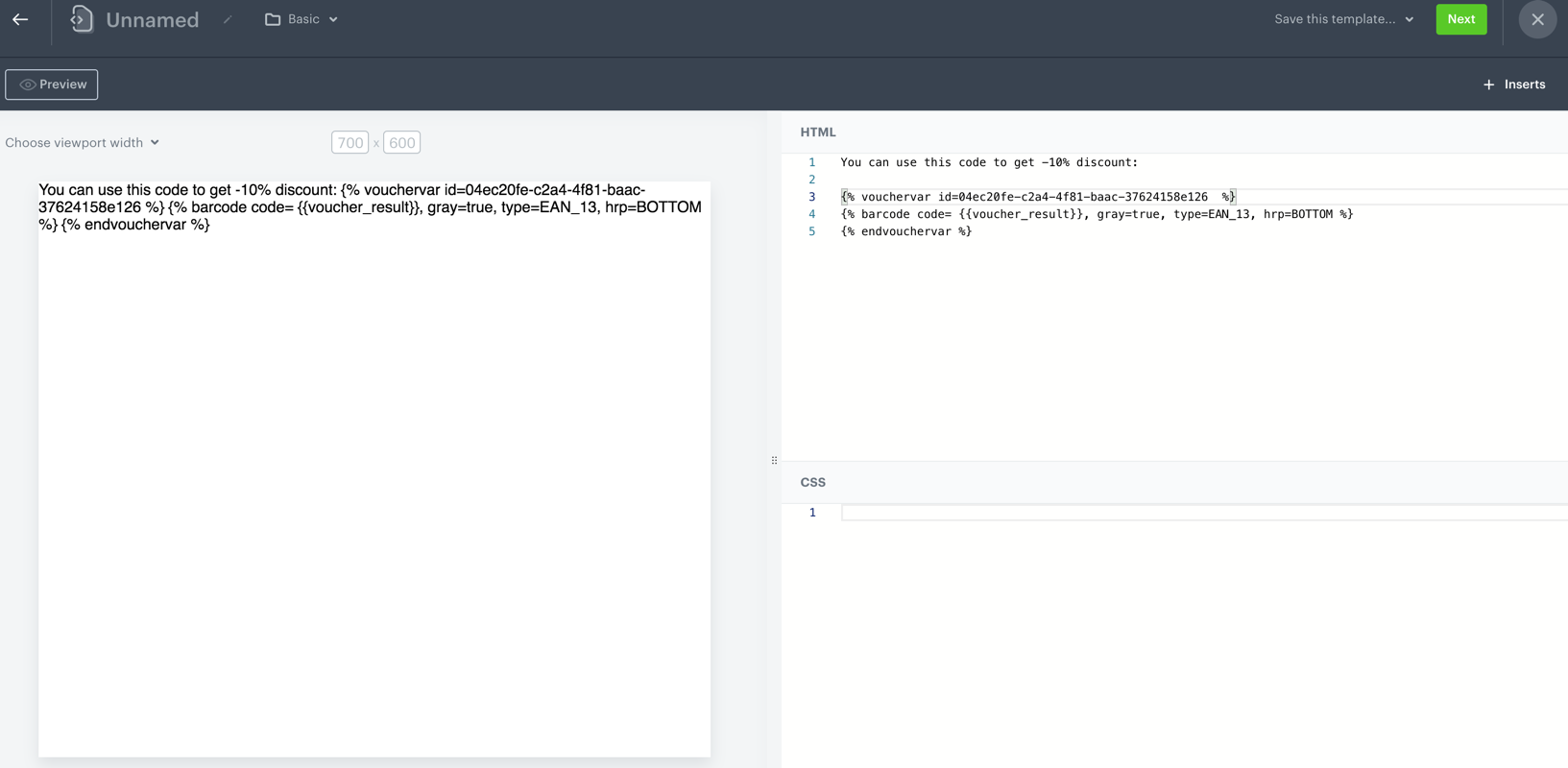
<details class="accordion"><summary>Click here to learn how to add the code in the form of barcodes</summary><div class="accordion-content"><div class="admonition admonition-note"><div class="admonition-icon"><svg xmlns="http://www.w3.org/2000/svg" fill="none" viewBox="0 0 24 24" stroke="currentColor" stroke-width="2.5"><path stroke-linecap="round" stroke-linejoin="round" d="M13 16h-1v-4h-1m1-4h.01M21 12a9 9 0 11-18 0 9 9 0 0118 0z" /></svg></div><div class="admonition-body"><div class="admonition-content"> <p>As an example, the procedure describes distributing barcodes (type EAN_39) through an email.</p> </div></div></div> <ol> <li><p>Go to <img src="/api/docs/image/54176ad07f146575310749eba44b7c2f42c1b327/icons/experience-hub-icon.svg" alt="Image presents the Experience Hub icon" class="icon"> <strong>Experience Hub &gt; Email &gt; Create new</strong>.</p> </li> <li><p>In the <strong>Content</strong> section, click <strong>Create message</strong>.</p> </li> <li><p>Select <strong>Code editor</strong>. </p> </li> <li><p>In the HTML section, enter the following code:</p> <pre><code class="language-jinjava">{% vouchervar id=uuid_of_voucher_pool %} {% barcode code= {{voucher_result}}, gray=true, type=barcode_type, hrp=BOTTOM %} {% endvouchervar %}</code></pre> </li> <li><p>Replace <code>uuid_of_voucher_pool</code> with the actual ID of your voucher pool. To get the ID of the voucher pool:</p> <ol> <li>Go to <strong>Data Modeling Hub &gt; Voucher Pools</strong>.</li> <li>From the list, open the pool.</li> <li>From the URL copy the UUID of the pool.</li> </ol> </li> <li><p>Edit the values for <code>type</code> and <code>hrp</code> parameters according to this <a href="/developers/inserts/insert-usage/#barcodes">instruction</a>. </p> <div class="admonition admonition-warning"><div class="admonition-icon"><svg xmlns="http://www.w3.org/2000/svg" fill="none" viewBox="0 0 24 24" stroke="currentColor" stroke-width="2.5"><path stroke-linecap="round" stroke-linejoin="round" d="M12 9v2m0 4h.01m-6.938 4h13.856c1.54 0 2.502-1.667 1.732-2.5L13.732 4c-.77-.833-1.964-.833-2.732 0L4.082 16.5c-.77.833.192 2.5 1.732 2.5z" /></svg></div><div class="admonition-body"><div class="admonition-content"> <p>The barcode type must match the type of codes stored in the voucher pool.</p> </div></div></div></li> </ol> <p><strong>Results</strong>: The preview mode for a specific customer is unused for this configuration. <figure> <img src="/api/docs/image/54176ad07f146575310749eba44b7c2f42c1b327/docs/assets/_gfx/distribute-barcode-example2.png" alt="Implementing a discount code in the form of a barcode in an email" class="full" > <figcaption> Implementing a discount code in the form of a barcode in an email </figcaption> </figure></p></div></details>

## Displaying codes
---
You can distribute a discount code by displaying it on a website, mobile application, or digital signage. You can do it in the following ways:

- Using the following method:
  | Method                                                                                                                                                   | API consumer                                                   | Description                                                             | Events generated           |
  |---------------------------------------------------------------------------------------------------------------------------------------------------------------|----------------------------------------------------------------|-------------------------------------------------------------------------|----------------------------|
  | [Get assigned vouchers](https://developers.synerise.com/LoyaltyandEngagement/LoyaltyandEngagement.html#operation/GetAssignedVouchers)  <br> `/v4/vouchers/item/get-assigned`                     | Profile (formerly client), Anonymous profile (formerly client) | This method lets you retrieve all codes assigned to a customer so you can display it.  | n/a |

- You can use [dynamic content](/docs/campaign/dynamiccontent) for this purpose. While creating a dynamic content campaign, in its contents use an insert that [retrieves a code from a pool](/developers/inserts/insert-usage#code-pools).
- [Create a document](/docs/assets/documents/creating-documents) that contains a [code pool insert](/developers/inserts/insert-usage#code-pools) and [barcode inserts](/developers/inserts/insert-usage#barcodes) in its body and display the document in a mobile application using the following methods:  
  - [Android](/developers/mobile-sdk/method-reference/android/content#generate-document)
  - [Flutter](/developers/mobile-sdk/method-reference/react-native/content#generate-document)
  - [iOS](/developers/mobile-sdk/method-reference/ios/content#generate-document)
  - [React Native](/developers/mobile-sdk/method-reference/flutter/content#generate-document)

When a voucher is retrieved for a profile, a [voucherCode.assigned](/docs/assets/events/event-reference/loyalty#vouchercodeassigned) event is generated.

  Example voucher insert:
  
<pre><code class="language-jinja">{% vouchervar id=pool-uuid %}
  {{ voucher_result }}
{% endvouchervar %}</code></pre>


  Output: 
  
<pre><code class="language-jinja">{% vouchervar id=5fae8aba-b48e-4144-8d28-db24b1570ab0 %}
&lt;ul&gt;
  &lt;li&gt;The voucher value is {{ voucher_result }}.&lt;/li&gt;
&lt;/ul&gt;
{% endvouchervar %}</code></pre>


## Redeeming codes
---

When a customer uses a discount code in a transaction, your backend must send a redemption request right after the discount is used. If you don't redeem a code, it will still be available to the customers and they may use it again. It is highly recommended to implement control over redeeming codes on your backend.

When a code is redeemed, a [voucherCode.redeemed](/docs/assets/events/event-reference/loyalty#vouchercoderedeemed) event is generated.

| Method                                                                                                                                                   | API consumer                                                   | Description                                                             | Events generated           |
|---------------------------------------------------------------------------------------------------------------------------------------------------------------|----------------------------------------------------------------|-------------------------------------------------------------------------|----------------------------|
| [Redeem a voucher](https://developers.synerise.com/LoyaltyandEngagement/LoyaltyandEngagement.html#operation/RedeemAVoucher) <br> `/v4/vouchers/item/redeem`                      | Workspace (formerly Business Profile), Synerise User | This method lets you redeem a code.  | [voucherCode.redeemed](/docs/assets/events/event-reference/loyalty#vouchercoderedeemed) |

