This article contains a reference of Brickwork inserts which can only be used within the Brickworks feature on the interface.
Retrieving values from fields
You can use the {{ record }} insert to retrieve the value of another field. You can only refer to String, Number, and Enumeration fields.
- Insert is allowed in: Jinjava code field type
- Syntax:
{{ record.APIname }}
APInamemust be replaced with the value of the API name option available in the settings of the field on the interface. - Description: This insert enables retrieval of values from other fields in a record. Retrieval is limited to fields containing primitive data types: strings, numbers, and booleans
- Where is the API name value located?:
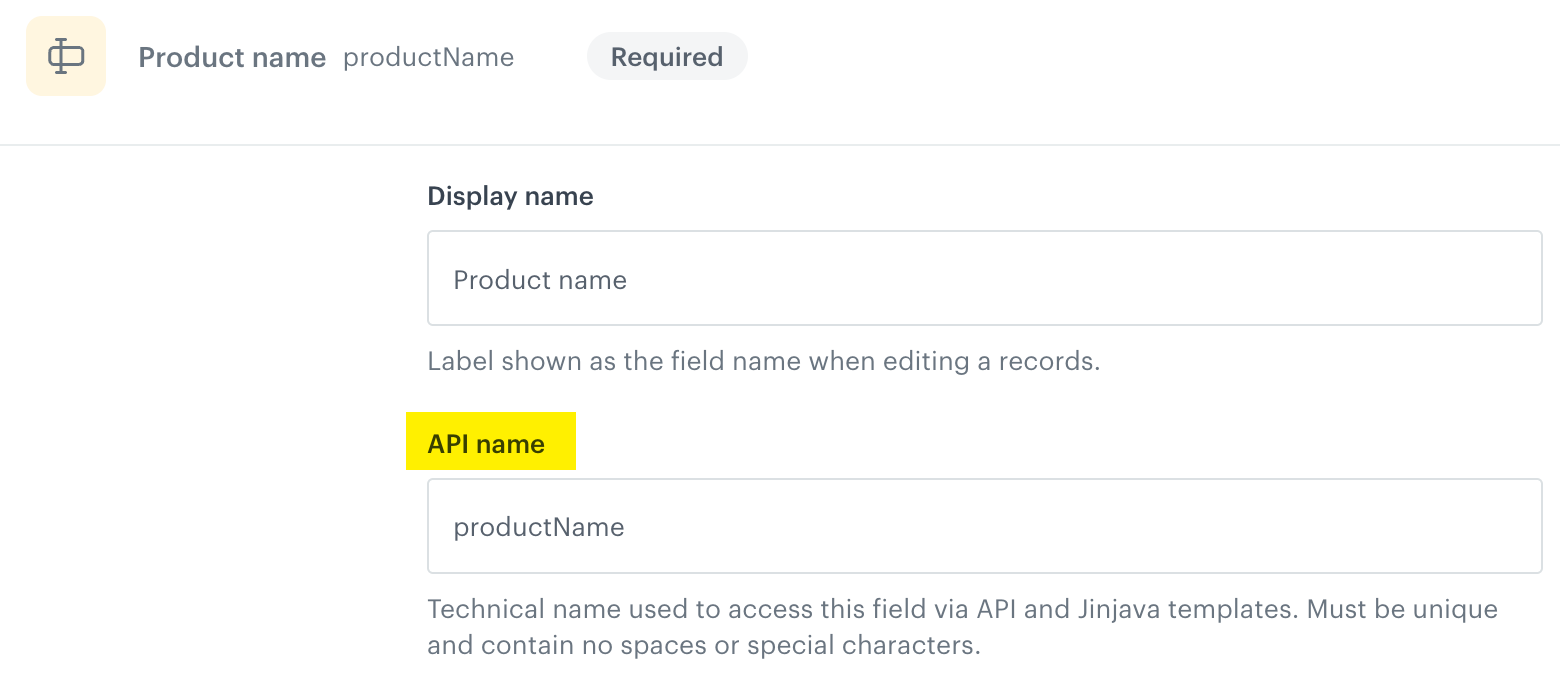
API name in the configuration of the schema field
In the tabs below, you can find the request for the preview of record results and its response.
The request contains two fields:
productNamewhich is a string fieldproductIdwhich is a Jinjava code field
{
  "identifierValue": "74029569-b01d-5ade-8cc2-6e8f7c136649",
  "context": {},
  "values": {
    "productName": "Sneakers ABC",
    "productId": "The identifier of the {{ record.productName }} is: 123456"
  }
}
{
"__slug": "this-is-unique-slug",
"__recordVersion": 1,
"__publishedAt": "2025-12-10T13:03:45.895630Z",
"__updatedAt": "2025-12-10T13:03:45.872542Z",
"__createdAt": "2025-12-10T13:03:45.872542Z",
"productName": "Sneakers ABC",
"productId": "The identifier of the Sneakers ABC is: 123456",
"__schemaId": "4ce815e6-6273-4b68-a732-d4589d72c625",
"__id": "a2b6d8a0-cde9-4987-804a-1bb215042cc6",
"__schemaVersion": 1
}Retrieving context
- Allowed in:
- Jinjava code field type
- Product context field in AI recommendation field type,
- Primary key field in Catalog field type
- Syntax:
{{ context.myField }}
ReplacemyFieldwith the parameter name whose value will be used as a context. - Description: Use the context insert to supply values for non-profile variables. When previewing the record, include the variable name as the key and its corresponding value to properly render the Jinjava field output in the preview.
- How to provide context for retrieval?
- In the Additional parameters in the preview of the record on the Synerise interface
- In the Jinjava for generating an object with record results
- In an object generation request, in the
contextobject.
In the tabs below, you can find the request for the preview of record results and its response.
The record contains the following fields:
productNamewhich is a string fieldproductIdwhich is a string fieldproductInformationwhich is a catalog field (Synerise object)productwhich is an AI recommendation field (Synerise object)
{
  "identifierValue": "74029569-b01d-5ade-8cc2-6e8f7c136649",
  "context": {
    "itemId": "0000208295260"
  },
  "values": {
    "productName": "Sneakers",
    "productId": "0000208295260",
    "productInformation": {
      "id": "15988",
      "itemKey": "{{ context.itemId }}"
    },
    "products": {
      "id": "TtZiwYdJQbuR",
      "params": {
        "itemId": "{{ context.itemId }}"
      }
    }
  }
}
{
"__slug": "this-is-unique-slug",
"__recordVersion": 1,
"productInformation": {
"channel": "online",
"description": "Excellent choice for colder seasons",
"color": "Gray",
"colors": [
"Gray"
],
"itemGroupId": "0000208295260",
"link": "https://www.example.com./sneakers-abc-gray.html",
"itemId": "0000208295260",
"category": "Women > Sneakers",
"discount": 0.508,
"discountAmount": 320,
"gender": "female",
"additionalImageLinks": [
"https://www.example.com/media/product/0/0/0000208295260_04_ks.jpg",
"https://www.example.com/media/product/0/0/0000208295260_02_ks.jpg",
],
"price": {
"currency": "PLN",
"value": 629.99
},
"contentLanguage": "PL",
"availability": true,
"brand": "ABC",
// ... other properties omitted for brevity
},
"__updatedAt": "2025-12-10T16:22:38.860058Z",
"__createdAt": "2025-12-10T16:22:38.860058Z",
"productName": "Sneakers",
"productId": "0000208295260",
"__schemaId": "8d64213a-4277-491d-93a8-e3be03e2666e",
"__id": "73e1b44e-94ea-4e95-83c5-59207dcdc553",
"__schemaVersion": 1,
"products": {
"data": [
{
"price": {
"value": 249.99
},
"brand": "XYZ",
"link": "https://www.example.com/sneakers-xyz-black.html?snrai_campaign=TtZiwYdJQbuR&snrai_id=139beb5b-672e-4984-80ac-7aba76031a61",
"itemId": "4002092027589",
"category": "Women > Sneakers",
"imageLink": "https://www.example.com/media/product/4/0/4002092027589_02_ws.jpg",
"title": "Sneakers XYZ Black",
"salePrice": {
"value": 249.99
}
},
{
"price": {
"value": 316.99
},
"brand": "DEF",
"link": "https://www.example.com/sneakers-def-black.html?snrai_campaign=TtZiwYdJQbuR&snrai_id=139beb5b-672e-4984-80ac-7aba76031a61",
"itemId": "5906489211270",
"category": "Women > Sneakers",
"imageLink": "https://www.example.com/media/product/5/9/5906489211270_01_plj.jpg",
"title": "Sneakers DEF Black",
"salePrice": {
"value": 316.99
}
}
],
"extras": {
"campaignId": "TtZiwYdJQbuR",
"contextItems": null,
"correlationId": "139beb5b-672e-4984-80ac-7aba76031a61",
"slots": [
{
"id": 0,
"itemIds": [
"4002092027589",
"5906489211270",
],
"name": "Unnamed slot",
"rows": null
}
]
}
},
"__publishedAt": "2025-12-10T16:22:38.875747Z"
}