Record generation is the process that changes your fixed content templates into personalized, dynamic content. When you use the API or JinJava tags, it fills in all dynamic parts, gets data from other sources, and uses Synerise's objects to create content that fits the situation.
IMPORTANT: When an object is generated, profile data and external source responses are cached and used in subsequent requests.
TIP: To learn how to modify the generated content with JavaScript before it's returned, see Response transformers.
Events generated
Brickworks automatically generate events whenever records are generated in the context of a customer profile. This creates a comprehensive audit trail and feeds valuable data back into the Synerise platform for analytics, personalization optimization, and customer journey tracking. The following events are generated:
You can distribute objects with record results in the following channels:
Website (inject content into website source, web push notifications)
Mobile (SMS, push notifications, in-app messages, mobile applications)
Display advertising (digital signage)
Email marketing
Context
When generating a record, you can pass additional data to influence what it renders. Two optional parameters are available for this — context and fieldContext:
context — a global JSON object. Any Jinjava field in the record can read its values at generation time.
fieldContext — a per-field JSON object. Each key is the API name of a schema field (the identifier assigned to the field when the schema was created), and the parameters nested under it are passed exclusively to that field.
Both support nested objects and work identically in the API and in Jinjava tags:
fieldContext passes parameters directly to individual fields during generation. Each top-level key is the API name of a schema field, and everything nested under it is scoped exclusively to that field — not shared with any other field in the record.
where similarProducts is the API name of the recommendation field.
Using Jinjava expressions with fieldContext
Recommendation fields allow you to configure each parameter — for example, itemId — as a Jinjava field. This means the parameter's value is not hardcoded: instead, it is evaluated from a Jinjava expression at generation time.
A common pattern is to read the value from context. For example, setting the itemId parameter to the expression {{ context.catalog.itemId }} means that when the record is generated, Brickworks evaluates the expression and uses the result as itemId for the recommendation.
When you additionally pass fieldContext for that parameter, the following priority applies:
fieldContext provided — the value from fieldContext is used directly. The Jinjava expression is not evaluated.
fieldContext not provided — the Jinjava expression is evaluated against context.
This gives you a flexible pattern: use context as the default data source via Jinjava expressions in the schema, and override specific recommendation parameters per request using fieldContext.
Example: the recoField field has its itemId parameter configured as a Jinjava field with expression {{ context.catalog.itemId }}.
itemId resolves to sku — evaluated from {{ context.catalog.itemId }}.
Methods of displaying records
API
Authentication:
When generating content from a record, you can authenticate as a:
workspace or Synerise user: in this case, you need to declare a profile for context.
profile: in this case, the profile is the context. Example:
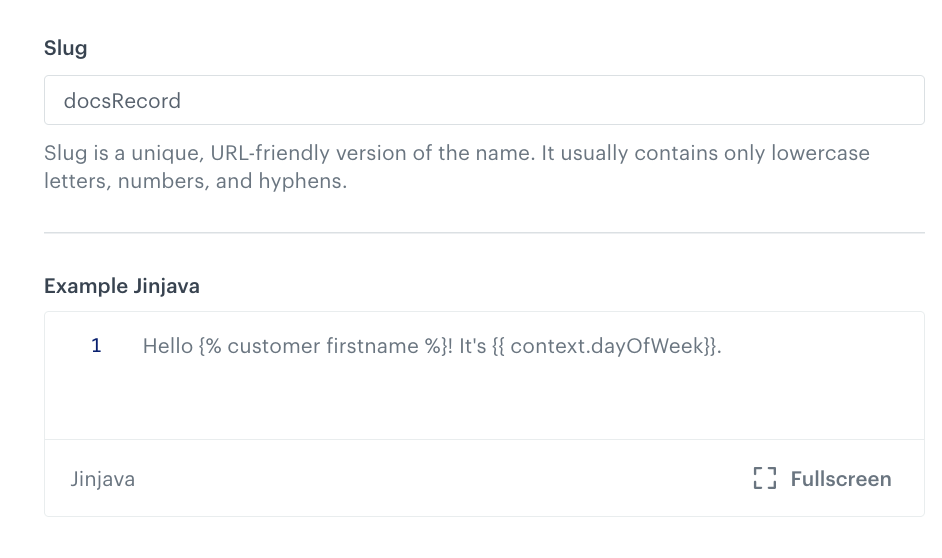
In the following example, content is generated for the following record: Example record with a Jinjava code field
To generate content, make the following request:
docsRecord is the slug of the record. In singleton schemas, use the API name (appName) or UUID of the schema in place of the record identifier.
Bearer ... is a profile JWT. This identifies the profile whose data is used for the {% customer firstname %} insert.
It would also provide data for other elements with a profile context (for example, a recommendation), if the record included them.
context.dayOfWeek provides the value for the {{ context.dayOfWeek }} insert in the record.
For more details on the request parameters, see the API reference.
Use Brickworks content in templates across the Synerise platform with dedicated JinJava tags.
JinJava tags work consistently across all Synerise modules that support JinJava rendering, creating a unified content experience throughout your platform:
Experience Hub channels – Email campaigns, SMS messaging, mobile push notifications, and web push notifications with dynamic, personalized content
Automation Hub workflows – Sophisticated automation sequences with content that adapts based on customer actions and behavioral triggers
Screen views and Documents – Interactive displays, personalized mobile applications content
In-App Messaging– Contextual experiences that respond to customer behavior in real-time
Generate record
This tag can't be used in Brickworks schemas or records. In Documents and Screen Views, if you want to display an entire object instead of just one property, you need to use {{ brickworks_result|tojson }}
In singleton schemas, use the API name (appName) or UUID of the schema in place of the record identifier.
The brickworksgenerate tag generates a an object from a record with all references resolved and Jinja templates rendered:
The values for the context and fieldContext arguments must be variables created with set (as shown above).
myFieldContext provides paging data for a relation field named oneToManyRelation. You can skip this argument if you don't need it.
myContext provides values for two inserts used in the record (regardless of field names): {{ context.example1 }} and {{ context.example2 }}. You can skip this argument if you don't need it.
Alternatively, you can use brickworksgeneratevar to create a {{ brickworks_result }} variable for reuse in a template:
{% brickworksgeneratevar schemaId=SCHEMA_ID/APP_ID recordId=RECORD_ID/SLUG context=myContext fieldContext=myFieldContext %}
  {{ brickworks_result }}            {# prints out the entire record #}
  {{ brickworks_result.someString }} {# prints out the value of the someString field #}
{% endbrickworksgeneratevar %}
Fetch raw record
The following tag fetches a raw record as defined in the database and saves the result to a variable for reuse in your template:
With singleton schemas, use the API name (appName) or UUID of the schema in place of the record identifier.
In Documents and Screen Views, if you want to display an entire object instead of just one property, you need to use {{ brickworks_result|tojson }}
This tag can't be used in Brickworks records and schemas.
Fetch raw records
This tag lets you retrieve multiple records (raw content) from a schema and access the result as an iterable.
This tag can't be used in Brickworks schemas or records. In Documents and Screen Views, if you want to display an entire object instead of just one property, you need to use {{ brickworks_result|tojson }}
{% brickworksrecordsvar schemaId=ID/APPID [optional parameters] %}

{# example logic: iterate through result and return record IDs #}
{% for record in brickworks_result %}
{{ record.id }}
{% endfor %}
{# end example logic #}
{% endbrickworksrecordsvar %}
where:
schemaId is the App ID or UUID of a schema.
optional parameters can be used to sort and filter the retrieved records:
The parameters can be applied in two ways (see examples):
as arguments in the tag. In this case, slugs, ids, and filters must be declared with set first.
as a filteringParams object. If you insert the same parameter in both ways, filteringParams takes precedence.
filters: an RSQL string to filter the records. These following system parameter names must include the __ prefix: __id, __schemaId, __name, __slug, __status, __createdAt, __updatedAt, __publishedAt, __recordVersion
slugs: a list of record slugs. Looks for exact matches.
ids: a list of record IDs. Looks for exact matches.
You can collect the filters in an object and provide that object as an argument in the tag. Example: