This article describes the permissions needed to use the AI Hub.
To set the permissions, you need to create a user role or edit an existing one and open the Permissions matrix. In the matrix, the permissions are collected into groups. Some of these groups can be expanded to set more granular permissions.
How to read this list
In this article, each heading describes an action. The permissions for that action are described in the form of breadcrumbs.
For example, if the required permissions are:
- Profiles > Client list:
read - Search engine:
create,edit
The permission matrix needs to look like this:
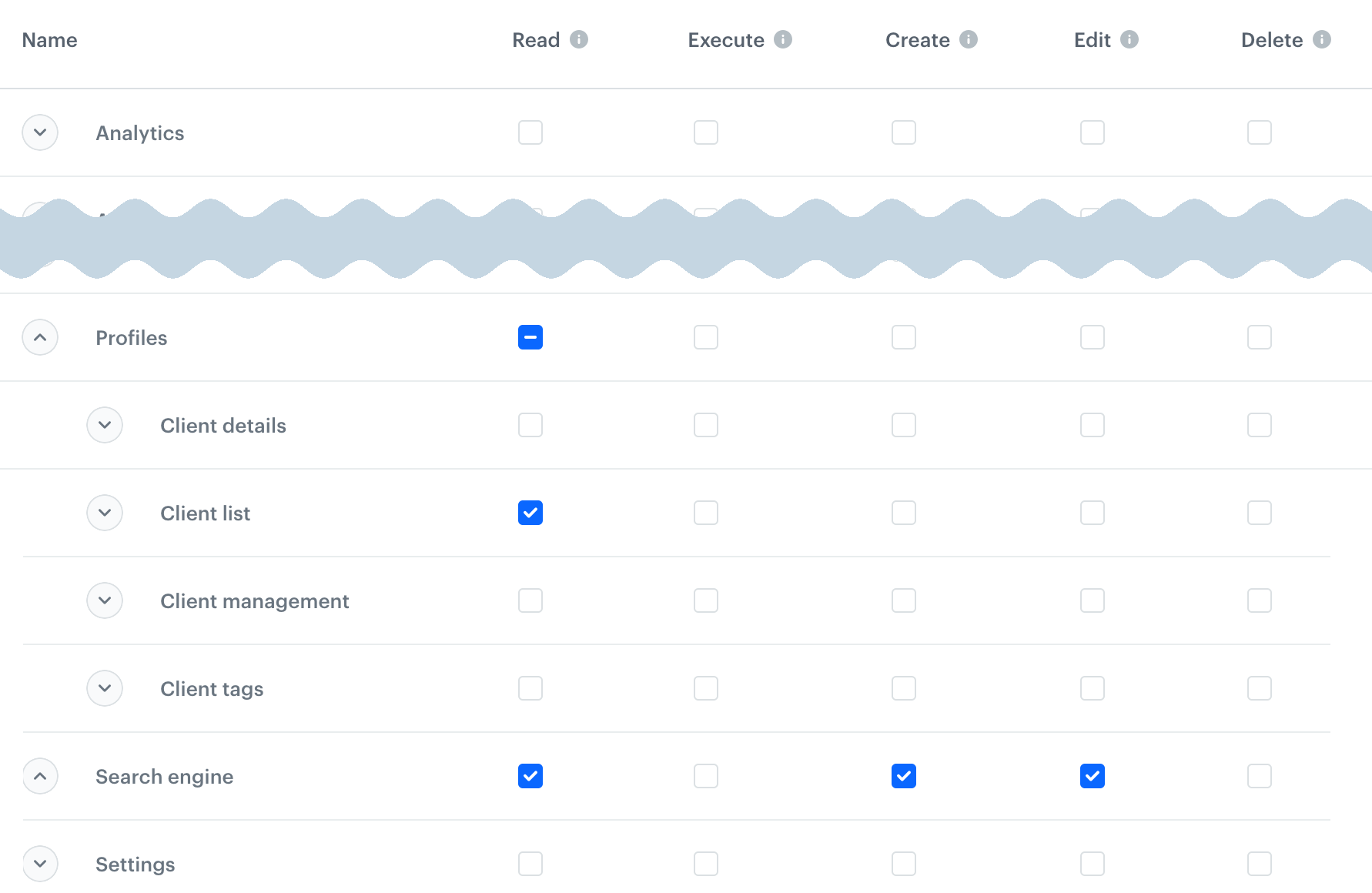
The read permission is not explicitly listed when any higher permission is required - the portal enables it automatically.
I want to...
work with AI Recommendations
NOTE: For permissions needed to configure the AI engine, see "Settings permissions".
see Recommendations and statistics
- Communications > Recommendations:
read - Assets > Catalogs:
read
preview a Recommendation
- Profiles:
read- to search or select a profile from the list of all profiles - Analytics > Segmentations:
read- to select a profile from a segmentation
see Recommendation details, create and edit a recommendation
- Communications > Recommendations:
create,edit - Settings > AI engine configuration:
read - Analytics > Aggregates, Expressions:
read - Search engine:
read
This also enables saving and activating a Recommendation.
duplicate a Recommendation
Communications > Recommendations: create, edit
delete a Recommendation
Communications > Recommendations: delete
work with Recommendation A/B/X tests
- Recommendation permissions as described above
- Communications > Test optimizer:
read- to see the testscreate,edit- to create and edit testsexecute- to run tests
work with promotions
see promotions
- Communications > Promotions:
read - Analytics > Segmentations, Expressions, Aggregates:
read
create, update and duplicate promotions
- Communications > Promotions:
create,edit - Assets > Tags:
read - Assets > Catalogs:
read
publish and hide promotions
Communications > Promotions: create, edit
delete promotions
Communications > Promotions: delete
import promotions
See "Import data" in "Data Management permissions".
work with personalized promotions
see personalized promotions
Communications > Personalized promotions: read
create, edit, and duplicate personalized promotions
- Communications > Personalized promotions:
create,edit - Assets > Catalogs:
read
publish and unpublish personalized promotions
Communications > Personalized promotions: create, edit
delete personalized promotions
Communications > Personalized promotions: delete
access AI search
This allows you to see the indexes and suggestion indexes.
NOTE: For permissions needed to configure the AI engine, see "Settings permissions".
- Search engine:
read - Settings > AI engine configuration:
read - Assets > Catalogs:
read - For A/B tests: Communications > Test optimizer:
read
edit indexes, suggestion indexes, and A/B tests
This includes managing synonyms and query rules.
TIP: Indexes may have individual access level configurations.
To check your access level, hover over the padlock icon in the index's entry in the index list.
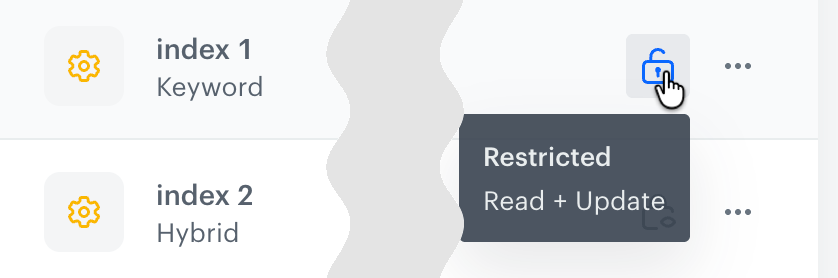
To change the access level of an index, see Change index access settings.
- Search engine:
edit - Settings > AI engine configuration:
edit - For A/B tests: Communications > Test optimizer:
editTo run an A/B test, you need Communications > Test optimizer:execute - For query rules: Analytics > Segmentations:
read
create indexes, suggestion indexes, and A/B tests
This includes managing synonyms and query rules.
- Search engine:
create - Settings > AI engine configuration:
create - For A/B tests: Communications > Test optimizer:
create
To run an A/B test, you need Communications > Test optimizer:execute - For query rules: Analytics > Segmentations:
read
preview search/suggestion results
Profiles > Client list: read - to select a preview context profile
delete indexes, suggestion indexes, and A/B tests
This includes managing synonyms and query rules.
TIP: Indexes may have individual access level configurations.
To check your access level, hover over the padlock icon in the index's entry in the index list.
To change the access level of an index, see Change index access settings.
- Search engine:
delete - Settings > AI engine configuration:
delete - For A/B tests: Communications > Test optimizer:
delete
access Predictions
This allows you to see the predictions:
- Predictions:
read - Settings > Predictions:
read - Settings > AI engine configuration:
read - Search engine:
read - Assets > Catalogs:
read
create and edit predictions
- Predictions:
create,edit - Analytics > Expressions:
read
calculate, deactivate, and duplicate predictions
Predictions: create, edit
clone a prediction to another workspace
In the source and target workspace, you need:
- Cloning:
create - all permissions for the cloned prediction and all nested objects that will also be cloned in the process.
To learn more about cloning, see Cloning objects to other workspaces.