This article describes the permissions needed to use the Behavioral Data Hub.
To set the permissions, you need to create a user role or edit an existing one and open the Permissions matrix. In the matrix, the permissions are collected into groups. Some of these groups can be expanded to set more granular permissions.
How to read this list
In this article, each heading describes an action. The permissions for that action are described in the form of breadcrumbs.
For example, if the required permissions are:
- Profiles > Client list:
read - Search engine:
create,edit
The permission matrix needs to look like this:
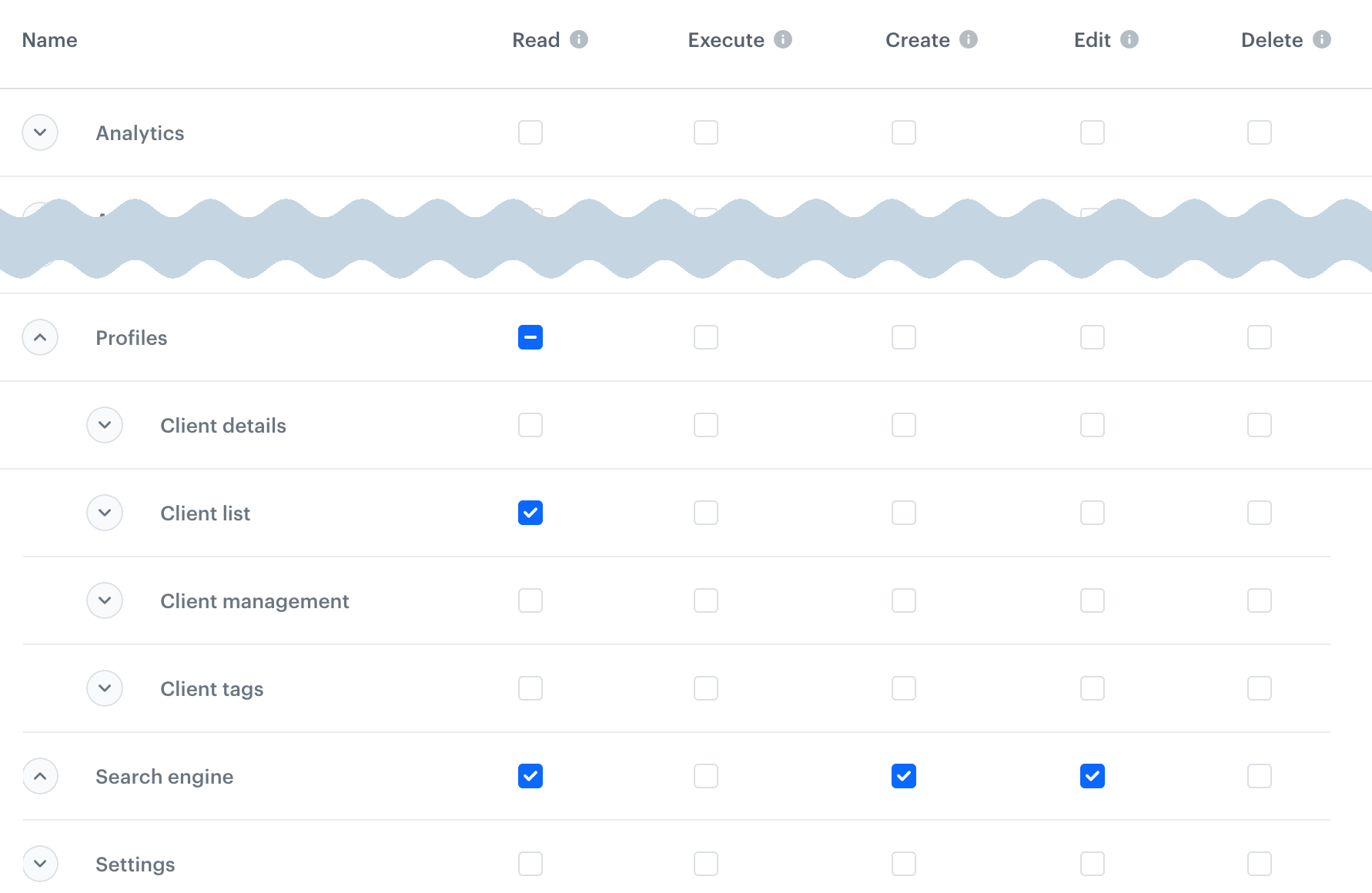
The read permission is not explicitly listed when any higher permission is required - the portal enables it automatically.
I want to...
access Profiles
- Profiles > Client management:
read - Profiles > Client list:
read
filter the list with an analysis
Profiles > Client list: create
view a profile card
Profiles > Client details > Client info: read
see more details of a profile
- Profiles > Client details > data type:
read- The settings here allow access to various elements of the profile card.
- Analytics preview - required to see results of analyses with the Show on profile card setting. Analytics permissions are not required.
- Client activities - allows filtering the activity list.
- Client tasks - deprecated
see screen views whose audience includes this profile
Assets > Documents: read
edit profile details
- Profiles > Client management:
edit - Profiles > Client details > data type:
create,edit
Some personal details (for example, birthday) are always read-only in this view, regardless of the permissions.
see and edit a profile's tags
- Assets > Tags:
execute,create,edit - Profiles > Client tags:
execute,create,edit
add events to a profile
Profiles > Clients details > Client activities: create
see the Statistics tab on the profile card
- Profiles > Client details > Client stats:
read - Analytics (all):
read
see and add notes in a profile
Profiles > Client details > Client notes: create, edit
send messages to a profile
- Settings > Integrations:
read - Profiles > Client details > Client messages:
execute,create,edit
create a profile
- Profiles > Client management:
create - Profiles > Client details (all):
create
delete a profile
- Profiles > Client management:
delete - Profiles > Client details (all):
delete
import profiles
- Profiles > Client management:
create - Profiles > Client details > Client info:
create - For local file imports: Simple imports:
create,execute - For imports with automation: See Automation Hub permissions
import events and transactions
- Profiles > Clients details > Client activities:
create - For local file imports: Simple imports:
create,execute - For imports with automation: See Automation Hub permissions
export profiles
- Profiles > Client details (all):
read - Settings > Export:
read- to see the list of exports and download datacreate- to create an export
view aggregates and expressions
Analytics > analysis type: read
edit aggregates and expressions
expressions
- Analytics > Expressions:
edit,execute
aggregates
- Analytics > Aggregates:
edit - Assets > Attributes:
read - Analytics > Segmentations:
edit
create aggregates and expressions
expressions
- Analytics > Expressions:
create,execute
aggregates
- Analytics > Aggregates:
create - Analytics > Segmentations:
create - Assets > Attributes:
read
duplicate aggregates and expressions
Analytics > analysis type: create
delete aggregates and expressions
Analytics > analysis type: delete
preview results of aggregates and expressions
- Analytics > analysis type:
read - Profiles > Client list:
read
This is required to choose the profile context for the preview.
clone aggregates and expressions to another workspace
In the source and target workspace, you need:
- Cloning:
create createandeditpermissions for the cloned analysis type and all nested objects that will also be cloned in the process.
To learn more about cloning, see Cloning objects to other workspaces.
manage profile attributes
Assets > Attributes:
read- to see attributescreate,edit- to add and modify attributes
work with profile tags
see profile tags
- Assets > Tags:
read - Profiles > Client tags:
read
access profile batch operations
- Profiles > Client details (all):
read - Profiles:
delete - Settings > Export:
read- to see the list of exports and download datacreate- to create an export
work with membership attributes
access synchronization logs
Assets > Membership attribute sync: read