You can use the Audit log to monitor and review the actions taken by users within a workspace. By selecting a specific service that represents a feature (e.g., Automation for creating and managing workflows in Automation Hub), you can see which records and Synerise objects have been interacted with and by whom, along with the type of action and when it occurred. This provides a detailed account of the activities within the workspace, ensuring transparency and accountability in tracking and monitoring user activities, as well as strengthening security measures.
Accessing the Audit Log
You can access the Audit Log in the following ways:
Global audit log - Go to Settings > Audit Log to view all actions across the workspace.
Analysis-specific audit log - Open an analysis configuration, in the upper right corner, click the icon , and select Show audit log to view the history of changes for that specific analysis.
AI feature-specific audit log - Available only for AI recommendation campaigns, AI Search indexes, and Predictions. Open the configuration details of the feature, in the upper right corner, click the icon, and select Show audit log to view the history of changes for that specific feature.
Automation-specific audit log - Open a workflow configuration, in the upper right corner, click the icon, and select Show audit log to view the history of changes for that specific workflow.
Campaign-specific audit log - Available for all campaign types except landing pages (email, SMS, dynamic content, mobile push, web push, screen view, and in-app message campaigns). Open the campaign configuration, in the upper right corner, click the icon, and select Show audit log to view the history of changes for that specific campaign.
Information scope
Subject - the type and ID of an object which was created, modified, or deleted
Action - describes what has happened to the object
Date - when the action happened
Modified by - the author of the change (either workspace user or a workspace)
Previewing and comparing versions
In the audit log, you can preview the details of a logged action and compare the object with its other versions. This is available in the global audit log and in the audit logs of specific objects, for all services and action types.
On the list of actions, click an entry. Result: The Preview record pop-up opens. It shows the object's data in JSON format, as it was saved by this action.
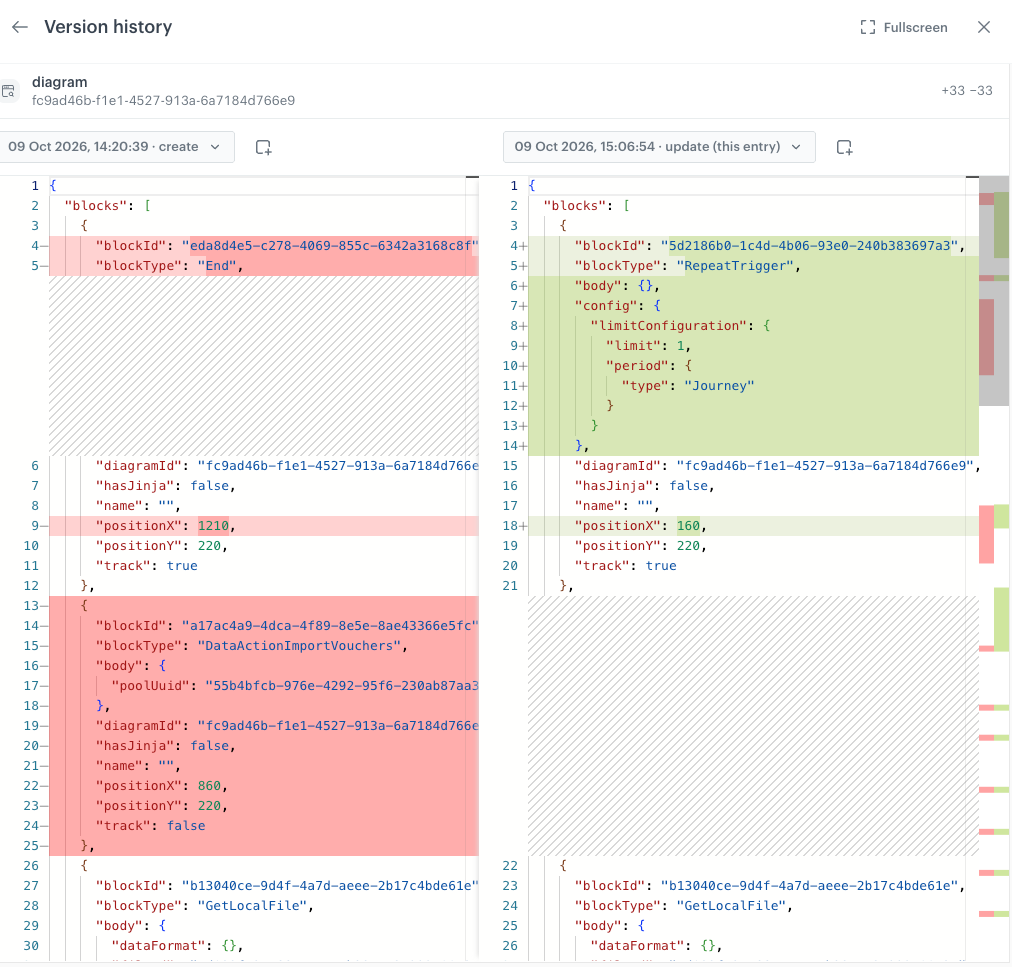
In the upper-right corner of the pop-up, click Version history. Result: A comparison of two versions of the object opens:
The right side shows the version saved by the selected action. In the list of versions, it is labeled (this entry).
The left side shows the previous version of the object.
Removed lines are highlighted in red, added lines in green.
The number of added and removed lines is shown in the upper-right corner.
Comparison of two versions of an object
Optionally, to compare other versions, select them from the lists above each side of the comparison. Each version is labeled with its date, time, and action type.
Optionally, to copy the JSON of a version, click the copy icon next to the list.
Optionally, to expand the view, click Fullscreen.
Service reference
The following list of services is ordered according to the positioning of modules in the left menu of the Synerise Platform.
 icon , and select Show audit log to view the history of changes for that specific analysis.